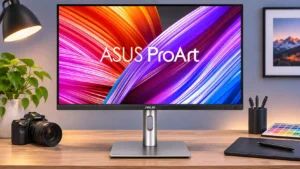
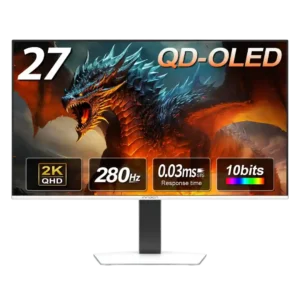
Other features
Ease of use
ASUS ProArt Display PA279CRVNo score yet
ASUS ROG Swift OLED PG27UCDM
4.7
The control joystick and logical menus make frequent adjustments quick and intuitive instead of cumbersome.
Accessory compatibility
ASUS ProArt Display PA279CRV
2.0
The inability to fit a shading hood is frustrating because the coating can spread side-window reflections into haze. VESA and USB accessory support are otherwise useful.
ASUS ROG Swift OLED PG27UCDMNo score yet
Blooming control
ASUS ProArt Display PA279CRVNo score yet
ASUS ROG Swift OLED PG27UCDM
5.0
Individual OLED pixels eliminate the bright halos commonly seen around small highlights and subtitles on zone-lit LCD displays.
Burn-in protection
ASUS ProArt Display PA279CRVNo score yet
ASUS ROG Swift OLED PG27UCDM
4.4
OLED Care features include pixel maintenance, logo protection, and a useful proximity sensor. They reduce wear during varied use but cannot make permanent burn-in impossible.
Device compatibility
ASUS ProArt Display PA279CRV
4.0
Windows and Mac computers can both use the monitor, including USB-C video and charging where supported. Specialized film rates and certain platform behaviors depend on the connected system.
ASUS ROG Swift OLED PG27UCDMNo score yet
Documentation quality
ASUS ProArt Display PA279CRV
5.0
A downloadable manual and accessible setup material make assembly and features easier to understand. Calibration paperwork is also a useful reference.
ASUS ROG Swift OLED PG27UCDMNo score yet
ELMB strobing quality
ASUS ProArt Display PA279CRVNo score yet
ASUS ROG Swift OLED PG27UCDM
3.5
ELMB improves perceived motion at 120Hz but halves brightness and disables HDR and VRR. It is helpful in particular games rather than a universal setting.
Ethernet network sharing
ASUS ProArt Display PA279CRV
2.0
The display does not include a wired LAN port. People seeking a true one-plug docking station with network access will need another adapter or dock.
ASUS ROG Swift OLED PG27UCDMNo score yet
Firmware updateability
ASUS ProArt Display PA279CRVNo score yet
ASUS ROG Swift OLED PG27UCDM
5.0
User-updateable firmware and automatic update support are welcome conveniences for keeping monitor controls current.
Gaming image presets
ASUS ProArt Display PA279CRVNo score yet
ASUS ROG Swift OLED PG27UCDM
3.8
Crosshairs, Shadow Boost, and other game tools offer meaningful flexibility, though veteran players may find some automated extras unnecessary.
Gradient smoothness
ASUS ProArt Display PA279CRV
4.7
Gray ramps and photo gradations are generally described as smooth, with minimal obvious banding. Dithering is effective even though the panel's advertised bit-depth terminology raised questions.
ASUS ROG Swift OLED PG27UCDMNo score yet
Integrated power supply
ASUS ProArt Display PA279CRVNo score yet
ASUS ROG Swift OLED PG27UCDM
5.0
The integrated power supply eliminates a separate external brick, simplifying cabling and desk placement.
Monitor daisy-chaining
ASUS ProArt Display PA279CRV
4.7
The DisplayPort output is a useful way to reduce cabling between screens. One reported dual-4K arrangement fell to 30Hz on the second display, so source and cable capabilities matter.
ASUS ROG Swift OLED PG27UCDMNo score yet
Motion clarity
ASUS ProArt Display PA279CRVNo score yet
ASUS ROG Swift OLED PG27UCDM
5.0
Rapid motion stays remarkably distinct, with moving objects and fine interface details easier to follow. Clarity remains impressive at lower refresh rates too.
OLED motion blur reduction
ASUS ProArt Display PA279CRVNo score yet
ASUS ROG Swift OLED PG27UCDM
4.5
OLED's extremely fast transitions deliver a major clarity advantage over LCD screens at comparable refresh rates, even without strobing.
Panel type
ASUS ProArt Display PA279CRVNo score yet
ASUS ROG Swift OLED PG27UCDM
3.8
QD-OLED delivers wonderfully deep blacks, vivid color, and fast pixel transitions. It also retains familiar limitations with ambient lighting and prolonged static content.
PC gaming compatibility
ASUS ProArt Display PA279CRVNo score yet
ASUS ROG Swift OLED PG27UCDM
4.9
A high-end PC can make excellent use of the 4K/240Hz panel's sharpness and low latency. More modest graphics hardware will not always reach the top refresh rate.
Phone stand utility
ASUS ProArt Display PA279CRV
4.0
The compact stand's base can hold small desk objects such as a phone without consuming extra workspace. It is a minor but appreciated convenience.
ASUS ROG Swift OLED PG27UCDMNo score yet
Portability and weight
ASUS ProArt Display PA279CRV
4.7
The lighter, thinner enclosure is easier to move than earlier ProArt designs. A missing carrying handle is a small complaint for people who rearrange their workspace often.
ASUS ROG Swift OLED PG27UCDMNo score yet
QuickFit layout guides
ASUS ProArt Display PA279CRV
4.0
On-screen rulers, markers, and safe-area guides can assist print and layout work. Some designers may find their editing software's equivalent tools easier.
ASUS ROG Swift OLED PG27UCDMNo score yet
SDR/HDR mode switching
ASUS ProArt Display PA279CRVNo score yet
ASUS ROG Swift OLED PG27UCDM
1.5
Switching into Dolby Vision triggered repeated display blackouts when opening different programs, prompting a move back to standard HDR.
Single-player cinematic gaming suitability
ASUS ProArt Display PA279CRVNo score yet
ASUS ROG Swift OLED PG27UCDM
4.0
Cinematic games look gorgeous thanks to deep blacks, highlights, and fine detail. A larger 32-inch screen can still feel more absorbing for single-player adventures.
Sleep and wake behavior
ASUS ProArt Display PA279CRVNo score yet
ASUS ROG Swift OLED PG27UCDM
4.7
The proximity sensor can blank the screen when you leave and restore it promptly when you return. That makes daily use simpler while reducing unnecessary OLED exposure.
Text fringing
ASUS ProArt Display PA279CRVNo score yet
ASUS ROG Swift OLED PG27UCDM
4.7
At this pixel density, the colored fringes associated with older QD-OLED monitors become very hard to notice. A few users may still spot artifacts in certain text or window edges.
Video cadence compatibility
ASUS ProArt Display PA279CRV
3.0
The display supports the common film and television frame rates, which suits professional playback. Certain fractional rates are not exposed for direct selection through macOS without extra hardware.
ASUS ROG Swift OLED PG27UCDMNo score yet
VRR compatibility
ASUS ProArt Display PA279CRVNo score yet
ASUS ROG Swift OLED PG27UCDM
4.5
Support for major PC and HDMI VRR formats makes the monitor flexible across devices and GPUs. Flicker with sudden frame-rate changes is the main caveat.
VRR flicker
ASUS ProArt Display PA279CRVNo score yet
ASUS ROG Swift OLED PG27UCDM
2.6
Changing frame rates can cause noticeable flicker, especially in dark games. Anti-flicker settings help in some tests but do not reliably remove the problem.
Performance
Audio settings
ASUS ProArt Display PA279CRV
5.0
Analog audio passthrough lets editors monitor synchronized sound from the same output clock as the picture. This is useful when avoiding a separate professional video/audio interface.
ASUS ROG Swift OLED PG27UCDMNo score yet
Automatic brightness limiting
ASUS ProArt Display PA279CRVNo score yet
ASUS ROG Swift OLED PG27UCDM
3.4
Automatic brightness limiting can make desktop windows change luminance as content shifts. Uniform Brightness largely fixes the distraction but caps maximum output.
Black equalizer performance
ASUS ProArt Display PA279CRVNo score yet
ASUS ROG Swift OLED PG27UCDM
4.5
Shadow Boost makes opponents hiding in dark areas easier to spot without demanding a separate software workaround.
Listing accuracy
ASUS ProArt Display PA279CRV
2.0
At least one independent gamut measurement fell short of an advertised Adobe RGB figure. That creates some distrust of marketing claims despite generally pleasing colors.
ASUS ROG Swift OLED PG27UCDMNo score yet
Battery and charging
Charging speed
ASUS ProArt Display PA279CRV
3.5
The main 96W USB-C connection can charge many laptops comfortably, including some MacBooks under load. Extra device-charging ports are considered slower and less capable.
ASUS ROG Swift OLED PG27UCDMNo score yet
Ownership and support
Dolby Vision support
ASUS ProArt Display PA279CRVNo score yet
ASUS ROG Swift OLED PG27UCDM
4.1
Dolby Vision is a useful extra for compatible Xbox games and video, supplementing HDR10. One user found switching between programs disruptive enough to disable it.
HDMI 2.1 support
ASUS ProArt Display PA279CRVNo score yet
ASUS ROG Swift OLED PG27UCDM
4.6
The high-bandwidth HDMI 2.1 ports make modern PCs and consoles easy to connect. They're especially welcome alongside DisplayPort 2.1.
Setup ease
ASUS ProArt Display PA279CRV
5.0
The stand assembles and attaches quickly, with a straightforward click-in mechanism. Even less experienced users should find physical setup simple.
ASUS ROG Swift OLED PG27UCDMNo score yet
Warranty and support service
ASUS ProArt Display PA279CRVNo score yet
ASUS ROG Swift OLED PG27UCDM
4.1
Three-year burn-in coverage is reassuring where the product's warranty terms confirm it. Coverage details should be checked for the region and SKU, and protection does not eliminate risk.
Controls and connectivity
Software and driver support
ASUS ProArt Display PA279CRV
2.0
Professional video cadence selection is not entirely seamless on Mac computers because some fractional rates are not exposed through the monitor's EDID. Specialized workflows may need an external interface or future firmware improvement.
ASUS ROG Swift OLED PG27UCDMNo score yet
Software support
ASUS ProArt Display PA279CRVNo score yet
ASUS ROG Swift OLED PG27UCDM
4.5
DisplayWidget Center makes adjusting monitor settings from Windows straightforward. Software and firmware controls add convenience beyond the OSD.