If you want better onboard memory
Choose Corsair Scimitar Elite Wireless SE. It scores 4.8 vs 1.5 for onboard memory, with a 4.4 overall score.

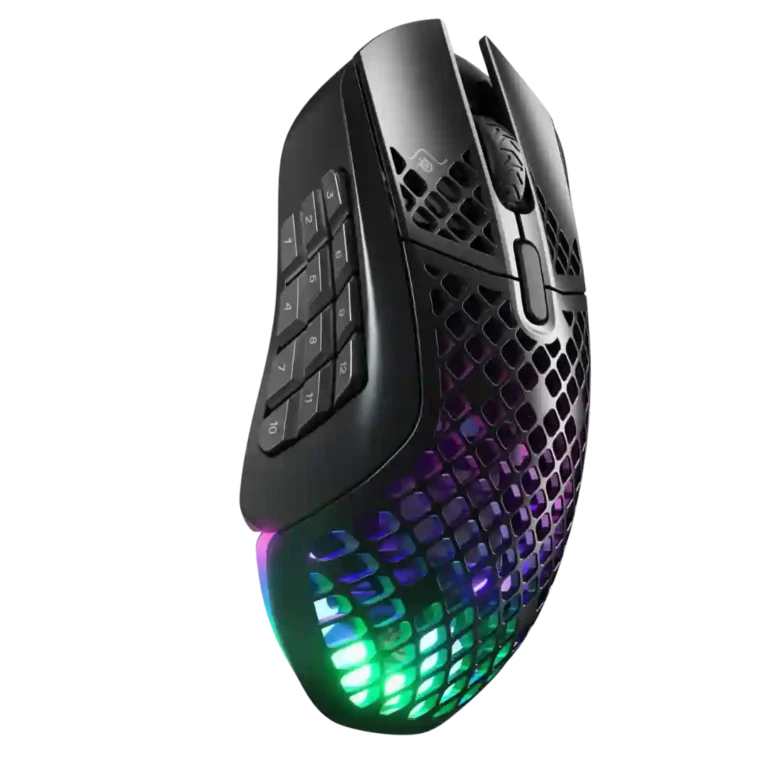
Choose the Aerox 9 Wireless if you want a lightweight wireless MMO/MOBA mouse with many programmable buttons. Skip it if you need cheap pricing, claw-grip comfort, or effortless side-button navigation.
Best for palm-grip MMO/MOBA players who want a light wireless mouse with many programmable buttons and are willing to spend time building muscle memory. It also suits productivity users who will map editing commands or macros.
Not ideal for claw or fingertip users, left-handers, budget-focused buyers, or players who mostly want an FPS mouse. It is also a poor fit for anyone who dislikes software bloat or needs the side buttons to feel instantly intuitive.
Review evidence frames the SteelSeries Aerox 9 Wireless as an ambitious lightweight MMO/MOBA mouse that largely succeeds through weight, glide, wireless performance, and deep customization. Reviewers repeatedly liked the 89g body, PTFE movement, accurate TrueMove Air sensor, quick switches, and the ability to map many buttons or macros for games and productivity. The tradeoff is that the very feature that defines it—the 12-button side grid—is also divisive: some found it intuitive and powerful, while others found it cramped, stiff, or easy to lose track of. Battery life is also context-dependent, improving with RGB off or Bluetooth but dropping sharply for some on 2.4GHz with lighting. Its premium price makes the strongest sense for palm-grip MMO/MOBA players who will actually use the button grid.
Compared with other Gaming Mice, this product is above average in MMO gaming suitability, cross-platform compatibility, weight, near average in battery life, software usability, below average in onboard memory, claw grip comfort, dock compatibility.
| Attribute | This product | Category average | Difference |
|---|---|---|---|
| onboard memory | 1.5 | 4.0 | -2.5 |
| claw grip comfort | 2.2 | 4.1 | -1.9 |
| dock compatibility | 2.0 | 3.9 | -1.9 |
| fingertip grip comfort | 2.5 | 3.7 | -1.2 |
| MMO gaming suitability | 4.3 | 3.5 | +0.8 |
| handedness options | 1.5 | 2.6 | -1.1 |
| cross-platform compatibility | 5.0 | 3.9 | +1.1 |
| weight | 4.7 | 4.1 | +0.6 |
Choose Corsair Scimitar Elite Wireless SE. It scores 4.8 vs 1.5 for onboard memory, with a 4.4 overall score.
Choose Turtle Beach Kone XP Air. It scores 4.8 vs 2.5 for fingertip grip comfort, with a 4.1 overall score.
Choose Razer Basilisk V3 Pro 35K. It scores 4.7 vs 3.3 for tilt gesture controls, with a 4.2 overall score.
Choose Razer Cobra Pro. It scores 4.6 vs 2.2 for claw grip comfort, with a 4.0 overall score.
Compared with SteelSeries Aerox 9 Wireless
Yes, most reviews found it well suited to MMO play because of the 12-button side panel, low weight, and extensive customization. The main caveat is that some reviewers needed time to learn the side grid.
Reviewers generally saw it as a strong MOBA option because commands and macros can be mapped to the side buttons. A few warned that the buttons can be tight or difficult to identify quickly.
Evidence is mixed. Some reviewers liked the sensor and used it successfully in shooters, while others said the MMO button grid, grip constraints, or weight make it better for casual FPS use than serious FPS play.
Only in some conditions. Reviewers repeatedly noted that Bluetooth and RGB-off use last much longer, while 2.4GHz gaming with lighting can reduce battery life sharply.
Opinions split. Some reviewers found them tactile, well placed, and easy to learn, while others found them small, stiff, cramped, or too similar by touch.
Many reviewers praised SteelSeries GG for mapping buttons, profiles, macros, DPI, and RGB. Others complained about bloat, battery reporting, sleep behavior, profile-switching pauses, or dongle-related limitations.
These are a few of the reviews included in our analysis.




Choose the ROG Harpe II Ace for ultralight FPS play, precise tracking, smooth glide, and web-based tuning. Skip it if you need palm-grip support, MMO buttons, onboard profiles, or long...
Pros: glide smoothness, weight
Cons: handedness options

Excellent tracking, comfortable right-handed ergonomics and a versatile scroll wheel make the Basilisk V3 a strong gaming and productivity mouse. Its substantial weight, fixed cable and sometimes over-sensitive automatic scrolling...
Pros: scroll wheel quality, RGB features
Cons: weight, handedness options

The L7 Pro delivers remarkably light handling, precise aiming and a grippy shell at a budget price. Stock skates are less impressive, and conflicting click-latency measurements warrant caution for latency-sensitive...
Pros: value for money, weight
Cons: wired connectivity

Best for ultra-light, competition-focused speed, precise tracking, stable wireless, and long battery life. Skip it if you need quieter clicks, left-handed support, Bluetooth, more buttons, or better value for casual...
Pros: value for money, weight
Cons: click noise, RGB features