If you want better switch options
Choose MonsGeek M1 V5 HE. It scores 4.8 vs 3.0 for switch options, with a 4.4 overall score.

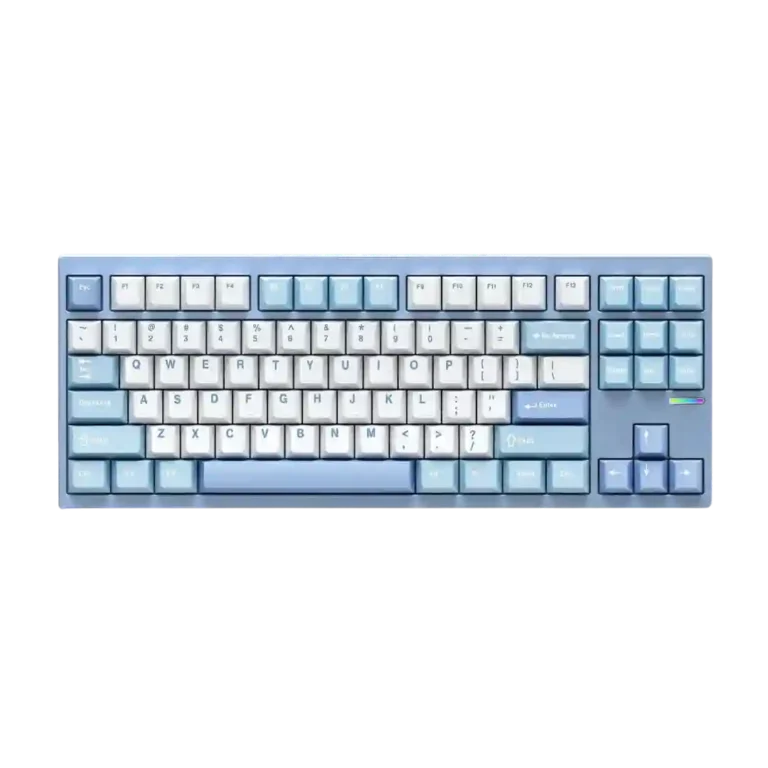
Choose the McHose GX87 if you want a dense aluminum TKL with standout sound, easy modding, and excellent value. Skip it if you need a light travel board, tactile switch choices, flawless RGB software, or elite Hall Effect gaming features.
Best for mechanical keyboard enthusiasts who want a thocky aluminum TKL, easy switch and case access, QMK/VIA-style customization, and premium feel without paying premium TKL prices. It also suits hybrid productivity and casual gaming setups.
Not for users who need a lightweight portable keyboard, broad tactile or clicky switch choices at checkout, per-key lighting evidence, or top-tier Hall Effect gaming features. It may also frustrate users who want flawless RGB software or zero connectivity quirks.
The McHose GX87 earns unusually strong review support for a budget aluminum TKL. Reviewers repeatedly praise its dense build, thocky or poppy acoustics, smooth typing feel, big battery, and quick-access customization system. The tradeoff is that it is not the most refined in every detail: switch choices are limited, RGB controls can feel clunky, plate-mounted stabilizers draw caveats, and at least one review noted minor connectivity or input reliability issues. It also favors desk-bound use because of its weight. Still, the overall evidence points to a keyboard that delivers premium-feeling sound, construction, and modding potential at a price reviewers considered exceptional.
Compared with other Gaming Keyboards, this product is above average in value for money, hot-swappable switches, battery life, near average in RGB customization, typing comfort, below average in cable quality, portability, RGB lighting quality.
| Attribute | This product | Category average | Difference |
|---|---|---|---|
| cable quality | 2.0 | 3.7 | -1.7 |
| portability | 2.0 | 3.5 | -1.5 |
| value for money | 4.9 | 3.6 | +1.3 |
| hot-swappable switches | 4.6 | 3.5 | +1.1 |
| battery life | 4.8 | 4.0 | +0.9 |
| ease of switch replacement | 4.5 | 3.7 | +0.8 |
| RGB lighting quality | 3.5 | 4.3 | -0.8 |
| compatibility | 4.5 | 3.8 | +0.7 |
Choose MonsGeek M1 V5 HE. It scores 4.8 vs 3.0 for switch options, with a 4.4 overall score.
Choose Alienware Pro Wireless Gaming Keyboard. It scores 4.7 vs 2.0 for portability, with a 4.4 overall score.
Choose Corsair K65 Plus. It scores 4.7 vs 3.3 for connectivity, with a 4.2 overall score.
Choose Keychron Q1 HE. It scores 5.0 vs 3.9 for key stability, with a 4.2 overall score.
Products reviewers directly compared with this model, grouped into quick takeaways.
Yes. Reviewers repeatedly described the typing feel as great, smooth, satisfying, bouncy, or close to ideal, though one noted it is firmer than the softest gasket-mounted boards.
Sound is one of its strongest areas. Reviewers praised its thocky, poppy, muted, and refined acoustics, with one calling it the best-sounding stock keyboard they had heard.
Yes. Multiple reviewers praised the quick-disassembly case, hot-swappable switches, and QMK/VIA or dedicated software customization, while one noted switch installation can be trickier because the PCB flexes.
It is viewed as strong for casual or hybrid gaming, with 1,000 Hz polling and responsive inputs. Reviewers did not present it as an elite Hall Effect gaming keyboard.
Battery life was praised strongly. Reviewers emphasized the 8,000 mAh capacity and described it as lasting a long time between charges.
The most evidence-backed downsides are limited switch choices, heavy weight, some RGB/software clunkiness, stabilizer caveats, a cheap included cable, and occasional minor connectivity or input issues.
These are a few of the reviews included in our analysis.

Good if you want a premium 96% Hall Effect keyboard for work and gaming with excellent build, sound, and customization. Skip it if you need cheaper esports-first speed, 8,000Hz polling,...
Pros: size and form factor, typing feel
Cons: switch options, portability

Choose it if competitive gaming speed, Rapid Trigger, and deep per-key customization matter more than extras. Skip it if you need wireless, dedicated arrows/media keys, adjustable height, or a lower-cost...
Pros: overall satisfaction, customization options
Cons: value for money, switch options

Good if you want a premium, quiet TKL Hall Effect keyboard for typing and gaming. Skip it if price, portability, 8,000Hz polling, or broad switch choice matters most.
Pros: build quality, switch feel
Cons: switch options

Good if you want a premium full-size Hall Effect keyboard with smooth switches, quiet sound, and deep customization. Skip it if you need a portable, budget-friendly board or broad switch...
Pros: build quality, keycap quality
Cons: switch options, portability