
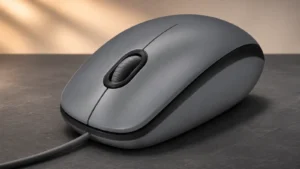
Logitech M100 Feature Scores
Overall Scorata score: 4.0/5
Based on 7 analyzed reviews · View source samples
Explore all 67 feature scores for Logitech M100, organized into pros and cons.
Scores by Feature
Summary
67 reviewed features-
Very positive 4.5-5.021 (31%)
-
Positive 3.5-4.418 (27%)
-
Neutral 2.5-3.410 (15%)
-
Negative 1.5-2.417 (25%)
-
Very negative below 1.51 (1%)
Pros
Sort
-
Basic movements and clicks feel fast to several users.
-
The low price and competent basic operation make this a worthwhile purchase for many users.
-
Plugging into USB is generally enough to begin using the mouse.
-
Setup is straightforward and requires little effort.
-
The compact body is easy to grab, and several users find the grip comfortable.
-
The simple shape feels comfortable to many users, especially with claw or fingertip grips.
-
Straightforward operation and an easy-to-grab shape make basic tasks uncomplicated.
-
The light body is easy to handle and particularly appealing to users who prefer lighter mice.
-
The USB cord offers simple, dependable operation without wireless pairing, though it occupies a USB port.
-
Owners appreciate the sturdy plastic, which can retain its appearance after years of use.
-
The compact size is welcomed by some users, while people with longer hands may find it too short.
-
The plain shape appeals to users who prefer a simple look, and the plastic can stay presentable over time.
-
The basic plastic construction feels surprisingly sturdy for an inexpensive mouse.
-
Cursor movement is generally described as smooth and precise enough for ordinary tasks.
-
Fingertip users benefit from the compact shape, which accommodates a broad range of hand sizes.
-
Pointer movement is described as smooth and free of noticeable delay.
-
Overall impressions are positive for the price and easy setup, although more demanding users find the basic design limiting.
-
Main clicks generally respond promptly, but the middle button can require several attempts to register.
-
Wired operation can be dependable, although button failures may appear after years of use.
-
Some users enjoy the smooth, pleasant wheel, while others find it clunky or miss advanced scrolling modes.
-
A wired connection can resolve frustrating intermittent wireless connectivity.
-
One user notices no delay when moving the pointer.
-
The generous cable length is appreciated for its reach.
-
Windows installation can be completed within seconds.
-
Claw grip works well for smaller and some medium hands; larger hands can struggle with the short shell.
-
The mouse worked immediately with an iMac through its USB connection.
-
The symmetrical shape is a practical fit for either hand.
-
The light main-button clicks feel pleasant and easy to press.
-
An iMac user found the mouse worked immediately after plugging it in.
-
Light clicks are enjoyable, although the switches are not particularly premium.
-
Some owners report years of use, although unwanted double-clicking can develop eventually.
-
The light click action is pleasant, although the switches feel more basic than premium alternatives.
-
Basic use requires no proprietary driver installation, but there is no customization software.
-
Broad operating-system compatibility is an attractive part of the straightforward design.
-
The relatively low lift-off distance is a welcome advantage over one competing gaming mouse.
-
Tracking feels smooth and precise in everyday use to some owners, but one finds the optical sensor less accurate than desired.
-
Cable impressions differ: one user finds it robust, while comparative testing describes it as cheap and stiff.
-
Clicks feel immediate in casual use, but comparative testing finds considerably more latency than dedicated gaming mice.
-
The optical sensor is adequate for normal pointing, though it does not impress everyone with its precision.
Cons
Sort
-
The middle button can fail to register reliably, making it particularly frustrating during gaming.
-
Button assignments cannot be customized through companion software.
-
The buttons cannot be programmed, restricting shortcut-heavy workflows.
-
The cable feels stiff compared with the more flexible cords on gaming mice.
-
Unwanted double-clicking can become a problem after prolonged ownership.
-
The wired-only design lacks wireless alternatives for flexible setups.
-
After five to six years, one owner encountered unintended double clicks.
-
Fixed sensitivity limits adjustment for users who want more control over their pointer settings.
-
The stock feet have disappointing glide even on different surfaces.
-
The wheel lacks a free-spin mode for faster scrolling.
-
The stock feet do not slide particularly well across tested surfaces.
-
There is no convenient horizontal scrolling function on the wheel.
-
Extended gaming and productivity sessions can expose the limitations of the simple shape.
-
The fixed polling rate is a disadvantage compared with more adjustable gaming mice.
-
The polling rate cannot be adjusted, limiting tuning for gaming.
-
The mouse feet offer disappointing glide across different surfaces.
-
Switches can develop faults after several years of use.
-
The absence of left and right tilt limits scroll-wheel flexibility.
-
Advanced gesture shortcuts are missing compared with premium office mice.
-
It handles routine office tasks, but limited ergonomics and advanced controls hold back productivity.
-
The light body and low price suit basic gaming, but unreliable middle clicks and limited performance make it a compromise.
-
Palm grip works for smaller hands, but longer fingers can extend past the short body.
-
Click noise divides users: one finds the switches fairly quiet, while another considers them too loud.
-
Fingertip grip accommodates a wide range of hands, but palm and claw grips are more size-sensitive.
-
The switches do the job, but their quality is regarded as basic.
-
A minimal button layout suits users who rely on keyboard shortcuts, but others miss side buttons.
-
Packaging experiences vary from well-protected and easy to unpack to frustrating plastic that must be cut open.
-
The shape is easy to hold for quick tasks, but lacks ergonomic support for prolonged work or gaming.
Use Cases
Best for
Sort
-
Budget-conscious shoppers get inexpensive, competent pointing without paying for advanced mouse features.
-
It works well for users who prefer a direct wired connection, particularly when wireless pairing has caused trouble.
-
Smaller hands are well served by the compact body, including for palm and claw grips.
-
The straightforward shape and low cost make it a sensible everyday mouse for basic computing.
-
Several years of service are possible, although switch problems can develop with age.
-
The ambidextrous design makes it suitable for left-handed use.
-
Medium-handed claw-grip users can find the shape comfortable.
-
The mouse is easy to grab and navigate with for quick browsing sessions.
Conditional or not ideal for
Sort
-
PC gamingIt can serve as an inexpensive PC gaming mouse, but dedicated gaming models offer better controls and performance.
-
Desktop productivityRoutine desktop tasks are manageable, but long work sessions and shortcut-heavy workflows expose the mouse's limitations.
-
FPS gamingThe lightweight body and low price can appeal to budget FPS players, but middle-click failures make demanding play risky.
-
Frequent scrollingSome owners find the wheel clunky or uncomfortable, making frequent scrolling less appealing.
-
Large-handed usersLarger-handed users are mostly limited to fingertip grip because the short body can make palm and claw grips uncomfortable.