If you want better actuation consistency
Choose Keychron V1 Ultra 8K. It scores 5.0 vs 1.0 for actuation consistency, with a 4.3 overall score.

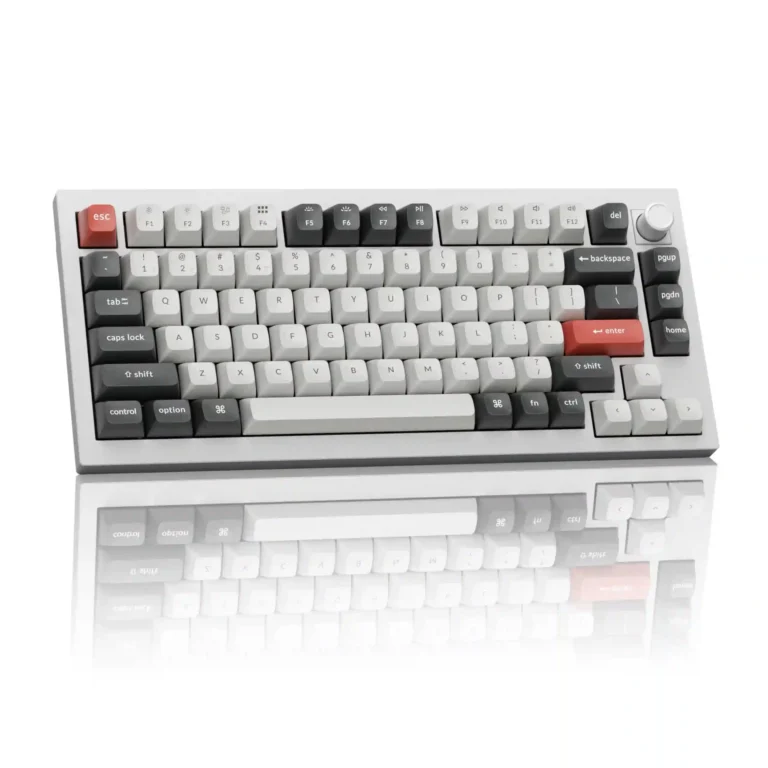
Choose it for a compact, tank-like 75% board with excellent typing, marathon battery life, and deep customization. Skip it if you need portability, adjustable feet, magnetic-switch features, or cannot risk the stock switch and stabilizer issues one reviewer encountered.
Desk-bound typists, productivity users, and mechanical-keyboard enthusiasts who want a compact premium board with long battery life, flexible connectivity, and extensive customization.
Travelers, budget buyers, users who need adjustable feet, or competitive players who require Rapid Trigger and variable actuation should skip it. Buyers sensitive to stock switch feel may also prefer the Red version or plan a switch swap.
The Keychron Q1 Ultra 8K is a premium 75% keyboard built around an exceptionally rigid aluminum chassis, excellent wireless endurance, and unusually broad customization. Most testers loved its smooth, cushioned typing, refined acoustics, stable 2.4GHz connection, and practical volume knob, while treating 8,000Hz polling as a minor bonus rather than a transformative feature. The main uncertainty is the stock switch and stabilizer execution: most units felt smooth and tightly tuned, but one experienced reviewer reported missed repeated presses, mushy Brown switches, and a space bar that could stick. It is also expensive, very heavy, and lacks adjustable feet, Rapid Trigger, and variable actuation. For desk-bound typists and mechanical-keyboard enthusiasts, the overall package is compelling; competitive players and risk-averse buyers should consider the Red switch version or budget for a switch swap.
Compared with other Gaming Keyboards, this product is above average in hot-swappable switches, legend visibility, switch options, near average in acoustics, design aesthetics, below average in actuation consistency, rapid trigger support, analog input support.
| Attribute | This product | Category average | Difference |
|---|---|---|---|
| actuation consistency | 1.0 | 4.2 | -3.2 |
| rapid trigger support | 1.0 | 3.6 | -2.6 |
| analog input support | 1.0 | 3.2 | -2.2 |
| key responsiveness | 2.5 | 4.6 | -2.1 |
| portability | 1.5 | 3.5 | -2.0 |
| hot-swappable switches | 4.9 | 3.5 | +1.4 |
| legend visibility | 5.0 | 3.5 | +1.5 |
| switch options | 4.5 | 3.2 | +1.3 |
Choose Keychron V1 Ultra 8K. It scores 5.0 vs 1.0 for actuation consistency, with a 4.3 overall score.
Choose Epomaker P65. It scores 4.8 vs 2.5 for key responsiveness, with a 4.2 overall score.
Choose Keychron Q1 HE. It scores 4.9 vs 1.0 for rapid trigger support, with a 4.2 overall score.
Choose ASUS ROG Azoth X. It scores 4.8 vs 3.0 for ergonomics, with a 4.1 overall score.
Products reviewers directly compared with this model, grouped into quick takeaways.
Yes. Most testers praised its solid, cushioned feel, sculpted PBT keycaps, and deep acoustics, although one reviewer strongly disliked the stock Brown switches and reported a sticking space bar.
Probably not. Several testers found the keyboard very responsive but noticed little or no practical difference between 1,000Hz and 8,000Hz.
Keychron claims up to 660 hours with the backlight off. Testers reported a week of heavy RGB use without charging, roughly a month with lighting, and the potential for several months with lighting disabled.
It performs well over wired or 2.4GHz and includes SOCD and full anti-ghosting. Red switches are the safest gaming choice, but it lacks Rapid Trigger and adjustable actuation found on magnetic keyboards.
Yes. The PCB supports three- and five-pin mechanical switches, and the box includes switch and keycap pullers plus tools for deeper modifications.
No. The 75% footprint is compact, but the aluminum board weighs about 3.8 pounds and is repeatedly described as a stationary desk keyboard.
Yes. It includes an operating-system switch and alternate Windows keycaps, though some Apple-specific controls such as external display brightness may require third-party software.
These are a few of the reviews included in our analysis.
The Keychron Q1 Ultra 8K is an incredibly versatile and premium-feeling keyboard with near-unparalleled build quality — just don't buy it...
There seems to be no ceiling for mechanical keyboards and the Keychron Q1 Ultra 8K is proof. It features an all metal build, wireless...
The Keychron Q1 Ultra 8K and V5 Ultra 8K blow away most other mechanical keyboards in battery life. These ZMK boards also have refinements...
## First Impressions: That Instant Vibe Check Alright, let's cut to the chase. Keychron's been on a roll, dropping boards that hit different...
A short review of the build quality, usability, and features of the Keychron Q1 Ultra wireless mechanical keyboard with 8 kHz wireless...

Good if you want a premium 96% Hall Effect keyboard for work and gaming with excellent build, sound, and customization. Skip it if you need cheaper esports-first speed, 8,000Hz polling,...
Pros: size and form factor, typing feel
Cons: switch options, portability

Choose it if competitive gaming speed, Rapid Trigger, and deep per-key customization matter more than extras. Skip it if you need wireless, dedicated arrows/media keys, adjustable height, or a lower-cost...
Pros: overall satisfaction, customization options
Cons: value for money, switch options

Good if you want a premium, quiet TKL Hall Effect keyboard for typing and gaming. Skip it if price, portability, 8,000Hz polling, or broad switch choice matters most.
Pros: build quality, switch feel
Cons: switch options

Good if you want a premium full-size Hall Effect keyboard with smooth switches, quiet sound, and deep customization. Skip it if you need a portable, budget-friendly board or broad switch...
Pros: build quality, keycap quality
Cons: switch options, portability