
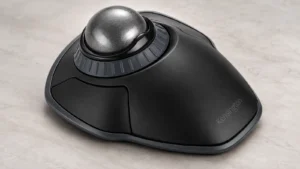
Kensington Orbit Wireless Trackball with Scroll Ring Feature Scores
Overall Scorata score: 4.1/5
Based on 6 analyzed reviews · View source samples
Explore all 68 feature scores for Kensington Orbit Wireless Trackball with Scroll Ring, organized into pros and cons.
Scores by Feature
Summary
68 reviewed features-
Very positive 4.5-5.030 (44%)
-
Positive 3.5-4.423 (34%)
-
Neutral 2.5-3.47 (10%)
-
Negative 1.5-2.48 (12%)
Pros
Sort
-
Minimal hand movement and a symmetrical, low-profile shape make this a comfortable alternative to a conventional mouse. The detachable rest is not essential for everyone.
-
The ring surrounding the ball provides exceptionally smooth, effortless vertical scrolling. It cannot scroll horizontally.
-
The simple controls and easy-to-reach scroll ring make basic use intuitive, even before extensive customization.
-
The centered ball and symmetrical buttons accommodate either hand without requiring a dedicated right-handed or left-handed model.
-
The ball rolls smoothly with little noticeable friction, a consistent strength even for fine pointer movements.
-
Overall impressions are favorable, with comfort and smooth scrolling outweighing limited buttons, software issues and occasional price concerns.
-
The low-profile shape lets the hand rest naturally over the controls. Several users actually prefer the feel without the wrist rest.
-
The stationary design lets users control the pointer with small finger movements instead of sliding the entire device across a desk.
-
Large buttons sit on either side of the centered ball where fingers naturally rest, making them accessible and easy to press.
-
Bluetooth is valued for dongle-free operation and convenient mobile connections; the older protocol still provides adequate desk-range connectivity.
-
A dedicated underside DPI switch makes sensitivity changes possible without relying on the companion application.
-
Bluetooth and a wireless USB receiver offer flexible connections across desks, laptops and compatible mobile devices.
-
Hardware sensitivity presets help tailor pointer speed, especially across multiple monitors. Companion-app DPI adjustments did not work in one Windows 11 test.
-
Small finger movements and a low, relaxed wrist position can help reduce hand fatigue and forearm discomfort during use.
-
The adjustable sensitivity presets provide practical speeds for ordinary pointer control and larger displays.
-
Everyday desktop work is comfortable and straightforward, and customized buttons can accelerate document editing. The modest input count limits advanced workflows.
-
Pressing both buttons together can add a useful shortcut such as media playback, but it supplies only one extra action.
-
Most find the comfortable trackball and scroll ring good value, although one buyer considered it expensive in their local market.
-
The ball provides good general cursor control, with sensitivity adjustments helping tailor movement. The smaller ball can reduce stability during fine maneuvers.
-
The trackball is usable with default settings and can be functional within minutes of connecting the receiver.
-
The ring is generally smooth and easy to turn. One tester noticed slight plastic friction, and others may prefer tactile notches.
-
Reviewers expect relatively infrequent battery changes, though no measured runtime is established here.
-
The low chassis and gently sloping wrist support can reduce awkward wrist positioning.
-
Bluetooth is a useful alternative when a USB receiver is inconvenient or easy to lose.
-
Finger-operated movement distributes effort rather than relying solely on the thumb, which some find more relaxing and precise.
-
The wireless update removes the cable while retaining the familiar wired design, a worthwhile improvement for those wanting a tidier desk.
-
Wireless operation is welcomed primarily for reducing clutter and offering more convenient placement.
-
Ordinary pointer tracking and text selection are satisfactory, but fine movements can feel less stable than on a larger trackball.
-
Basic clicking and scrolling feel intuitive, but adapting pointer control from a traditional mouse can take about a week.
-
Button response is pleasant and sufficient for normal desktop work.
-
The buttons can be remapped, including a combined press, but the two-button layout restricts the number of available shortcuts.
-
Programmable clicks can handle media, editing or navigation shortcuts. Only two physical buttons and one combined action limit flexibility.
-
The included detachable wrist rest is a welcome option, though its loose attachment and preferred hand position make it less useful for some owners.
-
The predominantly cardboard packaging with minimal plastic was well received.
-
The scroll ring offers precise control over vertical movement and is easy to operate.
-
Initial setup is quick, with the trackball becoming functional within minutes of connecting the receiver.
-
The body feels reasonably sturdy for its price, although its plastic construction lacks the refinement of pricier trackballs.
-
Scroll speed and direction can be customized through the app, although these settings did not take effect in one test.
-
The body is compact relative to larger trackballs, and its stationary operation saves space despite being larger than many ordinary mice.
-
The symmetrical shape is especially well suited to a claw-style grip.
-
Basic use does not depend on KensingtonWorks. The app is most useful when users want to customize controls.
-
Bluetooth offers an easy connection to compatible tablets and other mobile devices.
-
Minimal plastic in the packaging is a welcome environmental consideration.
-
Wireless operation makes the device easier to transport than a comparable wired trackball.
-
KensingtonWorks earns praise for useful customization from some users, but another found most pointer and scrolling settings ineffective on Windows 11.
-
The oversized buttons work reliably enough for desktop tasks, but their hollow feel is less satisfying than higher-end controls.
-
Left and right clicks are functional and accessible, although their hollow feel detracts from tactile quality.
-
Initial operation was easy on Windows 10, while a Windows 11 test encountered problems with some companion-app adjustments.
-
Bluetooth range was sufficient for ordinary desk use, with one test reporting disconnection only beyond roughly 15–20 feet.
-
The medium-size ball was adequate even for a reviewer with large hands and long fingers.
-
Replaceable AA batteries are convenient for users who already keep spares available.
-
Companion software can enable valuable shortcuts, but one Windows 11 experience required native mouse settings because several controls did not work.
-
The app is intuitive and customizable for some, but another user found it worth installing only for button remapping.
Cons
Sort
-
The controls are designed for everyday work rather than gaming; high click latency and the trackball format are significant drawbacks for fast action.
-
There is no horizontal scrolling function, a notable limitation for wide documents and editing timelines.
-
Click latency is too high for gaming, even though it improves on some older trackball alternatives.
-
The plastic body feels inexpensive compared with higher-end models. Its material finish is a compromise rather than a luxury feature.
-
Functional construction takes priority over a premium finish. The plastic does not feel as refined as more expensive competitors.
-
The detachable rest can move around or come away too easily. Its unusual mounting method is a recurring ergonomic caveat.
-
One Windows 11 test found the companion application's acceleration setting ineffective, requiring the operating system's own controls.
-
The lack of a dedicated middle-click button is frustrating for users accustomed to conventional mouse wheels.
-
Some appreciate the uncomplicated two-button layout, while others miss dedicated middle-click and browser navigation controls.
-
The functional design is appreciated, though its appearance is somewhat uninspiring.
-
The tiny receiver is unobtrusive when installed but easy to misplace.
-
Disassembly is not particularly complicated, but a special screwdriver is required.
-
Responsiveness is adequate for ordinary desktop work and better than some trackballs, but gaming mice are snappier.
-
The medium ball is adequate for everyday work but provides less space for three fingers than a larger trackball, making fine control less stable.
-
The wrist rest provides extra support, but several users prefer operating the trackball without it. Its tendency to shift can undermine the benefit.
Use Cases
Best for
Sort
-
The smooth ring is a major advantage when repeatedly scrolling through pages, since it requires little finger movement.
-
Wireless operation clears cable clutter and avoids the cable-related problems that can affect wired mice.
-
Left-handed users can operate the centered ball as easily as right-handed users. Button remapping adds further flexibility.
-
The modest feature set keeps the device relatively affordable compared with more elaborate trackballs. Regional pricing can affect the value proposition.
-
The stationary pointer and smooth scroll ring work particularly well for office tasks. Two buttons cover the basics but leave fewer shortcuts than productivity-oriented alternatives.
-
People looking to minimize wrist movement may benefit from the stationary design and gently sloped shape. It is not a guarantee of relief from an existing injury.
-
A simple layout, smooth ball and useful scroll ring make it a particularly appealing first trackball. Allow some practice to adjust from a regular mouse.
-
The comfortable, straightforward trackball is a strong option for everyday non-gaming computer use.
-
Text selection is practical, but photo editing and very fine pointer work may take practice or benefit from a larger ball.
-
Because the trackball stays in place during pointer movement, it needs less operating space than a conventional mouse.
-
The stationary pointer and oversized buttons are particularly useful when moving a conventional mouse or making precise individual finger movements is difficult.
-
Comfortable everyday operation and practical document shortcuts make the trackball an appealing option for university study.
-
Its practical features and moderate price make it an appealing technology gift for a university student.
-
Higher DPI presets help the cursor cross large displays and multiple monitors without excessive ball movement.
-
Customized button shortcuts can save time when working through large documents.
-
The wireless connection choices make travel easier by eliminating a permanently attached cable.
-
A large-handed user found the 40 mm ball adequate, though more space on a larger ball could improve multi-finger control.
-
Occasional video editing is a reasonable fit, but the lack of horizontal scrolling can hinder extensive timeline work.
Conditional or not ideal for
Sort
-
PC gamingFast PC games are a poor match because click response and the trackball layout do not suit rapid inputs.
-
Web browsingThe ring is excellent for navigating pages, but missing dedicated back and forward buttons makes browser navigation less convenient.
-
Photo editingFine photo editing is possible in principle, but a new trackball user found that gaining confidence would take substantial practice.