If you want better long-session comfort
Choose Pulsar X2 CrazyLight. It scores 5.0 vs 2.0 for long-session comfort, with a 4.3 overall score.

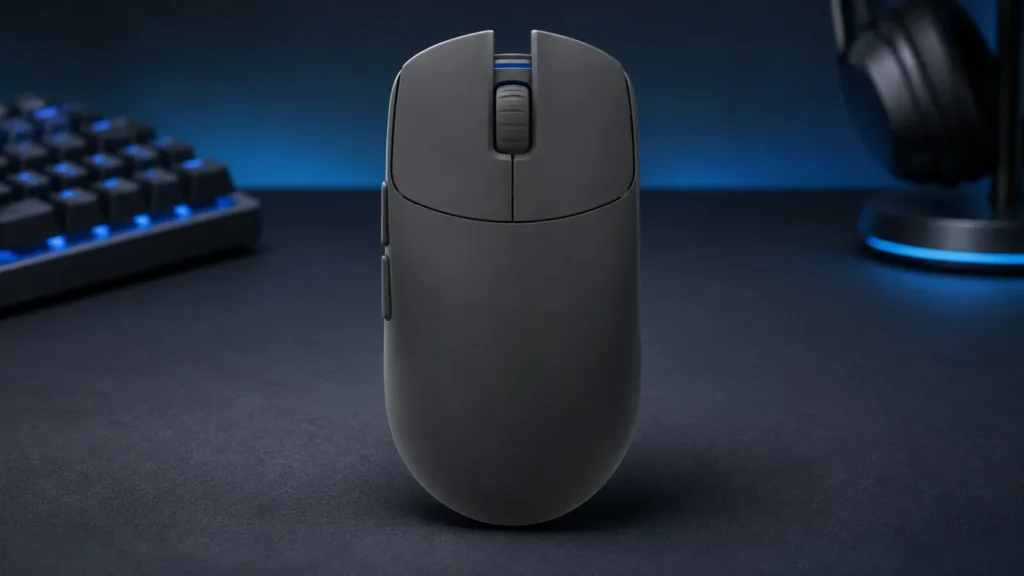
The LYCAN delivers exceptionally fast clicks and effortless flicks in a remarkably light, claw-focused shell. Its sensitive feel, exposed underside and premium price make it a specialist rather than a universally safe choice.
Competitive FPS players who favor claw grips and effortless flicks, especially those using firm or glass mousepads.
Budget-conscious buyers, players who prefer a fully supported palm grip or those who find extremely light mice tiring to stabilize.
The G-Wolves LYCAN is an impressive option for players who want a full-sized wireless gaming mouse weighing around 29 grams. Its solid upper shell feels surprisingly rigid, the SPDT switches are exceptionally responsive, and the forward sensor makes small movements feel immediate. The rear hump is particularly effective for claw grips, although very large hands may struggle with the low sidewalls. Aim experiences differ: some players love the effortless starts and stops, while others find the lack of inertia tiring and inconsistent. The exposed underside also collects dust and can scrape or rock on plush pads, making skate choice important. A generous accessory bundle and flexible web driver help justify the premium price, but the stock cables and uncertain support are drawbacks. It is most compelling for competitive shooter players who already appreciate extreme lightweight designs.
Compared with other Gaming Mice, this product is above average in USB-C connectivity, firmware reliability, Included grip tape quality, near average in left and right click quality, grip texture, below average in cable quality, long-session comfort, programmable buttons.
| Attribute | This product | Category average | Difference |
|---|---|---|---|
| cable quality | 1.0 | 3.8 | -2.8 |
| long-session comfort | 2.0 | 4.4 | -2.4 |
| programmable buttons | 2.0 | 4.1 | -2.1 |
| profile switching | 2.0 | 3.8 | -1.8 |
| accessory compatibility | 2.0 | 3.8 | -1.8 |
| cable flexibility | 2.0 | 3.6 | -1.6 |
| skate durability | 2.0 | 3.6 | -1.6 |
| USB-C connectivity | 5.0 | 3.4 | +1.6 |
Choose Pulsar X2 CrazyLight. It scores 5.0 vs 2.0 for long-session comfort, with a 4.3 overall score.
Choose McHose L7 Pro. It scores 4.8 vs 1.0 for cable quality, with a 4.5 overall score.
Choose Endgame Gear OP1 8k v2. It scores 5.0 vs 2.0 for cable flexibility, with a 4.3 overall score.
Choose Keychron M3 Mini. It scores 5.0 vs 2.0 for programmable buttons, with a 4.0 overall score.
Compared with G-Wolves LYCAN
Tested stock configurations are around 29 grams. Larger skates and grip tape can bring the total above 30 grams.
Claw grip is the strongest match. Palm and fingertip suitability depend on hand size, and very large hands may find the low sides restrictive.
Yes. Exceptionally low click and motion latency, low inertia and a forward sensor make it particularly capable for rapid flicks, although some players find it too sensitive.
It can, but the open underside and rear skate mount can catch or rock on plush surfaces. Taller or wider skates and firm pads can help.
One tester estimated about 100 hours at the normal 1 kHz setting and about 20 hours at 8 kHz; actual runtime depends on settings and use.
The textured solid plastic is usable without tape for many players, though it can lack grip with sweaty hands. The included tape provides additional traction.
Yes, with up to 8,000 Hz polling over USB-C. A flexible aftermarket cable is preferable to the supplied cables for wired gaming.
These are a few of the reviews included in our analysis.



The G-Wolves LYCAN is an ultra-lightweight wireless gaming mouse with a symmetrical shape. Unlike the brand's compact fingertip-grip models...
A cutting-edge sub-29g wireless mouse featuring forward sensor placement and 8000 Hz polling, tempered by base-plate glide instability on...
G-Wolves Lycan 8K Review — The First Real Banger Mouse of 2026? Every year, we get our hands on several “promising” mouse launches. Most pan...
G-Wolves Lyan review: a 29g full-size claw-grip mouse with a forward sensor and 8K polling. Brilliant on glass pads, flawed on soft cloth.

Choose the ROG Harpe II Ace for ultralight FPS play, precise tracking, smooth glide, and web-based tuning. Skip it if you need palm-grip support, MMO buttons, onboard profiles, or long...
Pros: glide smoothness, weight
Cons: handedness options

Excellent tracking, comfortable right-handed ergonomics and a versatile scroll wheel make the Basilisk V3 a strong gaming and productivity mouse. Its substantial weight, fixed cable and sometimes over-sensitive automatic scrolling...
Pros: scroll wheel quality, RGB features
Cons: weight, handedness options

The L7 Pro delivers remarkably light handling, precise aiming and a grippy shell at a budget price. Stock skates are less impressive, and conflicting click-latency measurements warrant caution for latency-sensitive...
Pros: value for money, weight
Cons: wired connectivity

Best for ultra-light, competition-focused speed, precise tracking, stable wireless, and long battery life. Skip it if you need quieter clicks, left-handed support, Bluetooth, more buttons, or better value for casual...
Pros: value for money, weight
Cons: click noise, RGB features