Other features
Ease of use
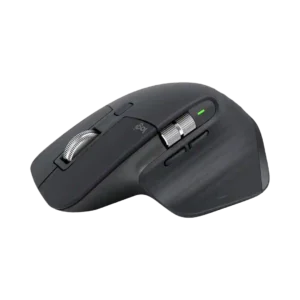
Logitech MX Master 3SNo score yet
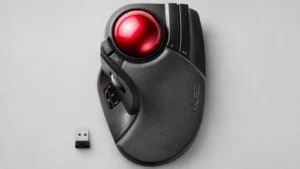
ELECOM Huge M-HT1DRBK
4.3
The ball itself is easy to manipulate and many controls are intuitive after adaptation, despite the initial learning curve.
Balance and weight distribution
Logitech MX Master 3S
5.0
The mouse’s weight distribution is praised for supporting a stable, planted feel during long desk sessions.
ELECOM Huge M-HT1DRBKNo score yet
Cable quality
Logitech MX Master 3S
2.0
The included charging cable is a weak point in one detailed assessment, where its thin, non-braided construction felt cheap beside the premium mouse.
ELECOM Huge M-HT1DRBKNo score yet
Click latency
Logitech MX Master 3SNo score yet
ELECOM Huge M-HT1DRBK
2.5
Click latency is high by modern gaming standards, even though it is lower than on some competing trackballs and rarely troublesome for desktop work.
Coating quality
Logitech MX Master 3S
2.3
The soft-touch coating feels good when new, but long-term feedback is consistently wary of staining, grime, discoloration, and surface wear. Lighter colors draw the most criticism.
ELECOM Huge M-HT1DRBKNo score yet
Connectivity versatility
Logitech MX Master 3SNo score yet
ELECOM Huge M-HT1DRBK
2.3
The dedicated wireless receiver is less flexible than tri-mode trackballs that support Bluetooth and wired fallback.
Dedicated DPI switch
Logitech MX Master 3SNo score yet
ELECOM Huge M-HT1DRBK
4.5
The physical three-position sensitivity control makes it easy to change DPI without opening software.
Device switching
Logitech MX Master 3S
4.6
Switching among computers is usually fast and convenient, particularly for multi-device desks. The underside button placement is the main usability complaint.
ELECOM Huge M-HT1DRBKNo score yet
Dust resistance
Logitech MX Master 3SNo score yet
ELECOM Huge M-HT1DRBK
4.5
The relatively large bearing contact points can help resist clogging, though occasional cleaning is still advisable.
Ecosystem integration
Logitech MX Master 3S
5.0
Logi Flow and integration with other Logitech devices are strong productivity features, especially for moving the pointer and clipboard across multiple computers.
ELECOM Huge M-HT1DRBKNo score yet
Glide smoothness
Logitech MX Master 3S
4.0
Glide is generally smooth for office work, but heavier weight and mediocre feet draw criticism from reviewers comparing it with fast gaming mice.
ELECOM Huge M-HT1DRBKNo score yet
Learning curve
Logitech MX Master 3SNo score yet
ELECOM Huge M-HT1DRBK
3.3
The finger-operated ball and unusual thumb and finger assignments take practice; some adapt quickly, while others still misclick weeks later.
MacOS compatibility
Logitech MX Master 3S
5.0
Mac support is excellent, with reviewers praising both reliable operation and useful app or gesture customization.
ELECOM Huge M-HT1DRBKNo score yet
Onboard memory
Logitech MX Master 3S
1.0
The lack of onboard memory is a serious weakness for power users because custom profiles depend on Logi Options+ being available and running on each machine.
ELECOM Huge M-HT1DRBKNo score yet
Overall satisfaction
Logitech MX Master 3SNo score yet
ELECOM Huge M-HT1DRBK
4.4
The spacious finger-operated trackball and plentiful controls win enthusiastic recommendations, although wireless interruptions and inconsistent units temper satisfaction.
Packaging quality and presentation
Logitech MX Master 3SNo score yet
ELECOM Huge M-HT1DRBK
4.0
The packaging is more modern-looking than the basic cartons used for some other trackballs.
Power efficiency
Logitech MX Master 3SNo score yet
ELECOM Huge M-HT1DRBK
4.0
A low-energy operating mode offers a convenient way to conserve battery power.
Profile switching
Logitech MX Master 3S
5.0
Automatic profile changes can work smoothly within Logitech’s ecosystem, reducing manual switching when moving between paired devices or setups.
ELECOM Huge M-HT1DRBKNo score yet
Sleep mode
Logitech MX Master 3S
2.5
Wake behavior is mostly fine, but one test found that resuming from full sleep occasionally needed an extra click or two.
ELECOM Huge M-HT1DRBKNo score yet
Stationary pointer operation
Logitech MX Master 3SNo score yet
ELECOM Huge M-HT1DRBK
4.5
Finger-operated tracking eliminates the need to repeatedly lift and reposition the mouse across a desk.
Surface compatibility
Logitech MX Master 3S
5.0
Darkfield tracking is a clear win, with reviewers repeatedly confirming reliable use on glass and other surfaces that trip up ordinary mice.
ELECOM Huge M-HT1DRBKNo score yet
Suspend and resume
Logitech MX Master 3SNo score yet
ELECOM Huge M-HT1DRBK
1.5
One defective unit repeatedly woke a sleeping PC, with unplugging the receiver the only workable immediate solution.
Sustainability
Logitech MX Master 3S
5.0
Reviewers who mention sustainability respond positively to recycled materials, reduced disposable-battery use, and Logitech’s environmental positioning.
ELECOM Huge M-HT1DRBKNo score yet
Switch quality
Logitech MX Master 3SNo score yet
ELECOM Huge M-HT1DRBK
4.0
The main OMRON switches feel premium, but the auxiliary controls use less satisfying switches.
Thumb strain
Logitech MX Master 3SNo score yet
ELECOM Huge M-HT1DRBK
1.8
The thumb handles several controls, and the wheel reach or prolonged use of the side buttons can cause discomfort.
Trackball bearing modification
Logitech MX Master 3SNo score yet
ELECOM Huge M-HT1DRBK
4.5
Replacing the synthetic ruby bearings with ceramic ones can make the ball slightly smoother and quieter without a difficult modification process.
Trackball rolling smoothness
Logitech MX Master 3SNo score yet
ELECOM Huge M-HT1DRBK
4.4
Many find the large ball exceptionally smooth and easy to control, although some report less fluid motion and contamination-related sluggishness.
Unit-to-unit quality control
Logitech MX Master 3SNo score yet
ELECOM Huge M-HT1DRBK
1.5
One reviewer needed three units before finding one without defects; sticky scrolling, click issues and receiver problems can vary between samples.
USB-A receiver compatibility
Logitech MX Master 3SNo score yet
ELECOM Huge M-HT1DRBK
2.0
The dedicated USB-A receiver requires an adapter or dock on USB-C-only computers.
USB-C connectivity
Logitech MX Master 3S
5.0
USB-C charging is consistently appreciated for modern convenience and the sensible front-facing port placement.
ELECOM Huge M-HT1DRBKNo score yet
Windows compatibility
Logitech MX Master 3S
5.0
Windows compatibility is strong, including full Options+ support and smooth multi-device workflows.
ELECOM Huge M-HT1DRBKNo score yet
Wrist and forearm strain relief
Logitech MX Master 3SNo score yet
ELECOM Huge M-HT1DRBK
3.9
Stationary pointing and cushioning can reduce wrist movement and strain, but the thick rest and thumb workload may introduce discomfort.
Controls and connectivity
Accidental button activation
Logitech MX Master 3SNo score yet
ELECOM Huge M-HT1DRBK
2.3
The unconventional button layout can cause wrong or accidental presses even after days or weeks of use.
Gesture controls
Logitech MX Master 3S
4.0
Gesture controls can be powerful once configured, but they are more useful to workflow-heavy users than to people who prefer simple mouse behavior.
ELECOM Huge M-HT1DRBKNo score yet
Simultaneous button input
Logitech MX Master 3SNo score yet
ELECOM Huge M-HT1DRBK
1.5
The default thumb layout makes holding the left button while scrolling difficult or impossible without remapping.
Software and driver support
Logitech MX Master 3SNo score yet
ELECOM Huge M-HT1DRBK
3.5
Button customization is available on Windows and macOS, but full functionality can vary by operating system version.
Software resource usage
Logitech MX Master 3SNo score yet
ELECOM Huge M-HT1DRBK
4.0
Mouse Assistant is appreciated for its simple, non-bloated approach.
Software stability
Logitech MX Master 3S
3.6
Options+ stability is inconsistent across reviewers: several find it dependable, while others report unresponsiveness or settings temporarily reverting.
ELECOM Huge M-HT1DRBKNo score yet
Zoom controls
Logitech MX Master 3SNo score yet
ELECOM Huge M-HT1DRBK
5.0
Assigning zoom to a dedicated button is particularly useful for changing on-screen content quickly.
Battery and charging
Charging speed
Logitech MX Master 3S
5.0
Fast charging earns near-universal praise because a very short top-up can restore hours of use, making a depleted battery a minor inconvenience.
ELECOM Huge M-HT1DRBKNo score yet
Rechargeable battery
Logitech MX Master 3S
5.0
The built-in rechargeable battery holds up well in long-term use and avoids the hassle of disposable cells.
ELECOM Huge M-HT1DRBKNo score yet
Comfort and build
Chassis height comfort
Logitech MX Master 3SNo score yet
ELECOM Huge M-HT1DRBK
2.3
The thick, elevated wrist rest can press into the forearm or require additional arm support, even though its padding is comfortable.
Claw grip comfort
Logitech MX Master 3SNo score yet
ELECOM Huge M-HT1DRBK
4.2
A relaxed claw grip can improve button reach, especially when the palm is positioned farther back.
Fingertip grip comfort
Logitech MX Master 3SNo score yet
ELECOM Huge M-HT1DRBK
4.5
A relaxed finger grip can improve access to the controls without forcing the palm against the chassis.
Grip comfort
Logitech MX Master 3S
5.0
Reviewers repeatedly praise how secure and comfortable the mouse feels in hand, helped by the thumb rest and rubberized contact areas.
ELECOM Huge M-HT1DRBKNo score yet
Switch durability
Logitech MX Master 3S
1.0
Long-term switch durability is a concern because multiple reports describe flaky clicking or a button failing after extended use.
ELECOM Huge M-HT1DRBKNo score yet
Performance
Cleaning ease
Logitech MX Master 3SNo score yet
ELECOM Huge M-HT1DRBK
3.8
The ball can be popped out for straightforward cleaning, but regular removal of dust and skin oil is necessary to maintain smoothness.
Click noise
Logitech MX Master 3S
4.8
Quiet Clicks are one of the most universally praised upgrades, making the mouse far less distracting in offices, calls, recording setups, and late-night work.
ELECOM Huge M-HT1DRBKNo score yet
Scroll wheel noise
Logitech MX Master 3SNo score yet
ELECOM Huge M-HT1DRBK
5.0
The scroll wheel provides soft tactile feedback without an audible click in one hands-on assessment.
Ownership and support
Dongle-free setup
Logitech MX Master 3S
5.0
Bluetooth makes dongle-free use practical, and at least one Mac-focused reviewer found the lack of a receiver unproblematic because pairing remained easy and broad.
ELECOM Huge M-HT1DRBKNo score yet
Double-click reliability
Logitech MX Master 3S
1.0
One long-term owner reported unwanted double-clicks and missed single clicks, a serious concern for precision work.
ELECOM Huge M-HT1DRBKNo score yet
Tilt wheel support
Logitech MX Master 3SNo score yet
ELECOM Huge M-HT1DRBK
4.0
The tilting wheel adds useful lateral scrolling inputs to the control layout.
Warranty
Logitech MX Master 3S
1.5
One account was sharply negative after a scroll-wheel problem reportedly was not covered to the user’s satisfaction.
ELECOM Huge M-HT1DRBKNo score yet