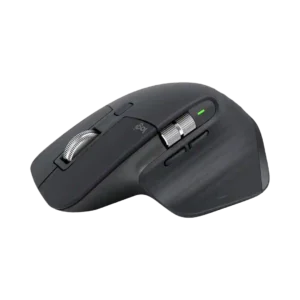
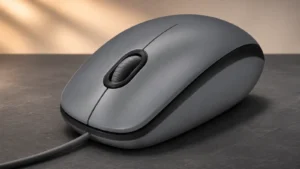
Compare Logitech MX Master 3S vs Logitech M100

Logitech MX Master 3S

Logitech MX Master 3S

Overall score 4.2 / 5

Based on 63 scored reviews

vs
Logitech M100

Logitech M100

Overall score 4.0 / 5

Based on 7 scored reviews

How we score

Scorata scores summarize analyzed review evidence on a 1–5 scale; they are not laboratory measurements or a simple average of customer star ratings. Feature scores summarize the reviews covering that feature. The overall score averages feature scores within each review, then combines review averages. When both expert and customer evidence are available, those two groups receive equal weight. Products can have different review coverage, so small score gaps do not establish a winner.

Recommendations prioritize important features for the category, with a score of at least 3.5, a gap of at least 0.25 points and at least two supporting reviews per product. Features with widely varying scores or broad connectivity contexts are excluded from recommendations. These safeguards do not establish statistical significance.

Quick verdict

What each product is best for

The review evidence points to a tradeoff: productivity performance and grip comfort versus wired connectivity and size. Choose according to which strengths matter more to you; the overall score alone does not settle that choice.

Choose Logitech MX Master 3S for productivity performance and grip comfort.

Choose Logitech M100 for wired connectivity and size.

Why these recommendations?

Logitech MX Master 3S

Where It Has the Edge

  • productivity performance is 5.0 vs 2.8. This is where the MX Master 3S earns its reputation: reviewers repeatedly describe it as an exceptional work...
  • grip comfort is 5.0 vs 4.5. Reviewers repeatedly praise how secure and comfortable the mouse feels in hand, helped by the thumb rest and...
  • shape comfort is 4.6 vs 4.3. The tall, sculpted shape fits many medium-to-large hands extremely well and is frequently described as natural or glove-like....

Logitech M100

Where It Has the Edge

  • wired connectivity is 4.5 vs 1.1. The USB cord offers simple, dependable operation without wireless pairing, though it occupies a USB port.
  • size is 3.9 vs 1.8. The compact size is welcomed by some users, while people with longer hands may find it too short.
Logitech MX Master 3S 4.2 overall score
Logitech M100 4.0 overall score

Compare features

Scores are out of 5. Missing scores mean missing review evidence, not a missing feature.

Scored on both products

Ownership and support

Reliability
Logitech MX Master 3S
3.7

Reliability is mixed over the long term: many users report years of dependable use, while others encounter wireless glitches, software resets, or button failures.

Logitech M100
4.3

Wired operation can be dependable, although button failures may appear after years of use.

Double-click reliability
Logitech MX Master 3S
1.0

One long-term owner reported unwanted double-clicks and missed single clicks, a serious concern for precision work.

Logitech M100
2.0

After five to six years, one owner encountered unintended double clicks.

Plug-and-play support
Logitech MX Master 3S
5.0

Basic pointing and scrolling work well without special software, so the mouse remains usable even before customization is installed.

Logitech M100
4.8

Plugging into USB is generally enough to begin using the mouse.

Setup ease
Logitech MX Master 3S
5.0

Pairing and configuration are generally straightforward, whether using Bluetooth, Bolt, or Options+.

Logitech M100
4.8

Setup is straightforward and requires little effort.

Value for money
Logitech MX Master 3S
4.4

Most reviewers think the premium is justified for serious productivity use, especially when discounted. Budget users and people who only need basic pointing and scrolling are less likely to see the value.

Logitech M100
4.4

The low price and competent basic operation make this a worthwhile purchase for many users.

Controls and connectivity

Button customization
Logitech MX Master 3S
5.0

Deep button remapping is a major strength, especially because controls can change by application and be tailored to creative or office workflows.

Logitech M100
1.5

Button assignments cannot be customized through companion software.

Programmable buttons
Logitech MX Master 3S
5.0

The programmable controls are repeatedly praised for turning common shortcuts and app commands into faster, more efficient mouse actions.

Logitech M100
1.5

The buttons cannot be programmed, restricting shortcut-heavy workflows.

DPI customization
Logitech MX Master 3S
5.0

Fine sensitivity adjustment is a useful strength for matching the mouse to different displays, workloads, and personal pointer-speed preferences.

Logitech M100
2.0

Fixed sensitivity limits adjustment for users who want more control over their pointer settings.

Gesture controls
Logitech MX Master 3S
4.0

Gesture controls can be powerful once configured, but they are more useful to workflow-heavy users than to people who prefer simple mouse behavior.

Logitech M100
2.5

Advanced gesture shortcuts are missing compared with premium office mice.

Button count
Logitech MX Master 3S
4.5

The control count is generally seen as generous for productivity, offering enough programmable inputs for power users without overwhelming the layout.

Logitech M100
3.3

A minimal button layout suits users who rely on keyboard shortcuts, but others miss side buttons.

Button responsiveness
Logitech MX Master 3S
3.1

Button response is generally good when new, but long-term reports of missed clicks and switch failures create a notable reliability concern.

Logitech M100
4.0

Main clicks generally respond promptly, but the middle button can require several attempts to register.

Button quality
Logitech MX Master 3S
4.0

Most reviewers like the substantial, responsive feel of the controls, although some dislike the softer main-switch feel and isolated failures hurt confidence.

Logitech M100
3.8

Light clicks are enjoyable, although the switches are not particularly premium.

Other features

Handedness options
Logitech MX Master 3S
1.0

The lack of a left-handed version is one of the clearest limitations. Its sculpted body and thumb controls effectively exclude left-handed users.

Logitech M100
4.5

The symmetrical shape is a practical fit for either hand.

Wired connectivity
Logitech MX Master 3S
1.1

The USB-C port charges the mouse but does not provide true wired input. Reviewers who want a cable fallback or zero-interference mode see that as a clear limitation.

Logitech M100
4.5

The USB cord offers simple, dependable operation without wireless pairing, though it occupies a USB port.

Free-spin scrolling
Logitech MX Master 3S
5.0

Free-spin mode is a major productivity benefit, letting users tear through long documents or timelines with far less effort than a conventional wheel.

Logitech M100
2.0

The wheel lacks a free-spin mode for faster scrolling.

Motion latency
Logitech MX Master 3S
2.0

The low polling rate can create perceptible lag compared with high-refresh gaming mice, even though office use is usually acceptable.

Logitech M100
5.0

One user notices no delay when moving the pointer.

Surface compatibility
Logitech MX Master 3S
5.0

Darkfield tracking is a clear win, with reviewers repeatedly confirming reliable use on glass and other surfaces that trip up ordinary mice.

Logitech M100
2.0

The mouse feet offer disappointing glide across different surfaces.

Horizontal scrolling
Logitech MX Master 3S
4.9

The thumb wheel is one of the most loved productivity features, particularly for spreadsheets, editing timelines, large canvases, and browser or app navigation.

Logitech M100
2.0

There is no convenient horizontal scrolling function on the wheel.

Glide smoothness
Logitech MX Master 3S
4.0

Glide is generally smooth for office work, but heavier weight and mediocre feet draw criticism from reviewers comparing it with fast gaming mice.

Logitech M100
2.0

The stock feet do not slide particularly well across tested surfaces.

Cable quality
Logitech MX Master 3S
2.0

The included charging cable is a weak point in one detailed assessment, where its thin, non-braided construction felt cheap beside the premium mouse.

Logitech M100
3.5

Cable impressions differ: one user finds it robust, while comparative testing describes it as cheap and stiff.

Weight
Logitech MX Master 3S
3.6

Weight is divisive: some users enjoy the solid, premium heft, while others find 141g tiring or too heavy for frequent lifting and fast movements.

Logitech M100
4.7

The light body is easy to handle and particularly appealing to users who prefer lighter mice.

Click consistency
Logitech MX Master 3S
1.0

Long-term click consistency is a concern because one owner reported missed single clicks, unintended double-clicks, and unreliable dragging.

Logitech M100
2.0

Unwanted double-clicking can become a problem after prolonged ownership.

Connection stability
Logitech MX Master 3S
4.0

Wireless stability is mostly good, especially with Logi Bolt, but not spotless. A minority of testers report Bluetooth hiccups, interference, stutters, or imperfect tracking.

Logitech M100
5.0

A wired connection can resolve frustrating intermittent wireless connectivity.

Cross-platform compatibility
Logitech MX Master 3S
5.0

The mouse works well across major desktop and mobile operating systems, which is especially useful for mixed-device work setups.

Logitech M100
4.0

Broad operating-system compatibility is an attractive part of the straightforward design.

Scroll wheel quality
Logitech MX Master 3S
4.7

The MagSpeed wheel is one of the most celebrated parts of the mouse, especially for fast document navigation and smooth mode switching. A few long-term reports of looseness or rattling keep it from being flawless.

Logitech M100
3.7

Some users enjoy the smooth, pleasant wheel, while others find it clunky or miss advanced scrolling modes.

Gaming suitability
Logitech MX Master 3S
2.0

The MX Master 3S can handle casual games, but reviewers consistently discourage it for competitive play because of its weight, 125Hz polling, and productivity-first design.

Logitech M100
2.8

The light body and low price suit basic gaming, but unreliable middle clicks and limited performance make it a compromise.

Cursor control
Logitech MX Master 3S
5.0

Cursor movement is praised for staying smooth and precise during everyday productivity tasks.

Logitech M100
4.5

Cursor movement is generally described as smooth and precise enough for ordinary tasks.

Left and right click quality
Logitech MX Master 3S
5.0

The main buttons are widely praised for combining very low noise with useful tactile feedback, making them especially pleasant for office work.

Logitech M100
4.5

The light main-button clicks feel pleasant and easy to press.

MacOS compatibility
Logitech MX Master 3S
5.0

Mac support is excellent, with reviewers praising both reliable operation and useful app or gesture customization.

Logitech M100
4.5

An iMac user found the mouse worked immediately after plugging it in.

Motion consistency
Logitech MX Master 3S
5.0

Motion is generally smooth and consistent in precision work, although wireless interference can still affect isolated setups.

Logitech M100
4.5

Pointer movement is described as smooth and free of noticeable delay.

Polling rate
Logitech MX Master 3S
1.9

The 125Hz polling rate is one of the most repeated technical criticisms. It is adequate for office work, but reviewers see it as dated for high-refresh displays and fast gaming.

Logitech M100
2.0

The fixed polling rate is a disadvantage compared with more adjustable gaming mice.

Switch feel
Logitech MX Master 3S
3.8

Switch feel divides opinion: many appreciate the softer, quiet tactile action, while others miss the firmer feedback of older or gaming-focused mice.

Logitech M100
3.8

The light click action is pleasant, although the switches feel more basic than premium alternatives.

Feet quality
Logitech MX Master 3S
2.0

The feet are adequate for desk work but draw criticism from reviewers accustomed to lighter gaming mice with faster, smoother skates.

Logitech M100
2.0

The stock feet have disappointing glide even on different surfaces.

Windows compatibility
Logitech MX Master 3S
5.0

Windows compatibility is strong, including full Options+ support and smooth multi-device workflows.

Logitech M100
5.0

Windows installation can be completed within seconds.

Comfort and build

Long-session comfort
Logitech MX Master 3S
4.4

Comfort over long work sessions is a standout strength for many users, with several reporting reduced strain or all-day ease. The main exceptions are people sensitive to the mouse’s size or weight.

Logitech M100
2.0

Extended gaming and productivity sessions can expose the limitations of the simple shape.

Size
Logitech MX Master 3S
1.8

The large body is a poor fit for some smaller hands and travel-focused users, even though it suits the mouse’s supportive desk-first design.

Logitech M100
3.9

The compact size is welcomed by some users, while people with longer hands may find it too short.

Ergonomic design
Logitech MX Master 3S
4.9

The sculpted right-handed shape receives unusually strong praise for wrist position, palm support, and everyday comfort. It is one of the product’s clearest strengths.

Logitech M100
3.4

The shape is easy to hold for quick tasks, but lacks ergonomic support for prolonged work or gaming.

Aesthetic design
Logitech MX Master 3S
3.3

The design looks professional and refined to many reviewers, but opinions are mixed on the conservative colors and how visibly pale finishes collect dirt.

Logitech M100
4.5

The plain shape appeals to users who prefer a simple look, and the plastic can stay presentable over time.

Palm grip comfort
Logitech MX Master 3S
4.0

Palm grip is the mouse’s natural fit and is usually very comfortable, though users may need to adjust hand position to keep both support and button reach.

Logitech M100
2.8

Palm grip works for smaller hands, but longer fingers can extend past the short body.

Switch durability
Logitech MX Master 3S
1.0

Long-term switch durability is a concern because multiple reports describe flaky clicking or a button failing after extended use.

Logitech M100
2.0

Switches can develop faults after several years of use.

Grip comfort
Logitech MX Master 3S
5.0

Reviewers repeatedly praise how secure and comfortable the mouse feels in hand, helped by the thumb rest and rubberized contact areas.

Logitech M100
4.5

The compact body is easy to grab, and several users find the grip comfortable.

Shape comfort
Logitech MX Master 3S
4.6

The tall, sculpted shape fits many medium-to-large hands extremely well and is frequently described as natural or glove-like. Smaller hands are the common exception.

Logitech M100
4.3

The simple shape feels comfortable to many users, especially with claw or fingertip grips.

Durability over time
Logitech MX Master 3S
3.5

Long-term durability is mixed: several owners say the mouse holds up for years, while others report coating wear, rattling scroll wheels, or click problems after extended use.

Logitech M100
3.8

Some owners report years of use, although unwanted double-clicking can develop eventually.

Materials quality
Logitech MX Master 3S
5.0

Materials receive strong praise for feeling refined and substantial, particularly the metal scroll wheels and soft-touch contact surfaces.

Logitech M100
4.8

Owners appreciate the sturdy plastic, which can retain its appearance after years of use.

Hand size compatibility
Logitech MX Master 3S
2.8

Fit depends heavily on hand size. Medium-to-large hands tend to love the shape, while smaller-handed users often find the mouse too large or harder to reach comfortably.

Logitech M100
3.0

Fingertip grip accommodates a wide range of hands, but palm and claw grips are more size-sensitive.

Build quality
Logitech MX Master 3S
4.6

Build quality is generally excellent, with reviewers calling the body solid, well engineered, and durable. The main caveats come from coating wear and isolated switch or wheel failures.

Logitech M100
4.5

The basic plastic construction feels surprisingly sturdy for an inexpensive mouse.

Performance

Productivity performance
Logitech MX Master 3S
5.0

This is where the MX Master 3S earns its reputation: reviewers repeatedly describe it as an exceptional work mouse that speeds up editing, spreadsheets, coding, and everyday desk workflows.

Logitech M100
2.8

It handles routine office tasks, but limited ergonomics and advanced controls hold back productivity.

Click noise
Logitech MX Master 3S
4.8

Quiet Clicks are one of the most universally praised upgrades, making the mouse far less distracting in offices, calls, recording setups, and late-night work.

Logitech M100
3.0

Click noise divides users: one finds the switches fairly quiet, while another considers them too loud.

Sensor performance
Logitech MX Master 3S
4.8

The Darkfield sensor is repeatedly praised for smooth, accurate performance and unusually broad surface support.

Logitech M100
3.5

The optical sensor is adequate for normal pointing, though it does not impress everyone with its precision.

Tracking and training

Accuracy and tracking precision
Logitech MX Master 3S
4.3

Tracking is usually described as smooth and highly precise across normal productivity work and high-resolution displays. A small number of wireless-interference reports create some inconsistency.

Logitech M100
3.5

Tracking feels smooth and precise in everyday use to some owners, but one finds the optical sensor less accurate than desired.

Evidence available for one product

Battery and charging

Battery life
Logitech MX Master 3S
4.9

Battery endurance is a major strength, with many reviewers getting weeks to roughly two months between charges and finding Logitech’s long-life claim believable in real use.

Logitech M100No score yet
Charging convenience
Logitech MX Master 3S
5.0

The front USB-C port lets the mouse keep working while it charges, a practical detail reviewers repeatedly appreciate.

Logitech M100No score yet
Charging speed
Logitech MX Master 3S
5.0

Fast charging earns near-universal praise because a very short top-up can restore hours of use, making a depleted battery a minor inconvenience.

Logitech M100No score yet
Rechargeable battery
Logitech MX Master 3S
5.0

The built-in rechargeable battery holds up well in long-term use and avoids the hassle of disposable cells.

Logitech M100No score yet
Replaceable battery support
Logitech MX Master 3S
2.0

The sealed, non-user-replaceable battery raises longevity concerns for buyers who want an easily serviceable mouse.

Logitech M100No score yet

Other features

Ease of use
Logitech MX Master 3SNo score yet
Logitech M100
4.7

Straightforward operation and an easy-to-grab shape make basic tasks uncomplicated.

2.4GHz connectivity
Logitech MX Master 3S
5.0

Logi Bolt is praised for providing a stable, low-latency connection and is often preferred over Bluetooth when reliability matters most.

Logitech M100No score yet
Balance and weight distribution
Logitech MX Master 3S
5.0

The mouse’s weight distribution is praised for supporting a stable, planted feel during long desk sessions.

Logitech M100No score yet
Cable flexibility
Logitech MX Master 3SNo score yet
Logitech M100
2.0

The cable feels stiff compared with the more flexible cords on gaming mice.

Click latency
Logitech MX Master 3SNo score yet
Logitech M100
3.5

Clicks feel immediate in casual use, but comparative testing finds considerably more latency than dedicated gaming mice.

Coating quality
Logitech MX Master 3S
2.3

The soft-touch coating feels good when new, but long-term feedback is consistently wary of staining, grime, discoloration, and surface wear. Lighter colors draw the most criticism.

Logitech M100No score yet
Connectivity versatility
Logitech MX Master 3SNo score yet
Logitech M100
2.0

The wired-only design lacks wireless alternatives for flexible setups.

Device compatibility
Logitech MX Master 3SNo score yet
Logitech M100
4.5

The mouse worked immediately with an iMac through its USB connection.

Device switching
Logitech MX Master 3S
4.6

Switching among computers is usually fast and convenient, particularly for multi-device desks. The underside button placement is the main usability complaint.

Logitech M100No score yet
DPI range
Logitech MX Master 3S
4.7

The 8,000-DPI ceiling is more than enough for productivity and helps on high-resolution or multi-monitor setups, though many users never need the upper range.

Logitech M100No score yet
Ecosystem integration
Logitech MX Master 3S
5.0

Logi Flow and integration with other Logitech devices are strong productivity features, especially for moving the pointer and clipboard across multiple computers.

Logitech M100No score yet
Grip texture
Logitech MX Master 3S
4.5

The rubberized texture is widely liked for feeling soft, secure, and grippy, although a few long-term users dislike how the coating ages or turns tacky.

Logitech M100No score yet
Lift-off distance
Logitech MX Master 3SNo score yet
Logitech M100
4.0

The relatively low lift-off distance is a welcome advantage over one competing gaming mouse.

Middle click quality
Logitech MX Master 3SNo score yet
Logitech M100
1.0

The middle button can fail to register reliably, making it particularly frustrating during gaming.

Mouse cable length
Logitech MX Master 3SNo score yet
Logitech M100
5.0

The generous cable length is appreciated for its reach.

Onboard memory
Logitech MX Master 3S
1.0

The lack of onboard memory is a serious weakness for power users because custom profiles depend on Logi Options+ being available and running on each machine.

Logitech M100No score yet
Overall satisfaction
Logitech MX Master 3SNo score yet
Logitech M100
3.9

Overall impressions are positive for the price and easy setup, although more demanding users find the basic design limiting.

Packaging quality and presentation
Logitech MX Master 3SNo score yet
Logitech M100
3.3

Packaging experiences vary from well-protected and easy to unpack to frustrating plastic that must be cut open.

Portability
Logitech MX Master 3S
2.7

Portability is only middling because the mouse is large and bulky, though some users still carry it daily. Compact alternatives are easier to travel with.

Logitech M100No score yet
Premium feel
Logitech MX Master 3S
5.0

The mouse is consistently described as substantial and premium, thanks to its metal wheels, solid construction, soft-touch surfaces, and overall finish.

Logitech M100No score yet
Profile management
Logitech MX Master 3S
5.0

App-specific profiles are a major customization strength, letting the same controls behave differently across editing, office, browser, and creative software.

Logitech M100No score yet
Profile switching
Logitech MX Master 3S
5.0

Automatic profile changes can work smoothly within Logitech’s ecosystem, reducing manual switching when moving between paired devices or setups.

Logitech M100No score yet
Receiver quality
Logitech MX Master 3S
5.0

The Bolt receiver is viewed as a strong connection option, especially for stable low-latency use in busy wireless environments.

Logitech M100No score yet
Repairability
Logitech MX Master 3S
1.5

Repairing a failed click switch can require disassembly, soldering, and tools that many owners will not have, making self-repair inconvenient.

Logitech M100No score yet
Responsiveness
Logitech MX Master 3SNo score yet
Logitech M100
5.0

Basic movements and clicks feel fast to several users.

Scroll wheel precision
Logitech MX Master 3S
4.6

The main wheel earns strong marks for moving cleanly between precise notched scrolling and rapid free-spin behavior.

Logitech M100No score yet
Scroll wheel resistance
Logitech MX Master 3S
4.0

Wheel resistance is generally well judged, with praise for controlled tactile scrolling. Some reviewers find the thumb wheel heavier or differently tensioned than they prefer.

Logitech M100No score yet
Sleep mode
Logitech MX Master 3S
2.5

Wake behavior is mostly fine, but one test found that resuming from full sleep occasionally needed an extra click or two.

Logitech M100No score yet
Sustainability
Logitech MX Master 3S
5.0

Reviewers who mention sustainability respond positively to recycled materials, reduced disposable-battery use, and Logitech’s environmental positioning.

Logitech M100No score yet
Switch quality
Logitech MX Master 3SNo score yet
Logitech M100
3.0

The switches do the job, but their quality is regarded as basic.

USB-C connectivity
Logitech MX Master 3S
5.0

USB-C charging is consistently appreciated for modern convenience and the sensible front-facing port placement.

Logitech M100No score yet
USB receiver storage
Logitech MX Master 3S
1.5

The missing receiver-storage slot is a recurring travel annoyance because the small Bolt dongle is easy to misplace.

Logitech M100No score yet
Wireless latency
Logitech MX Master 3S
2.9

Latency is usually fine for desk work, but some reviewers notice or warn about lag, interference, or the limits of the low polling rate compared with gaming mice.

Logitech M100No score yet

Controls and connectivity

Bluetooth support
Logitech MX Master 3S
4.0

Bluetooth is easy and reliable for most reviewers, though a few users report occasional connection trouble and prefer the Bolt receiver when stability matters most.

Logitech M100No score yet
Button placement
Logitech MX Master 3S
4.3

Most controls fall naturally under the fingers and thumb, but the hidden thumb-rest button and underside device-switch button can require an awkward reach.

Logitech M100No score yet
Polling rate customization
Logitech MX Master 3SNo score yet
Logitech M100
2.0

The polling rate cannot be adjusted, limiting tuning for gaming.

Software and driver support
Logitech MX Master 3SNo score yet
Logitech M100
3.5

Basic use requires no proprietary driver installation, but there is no customization software.

Software quality
Logitech MX Master 3S
4.9

Logi Options+ is generally praised as polished, powerful, and useful for tailoring the mouse to real workflows. The strongest feedback highlights app-specific control rather than basic pointer settings.

Logitech M100No score yet
Software stability
Logitech MX Master 3S
3.6

Options+ stability is inconsistent across reviewers: several find it dependable, while others report unresponsiveness or settings temporarily reverting.

Logitech M100No score yet
Software usability
Logitech MX Master 3S
5.0

Options+ is generally easy to understand and configure, making deep customization accessible without feeling overly technical.

Logitech M100No score yet

Comfort and build

Claw grip comfort
Logitech MX Master 3SNo score yet
Logitech M100
3.7

Claw grip works well for smaller and some medium hands; larger hands can struggle with the short shell.

Fingertip grip comfort
Logitech MX Master 3SNo score yet
Logitech M100
4.5

Fingertip users benefit from the compact shape, which accommodates a broad range of hand sizes.

Ownership and support

Dongle-free setup
Logitech MX Master 3S
5.0

Bluetooth makes dongle-free use practical, and at least one Mac-focused reviewer found the lack of a receiver unproblematic because pairing remained easy and broad.

Logitech M100No score yet
Hand support
Logitech MX Master 3S
5.0

The sculpted body and thumb rest provide excellent support for the hand and wrist during prolonged desk use.

Logitech M100No score yet
Macro support
Logitech MX Master 3S
2.0

Macro capability is limited compared with dedicated gaming mice, and users who rely heavily on mouse-based macros may find the available controls insufficient.

Logitech M100No score yet
Multi-device support
Logitech MX Master 3S
5.0

Three-device support is consistently treated as a major productivity advantage for users juggling desktops, laptops, tablets, or work and personal machines.

Logitech M100No score yet
Replacement parts availability
Logitech MX Master 3S
4.0

Some mechanical issues appear repairable with inexpensive parts, which is a modest positive for owners willing to service the mouse.

Logitech M100No score yet
Tilt wheel support
Logitech MX Master 3SNo score yet
Logitech M100
2.0

The absence of left and right tilt limits scroll-wheel flexibility.

Warranty
Logitech MX Master 3S
1.5

One account was sharply negative after a scroll-wheel problem reportedly was not covered to the user’s satisfaction.

Logitech M100No score yet

Performance

Wireless performance
Logitech MX Master 3S
4.0

Wireless performance is good for most office use, but a few testers encountered stutters or interference that feel out of place on a premium mouse.

Logitech M100No score yet

Other Top Mice to Consider

#1 Logitech MX Anywhere 3S
4.5

Best for travel, quiet shared spaces, precise any-surface tracking, and multi-device productivity. Skip it if you have large hands, want all-day palm support, or need a gaming-focused mouse.

Pros: portability, click noise

Cons: hand size compatibility, dongle-free setup

#2 Corsair Scimitar Elite Wireless SE
4.4

Choose it if you want a premium MMO/productivity mouse with 12 adjustable side buttons, strong battery life, and Stream Deck integration. Skip it if you need an ultralight FPS mouse,...

Pros: button customization, MMO gaming suitability

Cons: FPS gaming suitability

#3 VXE R1 Pro
4.3

Fast tracking, a very light shell and a grippy coating make this a compelling affordable FPS mouse. The optional 4K receiver costs extra, and Bluetooth is absent.

Pros: Overall satisfaction, gaming suitability

Cons: polling rate, Software and driver support

#4 Turtle Beach Kone II
4.3

Choose the Kone II if you want a large, ergonomic mouse with deep customization and strong sensor performance. Skip it if you have small hands, need an ambidextrous mouse, or...

Pros: value for money, button customization

Cons: fingertip grip comfort, portability