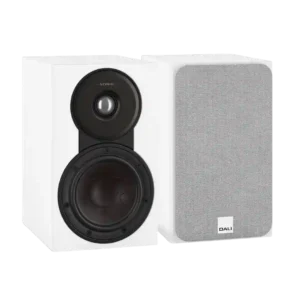
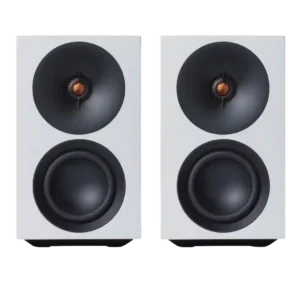
Other features
AirPlay compatibility
Wharfedale Diamond 12.1iNo score yet
Edifier S880DB MKII
1.5
Native AirPlay is absent, which is a meaningful drawback for buyers who want Apple-centric network streaming.
Auto-off and standby behavior
Wharfedale Diamond 12.1iNo score yet
Edifier S880DB MKII
2.5
The remote's energy-saving behavior can delay the first command after it wakes, adding friction to otherwise simple adjustments.
Break-in period
Wharfedale Diamond 12.1i
3.7
Several reviewers say the speakers improve after some playing time, opening up and becoming richer. They are best judged after a few hours rather than straight out of the box.
Edifier S880DB MKIINo score yet
Cable management
Wharfedale Diamond 12.1iNo score yet
Edifier S880DB MKII
2.3
The proprietary inter-speaker cable is repeatedly described as chunky or unwieldy. It works, but it is the least graceful part of an otherwise tidy compact setup.
Driver protection
Wharfedale Diamond 12.1iNo score yet
Edifier S880DB MKII
5.0
Metal protection over the tweeters is a practical strength, reducing the risk of damage from fingers or accidental contact without hiding the drivers.
HDMI ARC
Wharfedale Diamond 12.1iNo score yet
Edifier S880DB MKII
2.0
HDMI ARC is missing, and that repeatedly comes up as a convenience loss for TV-centered setups. Optical is the main workaround.
Inter-speaker connectivity
Wharfedale Diamond 12.1iNo score yet
Edifier S880DB MKII
5.0
The long inter-speaker cable gives enough reach for wide placement, including either side of a large TV. It offers useful placement flexibility even though the cable itself is bulky.
Lighting effects
Wharfedale Diamond 12.1iNo score yet
Edifier S880DB MKII
2.0
There is no RGB or flashy lighting, so buyers looking for a gaming-style visual show may find the design too restrained.
Physical control responsiveness
Wharfedale Diamond 12.1iNo score yet
Edifier S880DB MKII
2.1
Touch-control responsiveness is a recurring weakness. Wake delays, late reactions, and accidental commands can turn simple adjustments into repeated attempts.
Power bank function
Wharfedale Diamond 12.1iNo score yet
Edifier S880DB MKII
2.0
The USB-C audio input does not provide 5V power for peripherals, a missed convenience for desk setups where spare powered USB ports are valuable.
Remote control usability and quality
Wharfedale Diamond 12.1iNo score yet
Edifier S880DB MKII
2.7
The rechargeable touch puck is the most consistent usability complaint: gestures can misfire, volume changes can trigger other commands, and wake-up can lag. A few reviewers still liked the concept or found it workable when used slowly.
Status indicators
Wharfedale Diamond 12.1iNo score yet
Edifier S880DB MKII
5.0
The small OLED display is consistently well liked because it clearly shows source, volume, or mode without becoming distracting. Auto-dimming and subtle presentation suit both desks and living rooms.
Weight convenience
Wharfedale Diamond 12.1iNo score yet
Edifier S880DB MKII
3.8
The pair is not especially tiny or lightweight, but it remains manageable enough to move between setups. Very cramped desks may still find the size more substantial than expected.
Performance
Audio-video synchronization (lip sync)
Wharfedale Diamond 12.1iNo score yet
Edifier S880DB MKII
5.0
Bluetooth latency was described as barely noticeable in computer use, making wireless playback feel responsive for timing-sensitive desktop use.
Audio format support
Wharfedale Diamond 12.1iNo score yet
Edifier S880DB MKII
5.0
High-resolution playback over USB and digital inputs is treated as a real strength for buyers who want better-quality source files without adding another DAC.
Gaming performance
Wharfedale Diamond 12.1iNo score yet
Edifier S880DB MKII
5.0
Gaming use benefits from punchy sound and very low perceived Bluetooth latency. The compact footprint also suits a gaming or creative desk.
Phono stage performance
Wharfedale Diamond 12.1iNo score yet
Edifier S880DB MKII
2.0
There is no internal phono stage, so a turntable needs its own phono preamp or an external one. That omission limits the otherwise broad all-in-one appeal.
Controls and connectivity
Bluetooth codec support
Wharfedale Diamond 12.1iNo score yet
Edifier S880DB MKII
4.4
LDAC support is a major wireless-audio plus and is repeatedly praised. The tradeoff is no aptX family support, while iPhone users fall back to SBC.
Bluetooth connection stability
Wharfedale Diamond 12.1iNo score yet
Edifier S880DB MKII
5.0
Bluetooth stability is excellent in the tested setups, with rock-solid pairing and no reported connection dropouts.
Bluetooth connectivity
Wharfedale Diamond 12.1iNo score yet
Edifier S880DB MKII
5.0
Bluetooth pairing is consistently simple and quick, with devices finding the speakers easily. Wireless setup is one of the least troublesome parts of daily use.
Review contexts may differ, so use caution when interpreting the score gap.
EQ customization
Wharfedale Diamond 12.1iNo score yet
Edifier S880DB MKII
4.5
Sound tailoring is unusually flexible through rear tone controls, presets, and the ConneX app's custom EQ. Monitor is often preferred, while Classic or Dynamic can sound overcooked to some listeners.
On-device controls
Wharfedale Diamond 12.1iNo score yet
Edifier S880DB MKII
4.4
The physical volume, bass, and treble knobs feel precise and useful, and they provide a welcome escape from the touch remote. Their rear placement can make daily access awkward.
Smart features
Wharfedale Diamond 12.1iNo score yet
Edifier S880DB MKII
3.1
The app can be useful for EQ and source control, but several reviewers found its smart features limited or unnecessary. Native streaming integrations are also sparse.
Ownership and support
Customer support
Wharfedale Diamond 12.1iNo score yet
Edifier S880DB MKII
5.0
Edifier customer service responded quickly and thoroughly to a channel-setup question, resolving unclear documentation with a helpful explanation.
Headphone output support and quality
Wharfedale Diamond 12.1iNo score yet
Edifier S880DB MKII
2.0
There is no headphone output, which reduces convenience for desktop users who want to switch quickly from speakers to private listening.
Optical input support
Wharfedale Diamond 12.1iNo score yet
Edifier S880DB MKII
4.5
Optical input works well as the practical TV connection, delivering clear dialogue and solid bass without needing an AV receiver.
Spotify Connect reliability
Wharfedale Diamond 12.1iNo score yet
Edifier S880DB MKII
1.5
Native Spotify Connect is not supported, so Spotify users must rely on another playback path rather than direct service integration.