
Turtle Beach Pure Air Feature Scores
Overall Scorata score: 3.3/5
Based on 8 analyzed reviews · View source samples
Explore all 71 feature scores for Turtle Beach Pure Air, organized into pros and cons.
Scores by Feature
Summary
71 reviewed features-
Very positive 4.5-5.020 (28%)
-
Positive 3.5-4.417 (24%)
-
Neutral 2.5-3.416 (23%)
-
Negative 1.5-2.415 (21%)
-
Very negative below 1.53 (4%)
Pros
Sort
-
Its roughly 54g body is consistently praised for feeling exceptionally light and easy to move, even during active games.
-
Optical clicks are praised as tactile and snappy by several testers, though the switch implementation is not universally liked.
-
Claw gripping works well for certain hand sizes, particularly around 19 cm; other testers find the compact contour too cramped.
-
The optical sensor generally earns strong praise for accurate tracking, even from testers unhappy with the shell.
-
Click feel divides opinion: some hear crisp, accurate responses while another finds grinding or cheap-feeling actuation.
-
Swarm II supports extensive remapping of buttons and commands, with straightforward controls.
-
A dedicated DPI button makes changing sensitivity convenient; software also makes its settings easy to customize.
-
Supporters report comfortable use through lengthy workdays or gaming sessions, including an eight-hour stretch without pain.
-
The mouse also serves as an efficient everyday work pointer, aided by Bluetooth and remappable shortcuts.
-
Buttons can be repurposed for game commands or practical work shortcuts, including screenshots.
-
A precise sensor and confident aiming stand out, especially during quick close-range movements or ordinary cursor work.
-
The deep thumb groove can feel secure and natural, but some hands experience uncomfortable pressure at the pinky.
-
Click reliability is generally praised despite disagreement about tactile feel and shell quality.
-
Battery-life impressions range from excellent for mixed work and gaming to merely average beside similarly priced rivals.
-
Bluetooth adds useful versatility for daily work and travel.
-
A short top-up can provide several hours of use, making charging speed a useful advantage.
-
Adjusting debounce can help register rapid clicks reliably when the timing is reduced.
-
The 26,000 DPI ceiling supplies plenty of sensitivity for fast movement and precise adjustment.
-
The protruding thumb rest helps support the hand without getting in the way.
-
Lift-off distance can be calibrated for a low lift that one reviewer prefers.
-
Programmable macros make it easy to turn the available controls into customized shortcuts.
-
The companion software installs easily and offers an intuitive first setup.
-
The companion application is a major strength for one reviewer thanks to its accessible controls and customization.
-
Smooth tracking across glass, plastic, and wood is reported by one tester, but another finds glass-pad contact uneven.
-
The wheel feels crisp and serviceable; no particularly advanced scrolling capability is praised.
-
Some testers find the shell sturdy and well assembled; others encounter unsettling creaks or popping under ordinary hand pressure.
-
Several users report strong game performance, while critics describe distracting shell noises or sluggish wireless response.
-
Swarm II is generally considered approachable, although advanced customization requires the software.
-
A sleek, fairly restrained design wins approval, even though the lighting is not especially showy.
-
Cursor control can be quick enough to track enemies accurately when connected by cable.
-
The compact size is described as suitable for fingertip gripping, particularly where larger palm support is unnecessary.
-
An MMO raider kept up with hectic battles and stayed comfortable, although major actions were on the keyboard.
-
Built-in profile storage lets users carry several setups without relying entirely on current PC settings.
-
Five stored profiles give users useful flexibility for different control schemes.
-
Bluetooth is handy for work and the 2.4GHz dongle can game well, yet one test found wireless response inadequate for competitive action.
-
One reviewer enjoys the precise main clicks, while another reports unwanted grinding and poor travel.
-
Its light body and Bluetooth are easy to carry between places, although the loose receiver lacks onboard storage.
Cons
Sort
-
There is no compartment to stow the small wireless receiver, increasing the chance of misplacing it when traveling.
-
The thin, tightly grouped side buttons can be difficult to distinguish, and another tester finds them placed too high.
-
Competitive shooters are a mixed proposition: the mouse can track targets, but wireless delay and hard-to-reach side buttons hold some players back.
-
This is a right-hand-shaped mouse rather than an ambidextrous option, leaving left-handed players without a suitable fit.
-
A hollow or cheap impression from the shell and finish undermines the otherwise modern, lightweight design.
-
Two reviewers wish the box included a USB receiver adapter or extra PTFE skates.
-
Its original roughly $99 price is difficult to defend for users bothered by shell quality, limited polling, or missing receiver storage.
-
Wireless movement suffers short input delays in one test, undermining fast-paced gaming.
-
One tester encountered short bursts of lag that made wireless aiming less responsive than cabled play.
-
The 1,000Hz polling ceiling is adequate for many players, but some wish for faster wireless reporting; one tester could only achieve consistent peak responsiveness wired.
-
Sensor and movement consistency are weakest in wireless mode, where some reviewers experience intermittent lag.
-
Wired movement can feel crisp, but Bluetooth or dongle operation felt less immediate to several testers.
-
The lightly textured surface feels grippy to one tester, but others find the finish thin or insufficient.
-
PTFE feet glide freely on some hard surfaces; other reviewers dislike the small skate layout and drag on pads.
-
Side-button feedback is snappy for one tester, but others find the buttons too thin, close together, or difficult to hit.
-
Hand size matters: smaller palm grips and medium-to-large claw grips fit better, while large palm grips can feel cramped.
-
Clicking is noticeably louder than expected for an otherwise polished mouse.
-
Some wireless sessions include momentary lag, though not every reviewer experienced such instability.
-
Basic pointer use works on macOS, but without companion-software support Mac users cannot customize the mouse normally.
-
Driver and software support is useful for Windows configuration, but macOS control customization is absent.
-
The optical switches have supporters, but one owner criticizes their feel as below premium standards.
-
Contoured grooves can secure the hand, although a reviewer finds the side texture ineffective.
-
As an all-round gaming mouse, opinions are polarized: one tester loves its work-and-play versatility while another returned it over quality issues.
-
Wireless gaming performance is sharply disputed: some report no meaningful compromise with the dongle, while others find lag and inconsistencies.
-
Compactness helps on smaller desks but can leave bigger hands searching for more palm support.
-
The mouse can move effortlessly over hard surfaces, although others report dragging on fabric or wobbling on glass.
-
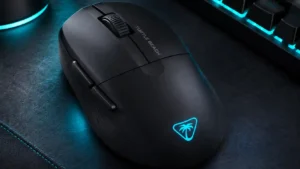
The built-in logo illumination provides a modest RGB accent, but it is hardly flashy.
-
The main buttons feel quick to some, but one reviewer notices small pre-travel before a click is registered.
-
Button actuation is generally fast, though one reviewer notices slight pre-travel before the switches register clicks.
-
Logo lighting adds a subtle glow rather than the elaborate RGB treatment some buyers expect.
-
A cable gives access to the reviewer’s most consistent high-speed response, at the cost of wireless freedom.
-
The sculpted right-hand shape and thumb groove can be comfortable, but larger hands and those wanting deeper support may be disappointed.
-
Palm grip feels comfortable for smaller hands, yet larger-handed users often cannot settle the rear into their palm.
-
The sculpted thumb channel is a favorite for some hands, though others cannot get comfortable with the short rear contour.
Use Cases
Best for
Sort
-
A compact body, Bluetooth connection, and programmable shortcuts make routine desk work a particularly good use.
-
The lightweight body lets some users play or work for hours without fatigue, although larger hands may not fit comfortably.
-
PC games are playable across genres, with good performance in action and MMO titles but a less dependable wireless experience for some.
-
Casual single-player sessions benefit from a comfortable grip and responsive control.
-
The compact body is easier to maneuver where desk space is limited.
-
Bluetooth convenience and comfortable sessions make switching between desk tasks and games unusually easy for a gaming-oriented mouse.
-
Lightness, Bluetooth, and easy handling make it a favorite travel companion for one reviewer.
-
It kept pace during demanding Final Fantasy XIV raids, though the most critical actions stayed mapped to the keyboard.
-
Quick combat movements worked well in a fast-paced action adventure, even if the mouse is less reliable for some shooters.
Conditional or not ideal for
Sort
-
FPS gamingAiming can feel accurate with a cable, but wireless lag and awkward side-button access make demanding FPS play a risk.
-
Glass mousepadsGlass experiences disagree: one reviewer reports effortless gliding, while another finds the stock skates uneven and wobbly.
-
Budget-conscious buyersAt around its original $99 price, inconsistent build quality is a concern for buyers prioritizing value.
-
Cloth mousepadsA reviewer found that the stock feet dragged on a fabric mousepad rather than gliding freely.