
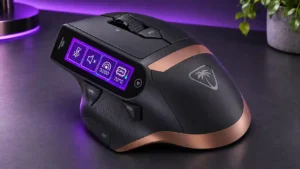
Turtle Beach Command Series MC7 Feature Scores
Overall Scorata score: 3.6/5
Based on 12 analyzed reviews · View source samples
Explore all 86 feature scores for Turtle Beach Command Series MC7, organized into pros and cons.
Scores by Feature
Summary
86 reviewed features-
Very positive 4.5-5.045 (52%)
-
Positive 3.5-4.416 (19%)
-
Neutral 2.5-3.48 (9%)
-
Negative 1.5-2.413 (15%)
-
Very negative below 1.54 (5%)
Pros
Sort
-
The two rechargeable cells and charging dock are the clearest standout. A charged spare replaces the drained battery in seconds, substantially reducing interruptions.
-
Charging one battery while using the other is intuitive and usually requires only a quick swap, though it still means managing cells.
-
The Owl-Eye sensor is a consistent highlight for precise, smooth tracking across games and surfaces.
-
Tracking draws consistent praise for accuracy, including rapid movements and changes between desk surfaces.
-
Optical switches consistently earn praise for a snappy, responsive click.
-
The adaptive wheel switches between tactile steps and free spinning, helping with both weapon changes and long pages.
-
Stepped and free-spin scrolling are widely liked, but a few testers notice a rattle when the mouse is lifted or flicked.
-
Adjustable underglow is generally liked for its restrained look and useful low-battery warning.
-
The main click buttons are praised for satisfying, snappy feedback, even by reviewers who dislike the mouse shape.
-
The ability to swap a ready-charged battery earns broad approval, although a single cell has comparatively modest runtime.
-
The settings interface is mostly intuitive and flexible, although occasional slowness and the need for software lessen convenience.
-
Users can organize settings by game or application, with flexible controls in Swarm II.
-
A red lighting warning and on-screen battery information make it easy to know when a swap is needed.
-
Optical switches consistently register crisp presses without reported double-click errors.
-
Tests report responsive optical switches without unwanted double clicks.
-
The finish handles fingerprints well and feels pleasant under the fingertips.
-
The optical sensor is repeatedly described as smooth and consistent without jumps or drift.
-
Touch commands support DPI, profiles, macros and OBS, but software limitations prevent some fully custom workflows.
-
Side-to-side wheel tilts are considered useful for navigation and quick control.
-
Main clicks feel satisfying and crisp even though opinions differ on the shell surrounding them.
-
On-mouse sensitivity changes can be quick and useful, although touchscreen access is not comfortable for everyone.
-
Core sensor and switch performance is solid, and some testers enjoy aiming despite the heavy chassis.
-
The generous set of programmable controls appeals to anyone who likes having extra commands on the mouse.
-
Mapping multiple physical buttons gives owners alternatives to using the touchscreen for frequently needed commands.
-
Tracking and movement feel notably smooth, with precision during gaming and everyday cursor motion.
-
The spare battery, charging dock, receiver and cable make the package feel well equipped.
-
On-device macros can be launched without leaving a game or task, a clear benefit for customized workflows.
-
Touchscreen shortcuts make jumping between saved profiles quick without opening a menu.
-
Extra assignable buttons are welcomed for games, browsing, and frequently used commands.
-
Tracking stays reliable across cloth, hard desk mats and even glass according to hands-on testing.
-
The 8,000Hz ceiling is praised for precise aiming, but some testers find little real benefit over 1,000Hz.
-
Bluetooth joins wired USB and 2.4GHz wireless to give the mouse welcome connectivity flexibility.
-
The finish feels pleasant and minimizes fingerprints, making the exterior easy to keep looking clean.
-
Multiple connection methods are appreciated for moving between compatible computers, though macOS support is a concern.
-
For gamers who want customizable controls more than low weight, the feature-rich design has appeal.
-
Distinct steps and quick adjustment make the adaptive wheel useful for fine navigation.
-
Construction feels solid to several users, though complaints about hard plastic, hollow screen feedback, and internal rattle weaken the premium impression.
-
The tactile surface feels solid to several testers, but hard plastic and occasional rattle compromise its premium image.
-
The 8,000Hz setting can be adjusted quickly, though the real benefit of very high rates varies by user.
-
The thumb groove or sloped body can feel pleasant, though the button layout makes overall grip comfort inconsistent.
-
The 2.4GHz option is part of a versatile three-mode connection system alongside Bluetooth and USB wired use.
-
Its batteries can be shared with the Stealth Pro II, reducing the number of spares needed in a Turtle Beach setup.
-
Wireless play is reported as stable, although one tester encountered software lag at the highest polling setting.
-
For long email, browsing and editing sessions, one tester found the substantial mouse comfortable and supportive.
-
Stable handling, an adaptive scroll wheel and direct shortcuts help with everyday office tasks.
-
Two rechargeable cells keep a spare ready while the other powers the mouse.
-
The wheel offers satisfyingly tactile stepped resistance for controlled actions such as weapon changes.
-
The Titan optical switches deliver a satisfying, snappy mechanical-feeling click.
-
Optical switches feel excellent under the fingertips and avoid reported double-click errors.
-
USB operation joins two wireless modes for a flexible connection setup.
-
Rapid turns and flicks register with virtually no perceptible wireless delay in a positive test.
-
The high-polling wireless connection stays responsive during extended play in a favorable hands-on assessment.
-
Its uncommon side-mounted touch display is intriguing and creative, even to people who question whether a mouse needs one.
-
Detailed angle and motion tuning gives enthusiasts more room to personalize movement.
-
A relaxed claw grip may accommodate the size, but this is not a nimble ultralight design.
-
Fine-grained debounce settings appeal to owners who enjoy adjusting switch behavior.
-
Changing between computers using the available wireless and wired options is appealing for a multi-PC desk.
-
The 30,000-DPI maximum places the sensor among premium gaming hardware, although that ceiling is not necessary for everyone.
-
Several connection modes appeal to people operating more than one computer at a desk.
-
Saved controls and widgets can be drawn from onboard memory as part of touchscreen setup.
-
The large chassis is described as tolerable for relaxed palm gripping despite its weight.
Cons
Sort
-
The angular, asymmetrical styling and mixed accents attract unusually strong criticism for looking cluttered or unattractive.
-
Side controls often require awkward thumb reaches; one tester repeatedly triggered a nearby button by mistake.
-
The high asking price is the dominant buying objection, since lighter premium mice can offer more comfortable handling.
-
Some users report the app failing to open after an update or crashing at 8,000Hz polling.
-
At around 135g, the mouse is substantially heavier than many gaming alternatives. Its heft can feel steady for office work but cumbersome for esports.
-
Several assessments find that the 135g body feels poorly balanced or rattly during quick movements; one user appreciates its stability for work.
-
Several testers report or anticipate unwanted touches and sensitivity changes, while one experienced no accidental inputs at all.
-
Some hands enjoy the sloped profile, while others cannot find a natural finger or palm position.
-
Fast controls and reliable tracking earned an enthusiastic endorsement for competitive shooters in one assessment.
-
Thumb access is the largest usability disagreement: some find the controls natural, while others must bend fingers or reposition their grip.
-
The unusually large chassis feels cumbersome for quick repositioning, though it can provide a stable working base.
-
The curved click buttons can leave parts of the fingers unsupported, making a natural resting position difficult.
-
Reach and accidental presses, rather than responsiveness, are the biggest problems with the side controls.
-
Swarm II provides plenty of settings, but serious update and polling-related reliability issues undercut its usefulness.
-
The wide chassis and far-reaching touchscreen limit fit for small hands, and some large-handed users struggle too.
-
The Windows-only configuration makes this a poor choice for users needing full macOS support.
-
Ergonomics are highly divisive: some testers find the sloped shell comfortable, while others report awkward finger support and poor handling at speed.
-
Companion software offers extensive device settings but crashes or failed launches can prevent reliable customization.
-
The display can be bright and responsive, but poor off-angle visibility frequently makes it look washed out.
-
One prospective buyer would have preferred a wireless charging dock instead of relying on battery swapping.
-
A single battery lasts substantially less than many flagship alternatives; the spare and dock compensate for that limitation.
-
The shell can feel solid and deliberate, yet rattles, hollow screen feedback and hard plastic make its premium credentials inconsistent.
-
The touchscreen divides opinion sharply: streamers and shortcut enthusiasts see real value, while others find it redundant or awkward.
-
One assessment enjoys the mechanical click sound while another finds the clicks somewhat too loud.
-
The textured thumb rest helps prevent slips but can feel restrictive when reaching for adjacent buttons.
Use Cases
Best for
Sort
-
OBS scene switching, microphone commands and macro shortcuts have genuine streaming appeal, despite disagreements about reaching the touchscreen.
-
Hot-swappable batteries nearly eliminate charging interruptions, although the heavy shape may not be ideal for everyone over time.
-
Touch shortcuts can spare users from switching windows, but critics question whether they outperform physical buttons.
-
The wheel, shortcuts and stable weight make long-document navigation and desk work a genuine strength.
-
Relaxed single-player play suits the steady, substantial body much better than competitive flick-heavy games.
-
A mixed work-and-gaming desk is a strong use case: shortcuts and weight help productivity, while casual gaming remains enjoyable.
-
Tracking stays clean and stable on a cloth pad, including when moved to a harder surface.
-
The OBS shortcuts and macro surface give streamers and other creators a convenient way to manage controls without leaving their workspace.
-
One tester reports precise, consistent tracking on glass as well as a standard desk mat.
-
Adjustable RGB is praised for staying restrained rather than stealing attention during play.
-
Fast tracking and extensive controls suit PC players who appreciate adjustable settings and streaming shortcuts.
-
Story-driven and exploratory games are a comfortable match for the substantial, stable feel.
-
Quick profile and sensitivity changes can be helpful in fast-paced strategy matches.
Conditional or not ideal for
Sort
-
FPS gamingAccurate tracking is praised, but the weight, balance, and accidental-touch concerns make competitive shooters a risky fit.
-
Budget-conscious buyersThe $160-class price is difficult to justify if a light, conventional mouse would meet the same needs.
-
Small-handed usersIts large body and hard-to-reach controls make it difficult to recommend for smaller hands.
-
Large-handed usersEven a tester with quite large hands struggled to reach the full touchscreen comfortably.