If you want better connection stability
Choose ASUS ROG Gladius III Wireless. It scores 4.8 vs 2.8 for connection stability, with a 4.3 overall score.

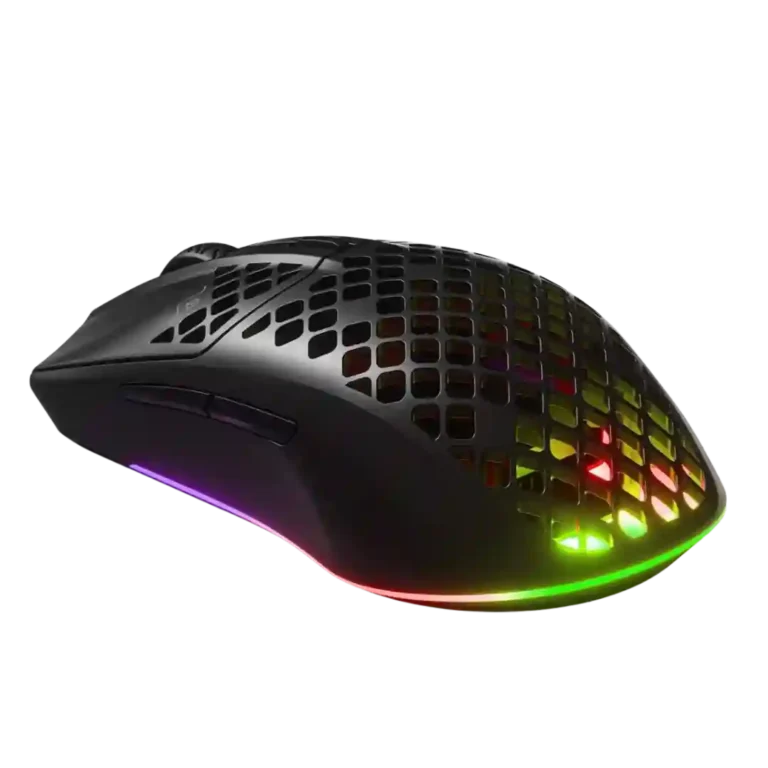
Choose it for an ultra-light wireless mouse with strong tracking, USB-C charging, vivid RGB, and claw/fingertip comfort. Skip it if you need flawless side buttons, long 2.4GHz battery life, palm comfort, or consistent QC.
Best for FPS players and everyday users who want a very light wireless mouse, strong tracking, USB-C charging, RGB, and a claw or fingertip-friendly shape. It especially suits small to medium hands that like low-weight mice.
Not ideal for large-hand palm grippers, users who rely heavily on side buttons or scroll-wheel precision, or buyers expecting the advertised maximum battery life in 2.4GHz RGB-heavy use. It is also risky for anyone sensitive to QC variance.
Reviewers consistently frame the Aerox 3 Wireless as a fast, very light gaming mouse with a strong sensor, smooth wireless performance when the 2.4GHz link behaves, and unusually convenient USB-C charging. Its shape earns major praise from small-hand, claw, and fingertip users, and the RGB plus IP54 protection help the perforated design feel less gimmicky. The tradeoff is that the same slim, lightweight chassis often weakens the side buttons, scroll wheel, feet, and perceived build quality. Battery life is also context-dependent: some reviewers were satisfied, while others found the 200-hour claim misleading or far from real 2.4GHz use. It is most compelling on sale or for users who prioritize lightness and sensor feel over premium controls.
Compared with other Gaming Mice, this product is above average in skate durability, water and dust resistance, RGB features, near average in value for money, sensor performance, below average in palm grip comfort, connection stability, firmware reliability.
| Attribute | This product | Category average | Difference |
|---|---|---|---|
| palm grip comfort | 2.0 | 3.8 | -1.8 |
| connection stability | 2.8 | 4.5 | -1.7 |
| firmware reliability | 1.3 | 2.7 | -1.5 |
| skate durability | 5.0 | 3.5 | +1.5 |
| side button quality | 2.5 | 3.7 | -1.1 |
| dock compatibility | 2.5 | 3.9 | -1.4 |
| glide smoothness | 3.4 | 4.4 | -1.0 |
| water and dust resistance | 4.7 | 3.6 | +1.1 |
Choose ASUS ROG Gladius III Wireless. It scores 4.8 vs 2.8 for connection stability, with a 4.3 overall score.
Choose ASUS ROG Keris II Ace. It scores 4.9 vs 4.5 for sensor performance, with a 4.2 overall score.
Choose ASUS ROG Harpe Ace Aim Lab. It scores 4.8 vs 3.4 for glide smoothness, with a 4.1 overall score.
Choose ASUS ROG Harpe II Ace. It scores 4.7 vs 3.4 for premium feel, with a 4.6 overall score.
Compared with SteelSeries Aerox 3 Wireless
Yes. Multiple reviewers praised its precise sensor, quick flicks, low-latency wireless feel, and strong performance in shooters.
Battery life is mixed. Some reviewers got good results, but others found 2.4GHz use with RGB far below the headline 200-hour Bluetooth claim.
They are a common weak point. Reviewers often described them as slim, cheap-feeling, small, mushy, or easy to press accidentally.
Bluetooth is useful for casual play, everyday use, portability, and cross-device use. Reviewers generally preferred 2.4GHz for accuracy and competitive gaming.
Comfort depends heavily on hand size and grip. Claw and fingertip users often liked it, while palm grippers or larger hands were more likely to struggle.
Reviewers were much warmer on the Aerox 3 Wireless when discounted. At full price, several felt the side buttons, feet, battery caveats, or build concerns made the value harder to justify.
These are a few of the reviews included in our analysis.





Choose the ROG Harpe II Ace for ultralight FPS play, precise tracking, smooth glide, and web-based tuning. Skip it if you need palm-grip support, MMO buttons, onboard profiles, or long...
Pros: glide smoothness, weight
Cons: handedness options

Excellent tracking, comfortable right-handed ergonomics and a versatile scroll wheel make the Basilisk V3 a strong gaming and productivity mouse. Its substantial weight, fixed cable and sometimes over-sensitive automatic scrolling...
Pros: scroll wheel quality, RGB features
Cons: weight, handedness options

The L7 Pro delivers remarkably light handling, precise aiming and a grippy shell at a budget price. Stock skates are less impressive, and conflicting click-latency measurements warrant caution for latency-sensitive...
Pros: value for money, weight
Cons: wired connectivity

Best for ultra-light, competition-focused speed, precise tracking, stable wireless, and long battery life. Skip it if you need quieter clicks, left-handed support, Bluetooth, more buttons, or better value for casual...
Pros: value for money, weight
Cons: click noise, RGB features