
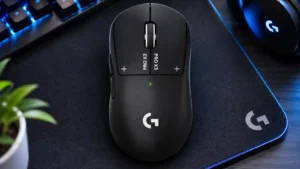
Logitech G PRO X3 SUPERSTRIKE Feature Scores
Overall Scorata score: 3.8/5
Based on 28 analyzed reviews · View source samples
Explore all 92 feature scores for Logitech G PRO X3 SUPERSTRIKE, organized into pros and cons.
Scores by Feature
Summary
92 reviewed features-
Very positive 4.5-5.040 (43%)
-
Positive 3.5-4.422 (24%)
-
Neutral 2.5-3.413 (14%)
-
Negative 1.5-2.417 (18%)
Pros
Sort
-
Redistributed internal weight is the standout handling improvement, making lifts and sweeps feel more natural. Some users still detect slight front bias.
-
Battery endurance is substantially improved, with several hands-on accounts reporting days or a week between charges. Higher polling and stronger haptics shorten runtime.
-
Precise tracking and rapid clicks make this an elite FPS mouse, particularly for players who can exploit short trigger travel.
-
Ten actuation levels let users choose hair-trigger or deliberate clicks. Faster registration is appealing, but extremely shallow settings can cause misclicks.
-
The new chipset markedly improves power efficiency without needing a larger battery, extending runtime despite the lightweight shell.
-
Rapid Trigger enables faster repeat inputs without fully releasing the button. Its real benefit depends on the game, player and input limits.
-
Gaming performance is widely praised, but faster clicking does not guarantee better scores or overcome in-game firing limits.
-
The HITS system is the standout innovation, offering compelling adjustment and speed without traditional switch contacts.
-
The HERO 2 tracks accurately through flicks, sweeps and rapid adjustments. The sensor upgrade itself is rarely noticeable in ordinary play.
-
Tuned main triggers respond rapidly and make repeated inputs easier; the conventional side buttons are much less crisp.
-
Click processing is extremely fast, and shorter actuation can reduce reaction delay. Measured personal reaction gains range from noticeable to negligible.
-
HERO 2 delivers excellent, reliable tracking; its higher headline specifications add little perceptible improvement over already excellent sensors.
-
The familiar understated silhouette and bold cross markings are distinctive, with the hot-pink color especially popular among several reviewers.
-
The lightweight shell is easy to flick, especially with improved balance, but rivals can be noticeably lighter and the actual weight reduction is small.
-
The familiar rounded shape is broadly comfortable and easy to pick up, but it is generic rather than a tailored ergonomic fit.
-
The mouse responds quickly and accurately, with especially snappy clicks. The improvement in responsiveness over its predecessor can be difficult to notice during gameplay.
-
The haptic main buttons are exceptionally quiet, even with strong feedback enabled.
-
Extensive per-button HITS controls and remapping let players customize inputs to their games and preferences.
-
Improved balance and accurate tracking make micro-adjustments and quick sweeps predictable.
-
Adjustable haptic feedback can simulate a click at the selected actuation point. It is softer than the X2 on several units and opinions differ on the feel.
-
The enclosed shell generally feels sturdy with minimal flex or creaking, though button wobble varies between units.
-
The updated chipset enables full 8K polling while plugged in, removing the previous model's wired-rate limitation.
-
Up to 8K polling over both wired and wireless connections offers flexibility, but the highest rate costs battery life and may cause stutter in some games.
-
The gradual hump and familiar symmetrical shape generally suit claw grips.
-
Sensor latency is exceptionally low and slightly improved over the previous generation, though the difference is difficult to feel.
-
Professional player presets offer a useful starting point for experimenting with HITS rather than configuring everything from scratch.
-
G Hub offers extensive HITS controls and profiles, but rivals have more advanced sensor adjustments and some users dislike its layout.
-
Adjustable simulated clicks can feel satisfying and very light, but some prefer the snap of a mechanical switch and cannot find a comfortable haptic setting.
-
The contactless design avoids conventional switch-contact double-click wear; one tester also found shallow actuation more reliable than on their X2.
-
Contactless sensing eliminates traditional electrical contact wear, an appealing durability advantage of the main triggers.
-
LIGHTSPEED wireless performance is excellent, providing fast, reliable response for competitive play.
-
The safe shell shape accommodates many grips comfortably without a lengthy adjustment period.
-
The lightly rubberized coating provides a steady grip without being excessively sticky or slippery; included tape adds optional grip.
-
Measured click latency is highly consistent, but the physical haptic feel can vary between individual copies.
-
The familiar shell is easy to adapt to, while unusually sensitive triggers need practice; presets help simplify configuration.
-
Better weight distribution helps fingertip players lift and flick the mouse, though smaller or lower-profile alternatives may fit some hands better.
-
DPI profiles and sensitivity-matching tools give players fine control over tracking preferences.
-
BHOP mode provides configurable scroll delays to prevent unwanted wheel inputs, useful for games with scroll-bound actions.
-
The sensor tracks well across many surfaces, including cloth and glass, but glass settings and textured-pad glide can require attention.
-
Onboard profiles keep settings portable and reduce dependence on G Hub, although saving configurations can be counterintuitive.
-
Selectable wired and wireless polling rates make it easy to choose between responsiveness and battery endurance.
-
G Hub is generally described as stable during configuration.
-
The smooth, slightly rubberized finish grips well, but some users find it unremarkable and prone to fingerprints.
-
Better balance and secure grip help extended play, though palm-grip users who need an ergonomic shape may experience discomfort.
-
G Hub supports macros and customized input assignments.
-
Rapid reset and repeat clicking are particularly appealing for MOBA players who issue inputs quickly.
-
Tracking remains consistent and avoids skipping across varied surfaces.
-
Sensitivity matching helps recreate the feel of a previous mouse even when the same nominal DPI produces different tracking behavior.
-
Custom game configurations and preset profiles simplify switching between different input preferences.
-
The absence of RGB is welcome to players who prefer an understated, battery-conscious design.
-
The wheel can scroll reliably without missed or ghost steps.
-
BHOP scroll filtering can prevent stray weapon swaps while preserving deliberate inputs.
-
The medium-sized shell is suitable for a wide range of hands, but extremes of hand size may need a different shape.
-
G Hub makes many adjustments easy, but its layout and onboard-memory workflow can be counterintuitive.
-
The included cable is light and flexible enough to use while playing wired.
-
The scroll wheel has a muted sound rather than a loud click.
-
The internal dongle storage compartment is a useful inclusion for a lightweight gaming mouse.
-
Longer runtime reduces charging interruptions, but charging can still require a cable without an optional compatible mat.
-
The very high DPI ceiling provides ample sensitivity headroom, although most players never need anything close to the maximum.
-
The included rubberized cable is usable as a wired mouse cable despite lacking a paracord covering.
-
A hands-on test reported normal operation without issues during the review period.
-
Surface settings can help address cursor jumps on glass mousepads.
Cons
Sort
-
The approximately $200 asking price is the dominant objection. HITS is distinctive, but many rivals provide similar practical performance for less.
-
A dedicated DPI switch is absent, making immediate sensitivity changes unnecessarily inconvenient on a premium mouse.
-
The thumb buttons are a recurring weakness: soft, mushy feedback and travel feel out of place on a flagship mouse.
-
Factory skates are a frequent complaint because they feel scratchy or slow compared with premium alternatives, particularly on textured pads.
-
Stock feet are often described as scratchy or slower than premium PTFE alternatives, although one user liked the glide out of the box.
-
G Hub is needed for initial configuration and can be inconvenient for DPI changes. Onboard settings reduce reliance after setup.
-
PowerPlay compatibility is useful for some users, but its added weight and proprietary mat requirement are unpopular with several competitive players.
-
The mouse has a symmetrical outline but no left-handed variant or equivalent right-side thumb buttons.
-
Better balance and substantially longer battery life are meaningful improvements, but most X2 owners should keep their existing mouse.
-
Left-side buttons are inconvenient for left-handed users.
-
The stock feet may wear down quickly on hard surfaces.
-
There is no hot-swap system for uninterrupted wireless use, unlike some competing premium mice.
-
The black finish readily shows fingerprints and hand oils; magenta may conceal them better.
-
G Hub is functional, but the lack of a browser-based configuration tool frustrates users who prefer lightweight drivers.
-
Advanced acceleration-curve customization is missing, despite the higher maximum acceleration specification.
-
G Hub lacks angle snapping, a feature available in some competing configuration software.
-
Testing two units revealed inconsistent haptic strength and button feel, an unwelcome variation at this price.
-
G Hub is considered a heavy application for what is primarily a mouse configuration task.
-
The wheel works reliably for many users but its soft middle click and indistinct notches feel dated.
-
The minimal five-button layout suits esports but leaves few spare controls for assigning DPI changes.
-
The safe symmetrical design suits numerous grips but lacks specialized ergonomic support, and one palm-grip user experienced wrist discomfort.
-
PowerPlay 2 can charge the mouse but cannot serve as its receiver, and the original PowerPlay is incompatible.
-
Plastic construction feels less impressive to buyers expecting more exotic materials for $200.
-
Black and hot magenta offer a distinctive choice, but the absence of a white version disappoints some buyers.
-
Palm grip comfort varies considerably: some find the familiar shape natural, while others prefer a more supportive ergonomic shell.
-
Main paddles can feel solid with little grinding, but excessive side-to-side movement is noticeable on some units.
-
Optional grip tape is useful, but premium pricing makes the lack of spare or alternative skates disappointing.
-
Wheel tension can prevent accidental clicks, but some users find the notches loose or insufficiently defined.
-
Main clicks are adjustable and generally well implemented, although weaker haptics and lateral paddle movement detract on some units.
-
The shallowest trigger settings can cause unintended clicks; careful tuning can reduce them without sacrificing much responsiveness.
Use Cases
Best for
Sort
-
Competitive players get highly adjustable, exceptionally fast clicks and precise tracking. The price makes the most sense when those small advantages matter.
-
Fast click registration, adjustable triggers and precise tracking are particularly well suited to competitive shooters; actual gains depend on the player and game.
-
Tracking can work very well on glass, although some settings and surfaces may require adjustment to prevent cursor jumps.
-
Tracking is solid on cloth, but stock feet may feel slow or scratchy on textured control pads.
-
Improved balance reduces effort over long sessions, and the coating maintains grip even during marathon play.
-
Quiet clicks suit office work, and a deeper actuation setting makes deliberate desktop inputs easier.
-
Enthusiasts who like fine-tuning trigger behavior have unusual controls to explore, although the price is high.
-
Battery endurance makes daily use easy, with one month-long test requiring only two recharges.
-
A single weekly charge can cover full workdays followed by evening gaming.
-
Nearly silent main clicks make this a good choice when other people are nearby.
-
Rapid Trigger can help players who repeatedly issue commands in MOBAs, although extended clicking may still be limited by finger fatigue.
-
Contactless inductive switches avoid the traditional contact-wear mechanism associated with double clicks, making them promising for ownership over time.
-
Deeper, deliberate actuation can be preferable for slower strategy titles.
Conditional or not ideal for
Sort
-
Casual gamingIt is enjoyable even for casual play, but most casual gamers will struggle to justify paying for small competitive advantages.
-
Budget-conscious buyersAt roughly $200, it is difficult to recommend for a tight budget when cheaper competitive mice perform nearly as well.
-
On-the-fly control shortcutsChanging sensitivity during play is inconvenient because it requires software or sacrificing a programmable button.
-
Left-handed usersThe symmetrical shell does not make the mouse fully ambidextrous: the left-side thumb buttons are awkward for left-handed use.
-
Large-handed usersThe middle-sized shell accommodates many hands but may not suit especially large hands.
-
Small-handed usersVery small hands may find the standard-sized shell less accommodating than a compact alternative.