If you want better balance and weight distribution
Choose Razer DeathAdder V4 Pro. It scores 4.8 vs 3.2 for balance and weight distribution, with a 4.2 overall score.

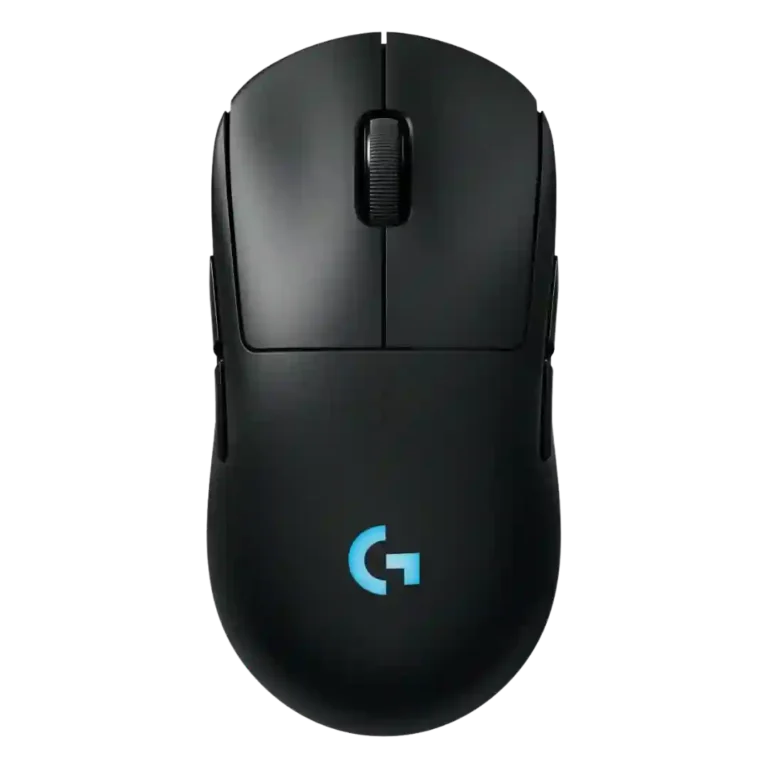
Choose the G Pro 2 Lightspeed if you want a familiar ambidextrous Logitech shape, strong sensor, good clicks, and long battery life. Skip it if you prioritize ultralight glide, high polling rates, Bluetooth, or the best value.
Best for players who want a familiar Logitech Pro shape with strong tracking, long battery life, and true ambidextrous side-button flexibility. It especially suits left-handed users and palm or mixed-grip players who do not chase ultralight weight.
Not for buyers who want the lightest glide, stock high polling rates, Bluetooth travel convenience, or a major redesign over prior Pro models. It also fits poorly if G Hub problems or price-to-upgrade value are dealbreakers.
The Logitech G Pro 2 Lightspeed earns its best feedback for sensor accuracy, ambidextrous flexibility, click feel, battery life, and a familiar comfortable shape. Reviewers repeatedly found it smooth, reliable, and strong for general gaming, FPS play, productivity, and left-handed use. The tradeoff is that it often feels more like a refresh than a leap: several reviewers criticized the 1000 Hz polling limit, heavier glide versus lighter alternatives, missing Bluetooth, and the need to rely on G Hub. Value is the main sticking point, especially when older or lighter Logitech models are discounted, but the core mouse still performs well.
Compared with other Gaming Mice, this product is above average in handedness options, palm grip comfort, dock compatibility, near average in battery life, cable flexibility, below average in Bluetooth support, polling rate, value for money.
| Attribute | This product | Category average | Difference |
|---|---|---|---|
| handedness options | 4.7 | 2.6 | +2.1 |
| Bluetooth support | 1.5 | 3.6 | -2.1 |
| polling rate | 2.4 | 3.9 | -1.5 |
| value for money | 2.4 | 3.8 | -1.3 |
| portability | 2.5 | 3.9 | -1.4 |
| profile switching | 2.5 | 3.8 | -1.3 |
| MMO gaming suitability | 2.3 | 3.5 | -1.2 |
| glide smoothness | 3.5 | 4.4 | -0.9 |
Choose Razer DeathAdder V4 Pro. It scores 4.8 vs 3.2 for balance and weight distribution, with a 4.2 overall score.
Choose ASUS ROG Harpe II Ace. It scores 4.6 vs 1.5 for Bluetooth support, with a 4.6 overall score.
Choose Razer Naga V2 HyperSpeed. It scores 5.0 vs 2.4 for polling rate, with a 3.9 overall score.
Choose HyperX Pulsefire Haste 2 Mini. It scores 5.0 vs 3.3 for cable flexibility, with a 3.8 overall score.
Products reviewers directly compared with this model, grouped into quick takeaways.
Yes, several reviewers found it snappy, accurate, and strong for competitive or twitch-shooter play. The caveat is that some FPS-focused reviewers preferred lighter alternatives.
Battery life is one of the strongest areas. Reviewers described it as good to exceptional, with repeated praise for long use between charges.
Yes. Reviewers repeatedly praised the ambidextrous shape and swappable side buttons, making left-handed support one of the clearest advantages.
Opinions are mixed. Some reviewers said 80 g felt light or deliberate, while others felt the weight and skates made it feel slower than its number suggests.
Reviewers said G Hub is useful for DPI, button, and lighting control, but also criticized it for quirks and, in one case, serious loading problems.
The evidence is cautious. Reviewers liked the performance upgrades, but several said the mouse feels too similar to older Pro models unless you specifically want the new sensor, switches, battery, or USB-C.
These are a few of the reviews included in our analysis.




Choose the ROG Harpe II Ace for ultralight FPS play, precise tracking, smooth glide, and web-based tuning. Skip it if you need palm-grip support, MMO buttons, onboard profiles, or long...
Pros: glide smoothness, weight
Cons: handedness options

Best for ultra-light, competition-focused speed, precise tracking, stable wireless, and long battery life. Skip it if you need quieter clicks, left-handed support, Bluetooth, more buttons, or better value for casual...
Pros: value for money, weight
Cons: click noise, RGB features

Choose it if you want a premium MMO/productivity mouse with 12 adjustable side buttons, strong battery life, and Stream Deck integration. Skip it if you need an ultralight FPS mouse,...
Pros: button customization, MMO gaming suitability
Cons: FPS gaming suitability

Best for precise wireless tracking, smooth glide, strong battery life, and unusually good 8K value. Skip it if you need polished software, quiet snappy clicks, true left-handed controls, or gentle...
Pros: software usability, sensor performance
Cons: RGB features, scroll wheel quality