If you want better build quality
Choose HyperX Pulsefire Haste 2 Mini. It scores 4.6 vs 3.1 for build quality, with a 3.8 overall score.

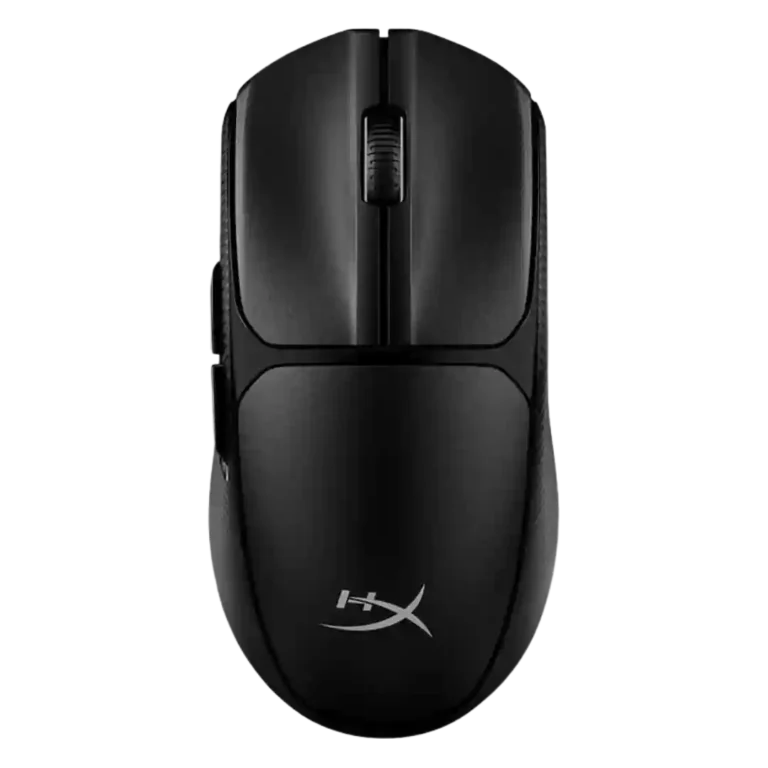
Choose the HyperX Pulsefire Fuse if you want affordable wireless gaming with solid 2.4GHz performance, long battery life, and light weight. Skip it if you need premium feel, strong RGB, true left-hand ergonomics, or great side buttons.
Best for budget-focused gamers who want light, practical wireless performance, long AAA battery life, and reliable 2.4GHz responsiveness without paying for premium-mouse refinement.
Not for left-handed buyers who rely on side buttons, users with larger hands who dislike low-profile shapes, or anyone expecting premium materials, standout RGB, or excellent side buttons.
Review evidence paints the HyperX Pulsefire Fuse as a capable budget wireless mouse with unusually strong basics: stable 2.4GHz performance, low perceived latency, precise tracking, long battery life, and light weight. The tradeoff is physical polish. Some reviewers found the shape comfortable and the buttons crisp, while others called the body too small, the left-hand claim weak, the side buttons poor, and the materials cheap. RGB also splits sharply, from acceptable and customizable to barely worth including. Its best case is practical wireless gaming value; its weakest case is anyone expecting premium build, standout skates, or truly ambidextrous ergonomics.
Compared with other Gaming Mice, this product is above average in software stability, portability, cross-platform compatibility, near average in handedness options, scroll wheel quality, below average in side button quality, materials quality, claw grip comfort.
| Attribute | This product | Category average | Difference |
|---|---|---|---|
| side button quality | 1.5 | 3.8 | -2.3 |
| materials quality | 1.9 | 4.0 | -2.1 |
| claw grip comfort | 2.0 | 4.1 | -2.1 |
| skate durability | 2.0 | 3.8 | -1.8 |
| durability over time | 2.2 | 4.0 | -1.8 |
| premium feel | 2.5 | 4.1 | -1.6 |
| build quality | 3.1 | 4.5 | -1.4 |
| glide smoothness | 3.2 | 4.4 | -1.3 |
Choose HyperX Pulsefire Haste 2 Mini. It scores 4.6 vs 3.1 for build quality, with a 3.8 overall score.
Choose Razer Viper V3 HyperSpeed. It scores 4.7 vs 1.5 for side button quality, with a 4.1 overall score.
Choose HyperX Pulsefire Haste 2 Pro. It scores 4.6 vs 1.9 for materials quality, with a 4.2 overall score.
Choose Logitech G705. It scores 4.7 vs 2.5 for premium feel, with a 3.8 overall score.
Products reviewers directly compared with this model, grouped into quick takeaways.
Yes, the strongest reviews praised its 2.4GHz connection, stable wireless behavior, and latency that felt close to wired in practical gaming.
Bluetooth adds useful device flexibility, but one review said the added latency is noticeable in fast-paced games, making 2.4GHz the better gaming mode.
Battery life was consistently praised. Reviewers found the claimed long runtime realistic or competitive, and several liked how quickly the AAA battery can be swapped.
Comfort is mixed. Some reviewers found it comfortable for long sessions, while others said the low-profile shape was too small or awkward for larger hands.
The most detailed side-button review was negative, calling them small, stiff, cheap-feeling, and poor for quick reactions.
No. RGB was one of the weakest and most divided areas, with multiple reviewers saying it was too minimal or not worth the battery tradeoff.
These are a few of the reviews included in our analysis.



Choose the ROG Harpe II Ace for ultralight FPS play, precise tracking, smooth glide, and web-based tuning. Skip it if you need palm-grip support, MMO buttons, onboard profiles, or long...
Pros: glide smoothness, weight
Cons: handedness options

Best for ultra-light, competition-focused speed, precise tracking, stable wireless, and long battery life. Skip it if you need quieter clicks, left-handed support, Bluetooth, more buttons, or better value for casual...
Pros: value for money, weight
Cons: click noise, RGB features

Choose it if you want a premium MMO/productivity mouse with 12 adjustable side buttons, strong battery life, and Stream Deck integration. Skip it if you need an ultralight FPS mouse,...
Pros: button customization, MMO gaming suitability
Cons: FPS gaming suitability

Best for precise wireless tracking, smooth glide, strong battery life, and unusually good 8K value. Skip it if you need polished software, quiet snappy clicks, true left-handed controls, or gentle...
Pros: software usability, sensor performance
Cons: RGB features, scroll wheel quality