
If you want better HDMI ARC
Choose Edifier M90. It scores 5.0 vs 2.5 for HDMI ARC, with a 4.3 overall score.

Choose the XF1 for clear desktop audio, flexible connections, and powerful EQ in a compact pair. Skip it if you need deep bass without a subwoofer, consistently polished sound at maximum volume, or TV-friendly HDMI connectivity.
Desktop listeners in small rooms who want clear music, gaming, and movie audio with extensive tuning options. Particularly appealing if you plan to add a powered subwoofer later.
Listeners seeking room-shaking bass from the pair alone, demanding studio monitoring, or battery-powered outdoor use. TV setups needing HDMI ARC or optical input also have better-fitting alternatives.
The Creative XF1 makes a convincing desktop upgrade through compact cabinets, clear sound, flexible inputs, and unusually capable parametric EQ. Listening impressions most consistently favor close-range use, where voices and instruments remain distinct and the included cork stands help aim the sound. USB-C, auxiliary input, and Bluetooth offer convenient device choices, while subwoofer output provides a practical route to deeper bass. The compromises become more obvious farther from the desk or at high volume: bass can thin out, dynamics compress, and some listeners find the upper frequencies harsh. EQ helps considerably, although not everyone finds parametric controls approachable. Value assessments are mostly favorable but include price reservations. Much of the supplied coverage describes launch features rather than listening tests, so the strongest recommendation is for a tunable small-room system rather than an uncompromising full-range setup.
Compared with other Computer Speakers, this product is above average in Audio format support, App usability and reliability, Bluetooth codec support, near average in Loudness / maximum volume, Design and aesthetics, below average in Dynamic headroom.
| Attribute | This product | Category average | Difference |
|---|---|---|---|
| Audio format support | 4.5 | 2.5 | +2.0 |
| App usability and reliability | 4.3 | 2.8 | +1.5 |
| Bluetooth codec support | 4.3 | 2.9 | +1.4 |
| Dynamic headroom | 2.5 | 4.1 | -1.6 |
| EQ customization | 4.5 | 3.3 | +1.2 |
| On-device controls | 4.5 | 3.1 | +1.4 |
| Physical control responsiveness | 4.5 | 3.3 | +1.2 |
| Cabinet construction / bracing | 4.7 | 3.6 | +1.0 |
Choose Edifier M90. It scores 5.0 vs 2.5 for HDMI ARC, with a 4.3 overall score.
Products reviewers directly compared with this model, grouped into quick takeaways.
It works as a stereo pair, but several listening impressions find deep bass limited. A powered subwoofer can be connected for more low-end weight.
The supplied coverage describes USB-C audio, 3.5 mm auxiliary input, Bluetooth, and a dedicated subwoofer output. HDMI ARC and optical input are absent.
Some listeners like the default balance, while others find it boxy or hear harsh upper frequencies. The Nexus app’s parametric EQ and presets can improve the presentation considerably.
Some listeners report clean room-filling output; others hear congestion, bass compression, or unpleasant sharpness near the top of the range. Close-range use at moderate levels gets more consistent praise.
The supplied coverage says iPhones use AAC rather than LDAC. Compatible Android devices can use LDAC, and one setup video notes that it must first be enabled in the app.
They angle the speakers toward seated listeners and are credited with reducing desk vibration. Several sources describe fastening them with the supplied screws, while others describe simply resting the speakers on them.
It requires mains power. The compact pair is easy to move around a workspace, but it is unsuitable as an outdoor battery-powered speaker.
These are a few of the reviews included in our analysis.

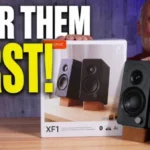
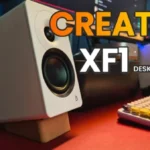


These could be on my desk for a long time. - The last speakers I reviewed here at Digital Foundry were absolute monsters. The Edifier R2750DB...
The Creative XF1 speakers embody the essence of compact audio performance, offering a remarkable sound experience without cluttering your...
Creative XF1 Review: For 159.99 euros, these desktop speakers surprise with their neutral sound, USB-C, Bluetooth 6.0, LDAC, and the...
James is a more recent PC gaming convert, often admiring graphics cards, cases, and motherboards from afar. It was not until 2019, after just...
The $180 Creative XF1 desktop speakers are compact yet deliver rich audio with ample bass sans subwoofer.
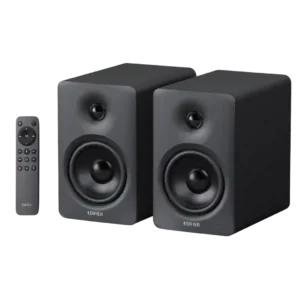
Choose the M90 for powerful, spacious sound, exceptional connectivity, and easy TV integration in a compact desktop-friendly pair. Skip it if you need Wi-Fi or AirPlay, front-mounted controls, or deep...
Pros: Bass performance, Value for money
Cons: On-device controls, Auto-off and standby behavior
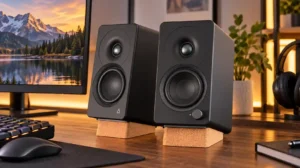
Choose the XF1 for clear desktop audio, flexible connections, and powerful EQ in a compact pair. Skip it if you need deep bass without a subwoofer, consistently polished sound at...
Pros: Placement footprint, speaker size
Cons: HDMI ARC, HDMI ARC support
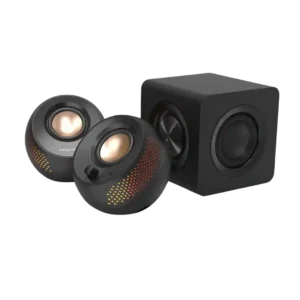
Choose the Creative Pebble X Plus if you want compact desktop speakers with RGB, strong volume, and subwoofer-backed bass. Skip it if you need deep sub-bass, clean cable management, advanced...
Pros: Value for money, Subwoofer
Cons: App reliability, EQ customization
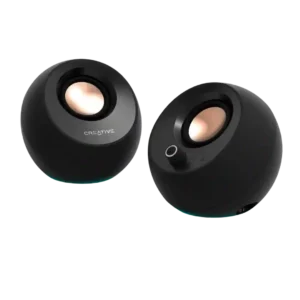
Choose these for clear, compact desktop sound, easy inputs, and standout value. Skip them if you need deep bass, room-filling volume, flawless USB/Bluetooth reliability, or a power adapter in the...
Pros: Overall sound quality, Value for money
Cons: Amplifier power requirements, Wired input