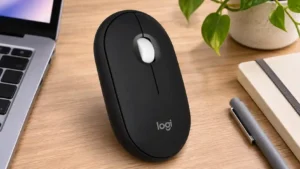
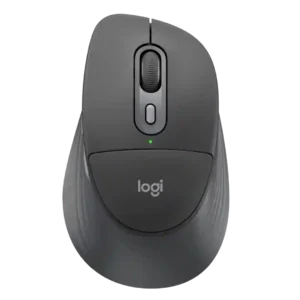
Compare Logitech Signature Comfort Plus M850 L vs Logitech Pebble Mouse 2 M350s

Logitech Signature Comfort Plus M850 L

Logitech Signature Comfort Plus M850 L

Overall score 4.3 / 5

Based on 11 scored reviews

vs
Logitech Pebble Mouse 2 M350s

Logitech Pebble Mouse 2 M350s

Overall score 4.0 / 5

Based on 32 scored reviews

How we score

Scorata scores summarize analyzed review evidence on a 1–5 scale; they are not laboratory measurements or a simple average of customer star ratings. Feature scores summarize the reviews covering that feature. The overall score averages feature scores within each review, then combines review averages. When both expert and customer evidence are available, those two groups receive equal weight. Products can have different review coverage, so small score gaps do not establish a winner.

Recommendations prioritize important features for the category, with a score of at least 3.5, a gap of at least 0.25 points and at least two supporting reviews per product. Features with widely varying scores or broad connectivity contexts are excluded from recommendations. These safeguards do not establish statistical significance.

Quick verdict

What each product is best for

The review evidence points to a tradeoff: long-session comfort and ergonomic design versus portability and switch feel. Choose according to which strengths matter more to you; the overall score alone does not settle that choice.

Choose Logitech Signature Comfort Plus M850 L for long-session comfort and ergonomic design.

Choose Logitech Pebble Mouse 2 M350s for portability and switch feel.

Why these recommendations?

Logitech Signature Comfort Plus M850 L

Where It Has the Edge

  • long-session comfort is 4.7 vs 1.9. Long-session comfort is generally excellent, with multiple reviewers reporting comfortable all-day or eight-to-ten-hour use; the main dissent centers...
  • ergonomic design is 4.4 vs 1.9. The overall sculpted shape is widely comfortable, especially for long desk work, but reviewers disagree sharply on whether...

Logitech Pebble Mouse 2 M350s

Where It Has the Edge

  • portability is 5.0 vs 2.3. Slim dimensions, low weight and a pocketable form make this a standout companion for working away from a...
  • switch feel is 4.7 vs 4.0. The softened buttons retain tactile feedback and feel satisfying despite their low noise.
  • software usability is 4.9 vs 4.5. Options+ is useful and mostly intuitive, though its richer controls can conflict and only one physical button is...
Logitech Signature Comfort Plus M850 L 4.3 overall score
Logitech Pebble Mouse 2 M350s 4.0 overall score

Compare features

Scores are out of 5. Missing scores mean missing review evidence, not a missing feature.

Scored on both products

Battery and charging

Battery life
Logitech Signature Comfort Plus M850 L
4.7

Battery life is a major strength. Reviewers repeatedly praise the long runtime from a single replaceable cell, with short-term testing showing very slow drain.

Logitech Pebble Mouse 2 M350s
4.9

Long expected AA-battery endurance means little day-to-day attention, although the two-year figure is largely a manufacturer rating.

Rechargeable battery
Logitech Signature Comfort Plus M850 L
2.0

The lack of a built-in rechargeable battery disappoints some reviewers, especially those concerned about disposable-cell waste.

Logitech Pebble Mouse 2 M350s
2.0

The replaceable AA is convenient, but more than one reviewer wishes it could recharge internally.

Replaceable battery support
Logitech Signature Comfort Plus M850 L
5.0

The replaceable cell is easy to swap, and one reviewer liked avoiding the long-term wear associated with built-in batteries.

Logitech Pebble Mouse 2 M350s
5.0

A magnetic top cover gives easy access to the replaceable AA cell, reducing dependence on charging equipment.

Comfort and build

Long-session comfort
Logitech Signature Comfort Plus M850 L
4.7

Long-session comfort is generally excellent, with multiple reviewers reporting comfortable all-day or eight-to-ten-hour use; the main dissent centers on whether the cushion itself deserves credit.

Logitech Pebble Mouse 2 M350s
1.9

Extended desk work exposes the biggest compromise: limited palm support can cause aching or cramped posture.

Ergonomic design
Logitech Signature Comfort Plus M850 L
4.4

The overall sculpted shape is widely comfortable, especially for long desk work, but reviewers disagree sharply on whether the built-in cushion adds meaningful ergonomic benefit.

Logitech Pebble Mouse 2 M350s
1.9

The low, nearly flat body prioritizes pocketability over palm support, dividing opinion on short-term comfort and drawing criticism for long sessions.

Hand size compatibility
Logitech Signature Comfort Plus M850 L
4.0

Fit depends on hand size: several reviewers with medium-to-large hands liked it, while another large-handed reviewer found the body too compact.

Logitech Pebble Mouse 2 M350s
1.9

Reviewers repeatedly warn that this mouse suits smaller hands better, with bigger hands often left unsupported.

Materials quality
Logitech Signature Comfort Plus M850 L
5.0

The plastic construction feels notably high quality and contributes to a sturdy, substantial impression.

Logitech Pebble Mouse 2 M350s
3.0

Plastic construction keeps weight down, but creates conflicting impressions, from acceptably sturdy to cheap and flimsy.

Build quality
Logitech Signature Comfort Plus M850 L
4.9

Build quality is consistently strong, with reviewers describing the chassis as solid, sturdy, well-built, and free of creaks or flex.

Logitech Pebble Mouse 2 M350s
3.5

Impressions range from surprisingly solid construction to fragile-feeling plastic, reflecting its budget build.

Size
Logitech Signature Comfort Plus M850 L
4.0

Sizing is somewhat subjective: one reviewer found it just right and another ideal for small-to-medium hands, while a large-handed reviewer wanted a longer body.

Logitech Pebble Mouse 2 M350s
3.0

Its tiny footprint is excellent for pockets, but reviewers with larger hands find the dimensions restrictive.

Aesthetic design
Logitech Signature Comfort Plus M850 L
4.7

The restrained, contemporary styling earns consistent praise, with the Graphite finish in particular described as fantastic and understated.

Logitech Pebble Mouse 2 M350s
4.9

Minimal curves and playful color variants frequently attract praise, particularly in matching desk setups.

Grip comfort
Logitech Signature Comfort Plus M850 L
5.0

Rubberized, textured side grips receive strong praise for keeping the hand secure and the thumb comfortable.

Logitech Pebble Mouse 2 M350s
5.0

One hands-on assessment finds the small shell comfortable to grip during ordinary use.

Other features

Portability
Logitech Signature Comfort Plus M850 L
2.3

The high-backed, larger design is better suited to a desk than travel, with reviewers calling it bulky and discouraging it for trips.

Logitech Pebble Mouse 2 M350s
5.0

Slim dimensions, low weight and a pocketable form make this a standout companion for working away from a fixed desk.

Scroll wheel precision
Logitech Signature Comfort Plus M850 L
5.0

The wheel was praised as precise and satisfying, even if it does not match Logitech's premium magnetic wheel.

Logitech Pebble Mouse 2 M350s
3.0

Scrolling is improved over the older Pebble, but occasional jumps remain on iPad.

Connection stability
Logitech Signature Comfort Plus M850 L
4.0

Wireless stability is generally good, including hiccup-free Bluetooth testing, although one reviewer found Bolt more reliable and sensitive to obstructions.

Logitech Pebble Mouse 2 M350s
5.0

Wireless connection and pointer movement are described as reliable in normal use.

Horizontal scrolling
Logitech Signature Comfort Plus M850 L
2.5

Side scrolling is possible through a button-and-wheel combination, but the workaround is less convenient than a true tilt wheel.

Logitech Pebble Mouse 2 M350s
1.5

The sparse wheel and button layout does not satisfy shoppers accustomed to dedicated horizontal scrolling.

Glide smoothness
Logitech Signature Comfort Plus M850 L
4.1

Most reviewers found the mouse smooth or effortless across surfaces, but one reported noticeably choppy, rougher-than-expected movement.

Logitech Pebble Mouse 2 M350s
3.3

It moves adequately on ordinary pads, though some feel a little more drag than on higher-end mice.

Switch feel
Logitech Signature Comfort Plus M850 L
4.0

Button feel is generally positive, with distinct side-button feedback, though the softer main-switch actuation can feel unusual at first.

Logitech Pebble Mouse 2 M350s
4.7

The softened buttons retain tactile feedback and feel satisfying despite their low noise.

2.4GHz connectivity
Logitech Signature Comfort Plus M850 L
2.3

The standard package draws criticism for leaving out a 2.4GHz receiver, so buyers who want dongle-based wireless may need an extra purchase.

Logitech Pebble Mouse 2 M350s
2.9

Logi Bolt adds an alternative to Bluetooth, but the receiver is generally extra when the mouse is bought alone. Combo packages can include it, so check which version is being sold.

Cross-platform compatibility
Logitech Signature Comfort Plus M850 L
4.5

Broad operating-system support makes the mouse a versatile choice for people who switch among Windows, macOS, and other platforms.

Logitech Pebble Mouse 2 M350s
5.0

It works with different operating systems and can be used across mixed-device workstations.

DPI range
Logitech Signature Comfort Plus M850 L
4.5

The 4,000-DPI ceiling is more than sufficient for fast productivity work, even if it is not aimed at serious gaming.

Logitech Pebble Mouse 2 M350s
4.0

Sensitivity is adequate for ordinary office movement rather than high-end, precision-intensive applications.

Polling rate
Logitech Signature Comfort Plus M850 L
2.5

The office-level polling rate is adequate for productivity but can look choppy to sensitive users and is too slow for competitive gaming.

Logitech Pebble Mouse 2 M350s
2.0

A hands-on test reports modest pointer polling and warns of potential lag in games.

Surface compatibility
Logitech Signature Comfort Plus M850 L
4.2

The mouse works well across many surfaces in most testing, including desks, pads, glass, and rubber mats, though one reviewer found movement rough on both a pad and tabletop.

Logitech Pebble Mouse 2 M350s
4.5

Tracking is praised on desks and ordinary household surfaces, with less confidence on glass and glossy pads.

Weight
Logitech Signature Comfort Plus M850 L
4.0

The mouse is on the heavier side, but several reviewers like the substantial feel and find the weight manageable; lightweight-mouse fans may disagree.

Logitech Pebble Mouse 2 M350s
4.2

Low weight suits travel, but some users prefer a heavier, more substantial feel.

Device switching
Logitech Signature Comfort Plus M850 L
4.8

Switching among paired devices is consistently easy and convenient, with reviewers moving between computers without hiccups.

Logitech Pebble Mouse 2 M350s
4.9

Easy-Switch makes changing between paired computers or tablets convenient, though the button is on the base.

Ecosystem integration
Logitech Signature Comfort Plus M850 L
5.0

Logitech Flow worked smoothly in testing, allowing text to move between two computers without manually changing Bluetooth sources.

Logitech Pebble Mouse 2 M350s
5.0

Logitech Flow is a notable addition, supporting movement and file transfer between connected computers.

Scroll wheel quality
Logitech Signature Comfort Plus M850 L
4.5

SmartWheel is generally a standout productivity feature for quick, adaptive scrolling, though one reviewer found it less refined than Logitech's premium wheels.

Logitech Pebble Mouse 2 M350s
4.5

Feedback is generally satisfying and the newer wheel is quieter, although results vary with software and device.

Ownership and support

Hand support
Logitech Signature Comfort Plus M850 L
3.5

The palm cushion is the most divisive feature. Some reviewers loved the softer support and pressure relief, while others barely contacted it or found its support negligible.

Logitech Pebble Mouse 2 M350s
1.4

There is little arch for the palm to rest on, making the mouse less comfortable than sculpted alternatives.

Value for money
Logitech Signature Comfort Plus M850 L
3.8

Value opinions vary by price and alternatives: some reviewers call it outstanding budget value, while others find it pricey or hard to justify against better-equipped mice.

Logitech Pebble Mouse 2 M350s
4.8

For a relatively inexpensive mouse, quiet clicks and three-device pairing make a compelling package, provided ergonomics suit your needs.

Tracking and training

Accuracy and tracking precision
Logitech Signature Comfort Plus M850 L
5.0

Tracking stayed stable even on uneven surfaces, with no precision problems noted in that testing.

Logitech Pebble Mouse 2 M350s
3.4

The sensor is responsive enough for general use, although precision work and quick gaming movements reveal its limitations.

Controls and connectivity

Bluetooth support
Logitech Signature Comfort Plus M850 L
3.5

Bluetooth is considered perfectly adequate for typical home use, though one comparison found a Bolt connection more dependable.

Logitech Pebble Mouse 2 M350s
5.0

Bluetooth pairing is usually quick and dependable, removing the need for a receiver in everyday setups.

Button placement
Logitech Signature Comfort Plus M850 L
3.5

Most controls are easy to reach and identify, but the Actions Ring button drew criticism for sitting too close to the scroll wheel.

Logitech Pebble Mouse 2 M350s
2.0

The multi-device selector works, but placing it underneath requires lifting the mouse to reach it.

DPI customization
Logitech Signature Comfort Plus M850 L
3.5

DPI control is inconsistent: one reviewer criticized the lack of sensor-DPI adjustment in Logi Options+, while another liked the two selectable DPI levels.

Logitech Pebble Mouse 2 M350s
4.7

Logi Options+ allows sensitivity adjustment, and the fine increments earn praise for restricted work areas.

Software usability
Logitech Signature Comfort Plus M850 L
4.5

Logi Options+ is praised as clean and intuitive, though some advanced features require a few minutes of setup before they become useful.

Logitech Pebble Mouse 2 M350s
4.9

Options+ is useful and mostly intuitive, though its richer controls can conflict and only one physical button is configurable.

Button customization
Logitech Signature Comfort Plus M850 L
4.8

Logi Options+ gives the mouse extensive shortcut and button remapping flexibility, including app-specific functions and Actions Ring controls that can meaningfully streamline work.

Logitech Pebble Mouse 2 M350s
4.7

The wheel click can be remapped for apps and shortcuts, bringing useful flexibility despite limited physical controls.

Performance

Sensor performance
Logitech Signature Comfort Plus M850 L
3.0

The sensor handles normal productivity tasks adequately, but one reviewer considered the underlying hardware basic for the price.

Logitech Pebble Mouse 2 M350s
4.3

The upgraded sensor is capable for everyday navigation, without the tracking refinements of premium models.

Click noise
Logitech Signature Comfort Plus M850 L
4.9

Quiet clicking is one of the most consistent wins. The main buttons are repeatedly described as barely audible or pleasantly subdued for office use.

Logitech Pebble Mouse 2 M350s
4.9

Quiet clicks are among its most consistent strengths, even if one reviewer finds them slightly hollow.

Evidence available for one product

Controls and connectivity

Button count
Logitech Signature Comfort Plus M850 LNo score yet
Logitech Pebble Mouse 2 M350s
2.0

Three-button simplicity suits basic navigation, but missing thumb controls are a recurring frustration.

Button responsiveness
Logitech Signature Comfort Plus M850 LNo score yet
Logitech Pebble Mouse 2 M350s
5.0

The muted buttons still respond promptly and retain a satisfying click.

Side button quality
Logitech Signature Comfort Plus M850 L
4.5

The side buttons have distinct, reassuring tactile feedback and are easy to recognize by feel.

Logitech Pebble Mouse 2 M350sNo score yet
Software quality
Logitech Signature Comfort Plus M850 L
4.8

Logi Options+ is a major strength, adding flexible shortcuts, Actions Ring features, and productivity tools that reviewers found highly useful.

Logitech Pebble Mouse 2 M350sNo score yet
Software stability
Logitech Signature Comfort Plus M850 LNo score yet
Logitech Pebble Mouse 2 M350s
2.0

Conflicting per-app and Smart Action assignments can make the middle-button behavior unpredictable.

Battery and charging

Charging convenience
Logitech Signature Comfort Plus M850 LNo score yet
Logitech Pebble Mouse 2 M350s
5.0

An ordinary AA cell eliminates routine charging cables, although some would prefer a built-in rechargeable battery.

Other features

Coating quality
Logitech Signature Comfort Plus M850 LNo score yet
Logitech Pebble Mouse 2 M350s
2.0

A cautionary assessment raises the possibility of surface shine and visible wear after heavy use.

Device compatibility
Logitech Signature Comfort Plus M850 LNo score yet
Logitech Pebble Mouse 2 M350s
3.5

It can handle different devices, but one user reports poorer mouse behavior on iPad than Windows.

Environmental sustainability
Logitech Signature Comfort Plus M850 LNo score yet
Logitech Pebble Mouse 2 M350s
4.9

Recycled plastic and reduced packaging earn appreciation, especially for a modestly priced mouse.

Free-spin scrolling
Logitech Signature Comfort Plus M850 L
4.8

Adaptive fast scrolling is a productivity highlight, making long spreadsheets, documents, and message lists much faster to navigate without manual mode switching.

Logitech Pebble Mouse 2 M350sNo score yet
Gaming suitability
Logitech Signature Comfort Plus M850 L
3.0

The mouse is fine for occasional or casual games, but its office-focused polling and sensor setup are not suited to competitive play.

Logitech Pebble Mouse 2 M350sNo score yet
Handedness options
Logitech Signature Comfort Plus M850 LNo score yet
Logitech Pebble Mouse 2 M350s
5.0

Its symmetrical shape can accommodate both hands, and button functions can be swapped in software.

Included accessories
Logitech Signature Comfort Plus M850 LNo score yet
Logitech Pebble Mouse 2 M350s
2.0

The standalone package generally does not include a Logi Bolt receiver, a drawback for computers needing one.

Left and right click quality
Logitech Signature Comfort Plus M850 L
4.5

The main clicks feel tactile without requiring much force, giving good feedback while remaining quiet.

Logitech Pebble Mouse 2 M350sNo score yet
MacOS compatibility
Logitech Signature Comfort Plus M850 LNo score yet
Logitech Pebble Mouse 2 M350s
5.0

A mouse-and-keyboard combo user found the mouse worked easily with standard Mac drivers.

Onboard memory
Logitech Signature Comfort Plus M850 L
1.5

The lack of onboard memory is a meaningful limitation because customizations cannot travel with the mouse without Logitech software installed.

Logitech Pebble Mouse 2 M350sNo score yet
Packaging quality and presentation
Logitech Signature Comfort Plus M850 LNo score yet
Logitech Pebble Mouse 2 M350s
5.0

Minimal, carefully presented packaging is appreciated, with some reviewers welcoming its sustainable materials.

Premium feel
Logitech Signature Comfort Plus M850 LNo score yet
Logitech Pebble Mouse 2 M350s
3.5

Some find the soft clicks and finish refined, while others say the all-plastic shell feels inexpensive.

Repairability
Logitech Signature Comfort Plus M850 L
5.0

A teardown found the mouse fairly simple to disassemble, making cleaning or basic part replacement approachable.

Logitech Pebble Mouse 2 M350sNo score yet
Responsiveness
Logitech Signature Comfort Plus M850 LNo score yet
Logitech Pebble Mouse 2 M350s
5.0

Its upgraded sensor feels prompt for ordinary office work.

Scroll wheel resistance
Logitech Signature Comfort Plus M850 LNo score yet
Logitech Pebble Mouse 2 M350s
2.0

A reviewer finds the wheel a little stiff at times.

Sustainability
Logitech Signature Comfort Plus M850 L
4.5

Recycled plastics and paper-based packaging are welcome sustainability touches, although the broader battery design still uses disposable cells.

Logitech Pebble Mouse 2 M350sNo score yet
USB receiver storage
Logitech Signature Comfort Plus M850 LNo score yet
Logitech Pebble Mouse 2 M350s
5.0

The compartment under the magnetic cover is useful for holding an optional receiver during transport.

Windows compatibility
Logitech Signature Comfort Plus M850 LNo score yet
Logitech Pebble Mouse 2 M350s
5.0

A reviewer reports stable performance on Windows, notably better than their iPad experience.

Wireless latency
Logitech Signature Comfort Plus M850 L
5.0

Bluetooth responsiveness was excellent in one test, with no noticeable input lag or latency during productivity use.

Logitech Pebble Mouse 2 M350sNo score yet

Ownership and support

Macro support
Logitech Signature Comfort Plus M850 LNo score yet
Logitech Pebble Mouse 2 M350s
4.0

Options+ Smart Actions expand the lone programmable button, but advanced control remains limited by the hardware.

Multi-device support
Logitech Signature Comfort Plus M850 LNo score yet
Logitech Pebble Mouse 2 M350s
5.0

Three remembered Bluetooth devices give a compact, affordable mouse versatility for laptop, desktop and tablet owners.

Setup ease
Logitech Signature Comfort Plus M850 LNo score yet
Logitech Pebble Mouse 2 M350s
5.0

Simple Bluetooth discovery and optional receiver support make initial setup quick.

Tilt wheel support
Logitech Signature Comfort Plus M850 L
2.0

The missing tilt wheel is a clear ergonomic and workflow drawback for users who frequently scroll sideways.

Logitech Pebble Mouse 2 M350sNo score yet

Performance

Productivity performance
Logitech Signature Comfort Plus M850 L
4.7

Productivity is a major strength thanks to comfortable operation, customizable shortcuts, adaptive scrolling, and reliable everyday performance.

Logitech Pebble Mouse 2 M350sNo score yet
Wireless performance
Logitech Signature Comfort Plus M850 LNo score yet
Logitech Pebble Mouse 2 M350s
5.0

Reliable wireless operation and smooth switching keep everyday work interruption-free.

Comfort and build

Shape comfort
Logitech Signature Comfort Plus M850 LNo score yet
Logitech Pebble Mouse 2 M350s
2.3

Some adapt and find the pebble shape acceptable; others dislike how flat it is and how little their palm can rest.

Other Top Mice to Consider

#1 Logitech MX Anywhere 3S
4.5

Best for travel, quiet shared spaces, precise any-surface tracking, and multi-device productivity. Skip it if you have large hands, want all-day palm support, or need a gaming-focused mouse.

Pros: portability, click noise

Cons: hand size compatibility, dongle-free setup

#2 Corsair Scimitar Elite Wireless SE
4.4

Choose it if you want a premium MMO/productivity mouse with 12 adjustable side buttons, strong battery life, and Stream Deck integration. Skip it if you need an ultralight FPS mouse,...

Pros: button customization, MMO gaming suitability

Cons: FPS gaming suitability

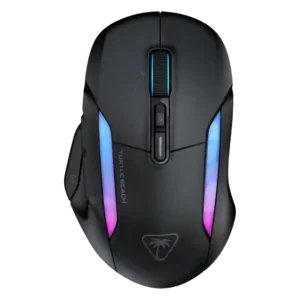
#3 Turtle Beach Kone II
4.3

Choose the Kone II if you want a large, ergonomic mouse with deep customization and strong sensor performance. Skip it if you have small hands, need an ambidextrous mouse, or...

Pros: value for money, button customization

Cons: fingertip grip comfort, portability

#4 Turtle Beach Kone II Air
4.3

Good if you want a large, ergonomic wireless mouse with long battery life and deep customization. Skip it if you have small hands, prioritize ultralight FPS speed, or want the...

Pros: battery life, software usability

Cons: weight, FPS gaming suitability