Ownership and support
Reliability
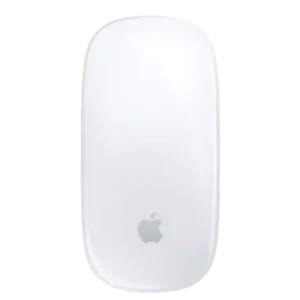
Apple Magic Mouse
5.0
Day-to-day reliability is very strong in the Apple ecosystem, with reviewers describing the connection and basic operation as flawless.
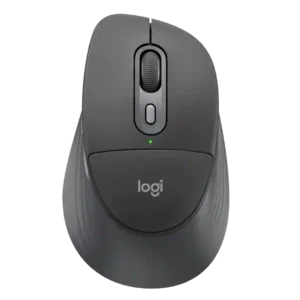
Logitech Signature Comfort Plus M850 LNo score yet
Macro support
Apple Magic Mouse
1.0
Macro support is essentially absent compared with productivity mice that offer dedicated automation tools.
Logitech Signature Comfort Plus M850 LNo score yet
Multi-device support
Apple Magic Mouse
1.5
Multi-device support is one of the weakest areas because the mouse is generally limited to a single paired device rather than quick multi-device cycling.
Logitech Signature Comfort Plus M850 LNo score yet
Plug-and-play support
Apple Magic Mouse
5.0
On a Mac, the mouse is essentially plug-and-play with no receiver, driver package, or setup wizard required.
Logitech Signature Comfort Plus M850 LNo score yet
Setup ease
Apple Magic Mouse
5.0
Setup is consistently effortless on a Mac, often requiring only a quick cable connection or Bluetooth pairing before the mouse is ready.
Logitech Signature Comfort Plus M850 LNo score yet
Tilt wheel support
Apple Magic MouseNo score yet
Logitech Signature Comfort Plus M850 L
2.0
The missing tilt wheel is a clear ergonomic and workflow drawback for users who frequently scroll sideways.
Other features
Acceleration control
Apple Magic Mouse
4.0
macOS sensitivity and acceleration adjustments can make the pointer feel more usable for people who dislike the default motion behavior.
Logitech Signature Comfort Plus M850 LNo score yet
Balance and weight distribution
Apple Magic Mouse
4.0
The low center of gravity keeps movement stable on the desk, even though the flat body gives little to grip during rapid repositioning.
Logitech Signature Comfort Plus M850 LNo score yet
Cable flexibility
Apple Magic Mouse
4.5
The woven USB-C cable resists tangling well and is easier to handle than a basic rubber charging cable.
Logitech Signature Comfort Plus M850 LNo score yet
Cable quality
Apple Magic Mouse
5.0
The included woven USB-C cable feels durable, resists tangling, and is a clear upgrade over a basic rubber cable.
Logitech Signature Comfort Plus M850 LNo score yet
Click consistency
Apple Magic Mouse
4.5
Primary clicks are reliable and consistent in everyday productivity use.
Logitech Signature Comfort Plus M850 LNo score yet
Coating quality
Apple Magic Mouse
2.5
The glossy finish looks polished but readily shows fingerprints, smudges, dirt, and surface scratches.
Logitech Signature Comfort Plus M850 LNo score yet
Cursor control
Apple Magic Mouse
2.0
Cursor control can feel less precise than a gaming mouse, and one reviewer needed sensitivity and acceleration changes to make it comfortable.
Logitech Signature Comfort Plus M850 LNo score yet
Feet quality
Apple Magic Mouse
4.8
The feet are well finished and help the mouse glide smoothly without rough edges or catching.
Logitech Signature Comfort Plus M850 LNo score yet
Grip texture
Apple Magic Mouse
5.0
The smooth glass surface feels excellent under the fingers and complements the gesture-first design.
Logitech Signature Comfort Plus M850 LNo score yet
Handedness options
Apple Magic Mouse
5.0
The symmetrical shape works equally well for left- and right-handed users, and macOS lets you swap the secondary-click side.
Logitech Signature Comfort Plus M850 LNo score yet
MacOS compatibility
Apple Magic Mouse
4.5
macOS compatibility is excellent on current versions, though older systems can lose gesture and advanced-setting support.
Logitech Signature Comfort Plus M850 LNo score yet
Motion consistency
Apple Magic Mouse
2.0
Movement can become inconsistent on unsuitable surfaces, with reports of jumping and lost precision.
Logitech Signature Comfort Plus M850 LNo score yet
Motion latency
Apple Magic Mouse
3.8
Motion latency is fine for productivity and often goes unnoticed, but low polling and Bluetooth-only operation can feel less immediate to demanding users.
Logitech Signature Comfort Plus M850 LNo score yet
Power efficiency
Apple Magic Mouse
5.0
Power efficiency is excellent, helping the mouse stretch a charge for weeks despite its always-wireless design.
Logitech Signature Comfort Plus M850 LNo score yet
Premium feel
Apple Magic Mouse
4.8
The solid construction, glass top, clean finish, and polished Apple design give the Magic Mouse a distinctly premium feel.
Logitech Signature Comfort Plus M850 LNo score yet
Profile management
Apple Magic Mouse
3.0
Profile support is mixed: native macOS controls lack per-app profiles, while third-party or workflow-specific setups can extend the mouse further.
Logitech Signature Comfort Plus M850 LNo score yet
Repairability
Apple Magic MouseNo score yet
Logitech Signature Comfort Plus M850 L
5.0
A teardown found the mouse fairly simple to disassemble, making cleaning or basic part replacement approachable.
Responsiveness
Apple Magic Mouse
3.3
Responsiveness is good in ordinary Mac use, though accidental gestures and lower-precision behavior can interrupt more demanding workflows.
Logitech Signature Comfort Plus M850 LNo score yet
Scroll wheel quality
Apple Magic MouseNo score yet
Logitech Signature Comfort Plus M850 L
4.5
SmartWheel is generally a standout productivity feature for quick, adaptive scrolling, though one reviewer found it less refined than Logitech's premium wheels.
Sleep mode
Apple Magic Mouse
5.0
Wake-from-sleep behavior is excellent, with the mouse reconnecting immediately when the Mac wakes.
Logitech Signature Comfort Plus M850 LNo score yet
Sustainability
Apple Magic MouseNo score yet
Logitech Signature Comfort Plus M850 L
4.5
Recycled plastics and paper-based packaging are welcome sustainability touches, although the broader battery design still uses disposable cells.
Switch feel
Apple Magic MouseNo score yet
Logitech Signature Comfort Plus M850 L
4.0
Button feel is generally positive, with distinct side-button feedback, though the softer main-switch actuation can feel unusual at first.
USB-C connectivity
Apple Magic Mouse
4.7
The move to USB-C is widely welcomed for cable compatibility and convenience, even though the port remains awkwardly positioned underneath.
Logitech Signature Comfort Plus M850 LNo score yet
Windows compatibility
Apple Magic Mouse
2.2
Windows use is possible in some form, but the mouse loses much of its defining gesture experience and is a poor choice for Windows-first users.
Logitech Signature Comfort Plus M850 LNo score yet
Wired connectivity
Apple Magic Mouse
5.0
One source describes the USB-C connection as usable while charging, making wired operation practical in that account.
Logitech Signature Comfort Plus M850 LNo score yet
Battery and charging
Battery indicator
Apple Magic Mouse
2.5
Battery status is inconsistent as a user experience: macOS can show charge information, but the mouse itself lacks a dedicated indicator or charging light.
Logitech Signature Comfort Plus M850 LNo score yet
Charging convenience
Apple Magic Mouse
1.8
The underside charging port is the most repeated complaint because the mouse cannot normally be used while plugged in, even though some reviewers consider the issue overblown.
Logitech Signature Comfort Plus M850 LNo score yet
Charging speed
Apple Magic Mouse
4.9
Quick charging is excellent: a few minutes can provide hours or even a workday of use, which softens the downside of the underside port.
Logitech Signature Comfort Plus M850 LNo score yet
Replaceable battery support
Apple Magic MouseNo score yet
Logitech Signature Comfort Plus M850 L
5.0
The replaceable cell is easy to swap, and one reviewer liked avoiding the long-term wear associated with built-in batteries.
Controls and connectivity
Button count
Apple Magic Mouse
1.8
The sparse two-click design keeps the mouse clean but leaves power users without side buttons or extra physical controls.
Logitech Signature Comfort Plus M850 LNo score yet
Button quality
Apple Magic Mouse
3.0
Click quality is functional and dependable, though the soft touch-surface mechanism lacks the crisp feel of conventional mechanical switches.
Logitech Signature Comfort Plus M850 LNo score yet
Button responsiveness
Apple Magic Mouse
4.8
Clicks respond quickly and cleanly, with responsive actuation called out as a positive even by reviewers who dislike the ergonomics.
Logitech Signature Comfort Plus M850 LNo score yet
Gesture controls
Apple Magic Mouse
4.8
Multi-Touch gestures are the Magic Mouse’s signature strength, offering fluid scrolling, desktop switching, page navigation, and other Mac actions directly on the top surface.
Logitech Signature Comfort Plus M850 LNo score yet
Haptic controls
Apple Magic Mouse
1.7
The absence of Force Touch or haptic feedback is a recurring missed opportunity for a device built around touch interaction.
Logitech Signature Comfort Plus M850 LNo score yet
Polling rate customization
Apple Magic Mouse
1.0
Polling rate cannot be customized, another sign that the Magic Mouse is designed for simplicity rather than performance tuning.
Logitech Signature Comfort Plus M850 LNo score yet
Programmable buttons
Apple Magic Mouse
1.0
There are no dedicated programmable buttons, a major limitation for shortcuts, app commands, and power-user workflows.
Logitech Signature Comfort Plus M850 LNo score yet
Side button quality
Apple Magic MouseNo score yet
Logitech Signature Comfort Plus M850 L
4.5
The side buttons have distinct, reassuring tactile feedback and are easy to recognize by feel.
Comfort and build
Claw grip comfort
Apple Magic Mouse
4.0
Claw grip works better than palm grip because the low shell naturally suits a more arched finger position.
Logitech Signature Comfort Plus M850 LNo score yet
Durability over time
Apple Magic Mouse
3.7
Functional durability appears solid, although the glossy shell and underside can accumulate cosmetic scratches and wear.
Logitech Signature Comfort Plus M850 LNo score yet
Fingertip grip comfort
Apple Magic Mouse
4.0
Fingertip users are among the best fit for the low-profile shape, which works more naturally without full palm contact.
Logitech Signature Comfort Plus M850 LNo score yet
Palm grip comfort
Apple Magic Mouse
1.5
Palm grip is a poor fit because the low shell does not fill or support the hand over longer sessions.
Logitech Signature Comfort Plus M850 LNo score yet
Shape comfort
Apple Magic Mouse
1.4
The ultra-flat shape is the mouse’s biggest comfort problem, often leaving the hand unsupported and causing strain during sustained use.
Logitech Signature Comfort Plus M850 LNo score yet
Skate durability
Apple Magic Mouse
3.5
The underside pads can pick up scratches over time, but the wear described did not impair normal function.
Logitech Signature Comfort Plus M850 LNo score yet
Performance
Wireless performance
Apple Magic Mouse
4.5
Bluetooth performance is smooth and dependable on Macs, with strong wake behavior and easy everyday connectivity.
Logitech Signature Comfort Plus M850 LNo score yet