Ownership and support
Reliability
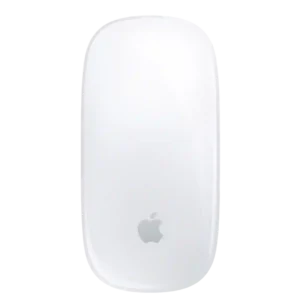
Apple Magic Mouse
5.0
Day-to-day reliability is very strong in the Apple ecosystem, with reviewers describing the connection and basic operation as flawless.
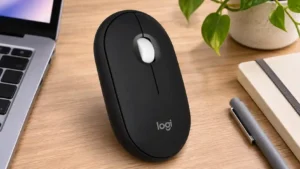
Logitech Pebble Mouse 2 M350sNo score yet
Plug-and-play support
Apple Magic Mouse
5.0
On a Mac, the mouse is essentially plug-and-play with no receiver, driver package, or setup wizard required.
Logitech Pebble Mouse 2 M350sNo score yet
Other features
Acceleration control
Apple Magic Mouse
4.0
macOS sensitivity and acceleration adjustments can make the pointer feel more usable for people who dislike the default motion behavior.
Logitech Pebble Mouse 2 M350sNo score yet
Balance and weight distribution
Apple Magic Mouse
4.0
The low center of gravity keeps movement stable on the desk, even though the flat body gives little to grip during rapid repositioning.
Logitech Pebble Mouse 2 M350sNo score yet
Cable flexibility
Apple Magic Mouse
4.5
The woven USB-C cable resists tangling well and is easier to handle than a basic rubber charging cable.
Logitech Pebble Mouse 2 M350sNo score yet
Cable quality
Apple Magic Mouse
5.0
The included woven USB-C cable feels durable, resists tangling, and is a clear upgrade over a basic rubber cable.
Logitech Pebble Mouse 2 M350sNo score yet
Click consistency
Apple Magic Mouse
4.5
Primary clicks are reliable and consistent in everyday productivity use.
Logitech Pebble Mouse 2 M350sNo score yet
Cursor control
Apple Magic Mouse
2.0
Cursor control can feel less precise than a gaming mouse, and one reviewer needed sensitivity and acceleration changes to make it comfortable.
Logitech Pebble Mouse 2 M350sNo score yet
Device compatibility
Apple Magic MouseNo score yet
Logitech Pebble Mouse 2 M350s
3.5
It can handle different devices, but one user reports poorer mouse behavior on iPad than Windows.
Environmental sustainability
Apple Magic MouseNo score yet
Logitech Pebble Mouse 2 M350s
4.9
Recycled plastic and reduced packaging earn appreciation, especially for a modestly priced mouse.
Feet quality
Apple Magic Mouse
4.8
The feet are well finished and help the mouse glide smoothly without rough edges or catching.
Logitech Pebble Mouse 2 M350sNo score yet
Free-spin scrolling
Apple Magic Mouse
1.0
There is no free-spin wheel, removing a familiar productivity option for users who prefer a physical scrolling mechanism.
Logitech Pebble Mouse 2 M350sNo score yet
Gaming suitability
Apple Magic Mouse
1.3
Gaming suitability is poor: low ergonomics, Bluetooth-only wireless, sparse buttons, and the touch-style click mechanism all work against serious play.
Logitech Pebble Mouse 2 M350sNo score yet
Grip texture
Apple Magic Mouse
5.0
The smooth glass surface feels excellent under the fingers and complements the gesture-first design.
Logitech Pebble Mouse 2 M350sNo score yet
Included accessories
Apple Magic MouseNo score yet
Logitech Pebble Mouse 2 M350s
2.0
The standalone package generally does not include a Logi Bolt receiver, a drawback for computers needing one.
Left and right click quality
Apple Magic Mouse
4.5
Left and right clicks feel reliable and satisfying, with good force and solid feedback.
Logitech Pebble Mouse 2 M350sNo score yet
Motion consistency
Apple Magic Mouse
2.0
Movement can become inconsistent on unsuitable surfaces, with reports of jumping and lost precision.
Logitech Pebble Mouse 2 M350sNo score yet
Motion latency
Apple Magic Mouse
3.8
Motion latency is fine for productivity and often goes unnoticed, but low polling and Bluetooth-only operation can feel less immediate to demanding users.
Logitech Pebble Mouse 2 M350sNo score yet
Onboard memory
Apple Magic Mouse
1.0
There is no onboard profile memory, so users looking for stored device-side configurations will find the mouse very limited.
Logitech Pebble Mouse 2 M350sNo score yet
Packaging quality and presentation
Apple Magic MouseNo score yet
Logitech Pebble Mouse 2 M350s
5.0
Minimal, carefully presented packaging is appreciated, with some reviewers welcoming its sustainable materials.
Power efficiency
Apple Magic Mouse
5.0
Power efficiency is excellent, helping the mouse stretch a charge for weeks despite its always-wireless design.
Logitech Pebble Mouse 2 M350sNo score yet
Profile management
Apple Magic Mouse
3.0
Profile support is mixed: native macOS controls lack per-app profiles, while third-party or workflow-specific setups can extend the mouse further.
Logitech Pebble Mouse 2 M350sNo score yet
Scroll wheel quality
Apple Magic MouseNo score yet
Logitech Pebble Mouse 2 M350s
4.5
Feedback is generally satisfying and the newer wheel is quieter, although results vary with software and device.
Scroll wheel resistance
Apple Magic MouseNo score yet
Logitech Pebble Mouse 2 M350s
2.0
A reviewer finds the wheel a little stiff at times.
Sleep mode
Apple Magic Mouse
5.0
Wake-from-sleep behavior is excellent, with the mouse reconnecting immediately when the Mac wakes.
Logitech Pebble Mouse 2 M350sNo score yet
Switch feel
Apple Magic MouseNo score yet
Logitech Pebble Mouse 2 M350s
4.7
The softened buttons retain tactile feedback and feel satisfying despite their low noise.
USB-C connectivity
Apple Magic Mouse
4.7
The move to USB-C is widely welcomed for cable compatibility and convenience, even though the port remains awkwardly positioned underneath.
Logitech Pebble Mouse 2 M350sNo score yet
USB receiver storage
Apple Magic MouseNo score yet
Logitech Pebble Mouse 2 M350s
5.0
The compartment under the magnetic cover is useful for holding an optional receiver during transport.
Wired connectivity
Apple Magic Mouse
5.0
One source describes the USB-C connection as usable while charging, making wired operation practical in that account.
Logitech Pebble Mouse 2 M350sNo score yet
Wireless latency
Apple Magic Mouse
4.3
Wireless lag is generally imperceptible in normal productivity work, though the mouse is not aimed at latency-sensitive gaming.
Logitech Pebble Mouse 2 M350sNo score yet
Battery and charging
Battery indicator
Apple Magic Mouse
2.5
Battery status is inconsistent as a user experience: macOS can show charge information, but the mouse itself lacks a dedicated indicator or charging light.
Logitech Pebble Mouse 2 M350sNo score yet
Charging speed
Apple Magic Mouse
4.9
Quick charging is excellent: a few minutes can provide hours or even a workday of use, which softens the downside of the underside port.
Logitech Pebble Mouse 2 M350sNo score yet
Replaceable battery support
Apple Magic MouseNo score yet
Logitech Pebble Mouse 2 M350s
5.0
A magnetic top cover gives easy access to the replaceable AA cell, reducing dependence on charging equipment.
Controls and connectivity
Button quality
Apple Magic Mouse
3.0
Click quality is functional and dependable, though the soft touch-surface mechanism lacks the crisp feel of conventional mechanical switches.
Logitech Pebble Mouse 2 M350sNo score yet
Gesture controls
Apple Magic Mouse
4.8
Multi-Touch gestures are the Magic Mouse’s signature strength, offering fluid scrolling, desktop switching, page navigation, and other Mac actions directly on the top surface.
Logitech Pebble Mouse 2 M350sNo score yet
Haptic controls
Apple Magic Mouse
1.7
The absence of Force Touch or haptic feedback is a recurring missed opportunity for a device built around touch interaction.
Logitech Pebble Mouse 2 M350sNo score yet
Polling rate customization
Apple Magic Mouse
1.0
Polling rate cannot be customized, another sign that the Magic Mouse is designed for simplicity rather than performance tuning.
Logitech Pebble Mouse 2 M350sNo score yet
Programmable buttons
Apple Magic Mouse
1.0
There are no dedicated programmable buttons, a major limitation for shortcuts, app commands, and power-user workflows.
Logitech Pebble Mouse 2 M350sNo score yet
Software quality
Apple Magic Mouse
3.0
Apple’s software approach is clean and reliable for basic settings, but far less capable than full-featured mouse utilities.
Logitech Pebble Mouse 2 M350sNo score yet
Software stability
Apple Magic MouseNo score yet
Logitech Pebble Mouse 2 M350s
2.0
Conflicting per-app and Smart Action assignments can make the middle-button behavior unpredictable.
Comfort and build
Claw grip comfort
Apple Magic Mouse
4.0
Claw grip works better than palm grip because the low shell naturally suits a more arched finger position.
Logitech Pebble Mouse 2 M350sNo score yet
Durability over time
Apple Magic Mouse
3.7
Functional durability appears solid, although the glossy shell and underside can accumulate cosmetic scratches and wear.
Logitech Pebble Mouse 2 M350sNo score yet
Fingertip grip comfort
Apple Magic Mouse
4.0
Fingertip users are among the best fit for the low-profile shape, which works more naturally without full palm contact.
Logitech Pebble Mouse 2 M350sNo score yet
Palm grip comfort
Apple Magic Mouse
1.5
Palm grip is a poor fit because the low shell does not fill or support the hand over longer sessions.
Logitech Pebble Mouse 2 M350sNo score yet
Skate durability
Apple Magic Mouse
3.5
The underside pads can pick up scratches over time, but the wear described did not impair normal function.
Logitech Pebble Mouse 2 M350sNo score yet
Performance
Productivity performance
Apple Magic Mouse
3.7
The Magic Mouse excels at browsing, scrolling, and gesture-heavy Mac workflows, but limited ergonomics and physical controls reduce its appeal for all-day power use.
Logitech Pebble Mouse 2 M350sNo score yet