Compare Logitech MX Master 4 vs Logitech Pebble Mouse 2 M350s

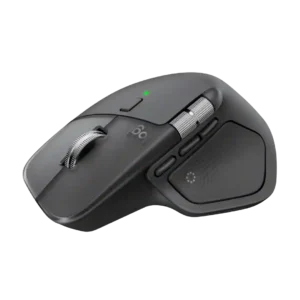
Logitech MX Master 4

Logitech MX Master 4

Overall score 3.7 / 5

Based on 69 scored reviews

vs
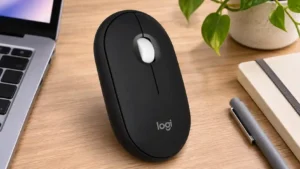
Logitech Pebble Mouse 2 M350s

Logitech Pebble Mouse 2 M350s

Overall score 4.0 / 5

Based on 32 scored reviews

How we score

Scorata scores summarize analyzed review evidence on a 1–5 scale; they are not laboratory measurements or a simple average of customer star ratings. Feature scores summarize the reviews covering that feature. The overall score averages feature scores within each review, then combines review averages. When both expert and customer evidence are available, those two groups receive equal weight. Products can have different review coverage, so small score gaps do not establish a winner.

Recommendations prioritize important features for the category, with a score of at least 3.5, a gap of at least 0.25 points and at least two supporting reviews per product. Features with widely varying scores or broad connectivity contexts are excluded from recommendations. These safeguards do not establish statistical significance.

Quick verdict

What each product is best for

The review evidence points to a tradeoff: horizontal scrolling and long-session comfort versus battery life and charging convenience. Choose according to which strengths matter more to you; the overall score alone does not settle that choice.

Choose Logitech MX Master 4 for horizontal scrolling and long-session comfort.

Choose Logitech Pebble Mouse 2 M350s for battery life and charging convenience.

Why these recommendations?

Logitech MX Master 4

Where It Has the Edge

  • horizontal scrolling is 4.0 vs 1.5. The horizontal thumb wheel is widely appreciated for timelines, spreadsheets, and large canvases. A minority find it slow,...
  • long-session comfort is 4.0 vs 1.9. The supportive shape is repeatedly praised for staying comfortable through long workdays and editing sessions. Size, weight, and...
  • button count is 4.0 vs 2.0. The large number of physical controls is a productivity advantage for power users. Some reviewers find the mouse...

Logitech Pebble Mouse 2 M350s

Where It Has the Edge

  • battery life is 4.9 vs 3.9. Long expected AA-battery endurance means little day-to-day attention, although the two-year figure is largely a manufacturer rating.
  • charging convenience is 5.0 vs 3.0. An ordinary AA cell eliminates routine charging cables, although some would prefer a built-in rechargeable battery.
  • portability is 5.0 vs 3.1. Slim dimensions, low weight and a pocketable form make this a standout companion for working away from a...
Logitech MX Master 4 3.7 overall score
Logitech Pebble Mouse 2 M350s 4.0 overall score

Compare features

Scores are out of 5. Missing scores mean missing review evidence, not a missing feature.

Scored on both products

Battery and charging

Battery life
Logitech MX Master 4
3.9

Battery life is repeatedly praised as excellent, with reviewers reporting weeks of daily use and very little charge loss. Quick top-ups further reduce the chance of being interrupted by a dead mouse.

Logitech Pebble Mouse 2 M350s
4.9

Long expected AA-battery endurance means little day-to-day attention, although the two-year figure is largely a manufacturer rating.

Charging convenience
Logitech MX Master 4
3.0

USB-C charging is convenient because the mouse remains usable while plugged in, avoiding the downtime associated with bottom-charging designs.

Logitech Pebble Mouse 2 M350s
5.0

An ordinary AA cell eliminates routine charging cables, although some would prefer a built-in rechargeable battery.

Rechargeable battery
Logitech MX Master 4
4.0

The rechargeable design is easy to live with because the battery lasts for weeks and can be topped up over USB-C while the mouse is still in use.

Logitech Pebble Mouse 2 M350s
2.0

The replaceable AA is convenient, but more than one reviewer wishes it could recharge internally.

Replaceable battery support
Logitech MX Master 4
4.0

The home-replaceable battery is praised as a meaningful longevity improvement and helps counter the usual disposable feel of sealed wireless mice.

Logitech Pebble Mouse 2 M350s
5.0

A magnetic top cover gives easy access to the replaceable AA cell, reducing dependence on charging equipment.

Other features

USB receiver storage
Logitech MX Master 4
2.3

Reviewers criticize the continued lack of built-in storage for the Bolt receiver, an avoidable inconvenience on a premium travel-capable mouse.

Logitech Pebble Mouse 2 M350s
5.0

The compartment under the magnetic cover is useful for holding an optional receiver during transport.

Horizontal scrolling
Logitech MX Master 4
4.0

The horizontal thumb wheel is widely appreciated for timelines, spreadsheets, and large canvases. A minority find it slow, imprecise, or hard to work into established habits.

Logitech Pebble Mouse 2 M350s
1.5

The sparse wheel and button layout does not satisfy shoppers accustomed to dedicated horizontal scrolling.

Handedness options
Logitech MX Master 4
2.8

The mouse is designed around right-handed use, and reviewers repeatedly call the lack of a left-handed version a meaningful limitation.

Logitech Pebble Mouse 2 M350s
5.0

Its symmetrical shape can accommodate both hands, and button functions can be swapped in software.

Portability
Logitech MX Master 4
3.1

The large, heavy body is repeatedly described as a desk-first design rather than a travel mouse. Some reviewers still carry it, but compact-mouse users will find it cumbersome.

Logitech Pebble Mouse 2 M350s
5.0

Slim dimensions, low weight and a pocketable form make this a standout companion for working away from a fixed desk.

Ecosystem integration
Logitech MX Master 4
3.3

Integration with Logi Options+, Flow, Adobe tools, and Logitech’s broader ecosystem can make the mouse unusually powerful for multi-device creative work. Plugin coverage is still uneven.

Logitech Pebble Mouse 2 M350s
5.0

Logitech Flow is a notable addition, supporting movement and file transfer between connected computers.

Windows compatibility
Logitech MX Master 4
3.7

Windows use is broadly straightforward, with strong customization and Bolt support. Older Windows 10 Bluetooth limitations are a caveat rather than a day-to-day issue for current systems.

Logitech Pebble Mouse 2 M350s
5.0

A reviewer reports stable performance on Windows, notably better than their iPad experience.

Coating quality
Logitech MX Master 4
3.3

The move away from broad soft-touch rubber is generally seen as better for stain resistance and long-term appearance. A few reviewers prefer the softer old coating or dislike the new button texture.

Logitech Pebble Mouse 2 M350s
2.0

A cautionary assessment raises the possibility of surface shine and visible wear after heavy use.

Connection stability
Logitech MX Master 4
3.8

Most reviewers report stable wireless use without dropouts or interference. Isolated software and Universal Control problems keep the experience from being universally trouble-free.

Logitech Pebble Mouse 2 M350s
5.0

Wireless connection and pointer movement are described as reliable in normal use.

Responsiveness
Logitech MX Master 4
3.8

Day-to-day pointer response is generally immediate and smooth, with little reported lag in productivity use. Gaming-focused reviewers are less impressed by the low polling rate.

Logitech Pebble Mouse 2 M350s
5.0

Its upgraded sensor feels prompt for ordinary office work.

Weight
Logitech MX Master 4
3.1

The roughly 150-gram body feels substantial and stable to some reviewers, but weight is one of the most common complaints. It hurts portability and makes fast gaming movements feel sluggish.

Logitech Pebble Mouse 2 M350s
4.2

Low weight suits travel, but some users prefer a heavier, more substantial feel.

Scroll wheel precision
Logitech MX Master 4
4.1

Reviewers praise the main wheel for combining fast navigation with precise stopping and controlled ratcheting. Minor looseness at high speed is the main reservation.

Logitech Pebble Mouse 2 M350s
3.0

Scrolling is improved over the older Pebble, but occasional jumps remain on iPad.

Cross-platform compatibility
Logitech MX Master 4
4.0

Reviewers value smooth use across Windows and macOS, especially with Flow and multi-device pairing. Cross-platform file transfer can still be hit-or-miss.

Logitech Pebble Mouse 2 M350s
5.0

It works with different operating systems and can be used across mixed-device workstations.

Device switching
Logitech MX Master 4
4.0

Switching among paired devices is repeatedly described as easy and useful for multi-computer desks. Flow and Action Ring shortcuts can make multi-device workflows even faster, though Flow itself can be clunky.

Logitech Pebble Mouse 2 M350s
4.9

Easy-Switch makes changing between paired computers or tablets convenient, though the button is on the base.

Polling rate
Logitech MX Master 4
2.9

The 125 Hz polling rate is acceptable for productivity but widely viewed as dated and limiting for fast gaming. Several reviewers explicitly wished Logitech had raised it.

Logitech Pebble Mouse 2 M350s
2.0

A hands-on test reports modest pointer polling and warns of potential lag in games.

MacOS compatibility
Logitech MX Master 4
4.2

Mac users generally report strong compatibility and useful gesture integration, though Options+ setup and Apple Universal Control can introduce friction.

Logitech Pebble Mouse 2 M350s
5.0

A mouse-and-keyboard combo user found the mouse worked easily with standard Mac drivers.

Glide smoothness
Logitech MX Master 4
3.9

Despite its weight, the widened feet and smooth skates let the mouse glide easily and predictably across desks. This helps preserve precise control in normal work.

Logitech Pebble Mouse 2 M350s
3.3

It moves adequately on ordinary pads, though some feel a little more drag than on higher-end mice.

Scroll wheel resistance
Logitech MX Master 4
2.7

The wheel’s controlled resistance is generally praised, especially on the horizontal wheel. A few reviewers find the main wheel slightly loose when spun quickly.

Logitech Pebble Mouse 2 M350s
2.0

A reviewer finds the wheel a little stiff at times.

2.4GHz connectivity
Logitech MX Master 4
3.5

Opinions on 2.4GHz connectivity are mixed and depend heavily on workflow, preferences, or how deeply the mouse is customized.

Logitech Pebble Mouse 2 M350s
2.9

Logi Bolt adds an alternative to Bluetooth, but the receiver is generally extra when the mouse is bought alone. Combo packages can include it, so check which version is being sold.

Switch feel
Logitech MX Master 4
4.1

The quiet switches are widely praised for a soft, satisfying action suited to shared workspaces rather than a sharp gaming-style click.

Logitech Pebble Mouse 2 M350s
4.7

The softened buttons retain tactile feedback and feel satisfying despite their low noise.

Premium feel
Logitech MX Master 4
4.0

The mouse earns a premium feel from its construction, quiet switches, metal wheels, and polished haptics. The premium price and hard-plastic changes make that impression slightly less universal.

Logitech Pebble Mouse 2 M350s
3.5

Some find the soft clicks and finish refined, while others say the all-plastic shell feels inexpensive.

Scroll wheel quality
Logitech MX Master 4
4.0

The MagSpeed wheel is one of the most celebrated parts of the mouse, combining controlled ratcheting with fast free-spinning navigation. A few reviewers noted minor looseness or long-term durability concerns.

Logitech Pebble Mouse 2 M350s
4.5

Feedback is generally satisfying and the newer wheel is quieter, although results vary with software and device.

Surface compatibility
Logitech MX Master 4
4.1

Reviewers repeatedly report reliable tracking on difficult surfaces such as wood and glass, making a mouse pad largely optional.

Logitech Pebble Mouse 2 M350s
4.5

Tracking is praised on desks and ordinary household surfaces, with less confidence on glass and glossy pads.

DPI range
Logitech MX Master 4
3.7

The 8,000-DPI ceiling is considered ample for productivity and high-resolution displays. Reviewers rarely see a need for more unless the mouse is being judged against gaming hardware.

Logitech Pebble Mouse 2 M350s
4.0

Sensitivity is adequate for ordinary office movement rather than high-end, precision-intensive applications.

Controls and connectivity

Software stability
Logitech MX Master 4
4.5

Software stability is mixed: many reviewers run Options+ without trouble, while others report setup loops, resource problems, or past kernel panics. Advanced features therefore carry some software risk.

Logitech Pebble Mouse 2 M350s
2.0

Conflicting per-app and Smart Action assignments can make the middle-button behavior unpredictable.

Button count
Logitech MX Master 4
4.0

The large number of physical controls is a productivity advantage for power users. Some reviewers find the mouse overly busy or complex until muscle memory develops.

Logitech Pebble Mouse 2 M350s
2.0

Three-button simplicity suits basic navigation, but missing thumb controls are a recurring frustration.

Button placement
Logitech MX Master 4
3.9

Button placement is usually praised as easy to reach and improved over older models, though a few reviewers needed time to adapt to shifted side controls or disliked the gesture-button position.

Logitech Pebble Mouse 2 M350s
2.0

The multi-device selector works, but placing it underneath requires lifting the mouse to reach it.

DPI customization
Logitech MX Master 4
3.0

Pointer sensitivity can be tuned broadly in Options+, including fine DPI steps and workflow-specific settings. Reviewers value the ability to dial in precision for editing.

Logitech Pebble Mouse 2 M350s
4.7

Logi Options+ allows sensitivity adjustment, and the fine increments earn praise for restricted work areas.

Button customization
Logitech MX Master 4
3.6

Button remapping is a major strength, with extensive per-app assignments and workflow-specific controls. The payoff is highest for users willing to spend time configuring the mouse.

Logitech Pebble Mouse 2 M350s
4.7

The wheel click can be remapped for apps and shortcuts, bringing useful flexibility despite limited physical controls.

Bluetooth support
Logitech MX Master 4
3.9

Bluetooth pairing is generally straightforward and reliable, including on Macs where several reviewers used it without the Bolt receiver. Some users still prefer the receiver for maximum consistency.

Logitech Pebble Mouse 2 M350s
5.0

Bluetooth pairing is usually quick and dependable, removing the need for a receiver in everyday setups.

Software usability
Logitech MX Master 4
4.5

Options+ can be intuitive for basic remapping, but deeper workflow setup is not universally simple. Several reviewers find the configuration process clunky, limited, or more involved than a mouse should require.

Logitech Pebble Mouse 2 M350s
4.9

Options+ is useful and mostly intuitive, though its richer controls can conflict and only one physical button is configurable.

Comfort and build

Long-session comfort
Logitech MX Master 4
4.0

The supportive shape is repeatedly praised for staying comfortable through long workdays and editing sessions. Size, weight, and personal grip preference can still make it less suitable for some hands.

Logitech Pebble Mouse 2 M350s
1.9

Extended desk work exposes the biggest compromise: limited palm support can cause aching or cramped posture.

Ergonomic design
Logitech MX Master 4
3.8

The sculpted right-handed shape earns widespread praise for supporting the palm and wrist through long work sessions. Comfort is less universal for people who prefer vertical mice or a smaller, lighter shape.

Logitech Pebble Mouse 2 M350s
1.9

The low, nearly flat body prioritizes pocketability over palm support, dividing opinion on short-term comfort and drawing criticism for long sessions.

Shape comfort
Logitech MX Master 4
4.0

The familiar sculpted shape is one of the mouse’s strongest qualities and fits many reviewers naturally. A few prefer the older shape or a vertical mouse.

Logitech Pebble Mouse 2 M350s
2.3

Some adapt and find the pebble shape acceptable; others dislike how flat it is and how little their palm can rest.

Hand size compatibility
Logitech MX Master 4
3.5

Large-hand users often report an excellent fit, while some reviewers note that the size can be too much for smaller hands. Personal hand size matters more here than on compact mice.

Logitech Pebble Mouse 2 M350s
1.9

Reviewers repeatedly warn that this mouse suits smaller hands better, with bigger hands often left unsupported.

Grip comfort
Logitech MX Master 4
3.8

The sculpted body and thumb rest create a secure, relaxed grip for many reviewers. The fit is less convincing for people who prefer vertical or much smaller mice.

Logitech Pebble Mouse 2 M350s
5.0

One hands-on assessment finds the small shell comfortable to grip during ordinary use.

Aesthetic design
Logitech MX Master 4
3.9

Most reviewers like the refined, modern appearance and desk presence, though the large sculpted styling is not universally attractive.

Logitech Pebble Mouse 2 M350s
4.9

Minimal curves and playful color variants frequently attract praise, particularly in matching desk setups.

Materials quality
Logitech MX Master 4
3.8

Materials generally feel solid and premium, with the new textured plastics praised for better aging and stain resistance. Some reviewers still prefer the softer feel of the previous rubberized shell.

Logitech Pebble Mouse 2 M350s
3.0

Plastic construction keeps weight down, but creates conflicting impressions, from acceptably sturdy to cheap and flimsy.

Size
Logitech MX Master 4
3.4

The MX Master 4 is a large mouse, which suits many medium-to-large hands but can feel bulky or oversized to others. Its size is a recurring tradeoff alongside its ergonomic support.

Logitech Pebble Mouse 2 M350s
3.0

Its tiny footprint is excellent for pockets, but reviewers with larger hands find the dimensions restrictive.

Build quality
Logitech MX Master 4
3.8

Build quality is widely described as sturdy, precise, and premium. A few isolated quality-control blemishes prevent a completely flawless consensus.

Logitech Pebble Mouse 2 M350s
3.5

Impressions range from surprisingly solid construction to fragile-feeling plastic, reflecting its budget build.

Ownership and support

Setup ease
Logitech MX Master 4
3.1

Basic Bluetooth or Bolt pairing is usually described as quick and easy. The main setup complaints center on Logi Options+, permissions, and software troubleshooting rather than the wireless pairing itself.

Logitech Pebble Mouse 2 M350s
5.0

Simple Bluetooth discovery and optional receiver support make initial setup quick.

Hand support
Logitech MX Master 4
3.0

The raised body, thumb cradle, and palm support are repeatedly credited with reducing strain during desk work. The right-handed shape is the main accessibility limitation.

Logitech Pebble Mouse 2 M350s
1.4

There is little arch for the palm to rest on, making the mouse less comfortable than sculpted alternatives.

Macro support
Logitech MX Master 4
2.5

Smart Actions and macro-style automation can reduce repetitive work and expand the mouse beyond simple button remaps. Power users appreciate the flexibility, while others find the software constraints limiting.

Logitech Pebble Mouse 2 M350s
4.0

Options+ Smart Actions expand the lone programmable button, but advanced control remains limited by the hardware.

Value for money
Logitech MX Master 4
3.7

Reviewers generally think the premium price is justified for people who will use its productivity features every day. Value is much weaker for casual users and many MX Master 3S owners who do not need the new haptics or Action Ring.

Logitech Pebble Mouse 2 M350s
4.8

For a relatively inexpensive mouse, quiet clicks and three-device pairing make a compelling package, provided ergonomics suit your needs.

Multi-device support
Logitech MX Master 4
4.0

Support for up to three paired devices is a major productivity benefit for users who move between computers or tablets. Reviewers especially value it in mixed Mac/PC setups.

Logitech Pebble Mouse 2 M350s
5.0

Three remembered Bluetooth devices give a compact, affordable mouse versatility for laptop, desktop and tablet owners.

Performance

Wireless performance
Logitech MX Master 4
3.7

Wireless performance is broadly praised as dependable, with the revised antenna and Bolt receiver delivering smooth day-to-day use. The underlying 125 Hz report rate still limits gaming responsiveness.

Logitech Pebble Mouse 2 M350s
5.0

Reliable wireless operation and smooth switching keep everyday work interruption-free.

Click noise
Logitech MX Master 4
4.3

Near-silent primary clicks are one of the most consistently praised refinements, especially for offices and shared rooms. Secondary and wheel clicks can still be noticeably louder.

Logitech Pebble Mouse 2 M350s
4.9

Quiet clicks are among its most consistent strengths, even if one reviewer finds them slightly hollow.

Sensor performance
Logitech MX Master 4
4.2

The 8,000-DPI Darkfield sensor is consistently praised for accurate tracking and excellent surface versatility. It is more than sufficient for productivity even if gaming specs have moved far beyond it.

Logitech Pebble Mouse 2 M350s
4.3

The upgraded sensor is capable for everyday navigation, without the tracking refinements of premium models.

Tracking and training

Accuracy and tracking precision
Logitech MX Master 4
4.0

Tracking is consistently described as smooth and precise across productivity and creative work, including fine editing. The heavy body can still make the pointer feel less agile in fast movement.

Logitech Pebble Mouse 2 M350s
3.4

The sensor is responsive enough for general use, although precision work and quick gaming movements reveal its limitations.

Evidence available for one product

Ownership and support

Reliability
Logitech MX Master 4
2.9

Hardware reliability is generally strong in current testing, but software quirks and inherited concerns about switches and the scroll wheel keep long-term confidence from being absolute.

Logitech Pebble Mouse 2 M350sNo score yet
Double-click reliability
Logitech MX Master 4
2.0

Current reviews do not report widespread double-click failures on the MX Master 4, but reviewers familiar with older models remain cautious about switch longevity.

Logitech Pebble Mouse 2 M350sNo score yet
Firmware reliability
Logitech MX Master 4
3.2

Firmware reliability has a notable blemish: at least one long-term reviewer reports the thumb button still fails during click-and-drag after many months without a patch.

Logitech Pebble Mouse 2 M350sNo score yet
Plug-and-play support
Logitech MX Master 4
4.0

Opinions on plug-and-play support are mixed and depend heavily on workflow, preferences, or how deeply the mouse is customized.

Logitech Pebble Mouse 2 M350sNo score yet
Warranty
Logitech MX Master 4
2.0

Warranty coverage is viewed as short for an expensive productivity mouse, especially by reviewers concerned about long-term scroll-wheel or switch wear.

Logitech Pebble Mouse 2 M350sNo score yet

Other features

Acceleration control
Logitech MX Master 4
4.0

Scroll and pointer acceleration controls add useful tuning for people who want faster movement without giving up precision, though this is mainly a power-user benefit.

Logitech Pebble Mouse 2 M350sNo score yet
Balance and weight distribution
Logitech MX Master 4
3.5

Reviewers are broadly positive about balance and weight distribution, with most comments emphasizing that it works well in everyday productivity use.

Logitech Pebble Mouse 2 M350sNo score yet
Cursor control
Logitech MX Master 4
4.0

Cursor movement is repeatedly described as smooth, steady, and easy to control for detailed work. Weight can make rapid movements feel less agile.

Logitech Pebble Mouse 2 M350sNo score yet
Device compatibility
Logitech MX Master 4No score yet
Logitech Pebble Mouse 2 M350s
3.5

It can handle different devices, but one user reports poorer mouse behavior on iPad than Windows.

Environmental sustainability
Logitech MX Master 4No score yet
Logitech Pebble Mouse 2 M350s
4.9

Recycled plastic and reduced packaging earn appreciation, especially for a modestly priced mouse.

Feet quality
Logitech MX Master 4
4.0

The larger PTFE feet are praised for smooth, controlled gliding and are seen as an improvement over the previous generation.

Logitech Pebble Mouse 2 M350sNo score yet
Free-spin scrolling
Logitech MX Master 4
3.8

MagSpeed free-spin scrolling is repeatedly praised for flying through long pages, spreadsheets, and timelines while retaining control. It is a signature feature many reviewers would not want to give up.

Logitech Pebble Mouse 2 M350sNo score yet
Gaming suitability
Logitech MX Master 4
2.9

Casual and slower-paced games are workable, but reviewers repeatedly warn that the weight and 125 Hz polling rate make this a poor fit for competitive or twitch-heavy gaming.

Logitech Pebble Mouse 2 M350sNo score yet
Grip texture
Logitech MX Master 4
4.1

Textured plastic and rubberized side areas generally provide secure grip, though opinions on the new button texture are mixed.

Logitech Pebble Mouse 2 M350sNo score yet
Included accessories
Logitech MX Master 4No score yet
Logitech Pebble Mouse 2 M350s
2.0

The standalone package generally does not include a Logi Bolt receiver, a drawback for computers needing one.

Left and right click quality
Logitech MX Master 4
4.0

The primary clicks are widely praised for being soft, quiet, and satisfying without feeling mushy. Several reviewers consider them an improvement over earlier MX Master models.

Logitech Pebble Mouse 2 M350sNo score yet
Motion consistency
Logitech MX Master 4
4.0

Reviewers frequently report steady tracking without skipping, shaking, or jerky motion, including on difficult surfaces.

Logitech Pebble Mouse 2 M350sNo score yet
Motion latency
Logitech MX Master 4
3.5

Normal work feels responsive over Bluetooth or Bolt, but fast-paced gaming exposes the limitations of the 125 Hz report rate.

Logitech Pebble Mouse 2 M350sNo score yet
Onboard memory
Logitech MX Master 4
3.0

The lack of onboard profile memory frustrates power users who want custom mappings to travel with the mouse without relying on Logi Options+ on every computer.

Logitech Pebble Mouse 2 M350sNo score yet
Packaging quality and presentation
Logitech MX Master 4No score yet
Logitech Pebble Mouse 2 M350s
5.0

Minimal, carefully presented packaging is appreciated, with some reviewers welcoming its sustainable materials.

Profile management
Logitech MX Master 4
3.3

Per-application profiles are a major strength for creative and office workflows, letting the same controls behave differently in Photoshop, Final Cut, Excel, and other apps.

Logitech Pebble Mouse 2 M350sNo score yet
Receiver quality
Logitech MX Master 4
3.4

The USB-C Logi Bolt receiver is generally praised for dependable pairing and modern laptop compatibility. Reviewers dislike that the Mac version omits it and that the mouse has nowhere to store it.

Logitech Pebble Mouse 2 M350sNo score yet
Repairability
Logitech MX Master 4
3.9

Reviewers praise the easier-to-disassemble construction and home-replaceable battery as a meaningful repairability improvement. Switch-level repairs may still require professional work.

Logitech Pebble Mouse 2 M350sNo score yet
Sustainability
Logitech MX Master 4
3.0

Reviewers welcome the recycled plastics, low-carbon aluminum, recycled cobalt, and more recyclable construction. Sustainability is treated as a positive extra rather than the primary reason to buy.

Logitech Pebble Mouse 2 M350sNo score yet
Switch quality
Logitech MX Master 4
4.1

Switch quality is generally viewed as high because the primary clicks are quiet, tactile, and pleasant. Durability is the unresolved question.

Logitech Pebble Mouse 2 M350sNo score yet
USB-C connectivity
Logitech MX Master 4
3.1

The shift to a USB-C Bolt receiver and USB-C charging is welcomed for modern laptops and tablets. Reviewers also appreciate being able to charge while continuing to work.

Logitech Pebble Mouse 2 M350sNo score yet
Wired connectivity
Logitech MX Master 4
2.5

USB-C is for charging only, so the mouse remains wireless even while plugged in. Reviewers generally accept using it during charging but note that it cannot operate as a true wired mouse.

Logitech Pebble Mouse 2 M350sNo score yet
Wireless latency
Logitech MX Master 4
2.7

Opinions on wireless latency are mixed and depend heavily on workflow, preferences, or how deeply the mouse is customized.

Logitech Pebble Mouse 2 M350sNo score yet

Battery and charging

Battery indicator
Logitech MX Master 4
4.3

The relocated battery/status light is a small but welcome refinement, with reviewers finding it easier to see from normal desk angles.

Logitech Pebble Mouse 2 M350sNo score yet
Charging speed
Logitech MX Master 4
4.3

Charging speed is another convenience: reviewers report that the mouse tops up quickly, complementing its already long battery life.

Logitech Pebble Mouse 2 M350sNo score yet

Controls and connectivity

Button quality
Logitech MX Master 4
3.2

Buttons generally feel solid, quiet, and satisfying, with the new thumb control easier to actuate. Some side controls can feel clunky or be triggered accidentally.

Logitech Pebble Mouse 2 M350sNo score yet
Button responsiveness
Logitech MX Master 4No score yet
Logitech Pebble Mouse 2 M350s
5.0

The muted buttons still respond promptly and retain a satisfying click.

Gesture controls
Logitech MX Master 4
3.9

Gesture controls remain useful for desktop switching, Mission Control, and navigation, but opinions vary on whether they beat familiar keyboard or trackpad gestures.

Logitech Pebble Mouse 2 M350sNo score yet
Haptic controls
Logitech MX Master 4
3.4

Haptics feel polished and satisfying to many reviewers, especially with the Action Ring and supported creative apps. Others see them as a pleasant gimmick rather than a reason to upgrade.

Logitech Pebble Mouse 2 M350sNo score yet
Programmable buttons
Logitech MX Master 4
3.8

The many programmable controls are repeatedly praised for letting users move common commands off the keyboard. Their value rises sharply for editing and other repetitive professional workflows.

Logitech Pebble Mouse 2 M350sNo score yet
Side button quality
Logitech MX Master 4
3.7

Side buttons are usually considered easy to find and useful, especially after Logitech separated or repositioned them. Some reviewers needed time to adapt or found the spacing imperfect.

Logitech Pebble Mouse 2 M350sNo score yet
Software quality
Logitech MX Master 4
3.9

Logi Options+ unlocks deep remapping, app profiles, haptics, and workflow tools, which many reviewers value. The app is also a recurring pain point because of setup problems, resource use, occasional instability, and dependence for advanced features.

Logitech Pebble Mouse 2 M350sNo score yet

Comfort and build

Claw grip comfort
Logitech MX Master 4
4.3

The shape also works well for claw grip according to reviewers who tried multiple grip styles, though the large body remains a preference issue.

Logitech Pebble Mouse 2 M350sNo score yet
Durability over time
Logitech MX Master 4
3.5

Long-term impressions are encouraging for the new materials, but reviewers remain cautious about scroll-wheel and switch longevity based on prior models. The repairable battery design helps the ownership outlook.

Logitech Pebble Mouse 2 M350sNo score yet
Fingertip grip comfort
Logitech MX Master 4
4.0

Fingertip use is possible despite the size, but the weight and large shell make it less naturally suited to that grip than lighter mice.

Logitech Pebble Mouse 2 M350sNo score yet
Palm grip comfort
Logitech MX Master 4
3.9

Palm-grip users are especially well served by the large sculpted body, which supports the hand comfortably over long sessions.

Logitech Pebble Mouse 2 M350sNo score yet
Switch durability
Logitech MX Master 4
3.3

Switch longevity is a lingering concern because earlier MX units developed click failures for some owners. The current model’s quieter switches feel good, but long-term confidence is not universal yet.

Logitech Pebble Mouse 2 M350sNo score yet

Performance

Productivity performance
Logitech MX Master 4
3.9

Reviewers consistently describe the mouse as a productivity powerhouse, especially for editing, spreadsheets, office work, and repetitive workflows. Its programmable controls can meaningfully reduce keyboard trips once configured.

Logitech Pebble Mouse 2 M350sNo score yet

Other Top Mice to Consider

#1 Logitech MX Anywhere 3S
4.5

Best for travel, quiet shared spaces, precise any-surface tracking, and multi-device productivity. Skip it if you have large hands, want all-day palm support, or need a gaming-focused mouse.

Pros: portability, click noise

Cons: hand size compatibility, dongle-free setup

#2 Corsair Scimitar Elite Wireless SE
4.4

Choose it if you want a premium MMO/productivity mouse with 12 adjustable side buttons, strong battery life, and Stream Deck integration. Skip it if you need an ultralight FPS mouse,...

Pros: button customization, MMO gaming suitability

Cons: FPS gaming suitability

#3 Turtle Beach Kone II
4.3

Choose the Kone II if you want a large, ergonomic mouse with deep customization and strong sensor performance. Skip it if you have small hands, need an ambidextrous mouse, or...

Pros: value for money, button customization

Cons: fingertip grip comfort, portability

#4 Turtle Beach Kone II Air
4.3

Good if you want a large, ergonomic wireless mouse with long battery life and deep customization. Skip it if you have small hands, prioritize ultralight FPS speed, or want the...

Pros: battery life, software usability

Cons: weight, FPS gaming suitability