Other features
Accessibility features
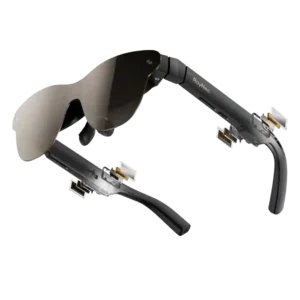
RayNeo Air 3s ProNo score yet
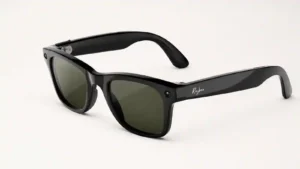
Meta Ray-Ban (Gen 3)
4.3
Hearing Enhancement is one of the standout additions, with hands-on testers finding it genuinely helpful and natural enough to fade into the background during use.
AI features
RayNeo Air 3s ProNo score yet
Meta Ray-Ban (Gen 3)
2.5
Meta’s AI shows useful potential, but the experience is uneven. Testers saw slow actions, incomplete tasks, and occasional wrong answers that keep it from feeling essential.
Android compatibility
RayNeo Air 3s Pro
3.2
Android can be excellent when the device supports USB-C video, with Samsung DeX getting especially positive comments. The RayNeo app experience on Android is much less polished and may require extra installation steps.
Meta Ray-Ban (Gen 3)No score yet
Camera privacy
RayNeo Air 3s ProNo score yet
Meta Ray-Ban (Gen 3)
2.3
The recording safeguards help, but several reviewers still think bystanders may feel vulnerable or fail to notice when the glasses are capturing. Privacy remains one of the product’s biggest weaknesses.
Camera quality
RayNeo Air 3s ProNo score yet
Meta Ray-Ban (Gen 3)
4.0
Opinions depend heavily on the comparison point. One side-by-side test found little visible change from recent Meta glasses, while a Gen 1 owner expected a major leap in image quality.
Capture orientation
RayNeo Air 3s ProNo score yet
Meta Ray-Ban (Gen 3)
5.0
Landscape capture is a meaningful improvement for first-person shooting, producing a view that better matches what the wearer actually sees.
Cloud dependency
RayNeo Air 3s Pro
5.0
Being able to use the glasses without an internet connection is a meaningful plus for users who prefer simple, self-contained hardware.
Meta Ray-Ban (Gen 3)No score yet
Connection stability
RayNeo Air 3s Pro
3.8
Direct USB-C use is usually stable and immediate on compatible hardware, though a few device-specific connection and handshake problems appear.
Meta Ray-Ban (Gen 3)No score yet
Data security
RayNeo Air 3s ProNo score yet
Meta Ray-Ban (Gen 3)
1.8
Trust in Meta remains a major concern. Reviewers question cloud privacy, AI data handling, and whether future protections are enough to make personal-data use feel safe.
Field of view
RayNeo Air 3s Pro
2.8
The roughly mid-40-degree field of view is a recurring compromise. It feels large enough for movies, but corner clipping and a more constrained view than premium rivals are common complaints.
Meta Ray-Ban (Gen 3)No score yet
First-person recording quality
RayNeo Air 3s ProNo score yet
Meta Ray-Ban (Gen 3)
4.0
Hands-free capture remains one of the glasses’ strongest use cases, with immersive audio and usable creator footage earning praise. The main caveat is that glasses capture can still feel slower and less reliable than a phone or dedicated camera.
Hearing assistance features
RayNeo Air 3s ProNo score yet
Meta Ray-Ban (Gen 3)
4.3
Hearing Enhancement is generally well received and can noticeably improve conversational clarity. The added cost tempers enthusiasm for some buyers.
Heat management
RayNeo Air 3s Pro
2.0
Heat is not universal, but it can become noticeable in longer sessions; one source found the face-contact areas especially hot.
Meta Ray-Ban (Gen 3)No score yet
Image clarity
RayNeo Air 3s Pro
3.9
Center clarity is often excellent and can look remarkably crisp, but edge blur and corner visibility are recurring fit-dependent weaknesses, especially for desktop text and HUD elements.
Meta Ray-Ban (Gen 3)No score yet
Included accessories
RayNeo Air 3s Pro
2.7
The included extras are functional, but the felt case and basic cable draw repeated criticism. Several owners prefer the older hard case or wish a light-blocking cover came standard.
Meta Ray-Ban (Gen 3)No score yet
IPhone compatibility
RayNeo Air 3s Pro
3.1
Recent USB-C iPhones with video output work well, but compatibility is model-dependent. Older Lightning iPhones and the iPhone 16e require workarounds or simply lack direct video support.
Meta Ray-Ban (Gen 3)No score yet
Lens clarity
RayNeo Air 3s Pro
2.6
Ambient reflections and light bleed can intrude on the image, especially in bright environments. A shade or darker room improves immersion substantially.
Meta Ray-Ban (Gen 3)No score yet
Media playback
RayNeo Air 3s Pro
4.0
Movies, streaming video, and gaming are where the Air 3s Pro is most consistently loved. The large private screen, bright OLED image, and easy connection make it especially strong for travel and couch use.
Meta Ray-Ban (Gen 3)No score yet
Microphone quality
RayNeo Air 3s ProNo score yet
Meta Ray-Ban (Gen 3)
3.8
The six-mic system is one of the more convincing hardware upgrades. Hands-on testing shows strong voice pickup, though some reviewers found little difference versus other recent Meta glasses.
Offline functionality
RayNeo Air 3s Pro
5.0
The ability to use the core display without accounts, cloud services, or a required app is a welcome part of the simple plug-and-play experience.
Meta Ray-Ban (Gen 3)No score yet
Photo quality
RayNeo Air 3s ProNo score yet
Meta Ray-Ban (Gen 3)
4.0
Dynamic Photos is a useful addition because it improves the odds of capturing a strong frame when subjects are moving.
Power efficiency
RayNeo Air 3s Pro
1.5
Host-device battery drain is a real travel concern. Long streaming or gaming sessions often require a charging adapter, power bank, or nearby outlet.
Meta Ray-Ban (Gen 3)No score yet
Prescription lens compatibility
RayNeo Air 3s Pro
3.1
Prescription inserts can transform clarity for nearsighted users, but wearing normal glasses underneath is often awkward and can worsen fit.
Meta Ray-Ban (Gen 3)No score yet
Privacy indicator light
RayNeo Air 3s ProNo score yet
Meta Ray-Ban (Gen 3)
3.1
The LED is valued as an important safeguard, but opinions are sharply divided on whether it is obvious enough. Some reviewers call it essential, while others think it is too subtle in real-world conditions.
Productivity features
RayNeo Air 3s Pro
3.3
Productivity is highly mixed. Some people successfully use the glasses as a second screen, but edge blur, fixed positioning, and limited workspace make spreadsheets and text-heavy work a poor fit for others.
Meta Ray-Ban (Gen 3)No score yet
Text readability
RayNeo Air 3s Pro
3.4
Subtitles and centered text can look sharp, but small desktop text and content near the edges are much less dependable because of blur and fit limitations.
Meta Ray-Ban (Gen 3)No score yet
Translation features
RayNeo Air 3s ProNo score yet
Meta Ray-Ban (Gen 3)
4.0
Live translation is useful and works solidly in hands-on use, though spoken output can become overwhelming without a more specific prompt.
Video stabilization
RayNeo Air 3s ProNo score yet
Meta Ray-Ban (Gen 3)
5.0
Improved stabilization is expected to make recorded footage look noticeably better than first-generation output.
Visual assistance features
RayNeo Air 3s ProNo score yet
Meta Ray-Ban (Gen 3)
4.0
Hands-free scene description is viewed as a useful accessibility benefit, especially for people who need help understanding their surroundings without pulling out a phone.
Volume level
RayNeo Air 3s Pro
2.7
Maximum volume is the audio system's biggest weakness. It is usually fine in quiet rooms but can be too soft on planes, in cars, or in other noisy environments.
Meta Ray-Ban (Gen 3)No score yet
Weight
RayNeo Air 3s Pro
4.0
At roughly 76 grams, the glasses are consistently viewed as light for the category and much easier to tolerate than bulky VR headsets.
Meta Ray-Ban (Gen 3)No score yet
Weight distribution
RayNeo Air 3s Pro
3.8
Weight balance is generally good and helps reduce nose strain, though comfort still depends heavily on individual fit.
Meta Ray-Ban (Gen 3)No score yet
Controls and connectivity
App quality
RayNeo Air 3s Pro
2.2
The companion software is one of the least convincing parts of the package. Mirror Studio and other app features are described as limited, unstable, or not worth buying the glasses for.
Meta Ray-Ban (Gen 3)No score yet
Bluetooth connectivity
RayNeo Air 3s Pro
2.0
Built-in Bluetooth is a missed convenience for users who want wireless audio or fewer cable-related workarounds.
Meta Ray-Ban (Gen 3)No score yet
Review contexts may differ, so use caution when interpreting the score gap.
Button responsiveness
RayNeo Air 3s Pro
4.5
The tactile on-glasses buttons make quick adjustments feel direct and dependable.
Meta Ray-Ban (Gen 3)No score yet
Companion app quality
RayNeo Air 3s Pro
2.5
The companion app adds some extra functions, but it is much less compelling than the core plug-and-play display experience and is notably limited on iPhone.
Meta Ray-Ban (Gen 3)No score yet
Smartphone compatibility
RayNeo Air 3s Pro
4.0
Phone support is broad only when the handset can output DisplayPort video over USB-C, so checking the exact device matters before buying.
Meta Ray-Ban (Gen 3)No score yet
Third-party app support
RayNeo Air 3s Pro
4.5
Alternative software can fill some gaps better than RayNeo's own app, particularly for specialized playback or virtual-screen functions.
Meta Ray-Ban (Gen 3)No score yet
Review contexts may differ, so use caution when interpreting the score gap.
Touch controls
RayNeo Air 3s ProNo score yet
Meta Ray-Ban (Gen 3)
1.5
The touchpad remains a weak point. Reviewers report accidental play/pause inputs while adjusting the glasses, with no clear fix for the inherited issue.
User interface
RayNeo Air 3s Pro
4.5
The simple on-screen menu is easy to learn and keeps picture, refresh-rate, and audio adjustments accessible without much friction.
Meta Ray-Ban (Gen 3)No score yet
Voice assistant support
RayNeo Air 3s ProNo score yet
Meta Ray-Ban (Gen 3)
2.0
The built-in assistant is not universally convincing. One reviewer finds it more effort than simply searching for an answer on a phone.
Voice command accuracy
RayNeo Air 3s ProNo score yet
Meta Ray-Ban (Gen 3)
4.0
Voice interaction is generally accurate even when spoken quietly, though occasional completely wrong answers keep it from being fully reliable.
Voice control
RayNeo Air 3s ProNo score yet
Meta Ray-Ban (Gen 3)
3.5
Voice control generally works well, including quiet speech, but a comparative test did not show a clear pickup advantage over other recent Meta glasses.
Voice pickup
RayNeo Air 3s ProNo score yet
Meta Ray-Ban (Gen 3)
4.0
Voice pickup is strong in noisy environments, although a comparative test found the improvement over other recent Meta glasses less obvious.
Performance
Audio leakage
RayNeo Air 3s Pro
3.9
Whisper mode usually keeps sound impressively private at moderate volume, which works well for travel and shared rooms. Leakage becomes more noticeable as volume rises.
Meta Ray-Ban (Gen 3)No score yet
Augmented reality performance
RayNeo Air 3s Pro
2.1
These are much stronger as wearable display glasses than as true AR hardware. The lack of screen anchoring and richer spatial interaction repeatedly limits the augmented-reality experience.
Meta Ray-Ban (Gen 3)No score yet
Background noise reduction
RayNeo Air 3s ProNo score yet
Meta Ray-Ban (Gen 3)
4.5
The upgraded microphone system performs well in noisy settings. Reviewers found voice pickup effective at a busy reception and expected clearer calls and commands around traffic or crowds.
Bass performance
RayNeo Air 3s Pro
3.9
Bass is surprisingly respectable for tiny open speakers, and several sources noticed warmer or fuller tuning. Others still find the low end light compared with proper headphones.
Meta Ray-Ban (Gen 3)No score yet
Blue light filtering
RayNeo Air 3s Pro
3.6
Eye-protection and low-blue-light features are generally viewed as useful for longer sessions, especially alongside the adjustable brightness and eye-care modes.
Meta Ray-Ban (Gen 3)No score yet
Color accuracy
RayNeo Air 3s Pro
4.4
Color is a major strength: vivid, rich output is repeatedly praised, with professional and movie-oriented modes adding useful flexibility without obvious crushing or dullness.
Meta Ray-Ban (Gen 3)No score yet
Contrast
RayNeo Air 3s Pro
4.6
Deep blacks and strong OLED contrast are repeatedly praised and contribute heavily to the cinematic look.
Meta Ray-Ban (Gen 3)No score yet
Display adjustment
RayNeo Air 3s Pro
3.4
Brightness and picture controls are flexible, but physical viewing adjustment is much more constrained. Missing IPD, diopter, screen-size, and repositioning controls can make the fit unforgiving.
Meta Ray-Ban (Gen 3)No score yet
Display brightness
RayNeo Air 3s Pro
4.4
Brightness is one of the clearest strengths. The 1,200-nit ceiling makes the Pro visibly stronger than earlier models and very effective indoors, though sunlight can still overpower it.
Meta Ray-Ban (Gen 3)No score yet
Display positioning
RayNeo Air 3s Pro
1.9
The virtual screen stays tied to your gaze instead of remaining anchored in space. That is fine for still viewing, but movement can feel disorienting and makes serious desktop use harder.
Meta Ray-Ban (Gen 3)No score yet
Display quality
RayNeo Air 3s Pro
4.4
The Micro-OLED image is the product's biggest selling point, with strong praise for sharpness, color, brightness, and cinematic impact across movies and games.
Meta Ray-Ban (Gen 3)No score yet
Display resolution
RayNeo Air 3s Pro
4.3
1080p per eye looks sharper than the number suggests for media and gaming. Text-heavy desktop work exposes the resolution limits more readily.
Meta Ray-Ban (Gen 3)No score yet
Low-light visibility
RayNeo Air 3s Pro
4.0
Dark rooms are an ideal environment for these glasses, where the OLED image looks vivid and immersive without fighting ambient light.
Meta Ray-Ban (Gen 3)No score yet
Outdoor visibility
RayNeo Air 3s Pro
2.8
The brighter Pro display handles ambient light better than earlier models, but direct sunlight, glare, and the lack of built-in dimming or a standard blackout cover still limit outdoor use.
Meta Ray-Ban (Gen 3)No score yet
Comfort and build
Build quality
RayNeo Air 3s Pro
4.0
The frame is usually described as solid and sturdy despite its plastic construction. A minority find the plastics cheap-feeling, so the build impresses more for rigidity than premium materials.
Meta Ray-Ban (Gen 3)No score yet
Durability
RayNeo Air 3s Pro
3.0
The glasses themselves generally feel sturdy enough for regular use, but the overall protection story is weakened by the softer carrying case and non-rugged construction.
Meta Ray-Ban (Gen 3)No score yet
Frame size options
RayNeo Air 3s Pro
3.3
A single basic frame size works for many people but can be restrictive for very large heads or unusual eye spacing.
Meta Ray-Ban (Gen 3)No score yet
Materials quality
RayNeo Air 3s Pro
2.8
The plastics keep weight down and can feel solid in use, but some sources explicitly describe the finish as cheap or less premium than higher-priced rivals.
Meta Ray-Ban (Gen 3)No score yet
Nose pad comfort
RayNeo Air 3s Pro
4.1
The adjustable nose pads help many users find a comfortable position, but some still report pressure or marks after long sessions.
Meta Ray-Ban (Gen 3)No score yet
Temple comfort
RayNeo Air 3s Pro
3.2
Flexible temples help with fit, but thicker arms, warmth, and the rear cable can create pressure or awkwardness during long sessions or when reclining.
Meta Ray-Ban (Gen 3)No score yet
Virtual screen size
RayNeo Air 3s Pro
4.0
The perceived screen can feel impressively theater-like, but the 201-inch claim is highly perspective-dependent. Some users see a giant cinema image while others perceive something closer to a large nearby monitor.
Meta Ray-Ban (Gen 3)No score yet
Battery and charging
Charging case
RayNeo Air 3s ProNo score yet
Meta Ray-Ban (Gen 3)
5.0
The redesigned foldable charging case gets enthusiastic praise for being easier to carry than the bulky older case.
Charging method
RayNeo Air 3s Pro
3.4
Drawing power from the connected device keeps the glasses light and avoids another battery to charge, but the required cable and adapters can complicate charging while using them.
Meta Ray-Ban (Gen 3)No score yet
Tracking and training
Fitness tracking
RayNeo Air 3s ProNo score yet
Meta Ray-Ban (Gen 3)
2.0
The lack of meaningful new fitness features is a disappointment, especially as competing wearables expand deeper into health and activity integrations.
Head tracking
RayNeo Air 3s Pro
1.8
Display head tracking is the standout missing capability. The screen generally follows head movement instead of staying fixed in the room, which limits spatial use and can trigger motion discomfort.
Meta Ray-Ban (Gen 3)No score yet
Tracking latency
RayNeo Air 3s Pro
3.0
Gaming response is usually quick, but isolated reports of input lag or software-induced motion problems show that latency can vary by setup.
Meta Ray-Ban (Gen 3)No score yet
Tracking stability
RayNeo Air 3s Pro
1.5
Attempts to stabilize or virtualize the screen through software can introduce drift or shakiness, while the native display itself remains rigidly head-locked.
Meta Ray-Ban (Gen 3)No score yet
Ownership and support
Prescription support
RayNeo Air 3s Pro
2.9
Prescription support is workable through custom inserts and partner services, yet the extra cost, ordering delay, and lack of built-in diopter adjustment add friction.
Meta Ray-Ban (Gen 3)No score yet
Setup ease
RayNeo Air 3s Pro
4.1
Core setup is one of the strongest usability wins: compatible USB-C devices are usually plug-and-play with little or no configuration.
Meta Ray-Ban (Gen 3)No score yet