Compare Asus ROG Raikiri II vs Thrustmaster eSwap X2 H.E.

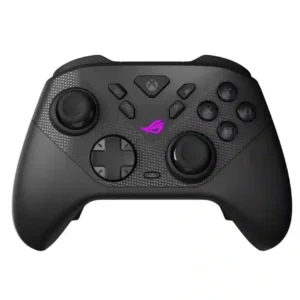
Asus ROG Raikiri II

Asus ROG Raikiri II

Overall score 4.3 / 5

Based on 42 scored reviews

vs
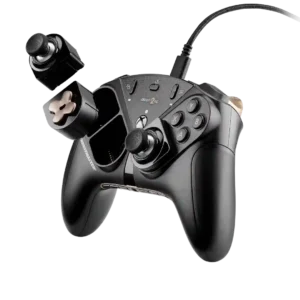
Thrustmaster eSwap X2 H.E.

Thrustmaster eSwap X2 H.E.

Overall score 3.9 / 5

Based on 11 scored reviews

How we score

Scorata scores summarize analyzed review evidence on a 1–5 scale; they are not laboratory measurements or a simple average of customer star ratings. Feature scores summarize the reviews covering that feature. The overall score averages feature scores within each review, then combines review averages. When both expert and customer evidence are available, those two groups receive equal weight. Products can have different review coverage, so small score gaps do not establish a winner.

Recommendations prioritize important features for the category, with a score of at least 3.5, a gap of at least 0.25 points and at least two supporting reviews per product. Features with widely varying scores or broad connectivity contexts are excluded from recommendations. These safeguards do not establish statistical significance.

Quick verdict

What each product is best for

The review evidence points to a tradeoff: wired performance and overall comfort versus bumper responsiveness and software customization. Choose according to which strengths matter more to you; the overall score alone does not settle that choice.

Choose Asus ROG Raikiri II for wired performance and overall comfort.

Choose Thrustmaster eSwap X2 H.E. for bumper responsiveness and software customization.

Why these recommendations?

Asus ROG Raikiri II

Where It Has the Edge

  • wired performance is 5.0 vs 4.0. Wired USB-C performance is excellent, delivering the lowest latency and stable high polling while remaining available for play-and-charge.
  • overall comfort is 4.6 vs 3.8. Comfort is a broad strength thanks to the familiar Xbox-style shape, textured grips and balanced shell. The main...
  • design and aesthetics is 5.0 vs 4.5. The design is widely praised as sleek, restrained and recognizably ROG without becoming overly flashy. Subtle lighting and...

Thrustmaster eSwap X2 H.E.

Where It Has the Edge

  • bumper responsiveness is 5.0 vs 4.5. Bumpers are consistently fast and clicky, with the mechanical shoulder controls contributing to the controller's immediate response.
  • software customization is 5.0 vs 4.6. Software customization is deep, covering stick curves and dead zones, trigger behavior, button mapping, profiles, and other detailed...
  • button quality is 5.0 vs 4.6. Mechanical buttons are one of the controller's clearest strengths, with clicky, tactile, satisfying presses that feel robust and...
Asus ROG Raikiri II 4.3 overall score
Thrustmaster eSwap X2 H.E. 3.9 overall score

Compare features

Scores are out of 5. Missing scores mean missing review evidence, not a missing feature.

Scored on both products

Comfort and build

Start and Select button design
Asus ROG Raikiri II
1.3

The extra ROG Ally shortcut keys repeatedly interfere with the usual Start/View layout. Several testers hit the wrong button or found the real menu controls awkward to reach.

Thrustmaster eSwap X2 H.E.
5.0

The View and Menu controls are more prominent than on some related Thrustmaster designs, making them easier to find in play.

Ergonomics
Asus ROG Raikiri II
4.4

The Xbox-style shape is generally comfortable and natural, with thoughtful grip contours. Fit becomes more personal around the trigger reach and rear-button layout.

Thrustmaster eSwap X2 H.E.
3.0

The bulky shape favors big-handed players and can feel unwieldy for others, so the ergonomics are not universally accommodating.

Size suitability for different hand sizes
Asus ROG Raikiri II
4.0

Medium and larger hands are generally well served by the grip shape, while smaller hands may find the trigger reach and overall span less natural.

Thrustmaster eSwap X2 H.E.
3.1

The controller's large, chunky body strongly favors bigger hands. Smaller-handed players can adapt, but several found the size less natural or more cumbersome.

Overall comfort
Asus ROG Raikiri II
4.6

Comfort is a broad strength thanks to the familiar Xbox-style shape, textured grips and balanced shell. The main caveat is that rear-button placement and hard micro-switch presses can reduce comfort for some hands.

Thrustmaster eSwap X2 H.E.
3.8

Comfort is best with larger hands: the chunky body can feel very comfortable there, while smaller hands may need time to adapt.

Durability
Asus ROG Raikiri II
4.3

Early durability impressions are mostly strong, helped by TMR sticks and micro-switch construction. Concerns center on smaller plastic parts such as removable stick caps rather than the main shell.

Thrustmaster eSwap X2 H.E.
5.0

Durability is a major strength. The controller and its magnetic modules are described as sturdy, dependable, and capable of holding up through heavy use.

Design and aesthetics
Asus ROG Raikiri II
5.0

The design is widely praised as sleek, restrained and recognizably ROG without becoming overly flashy. Subtle lighting and varied textures add to the premium look.

Thrustmaster eSwap X2 H.E.
4.5

The understated black design feels mature and premium, although mixed matte and glossy surfaces create a little visual inconsistency.

Build quality
Asus ROG Raikiri II
4.9

The controller itself is overwhelmingly described as solid, rigid and well assembled, with tight seams and very little flex or creaking.

Thrustmaster eSwap X2 H.E.
4.9

Build quality is a standout strength, repeatedly described as sturdy, solid, reliable, and even 'bombproof.' The modular parts still feel secure rather than flimsy.

Ownership and support

Firmware update support
Asus ROG Raikiri II
4.4

Firmware support has been responsive enough to fix early connectivity or tuning problems, though one setup-heavy experience still found the update process frustrating.

Thrustmaster eSwap X2 H.E.
1.0

Firmware support drew a severe complaint from one customer, who called the firmware useless during failed mapping attempts.

Ease of setup
Asus ROG Raikiri II
3.7

Basic mode switching can be simple, but setup quality depends heavily on software. One tester encountered a long sequence of installs and updates that turned setup into a major frustration.

Thrustmaster eSwap X2 H.E.
1.0

One customer had a very poor setup experience, reporting repeated failed attempts to make the desired controller-to-keyboard mapping work.

Upgrade value
Asus ROG Raikiri II
5.0

As an upgrade from earlier Raikiri models, the II is widely seen as a substantial step forward in responsiveness, wireless capability, controls, accessories and overall execution.

Thrustmaster eSwap X2 H.E.
2.6

Upgrade value is limited for owners of earlier eSwap models because the new Hall effect modules can often be bought separately. New buyers get the strongest case for choosing the H.E. version.

Value for money
Asus ROG Raikiri II
3.5

Value depends heavily on priorities. Many reviewers think the $190-class package earns its price through TMR hardware and accessories, while others see cheaper alternatives or setup flaws as reasons to spend less.

Thrustmaster eSwap X2 H.E.
2.8

Value is one of the biggest tradeoffs. The controller can feel worth it for its performance and customization, but the high price, paid add-ons, and wired-only design draw repeated criticism.

Other features

Haptic feedback quality
Asus ROG Raikiri II
2.0

Haptic immersion is limited; the light rumble was described as understated and less textured than stronger first-party feedback systems.

Thrustmaster eSwap X2 H.E.
5.0

Haptic feedback feels satisfying in normal play, with the revised rumble praised for being more controlled and enjoyable.

Accessibility features
Asus ROG Raikiri II
2.5

Vibration adjustment can help players who are sensitive to strong rumble, but the lack of illuminated face-button labels was called out as a real accessibility problem in dark rooms.

Thrustmaster eSwap X2 H.E.
5.0

The modular layout is especially helpful for accessibility, letting players quickly rearrange stick and D-pad positions around different needs and preferences.

Vibration quality
Asus ROG Raikiri II
2.9

Vibration is serviceable rather than a standout. Some testers find it controlled and precise, but others call it weak or too understated for immersive single-player play.

Thrustmaster eSwap X2 H.E.
5.0

Rumble is much improved over the earlier overly intense tuning, settling into a more traditional and deeply satisfying vibration feel.

Included accessories
Asus ROG Raikiri II
4.8

The accessory bundle is a standout, typically including a protective case, charging stand, cable, dongle storage and alternate stick caps. It makes the premium package feel complete and travel-ready.

Thrustmaster eSwap X2 H.E.
2.8

The package is mixed: Hall effect sticks and alternate caps add value, but the lack of a proper hard case and extra modules feels stingy at this price.

Grip texture
Asus ROG Raikiri II
4.9

The textured and rubberized grip surfaces are repeatedly praised for staying secure without feeling overly rough or sticky.

Thrustmaster eSwap X2 H.E.
3.0

Grip treatment is mixed. Rubberized side pads add purchase, but another take found the grips and removable panels too slick and sub-par.

Analog trigger precision
Asus ROG Raikiri II
4.7

The full-range TMR triggers are excellent for nuanced analog control, especially throttle and braking in racing games. One tester found the feel less subtle than expected.

Thrustmaster eSwap X2 H.E.
3.0

The analog triggers work, but the lack of Hall effect trigger sensors is a missed opportunity for better precision and long-term reliability.

D-pad feel
Asus ROG Raikiri II
4.3

The D-pad generally feels springy, crisp and satisfying, although a few testers describe it as spongy or less refined in certain directions.

Thrustmaster eSwap X2 H.E.
3.0

D-pad feel is divisive. Some praise its crisp mechanical click, while others find the raised, blobby shape uncomfortable and indistinct under the thumb.

Material quality
Asus ROG Raikiri II
3.3

Materials are mixed by component. The controller shell and grips usually feel high quality, while the charging dock and some removable plastic parts attract criticism for feeling cheap or fragile.

Thrustmaster eSwap X2 H.E.
4.5

The sturdy black-plastic construction feels robust and appropriate for a premium wired controller.

Compatibility with Xbox
Asus ROG Raikiri II
3.8

Xbox support works well at the hardware level, including wireless dongle connectivity, but console-only users face more software and profile-management friction than PC players.

Thrustmaster eSwap X2 H.E.
5.0

Xbox use is equally strong, with the controller praised as a tremendous Xbox pad and designed around the familiar Xbox control layout.

Platformer control precision
Asus ROG Raikiri II
4.7

Platformers generally benefit from the quick buttons and precise directional response, though the D-pad is less convincing for more complex motion-heavy play.

Thrustmaster eSwap X2 H.E.
3.5

Platformer control is mixed because stick precision is excellent, but the D-pad's uncomfortable shape can make directional platforming less pleasant.

Analog stick precision
Asus ROG Raikiri II
3.8

Fine stick control can be excellent after tuning, with strong praise for tiny aiming and steering adjustments. Several testers found the stock deadzones or wide stick wells caused over-correction or weak micro-aiming.

Thrustmaster eSwap X2 H.E.
4.9

Stick precision is excellent, with Hall effect models delivering extremely accurate movement, aiming, and steering and earlier sticks also praised for precise control.

Fighting game suitability
Asus ROG Raikiri II
2.8

Fighting-game performance is inconsistent. Some testers liked the fast buttons and one praised the rotating D-pad, while others found diagonal sequences and circular motions unreliable.

Thrustmaster eSwap X2 H.E.
3.8

Fighting-game suitability is mixed. Some praise the mechanical D-pad and optional fight-focused layouts, while others find the D-pad shape uncomfortable enough to avoid for fighters.

Onboard profile storage
Asus ROG Raikiri II
4.0

Five onboard profiles are useful for storing different game setups, but profile switching and identification are not equally convenient in every environment, especially on Xbox.

Thrustmaster eSwap X2 H.E.
5.0

Two personalized profiles can be stored on the controller and switched with dedicated controls, making different game setups easy to keep ready.

Hand fatigue over long sessions
Asus ROG Raikiri II
3.4

The shell itself handles long sessions well, but button fatigue divides testers. Some report hours without discomfort, while others found the hard micro-switch impacts tiring on fingers and joints.

Thrustmaster eSwap X2 H.E.
2.5

The substantial heft can wear on the hands over longer sessions; after a few hours, the weight is hard to ignore.

Weight balance
Asus ROG Raikiri II
4.4

Weight is usually praised as light yet balanced and substantial enough to feel premium. One reviewer preferred a heavier controller and thought the lighter feel reduced perceived quality.

Thrustmaster eSwap X2 H.E.
3.7

At around 300g, the controller has reassuring heft without a battery, but its weight becomes more noticeable during long play.

Bumper responsiveness
Asus ROG Raikiri II
4.5

Bumpers actuate quickly and with very little force. That speed is useful, though the light touch may require a short adjustment period.

Thrustmaster eSwap X2 H.E.
5.0

Bumpers are consistently fast and clicky, with the mechanical shoulder controls contributing to the controller's immediate response.

Casual gaming suitability
Asus ROG Raikiri II
3.0

Casual and single-player suitability is mixed. The shape is comfortable, but the aggressive micro-switch feel and competitive focus can make softer controllers more appealing for long, relaxed sessions.

Thrustmaster eSwap X2 H.E.
2.5

Casual players may find the controller excessive for the money, especially if they mainly want drift-resistant sticks and can get that more cheaply elsewhere.

USB-C convenience
Asus ROG Raikiri II
5.0

USB-C play-and-charge keeps the controller usable when the battery runs low, avoiding downtime during longer sessions.

Thrustmaster eSwap X2 H.E.
4.5

USB-C is a welcome modernization over the older connection and helps make the wired setup more current and convenient.

Stick drift resistance
Asus ROG Raikiri II
4.6

Stick-drift resistance is a major reason reviewers favor the TMR hardware, with repeated confidence that it avoids the wear problem of traditional potentiometers. One test unit did show drift-like calibration behavior, tempering the otherwise strong consensus.

Thrustmaster eSwap X2 H.E.
5.0

Drift resistance is one of the strongest reasons to choose the H.E. version. Hall effect sticks are repeatedly credited with eliminating or greatly reducing drift risk.

Bumper quality
Asus ROG Raikiri II
4.7

The bumpers feel strong and well implemented, with micro-switch construction giving them a crisp, premium character.

Thrustmaster eSwap X2 H.E.
5.0

The bumpers have a satisfying clicky feel that matches the controller's strong mechanical-button quality.

Input lag
Asus ROG Raikiri II
4.7

Input lag is consistently low in testing, especially over wired and 2.4GHz connections. A small number of measurements found stick latency less impressive, but gameplay usually felt immediate.

Thrustmaster eSwap X2 H.E.
5.0

Input lag is a major strength of the wired design, with near-zero latency and quick USB-C response repeatedly highlighted.

Premium feel
Asus ROG Raikiri II
4.6

The controller usually feels convincingly premium through its solid shell, finish, controls and presentation. A few testers think the light weight or cheaper dock materials weaken that impression.

Thrustmaster eSwap X2 H.E.
4.8

Firmness, heft, and sturdy construction give the controller a convincing premium feel, even when the design itself stays understated.

Competitive gaming suitability
Asus ROG Raikiri II
5.0

Competitive play is the controller’s clearest use case. Fast micro-switches, trigger stops, rear controls and low-latency connectivity repeatedly earn praise for shooters and other reaction-heavy games.

Thrustmaster eSwap X2 H.E.
4.9

Competitive play is a core strength thanks to low wired latency, fast mechanical buttons, rear inputs, Hall effect precision, and effective trigger stops.

Racing game suitability
Asus ROG Raikiri II
4.9

Racing games are a strong fit because the full-travel analog triggers allow fine throttle and brake control, while the precise sticks help with steering.

Thrustmaster eSwap X2 H.E.
5.0

Racing performance is excellent, with Hall effect sticks providing especially precise steering in Forza.

Analog stick smoothness
Asus ROG Raikiri II
4.8

Stick movement is consistently described as smooth, springy and controlled, with anti-friction rings helping the sticks glide cleanly.

Thrustmaster eSwap X2 H.E.
4.9

Stick movement feels notably smooth and slick, with the Hall effect modules drawing especially strong praise for their feel.

Learning curve
Asus ROG Raikiri II
3.4

The controller has a modest learning curve around ultra-short buttons, deadzone tuning, profile controls and unusual menu-key placement. Most testers adapted after some use.

Thrustmaster eSwap X2 H.E.
3.5

The extra lower buttons require a short adjustment period before they feel natural.

Cable length and quality
Asus ROG Raikiri II
4.3

The included braided cable feels strong and premium, and its generous length is useful. One tester found it stiff enough to prefer a more flexible third-party cable.

Thrustmaster eSwap X2 H.E.
4.3

The included cable is long enough for most setups, with the H.E. version extending the leash compared with an earlier model.

Overall satisfaction
Asus ROG Raikiri II
4.4

Overall sentiment is strongly positive: most testers see this as a high-performance premium controller with standout precision and speed. The main dissent centers on setup, price, harsh buttons and a few awkward design choices.

Thrustmaster eSwap X2 H.E.
4.4

The controller earns strong praise for precision, build quality, customization, and mechanical inputs. Price, wired-only operation, size, and the D-pad are the main reservations.

Compatibility with PC
Asus ROG Raikiri II
5.0

PC is where the controller feels most complete, with full customization, 1,000Hz operation and flexible wired, Bluetooth and 2.4GHz use.

Thrustmaster eSwap X2 H.E.
5.0

PC use is a strong fit; the controller was tested as a daily driver and described as a tremendous PC controller.

Consistency across sessions
Asus ROG Raikiri II
5.0

Across longer tests and multiple genres, the controller stayed consistent, with reliable connections, stable controls and strong day-to-day behavior.

Thrustmaster eSwap X2 H.E.
5.0

Long-term consistency looks strong, with the controller described as remaining reliable and precise through extended play.

Steering precision
Asus ROG Raikiri II
5.0

Fine steering adjustments are a strong point; small stick movements translated into precise directional changes in racing tests.

Thrustmaster eSwap X2 H.E.
5.0

Hall effect sticks are particularly effective for racing, giving fine, confident steering control in Forza.

Trigger responsiveness
Asus ROG Raikiri II
5.0

Trigger response is outstanding in short mode, with near-instant mouse-like clicks that repeatedly impress shooter-focused testers.

Thrustmaster eSwap X2 H.E.
5.0

Trigger response is excellent when the physical locks are engaged, cutting travel and making presses faster for shooters and other quick-input games.

Trigger stop effectiveness
Asus ROG Raikiri II
5.0

Trigger stops are one of the most consistently praised features, switching quickly into a firm, extremely short micro-switch action that suits shooters.

Thrustmaster eSwap X2 H.E.
5.0

Physical trigger stops are highly effective, sharply reducing travel and making the triggers quick and easy to activate.

Controls and connectivity

Onboard audio controls
Asus ROG Raikiri II
2.0

Dedicated headset control has regressed because the former mute function is no longer clearly available from a hardware button.

Thrustmaster eSwap X2 H.E.
5.0

Dedicated onboard volume controls beside the headset jack are a welcome convenience that keeps common audio adjustments off external menus.

Screenshot button usefulness
Asus ROG Raikiri II
2.0

The share/screenshot control sits lower than ideal, making its placement a minor usability complaint.

Thrustmaster eSwap X2 H.E.
5.0

The Share button is prominent and easy to locate alongside the other Xbox function controls.

Back button usefulness
Asus ROG Raikiri II
4.9

The rear buttons can keep thumbs on the sticks and move common actions under the fingers, which testers found genuinely useful for faster play.

Thrustmaster eSwap X2 H.E.
3.3

Rear-button usefulness depends heavily on hand fit. They can provide a competitive edge, but some players find them less intuitive or prone to accidental presses.

Button noise
Asus ROG Raikiri II
3.0

The mechanical buttons deliver a pronounced click that some testers enjoy, but others find noticeably loud during rapid play. Noise tolerance will matter here.

Thrustmaster eSwap X2 H.E.
2.0

The mechanical buttons are satisfyingly clicky but can be loud enough to bother a roommate in the same room.

Companion app quality
Asus ROG Raikiri II
3.5

Gear Link offers strong control without a heavy desktop app, and many testers like the browser-based approach. Others strongly dislike the internet requirement, PC dependence or setup friction, making the software experience one of the most divisive areas.

Thrustmaster eSwap X2 H.E.
4.5

ThrustmapperX gives broad access to controller tuning, making it a capable companion for players who want to fine-tune inputs.

Back button placement
Asus ROG Raikiri II
4.3

Rear-button placement is usually a highlight, sitting naturally under the middle and ring fingers. Some hand positions cause accidental presses, so the layout is not universal.

Thrustmaster eSwap X2 H.E.
3.4

Rear-button placement is polarizing: it fits some hands naturally, while smaller-handed users can struggle with the central position or trigger buttons accidentally.

Software customization
Asus ROG Raikiri II
4.6

Software tuning is extensive, with detailed control over curves, deadzones, triggers, vibration, lighting and profiles. The settings are powerful even when the delivery method is divisive.

Thrustmaster eSwap X2 H.E.
5.0

Software customization is deep, covering stick curves and dead zones, trigger behavior, button mapping, profiles, and other detailed settings.

Button quality
Asus ROG Raikiri II
4.6

Micro-switch buttons are one of the most consistently praised parts of the controller, offering crisp, tactile and very fast presses. Some testers find the rigid click harsh over long sessions.

Thrustmaster eSwap X2 H.E.
5.0

Mechanical buttons are one of the controller's clearest strengths, with clicky, tactile, satisfying presses that feel robust and fast.

Button remapping options
Asus ROG Raikiri II
4.0

Remapping is flexible for controller inputs and can be very quick, including on-the-fly changes. The main limitation is that several buttons can only mirror existing controller commands rather than keyboard keys or combos.

Thrustmaster eSwap X2 H.E.
3.7

Remapping is powerful when it works, with rear buttons and other inputs configurable through software or onboard controls. One customer, however, could not get the desired keyboard mapping to function.

Face button responsiveness
Asus ROG Raikiri II
4.8

Face buttons register exceptionally quickly, with immediate micro-switch actuation that suits fast play. Extremely rapid repeated presses can occasionally expose reset behavior on some units.

Thrustmaster eSwap X2 H.E.
5.0

Face buttons are consistently praised for crisp, immediate response, with short actuation that makes inputs feel fast and precise.

Customization depth
Asus ROG Raikiri II
4.8

Customization is deep, covering stick curves and deadzones, trigger ranges, vibration, lighting, mappings and profiles. Testers repeatedly describe the tuning range as one of the controller’s premium strengths.

Thrustmaster eSwap X2 H.E.
5.0

Modularity is one of the product's defining strengths, allowing fast stick/D-pad rearrangement, alternate modules, and extensive per-game customization.

Face button travel
Asus ROG Raikiri II
5.0

Face-button travel is exceptionally short, creating near-instant actuation. That speed is a competitive advantage but contributes to the harder, less cushioned feel some testers dislike.

Thrustmaster eSwap X2 H.E.
5.0

The face buttons use very short actuation travel, helping inputs register quickly and giving the controls a snappy feel.

Programmable button support
Asus ROG Raikiri II
5.0

Programmable rear controls are genuinely useful because they can be assigned quickly and moved to important in-game actions without taking a thumb off the sticks.

Thrustmaster eSwap X2 H.E.
5.0

Four programmable rear inputs add meaningful competitive flexibility and can be customized to suit different games.

Performance

D-pad accuracy
Asus ROG Raikiri II
3.4

D-pad accuracy is mixed: it works well for menus and simpler directional play, but complex diagonals and fighting-game motions expose inconsistency for several testers.

Thrustmaster eSwap X2 H.E.
4.5

The D-pad performs accurately even when its shape is disliked; functionally, it was described as matching the high performance of the other inputs.

Wired performance
Asus ROG Raikiri II
5.0

Wired USB-C performance is excellent, delivering the lowest latency and stable high polling while remaining available for play-and-charge.

Thrustmaster eSwap X2 H.E.
4.0

Wired performance is excellent for latency and competitive response, but the tether remains restrictive and inconvenient for living-room use.

FPS performance
Asus ROG Raikiri II
4.0

The controller is a strong FPS fit once the sticks are tuned, thanks to rapid triggers and responsive inputs. Default deadzones or game-specific trigger behavior can make fine aiming less convincing for some players.

Thrustmaster eSwap X2 H.E.
4.7

Shooter performance is strong, helped by precise sticks, short trigger travel, and fast buttons; several accounts found aiming or reaction-heavy play easier.

Evidence available for one product

Battery and charging

Battery life
Asus ROG Raikiri II
4.8

Battery life is a major strength, commonly landing around 30–50 hours depending on RGB, vibration and audio settings. Testers rarely felt pressured to recharge during normal use.

Thrustmaster eSwap X2 H.E.No score yet
Battery replaceability
Asus ROG Raikiri II
2.0

The integrated battery cannot be replaced easily, which was specifically called out as a repairability drawback.

Thrustmaster eSwap X2 H.E.No score yet
Charging dock support
Asus ROG Raikiri II
3.0

The charging dock is convenient and can keep the pad topped up, especially when paired with the case and dongle port. Build quality varies sharply by reviewer, with several calling the stand cheap, light or flimsy.

Thrustmaster eSwap X2 H.E.No score yet

Performance

2.4GHz dongle performance
Asus ROG Raikiri II
4.8

The 2.4GHz link is repeatedly praised for low latency and dependable response, with the compact dongle also earning points for practical storage and positioning.

Thrustmaster eSwap X2 H.E.No score yet
Audio jack quality
Asus ROG Raikiri II
5.0

The 3.5mm headset jack performs very well, with strong volume and very low audio latency even over the wireless dongle.

Thrustmaster eSwap X2 H.E.No score yet
Hall effect stick performance
Asus ROG Raikiri IINo score yet
Thrustmaster eSwap X2 H.E.
4.9

The Hall effect sticks are the headline upgrade, bringing excellent precision, smooth feel, strong tracking, and much better long-term drift resistance.

TMR stick performance
Asus ROG Raikiri II
4.7

TMR is one of the controller’s headline strengths, delivering crisp, smooth and highly precise stick behavior in most testing. A minority found the default deadzones or tuning disappointing until adjusted.

Thrustmaster eSwap X2 H.E.No score yet

Other features

Analog stick tension
Asus ROG Raikiri II
2.5

Stick tension is divisive: some testers found the TMR sticks unusually light or too loose, especially if they prefer firmer resistance.

Thrustmaster eSwap X2 H.E.No score yet
Control placement
Asus ROG Raikiri IINo score yet
Thrustmaster eSwap X2 H.E.
5.0

The main inputs and rear buttons are positioned clearly and comfortably, keeping key controls easy to reach.

Microphone passthrough quality
Asus ROG Raikiri II
5.0

Headset passthrough is strong, with solid audio quality and low latency through the controller’s 3.5mm connection.

Thrustmaster eSwap X2 H.E.No score yet
Mobile compatibility
Asus ROG Raikiri II
2.3

Mobile support is inconsistent. Some Windows-handheld use works well, but smartphone recognition is incomplete and one tester explicitly advises iOS and Android users to avoid it.

Thrustmaster eSwap X2 H.E.No score yet
Paddle quality
Asus ROG Raikiri II
5.0

The rear paddle-style controls respond quickly and click crisply, reinforcing the controller’s fast mechanical feel.

Thrustmaster eSwap X2 H.E.No score yet
Polling rate
Asus ROG Raikiri II
4.8

The 1,000Hz polling mode on PC is a major performance selling point, giving the controller a fast, immediate feel over both wired and 2.4GHz connections.

Thrustmaster eSwap X2 H.E.No score yet
Portability
Asus ROG Raikiri II
5.0

The compact case and integrated dongle storage make the controller easy to carry, with strong protection for travel.

Thrustmaster eSwap X2 H.E.No score yet
Repairability
Asus ROG Raikiri II
2.0

Repairability takes a hit from the sealed, integrated battery, which is not designed for straightforward user replacement.

Thrustmaster eSwap X2 H.E.No score yet
Retro gaming suitability
Asus ROG Raikiri II
5.0

Retro games work cleanly in the tested use case, with no input problems reported when using the controller for older-style play.

Thrustmaster eSwap X2 H.E.No score yet
RGB lighting usefulness
Asus ROG Raikiri II
3.9

The RGB is generally seen as tasteful and highly customizable, and the battery-status lighting can be genuinely useful. A few testers felt grip lighting was wasted power because it is hidden under the hands.

Thrustmaster eSwap X2 H.E.No score yet
Symmetrical stick layout
Asus ROG Raikiri IINo score yet
Thrustmaster eSwap X2 H.E.
5.0

The magnetic modules make a symmetrical PlayStation-style stick layout quick and easy to adopt, and players who prefer that arrangement value the flexibility.

Thumbstick grip
Asus ROG Raikiri II
2.0

The removable stick-cap system is convenient, but one reviewer found the plastic connection fragile and insufficiently secure for frequent swapping.

Thrustmaster eSwap X2 H.E.No score yet
Travel friendliness
Asus ROG Raikiri II
5.0

The protective case, in-case charging and integrated dongle storage make the controller particularly practical for tournaments and trips.

Thrustmaster eSwap X2 H.E.No score yet
Trigger smoothness
Asus ROG Raikiri II
3.5

Trigger feel is mixed: the full-range mode can be buttery smooth, while another tester found the short-pull triggers less satisfying than rival implementations.

Thrustmaster eSwap X2 H.E.No score yet
Wireless connectivity
Asus ROG Raikiri IINo score yet
Thrustmaster eSwap X2 H.E.
1.1

Wireless connectivity is the clearest missing feature. Multiple accounts criticize the controller for remaining wired-only at a premium price.

Wireless latency
Asus ROG Raikiri II
5.0

Wireless latency over 2.4GHz is exceptionally low in most testing, often feeling nearly indistinguishable from wired play.

Thrustmaster eSwap X2 H.E.No score yet
Wireless stability
Asus ROG Raikiri II
5.0

The 2.4GHz connection stays stable under testing, with no obvious dropouts and polling behavior that closely matches wired mode.

Thrustmaster eSwap X2 H.E.No score yet

Controls and connectivity

Bluetooth performance
Asus ROG Raikiri II
3.5

Bluetooth is useful for quick pairing and mobile-style use, but several testers preferred the 2.4GHz dongle because it delivers lower latency and higher polling performance.

Thrustmaster eSwap X2 H.E.No score yet
Brand software support
Asus ROG Raikiri II
5.0

ASUS responded to early software and dongle issues with firmware fixes, and those updates resolved problems in follow-up testing.

Thrustmaster eSwap X2 H.E.No score yet
Button label visibility
Asus ROG Raikiri II
1.5

The face-button lettering is difficult to read in low light because there is no backlighting behind the labels, a recurring usability complaint.

Thrustmaster eSwap X2 H.E.No score yet

Ownership and support

Connection reliability
Asus ROG Raikiri II
5.0

Connection reliability is excellent across the tested modes, with repeated reports of seamless switching, stable RF performance and no meaningful dropouts.

Thrustmaster eSwap X2 H.E.No score yet
Macro support
Asus ROG Raikiri II
2.0

Macro support is a clear limitation: complex macros, turbo and button-combination programming are unavailable or non-functional in the tested software.

Thrustmaster eSwap X2 H.E.No score yet

Other Top Video Game Controller to Consider

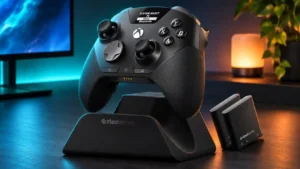
#1 SteelSeries Aeon Pro Wireless Controller
4.3

The dual-device dock and hot-swappable batteries make the Aeon Pro exceptionally convenient for Xbox and PC gaming. Crisp controls impress, but its steep price and divisive rear paddles make it...

Pros: battery replaceability, charging dock support

Cons: value for money, back button placement

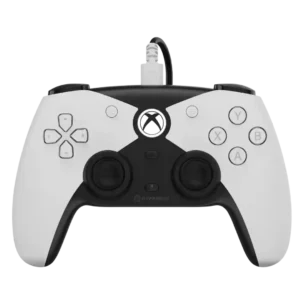
#3 Hyperkin The Competitor
4.3

Best for a comfortable, affordable Xbox/PC pad with precise Hall sticks, a PlayStation-style layout, and useful rear buttons. Skip it if wireless play, deep software tuning, or consistently top-tier D-pad...

Pros: overall satisfaction, value for money

Cons: wired performance, vibration quality

#4 Corsair Novablade Pro
4.3

Choose it if you want a premium, tournament-ready leverless controller with excellent 2.4GHz wireless, deep actuation tuning, and sturdy construction. Skip it if loud, tall buttons, a heavy chassis, or...

Pros: overall satisfaction, button quality

Cons: control placement, button noise

#5 GameSir Cyclone 2 Wireless Controller
4.2

Choose the GameSir Cyclone 2 if you want a low-cost PC/Switch/mobile controller with precise sticks, deep customization, and a dock. Skip it if Xbox/PS5 support, premium buttons, or flawless dock/battery...

Pros: value for money, charging dock support

Cons: d-pad feel, compatibility with Xbox