Other features
Ease of use
Asus ROG Raikiri IINo score yet
SteelSeries Aeon Pro Wireless Controller
4.9
Most functions feel intuitive, especially the OLED-based settings and rapid source switching. The unusually placed menu buttons can interrupt early familiarity.
Accessibility features
Asus ROG Raikiri II
2.5
Vibration adjustment can help players who are sensitive to strong rumble, but the lack of illuminated face-button labels was called out as a real accessibility problem in dark rooms.
SteelSeries Aeon Pro Wireless ControllerNo score yet
Accessory compatibility
Asus ROG Raikiri IINo score yet
SteelSeries Aeon Pro Wireless Controller
1.5
Some owners may find accessory compatibility narrower than expected, especially when using third-party charging gear or specialized custom parts.
Bumper responsiveness
Asus ROG Raikiri II
4.5
Bumpers actuate quickly and with very little force. That speed is useful, though the light touch may require a short adjustment period.
SteelSeries Aeon Pro Wireless ControllerNo score yet
Cable length and quality
Asus ROG Raikiri II
4.3
The included braided cable feels strong and premium, and its generous length is useful. One tester found it stiff enough to prefer a more flexible third-party cable.
SteelSeries Aeon Pro Wireless ControllerNo score yet
Compatibility with Nintendo Switch
Asus ROG Raikiri IINo score yet
SteelSeries Aeon Pro Wireless Controller
1.4
Nintendo Switch owners cannot count on it as their Switch controller. Its licensed Xbox and PC focus leaves Nintendo gaming out.
Compatibility with PlayStation
Asus ROG Raikiri IINo score yet
SteelSeries Aeon Pro Wireless Controller
1.4
This is not a viable replacement controller for PlayStation players; reviewers repeatedly warn that the PS5 is unsupported.
Mac integration
Asus ROG Raikiri IINo score yet
SteelSeries Aeon Pro Wireless Controller
2.0
Mac owners cannot rely on the full SteelSeries GG desktop experience, limiting deeper setup and firmware maintenance compared with Windows users.
Microphone passthrough quality
Asus ROG Raikiri II
5.0
Headset passthrough is strong, with solid audio quality and low latency through the controller’s 3.5mm connection.
SteelSeries Aeon Pro Wireless ControllerNo score yet
QuickSwitch platform switching
Asus ROG Raikiri IINo score yet
SteelSeries Aeon Pro Wireless Controller
4.9
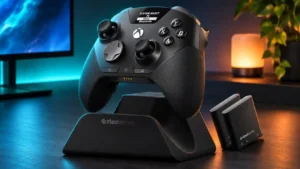
Switching between a nearby Xbox, PC, and Bluetooth device is unusually fluid, with the QuickSwitch dock sparing repeated pairing and dongle swaps. The dual-host advantage depends on keeping both wired devices within reach.
Repairability
Asus ROG Raikiri II
2.0
Repairability takes a hit from the sealed, integrated battery, which is not designed for straightforward user replacement.
SteelSeries Aeon Pro Wireless ControllerNo score yet
Retro gaming suitability
Asus ROG Raikiri II
5.0
Retro games work cleanly in the tested use case, with no input problems reported when using the controller for older-style play.
SteelSeries Aeon Pro Wireless ControllerNo score yet
RGB lighting usefulness
Asus ROG Raikiri II
3.9
The RGB is generally seen as tasteful and highly customizable, and the battery-status lighting can be genuinely useful. A few testers felt grip lighting was wasted power because it is hidden under the hands.
SteelSeries Aeon Pro Wireless ControllerNo score yet
Steering precision
Asus ROG Raikiri II
5.0
Fine steering adjustments are a strong point; small stick movements translated into precise directional changes in racing tests.
SteelSeries Aeon Pro Wireless ControllerNo score yet
Thumbstick grip
Asus ROG Raikiri II
2.0
The removable stick-cap system is convenient, but one reviewer found the plastic connection fragile and insufficiently secure for frequent swapping.
SteelSeries Aeon Pro Wireless ControllerNo score yet
USB-C convenience
Asus ROG Raikiri II
5.0
USB-C play-and-charge keeps the controller usable when the battery runs low, avoiding downtime during longer sessions.
SteelSeries Aeon Pro Wireless ControllerNo score yet
Xbox console wake functionality
Asus ROG Raikiri IINo score yet
SteelSeries Aeon Pro Wireless Controller
5.0
Xbox wake-from-standby support is welcomed as a practical perk that some third-party wireless controllers lack. It makes the gamepad easier to treat as a main Xbox controller.
Controls and connectivity
Button label visibility
Asus ROG Raikiri II
1.5
The face-button lettering is difficult to read in low light because there is no backlighting behind the labels, a recurring usability complaint.
SteelSeries Aeon Pro Wireless ControllerNo score yet
Face button travel
Asus ROG Raikiri II
5.0
Face-button travel is exceptionally short, creating near-instant actuation. That speed is a competitive advantage but contributes to the harder, less cushioned feel some testers dislike.
SteelSeries Aeon Pro Wireless ControllerNo score yet
Magnetic thumbstick cap swapping
Asus ROG Raikiri IINo score yet
SteelSeries Aeon Pro Wireless Controller
5.0
Magnetically attached stick caps snap on and off without a struggle, while the dock provides safe spots for the spares. Reviewers like the convenience even when wishing for more cap choices.
Onboard audio controls
Asus ROG Raikiri II
2.0
Dedicated headset control has regressed because the former mute function is no longer clearly available from a hardware button.
SteelSeries Aeon Pro Wireless ControllerNo score yet
Onboard menu readability
Asus ROG Raikiri IINo score yet
SteelSeries Aeon Pro Wireless Controller
5.0
Large lettering and responsive navigation make the OLED settings menu clearer than the tiny, fiddly displays found on some controllers.
Onboard OLED controls
Asus ROG Raikiri IINo score yet
SteelSeries Aeon Pro Wireless Controller
4.6
The onboard OLED is more than decoration: it makes source switching, profiles, battery levels, and basic remapping accessible without opening software. Some find the small display or initial menu navigation less polished.
Physical controller customization
Asus ROG Raikiri IINo score yet
SteelSeries Aeon Pro Wireless Controller
2.0
Physical personalization is relatively shallow at this price: you can change the stick caps, but the D-pad, paddles, and basic button layout stay fixed. Owners wanting swappable modules may feel restricted.
Screenshot button usefulness
Asus ROG Raikiri II
2.0
The share/screenshot control sits lower than ideal, making its placement a minor usability complaint.
SteelSeries Aeon Pro Wireless ControllerNo score yet
Battery and charging
Charging speed
Asus ROG Raikiri IINo score yet
SteelSeries Aeon Pro Wireless Controller
5.0
Charging the spare pack was reported to be quick, recovering a useful amount of charge within an hour.
Performance
D-pad accuracy
Asus ROG Raikiri II
3.4
D-pad accuracy is mixed: it works well for menus and simpler directional play, but complex diagonals and fighting-game motions expose inconsistency for several testers.
SteelSeries Aeon Pro Wireless ControllerNo score yet
Hall effect stick performance
Asus ROG Raikiri IINo score yet
SteelSeries Aeon Pro Wireless Controller
4.5
The Hall Effect sticks are precise and generally responsive, with resistance to drift. Some enthusiasts would prefer TMR sensors or need time to adapt to the stick feel.
Motion control accuracy
Asus ROG Raikiri IINo score yet
SteelSeries Aeon Pro Wireless Controller
2.0
A reviewer specifically criticizes the lack of useful motion-control functionality for their preferred way of playing.
TMR stick performance
Asus ROG Raikiri II
4.7
TMR is one of the controller’s headline strengths, delivering crisp, smooth and highly precise stick behavior in most testing. A minority found the default deadzones or tuning disappointing until adjusted.
SteelSeries Aeon Pro Wireless ControllerNo score yet
Ownership and support
Upgrade value
Asus ROG Raikiri II
5.0
As an upgrade from earlier Raikiri models, the II is widely seen as a substantial step forward in responsiveness, wireless capability, controls, accessories and overall execution.
SteelSeries Aeon Pro Wireless ControllerNo score yet