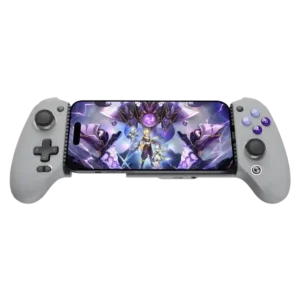
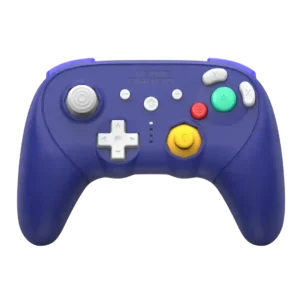
GameSir G8 Galileo
Where It Has the Edge
- material quality is 4.5 vs 1.0. The plastics feel thicker and more substantial than typical budget mobile-controller materials. Reviewers frequently compare the finish favorably...

Scorata scores summarize analyzed review evidence on a 1–5 scale; they are not laboratory measurements or a simple average of customer star ratings. Feature scores summarize the reviews covering that feature. The overall score averages feature scores within each review, then combines review averages. When both expert and customer evidence are available, those two groups receive equal weight. Products can have different review coverage, so small score gaps do not establish a winner.
Recommendations prioritize important features for the category, with a score of at least 3.5, a gap of at least 0.25 points and at least two supporting reviews per product. Features with widely varying scores or broad connectivity contexts are excluded from recommendations. These safeguards do not establish statistical significance.
Quick verdict
The review evidence points to a tradeoff: material quality versus bumper quality and design and aesthetics. Choose according to which strengths matter more to you; the overall score alone does not settle that choice.
Choose GameSir G8 Galileo for material quality.
Choose Retro Fighters BattlerGC Pro for bumper quality and design and aesthetics.
Scores are out of 5. Missing scores mean missing review evidence, not a missing feature.
Because the controller draws power from the phone, there is no separate battery to remember or recharge. Most users consider the added phone drain modest, though one owner noticed meaningful power use.
Battery impressions are acceptable rather than class-leading: some owners call it long-lasting, while others find roughly 10 hours weak by modern controller standards.
Pass-through charging is a major convenience and often maintains useful charging speeds during play. Compatibility is inconsistent with some chargers and phones, and a few users report that charging is slow or does not work.
USB-C charging is reasonably quick, though one test found the charge indicators confusing and needed about three hours for a full cycle.
Customer-support experiences are sparse but include a strongly negative report about help with a failed firmware update. Service quality is therefore a potential risk for buyers needing troubleshooting.
Retro Fighters support is a major bright spot, with repeated reports of quick replies, replacements, and helpful troubleshooting when hardware problems arose.
Firmware updates have added useful features such as faster charging, but the process is not always trouble-free. A few users report failed updates or controllers that malfunctioned afterward.
Firmware updates have fixed latency, trigger mapping, and Switch 2 issues for several users, but the Windows-only process and unclear versioning can be frustrating.
Turbo and macro-style functions are useful for repetitive inputs and can be activated quickly. One owner strongly disliked that the related buttons could not be disabled.
Rear buttons can execute multi-command macros without external software, adding useful flexibility for players who want more than simple remapping.
Most reviewers see strong value because it undercuts major rivals while offering Hall controls, rear buttons, charging, and audio. A smaller group considers the price steep for a phone-only accessory.
Value is polarizing: many think the features justify the price, while others consider the materials, import cost, or reliability too weak for a roughly $60–$70 controller.
The direct connection is usually stable and instantly recognized. A minority of users needed to unplug and reconnect the controller or encountered modes that did not register reliably.
Reliability is the biggest ownership wildcard: many units reconnect and pair cleanly, but others suffer frequent desyncs, short range, or complete mid-game dropouts.
Buyers moving from smaller or older mobile controllers often see a major improvement in comfort, controls, and durability. The upgrade is less compelling for users who prioritize pocket portability.
For owners of earlier Retro Fighters GameCube pads, the Pro is usually a substantial upgrade in triggers, sticks, wireless options, rear controls, and overall feel.
Native controller-supported games are generally plug-and-play, and attaching a phone is simple. Touch mapping, special modes, and occasional recognition problems can add extra setup for unsupported games.
Pairing and switching systems are usually quick and straightforward, with most users describing setup as simple or nearly automatic after the first connection.
The plastics feel thicker and more substantial than typical budget mobile-controller materials. Reviewers frequently compare the finish favorably with regular console gamepads.
The main shell material draws harsh criticism from a few owners who describe the plastic as cheap-feeling, overly smooth, or scuffed on arrival.
Vibration support is limited and depends on games, modes, and phone compatibility. Reviewers who expect console-level rumble should treat it as a secondary feature rather than a core strength.
Rumble is a strong feature, with adjustable intensity and punchy feedback that fixes a weakness of earlier Retro Fighters models.
Many users report dependable performance over months and across different games. A smaller group encountered calibration drift, intermittent recognition, or controls that behaved inconsistently.
Several negative owner reports describe controls becoming unresponsive, repeating faults after replacement, or producing unintended inputs, making long-term consistency a concern.
Long analog triggers and precise sticks work particularly well in racing games. Reviewers describe smooth throttle control and a much more console-like driving experience.
Racing impressions are mixed: some advanced Mario Kart techniques work well, but connection drops and trigger-range issues make it hard to recommend universally.
Basic play is intuitive, while sensitive sticks, mode switching, and touch mapping can take time to learn. Most users become comfortable after calibration or a short adjustment period.
The authentic GameCube layout and trigger ranges take some adjustment, especially in modern games where players may need to reorient their hands or relearn inputs.
The rear paddles add pro-style flexibility without dominating the grip. Some users find them too easy to hit or wish they had a firmer, more substantial action.
The rear paddle-style buttons add useful fingertip inputs and were specifically praised as a good fit for first-person shooters.
Alternate thumbsticks are a welcome inclusion and easy to swap, but only one of each style is supplied. The absence of a hard carrying case is another repeated disappointment.
The dual dongles, braided cable, and color-matched pin make the package feel unusually complete, even if the pin is more fun than functional.
Rear buttons and a satisfying D-pad can make platformers easier and less stressful on the thumbs. Performance is strongest in games that do not depend heavily on rapid diagonal inputs.
The D-pad works well for relaxed platforming, but stiffness, placement, and latency make it less convincing for speed-focused or precision-heavy play.
The D-pad can manage casual fighting-game inputs, but diagonal motions are not its strength. Reviewers who tested demanding Street Fighter-style commands would not choose it primarily for fighters.
Smash impressions are often excellent, but fighting-game suitability is not universal: some D-pad-focused testers explicitly reject it for traditional fighters.
Textured thumbstick edges give the thumbs a secure, non-slip surface. The interchangeable caps also let players choose a shape that better matches their grip preference.
The GameCube-style stick tops and notches often feel authentic and secure, but repeated rubber peeling reports are a serious weak point.
Fast response, precise sticks, rear buttons, and hair-trigger mode make it capable of competitive play. The D-pad and app-dependent setup prevent it from being equally strong in every genre.
Competitive suitability depends heavily on the game: Smash-focused testers can love it, while low polling, latency, and D-pad limitations hurt precision-focused play.
The pivoting USB-C connector is widely regarded as one of the smartest parts of the design because it simplifies insertion and removal. Some owners nevertheless report that the swivel connection can loosen or break over time.
USB-C is treated as a welcome modern upgrade, especially compared with swapping AA batteries on older wireless GameCube controllers.
PlayStation Remote Play is an important use case and often works smoothly in PS mode. Some users encountered mode or app recognition failures and resorted to third-party software.
PS3 use is possible through Direct Input, but the controller does not extend cleanly to PS2 backward-compatible games.
The Hall sticks are repeatedly praised for accurate aiming and controlled movement. Their high sensitivity can feel demanding at first, especially for casual players.
Stick precision is one of the more divided areas: many players report accurate, responsive control, while precision-heavy tests found sensitivity, dead-zone, and consistency problems.
The shoulder controls are usually solid and responsive. A few reviewers think the bumpers feel cheaper or less textured than the otherwise premium controls.
The shoulder buttons earn strong marks for crisp, tactile switches and a more premium feel than earlier or original GameCube designs.
The sticks feel quick and direct, but their sensitivity and shorter throw can take adjustment. Players who prefer slower, heavier analog movement may need to tune the deadzones.
Stick resistance is generally well judged and smooth, though one owner wanted slightly more tension from the left stick.
The analog triggers provide a broad, controllable range for racing and other pressure-sensitive actions. Reviewers especially like the nuanced throttle control when streaming console games.
Dual-stage analog triggers are a major strength on compatible hardware, but platform limitations and large initial dead zones can keep them from behaving perfectly everywhere.
Casual games benefit from the comfort and immediate physical controls, although sensitive sticks can require acclimation. Several reviewers say the controller made them play more mobile games than expected.
For relaxed GameCube titles, RPGs, and general play, the controller is easy to enjoy; its unusual layout matters more in demanding modern games.
Trigger travel is generally smooth and comfortably shaped, but feel is not universally premium. Some reviewers describe the pull as too light, hollow, or less tactile than they prefer.
Trigger travel and resistance generally feel satisfying and controlled, but one long-session player found them too stiff.
Most reviewers find the sticks exceptionally smooth and fluid. Isolated units have shown rough rubbing or imperfect centering, usually resolved by changing a cap or calibrating.
Most users describe the sticks as smooth, familiar, and pleasant to rotate, with several saying they closely capture the original GameCube feel.
Opinions on the D-pad are split: some find it precise and satisfying, while others call it mushy, wobbly, or overly clicky. Its suitability depends heavily on game genre and personal preference.
The D-pad is one of the controller’s most praised upgrades, with a larger, clickier, smoother feel that many strongly prefer to the original GameCube pad.
Long-session comfort is a major strength, with several reviewers reporting little or no cramping. A small number of users with very large hands still found the shape uncomfortable after a short time.
The modern shape and softer trigger action can be comfortable for long sessions, but stiff triggers or D-pad pressure caused fatigue for a few players.
USB-C Android phones and newer iPhones are broadly supported, but platform features are not equal. Lightning iPhones, some foldables, and devices with unusual ports or camera housings may be excluded.
Android and iOS support adds useful versatility, and hands-on Android use was reported as trouble-free with working pressure-sensitive triggers.
The controller is a strong companion for emulation, especially on wide-screen phones and more demanding systems. Older 4:3 games leave large side bars, and the D-pad is not ideal for every retro genre.
This is where the controller shines most consistently, delivering a modern wireless take on the GameCube layout that testers repeatedly recommend for original hardware and emulation.
The controller feels substantial and usually balances a phone well between the grips. Heavier phones can make the combined setup tiring during marathon sessions.
The extra heft is usually seen as a positive, giving the controller a substantial, well-balanced feel without making it uncomfortable.
Input response is consistently described as nearly instantaneous. The direct USB-C connection makes it especially attractive for action games and remote play.
Hands-on impressions of input lag are overwhelmingly positive, with multiple testers reporting no noticeable delay and measured wired or 2.4GHz results among the fastest they had seen.
Texturing on the rear grips usually keeps the controller secure during play. A few users wanted a more aggressive surface, but slipping is rarely reported as a serious problem.
The textured handles usually provide secure, comfortable grip, though a few owners find the shell too smooth or the texturing too subtle.
PC support is possible through USB on some setups and can resemble a generic Xbox pad. It is not the controller’s main purpose, and the empty center makes desktop use less comfortable.
PC support is broadly useful across wired, dongle, and Bluetooth modes, but Linux, Dolphin trigger behavior, and a few connection failures can complicate the experience.
The magnetic stick sensors inspire strong confidence against drift, and long-term users usually report no drifting. That durability advantage is a common reason buyers choose it over conventional alternatives.
Hall Effect sticks inspire strong confidence against drift, and reviewers repeatedly treat drift resistance as a core advantage over conventional GameCube-style alternatives.
Its full-size controls and rigid construction give it a distinctly premium, console-like feel. That impression is one of the clearest ways it separates itself from cheaper telescopic pads.
Most owners find the controller substantial and premium for a third-party GameCube pad, with weight and finish that compare well to modern Pro-style controllers.
Owners and experts overwhelmingly describe it as one of the strongest mobile controllers available. Even critical reviews usually frame the drawbacks as compromises around an otherwise excellent gaming experience.
The broad consensus is strongly positive, with many calling it a favorite or best-in-class GameCube-style controller, though hardware defects and connection failures create a meaningful minority of dissatisfied owners.
Trigger response is fast and reliable, with hair-trigger mode adding an instant option for shooters. Most reviewers consider them more responsive than the compact triggers on many mobile pads.
The dual-stage triggers are widely praised for tactile clicks and improved actuation, though isolated failures and slight late activation keep them from universal perfection.
Start, Select, Menu, and mode functions provide useful shortcuts, but the layout can become crowded. The capture and macro controls beneath the D-pad are especially easy to trigger accidentally.
The simplified plus, minus, and Home area gives the front face a cleaner, more streamlined look than earlier Retro Fighters GameCube pads.
Most long-term reports are positive, but durability is not flawless. Several owners describe broken or worn USB-C connectors, trigger parts, or labels after extended use or impact.
Long-term durability is a notable concern because multiple owners report peeling thumbstick rubber and one reported a split trigger, despite strong results in one stress test.
The larger grips generally suit medium and large hands better than compact mobile controllers. Fit is not universal, and a few very large-handed users wanted more room for their pinkies.
The larger shell is more comfortable than the original for many people, but tight button spacing and rear-control placement can be troublesome for larger hands.
The gray-and-purple retro styling has plenty of fans, especially among those who like its Super Nintendo influence. Others find the color scheme plain and wish the removable faceplates had more visual options.
The GameCube-inspired colors and layout are widely loved, especially the Crystal finish, while the more modern shell can be less appealing to strict purists.
The contoured handles and familiar controller shape fit the hands naturally. Its larger body is a deliberate ergonomic choice rather than a compact travel-first design.
The wider, modernized shape is a major strength, repeatedly compared favorably with the Switch Pro Controller and preferred over the original GameCube shell.
Full-size, Xbox-like grips make phone gaming far more comfortable than flatter telescopic controllers. Many reviewers could play for long sessions without the hand discomfort they normally associate with mobile controls.
Comfort is one of the strongest points: the wider modern grips fit most hands naturally and remain pleasant through long GameCube and Switch sessions.
The chassis is consistently praised for tight construction, sturdy plastics, and minimal flex or creaking. Long-term users often say it still feels solid after months of regular use.
Construction is usually considered solid, substantial, and well made, but isolated failures such as a split trigger keep the durability picture from being flawless.
Android receives the fullest software support, while iPhone owners lose advanced mapping and sometimes controller recognition inside the app. That platform gap is a recurring complaint.
Ongoing firmware work meaningfully improves the controller’s usefulness, with updates changing one reviewer’s view of its Switch 2 compatibility.
Face buttons are typically tactile, responsive, and close to console-controller quality. Critics mainly object to the use of membrane switches at this price rather than to everyday performance.
Button feel is sharply split: many praise solid, tactile presses, while several owners describe the face buttons as gummy, mushy, cheap, or prematurely worn-feeling.
Remapping is broad and often easy, whether performed on the controller or through the app. Touch-only games may still require per-game setup and experimentation.
On-the-fly remapping is a standout convenience, letting players change rear-button assignments without needing a PC.
A dedicated capture button is convenient when intentionally used. Its close placement beneath the D-pad causes accidental screenshots for some players.
The multifunction top button keeps Switch screenshot capture available while also serving programming duties, preserving useful modern-console functionality.
The face buttons have enough travel to feel deliberate without becoming slow. Reviewers who discuss the movement usually describe it as satisfying and familiar.
Face-button travel is generally well judged and improved over earlier models, although one tester disliked the unusually short travel of the X button.
Control noise is moderate and often quieter than Xbox-style alternatives. Some users still find the clicky D-pad or hollow trigger sound more noticeable than they would like.
Buttons are generally quieter than earlier Retro Fighters GameCube pads while still retaining clear tactile feedback.
Button presses normally register cleanly and consistently, including after months of use. Reports of sticking or missed inputs are rare but do appear in isolated units.
Most users get crisp, dependable face-button response, but a minority report gummy, glitchy, lagging, or failed inputs.
Magnetic faceplates, swappable stick caps, adjustable modes, and mapping options create unusually deep customization. The main frustration is that alternate sticks are supplied as singles rather than matching pairs.
Rear-button mapping can cover single presses or multi-command macros, giving the controller unusually broad on-the-fly customization for a GameCube-style pad.
The rear buttons are useful for jumping, attacks, emulator shortcuts, and other actions that keep the thumbs on the sticks. Their value depends on whether the player actually uses extra inputs.
The rear buttons can be genuinely useful in non-GameCube games, giving frequently used inputs a more convenient position.
Software controls allow adjustment of deadzones, sensitivity, layouts, and virtual touch mappings. The range is impressive, but achieving ideal settings can require trial and error.
Calibration and firmware tools can solve real issues, but the lack of deeper trigger tuning leaves some performance-minded users wanting more control.
Two programmable rear inputs give the controller more flexibility than many mobile rivals. They can usually be assigned without needing to interrupt play with an app.
The two rear programmable buttons are easy to set up and frequently praised as a useful modern addition to the GameCube layout.
Most reviewers praise the rear-button placement because the controls fall naturally under the middle fingers. A few users press them accidentally or find them lower than ideal.
Rear-button placement is usually comfortable and easy to reach, although one reviewer found the extra buttons prone to accidental presses.
The wired USB-C connection delivers immediate, dependable control without pairing. Reviewers value the simplicity and responsiveness compared with Bluetooth alternatives.
Wired use can be extremely fast on PC, but platform and protocol quirks mean it is not equally reliable or fully featured everywhere.
Shooters benefit from low latency, accurate Hall sticks, and optional hair triggers. A few reviewers find the small or sensitive sticks less controlled than a full-size console gamepad.
The clicky triggers and rear controls can feel excellent in shooters, but one technical test found the Hall sticks too imprecise and jumpy for serious aiming.
The D-pad handles basic directional inputs accurately and works well for many platformers. Diagonal-heavy tests expose more inconsistency, especially for fighting games.
The larger D-pad is usually precise with good directional control, but some testers found diagonals or competitive inputs harder than ideal.
Hall effect sticks are one of the controller’s defining strengths, combining smooth movement with confidence against wear. Reviewers regularly cite them as a premium feature at this price.
The custom Hall Effect sticks are consistently praised for feeling authentic, smooth, and substantial while adding modern drift resistance.
The bundled 2.4GHz receivers can deliver strong, low-latency play and convenient retro-console support, but several owners reported defective dongles, short range, or outright connection failures.
The 3.5mm jack is appreciated for simple, latency-free wired audio on phones without a headphone port. One reviewer found its sound quality underwhelming, but outright failures are uncommon.
Gyro support on Switch is a welcome modern feature and was praised as part of the controller’s broader Switch functionality.
Motion controls work well over Bluetooth on Switch and were described as feeling in line with a first-party Pro Controller.
The full-size spacing can be easier on stiff or arthritic hands than cramped mobile controls. Its larger grip may therefore improve access for some players, though it is not a dedicated adaptive controller.
Shoulder-button feedback is mostly solid, though one tester had trouble feeling the expected click on a Z control.
The included braided USB cable is a small but appreciated upgrade over a basic charging lead.
The controller works especially well with Xbox Cloud Gaming, Steam Link, GeForce Now, Luna, and remote-play services. Streaming quality still depends on the user’s network and the limitations of each service.
Switch support is broad and usually works very well, but Switch 2 firmware requirements, Bluetooth-only limitations, and a few failed connections create real caveats.
Its Xbox-style layout and direct connection make it particularly natural for Game Pass and Xbox Remote Play. Multiple reviewers call it one of the best ways to use Xbox cloud gaming on a phone.
A recurring ergonomic flaw is the placement of certain controls: Home, reset/off, Z, and B/C spacing can force awkward reaches or cause accidental presses.
A few buyers received scratched or scuffed units, and one customer received the wrong color, so arrival condition has not been uniformly clean.
The spring-loaded cradle usually holds phones firmly, even during vigorous movement. One customer reported repeated slipping, so mounting security may vary by device and unit.
One detailed performance test found the polling rate low enough to contribute to missed precision inputs during demanding gameplay.
The full-size grips make it far bulkier than most telescopic controllers. It fits a backpack or travel bag, not a pocket, although some reviewers accept the extra size for the comfort gained.
Stick replacement is possible, but the unusual fit pushed one owner toward PS5-style replacement sticks rather than standard GameCube parts.
Travel opinions depend on available bag space. Some users carry it everywhere and love it on trips, while frequent commuters prefer smaller controllers that pack down more easily.
Hair-trigger mode gives shooters a noticeably faster activation point and is easy to toggle. Rare reports of random activation or faulty trigger hardware keep it from being uniformly dependable.
2.4GHz can be very fast in favorable conditions, while one performance-focused test measured weaker latency and polling behavior in demanding games.
Wireless stability varies significantly by unit and environment: some users report flawless play, while others see interference, repeated desyncs, or extremely short effective range.
The built-in battery is a long-term drawback because it is not easily replaceable, unlike the AA-powered WaveBird.
Bluetooth is generally convenient and responsive, especially on Switch where it can add wake and motion features, though some users saw outright pairing failures and it can trail 2.4GHz latency.
Switch-style shoulder labels fix a small annoyance from earlier Retro Fighters models and make the control scheme feel more coherent.
The companion app is powerful for calibration, firmware, touch mapping, and game launching. Its polish and reliability vary, with reports of crashes, clunky navigation, iOS limitations, and recognition problems.
Phone fit varies more than any other physical trait. Bare phones and many slim cases sit securely, while thicker cases, large camera modules, off-center ports, and some foldables can require case removal or fail to fit.
Moving the fingers off the touchscreen normally improves visibility, but game aspect ratios and black bars can still reduce the usable display area. The experience depends heavily on the phone and game.
Bluetooth wake support is a clear convenience win, letting the controller wake a Switch without reaching for another input device.
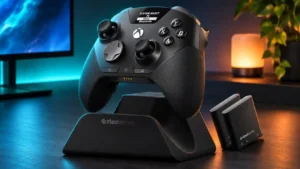
The dual-device dock and hot-swappable batteries make the Aeon Pro exceptionally convenient for Xbox and PC gaming. Crisp controls impress, but its steep price and divisive rear paddles make it...
Pros: battery replaceability, charging dock support
Cons: value for money, back button placement
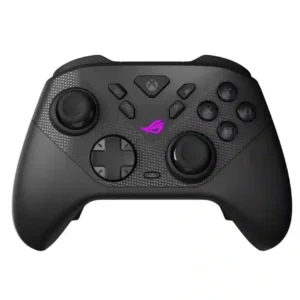
Best for precise TMR sticks, fast trigger stops, low-latency 2.4GHz play, and deep tuning. Skip it if you want a cheaper all-rounder, softer buttons for long sessions, or painless console-only...
Pros: overall satisfaction, button quality
Cons: d-pad accuracy, charging dock support
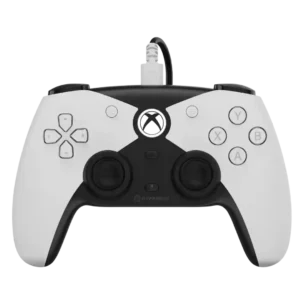
Best for a comfortable, affordable Xbox/PC pad with precise Hall sticks, a PlayStation-style layout, and useful rear buttons. Skip it if wireless play, deep software tuning, or consistently top-tier D-pad...
Pros: overall satisfaction, value for money
Cons: wired performance, vibration quality
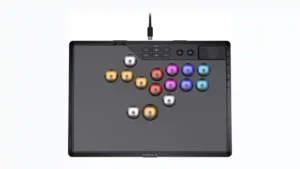
Choose it if you want a premium, tournament-ready leverless controller with excellent 2.4GHz wireless, deep actuation tuning, and sturdy construction. Skip it if loud, tall buttons, a heavy chassis, or...
Pros: overall satisfaction, button quality
Cons: control placement, button noise