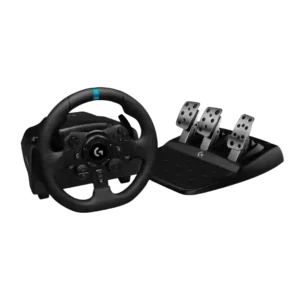
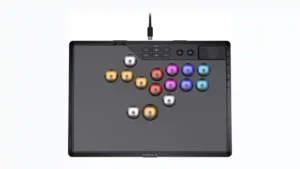
Logitech G923
Where It Has the Edge
- learning curve is 4.3 vs 2.4. The wheel is approachable for first-time sim racers and helps translate real driving instincts into games. New users...

Scorata scores summarize analyzed review evidence on a 1–5 scale; they are not laboratory measurements or a simple average of customer star ratings. Feature scores summarize the reviews covering that feature. The overall score averages feature scores within each review, then combines review averages. When both expert and customer evidence are available, those two groups receive equal weight. Products can have different review coverage, so small score gaps do not establish a winner.
Recommendations prioritize important features for the category, with a score of at least 3.5, a gap of at least 0.25 points and at least two supporting reviews per product. Features with widely varying scores or broad connectivity contexts are excluded from recommendations. These safeguards do not establish statistical significance.
Quick verdict
The review evidence points to a tradeoff: learning curve versus cable length and quality and included accessories. Choose according to which strengths matter more to you; the overall score alone does not settle that choice.
Choose Logitech G923 for learning curve.
Choose Corsair Novablade Pro for cable length and quality and included accessories.
Scores are out of 5. Missing scores mean missing review evidence, not a missing feature.
Cable feedback is inconsistent, but several reviewers found the USB lead too short or the cabling cheaper than the rest of the hardware. Living-room setups are the most likely to need an extension or rearrangement.
The included braided USB cable receives direct praise for being long, sturdy, and unusually high quality. Reviewers who mentioned it treated it as a premium accessory.
The wheel is approachable for first-time sim racers and helps translate real driving instincts into games. New users without driving experience may still need time to coordinate steering and three pedals.
The leverless layout and shortcut-heavy settings system take time to learn. Some reviewers adjusted quickly, but others needed the manual repeatedly or found even basic configuration frustrating.
The G923 is easy to recommend for casual racers who want more immersion without committing to a complex rig.
Casual appeal is mixed: wireless couch play is convenient, but the $250 price and specialized leverless layout are hard to justify for newcomers or general gaming. It makes most sense for casual players already invested in fighting games.
The box includes the wheel, three pedals, power supply, and mounting hardware, while a broad accessory ecosystem supports expansion. A shifter and handbrake are not included, and Logitech offers no dedicated handbrake.
The protective shell or cover is widely appreciated for guarding the buttons in a bag, even if its styling is not universally loved. Reviewers also valued the practical travel protection it provides.
The long-running Logitech ecosystem has adapters, replacement parts, pedal modifications, and upgrade paths that can extend the useful life of the hardware.
Repairability is mixed. Several reviewers worry about proprietary caps, switch availability, or hard-to-source replacements, while one tester found the switch and keycap area easy to access and compatible with standard-style parts.
The wheel supplies enough handling detail for fast laps and competition, though stronger systems offer greater precision.
Tournament-oriented features are a major strength, including Game Mode, SOCD controls, extra mappings, fast input response, and wired or low-latency wireless options. Reviewers consistently see the Novablade Pro as built for serious competitive fighting-game play.
The relatively light base is easy to move, store, and remount between sessions.
Despite its heavy build, the controller is repeatedly considered easy to carry because it is thin, compact, and backpack-friendly. Several reviewers specifically liked it for tournaments and travel.
The PlayStation version works across supported PlayStation generations and PC, giving console racers a broad and familiar game library.
Official PS4 and PS5 licensing is considered a meaningful advantage over unlicensed leverless controllers that need authentication adapters. The native console support adds convenience and value for PlayStation players.
The G923 provides a familiar, predictable feel across simulation titles, reducing the need to relearn steering behavior whenever the game changes.
One month-long user reported no noticeable performance issues and kept using the controller as a daily driver. That longer stint supports strong consistency across repeated sessions.
Most reviewers found the wheel comfortable, but rough thumb-area stitching caused soreness during multi-hour sessions for one user.
Two reviewers reported hand discomfort or cramping during use, although both were also adapting to leverless play. This makes fatigue a possible concern for players changing input styles.
Updated processing made steering reactions noticeably quicker than previous Logitech generations.
Overall input response is one of the product's strongest performance traits. Reviewers repeatedly described the controller as snappy, fast, and responsive with no meaningful sense of delay.
Most reviewers enjoyed the G923 as a dependable first wheel and praised how much more engaging it feels than a controller. Satisfaction drops when it is judged at full retail against newer direct-drive bundles.
Overall sentiment is strongly positive: most reviewers recommend the Novablade Pro, call it premium, or choose it as a regular controller. A small minority are mixed or sharply negative, mainly over complexity and button-travel design.
Metal pedals, leather or synthetic-leather wrapping, and sturdy plastics create a durable, convincing package. The finish generally feels above its entry-level positioning.
Reviewers liked the mix of metal, plastic, rubber, and protective detailing, with the aluminum surface receiving particular praise. The materials consistently read as high quality rather than cheap.
Leather wrapping, metal trim, substantial weight, and clean finishing give the G923 a more premium feel than many entry-level wheels.
The controller is repeatedly described as premium, sturdy, and high-end, with metal construction, substantial weight, and polished details. Even reviewers with setup or price complaints generally agreed it feels expensive in hand.
G Hub offers useful button mapping, wheel range, pedal sensitivity, force settings, macros, and per-game profiles. Console users get far fewer adjustment options, and a few reviewers wanted deeper controls.
Software customization is a clear weakness because the controller lacks a desktop configuration app. One reviewer specifically criticized the absence of software for checking and managing settings from a PC.
Button impressions are split: some reviewers found the controls solid and tactile, while others criticized the cheap D-pad, delicate small buttons, and unreliable rotary dial.
Most reviewers liked the buttons' feel, reliability, click, and smoothness, with several calling them especially satisfying. The main dissent comes from concerns about their tall shape and one review that felt the physical design undermined otherwise fast response.
G Hub can unlock the wheel’s features, but both long-term tests reported frustrating driver conflicts or reinstalls. Tech-savvy users can recover, while beginners may find troubleshooting discouraging.
The lack of iCUE integration is a notable omission for a Corsair peripheral with so many settings. Reviewers felt software support could make configuration much easier to verify and manage.
PC users get broad adjustment options through G Hub, although some reviewers still wanted deeper advanced controls.
Customization is exceptionally deep, covering actuation, SOCD behavior, profiles, mappings, lighting, and more. The tradeoff is complexity: several reviewers love the control, while others say the abundance of settings becomes a blessing and a curse.
The face buttons were described as crisp and appropriately snappy.
Face-button response is a major strength, with reviewers describing inputs as smooth, sensitive, reliable, and extremely quick. Several testers said execution felt cleaner or easier once actuation was tuned.
Wheel buttons can be assigned through G Hub for game-specific functions.
The extra programmable buttons give fighting-game players useful places for parry, tag, jump, and other actions. Reviewers generally liked the flexibility, especially for moves that would otherwise require awkward finger reaches.
G Hub makes it easy to reassign wheel controls and adjust core input behavior.
Remapping is usually considered quick and easy directly on the controller, with several reviewers calling it a major advantage. One reviewer disliked that certain remaps disable the original input, but the overall sentiment is strongly positive.
Firmware updates and force-feedback tuning are accessible through G Hub, helping users keep the wheel current and adjust its behavior.
Firmware updating drew criticism for requiring a supported browser, PC, and internet connection. One prototype tester also experienced failed update attempts, making the process feel less robust than the hardware.
The G923 is a modest refinement rather than a major generational leap. G29 and G920 owners are usually better served by keeping their wheel or moving to a stronger mid-tier or direct-drive system.
One reviewer coming from a cheaper leverless called the Novablade Pro a significant upgrade, especially in materials, features, layout, and wireless response.
Desk mounting and console connection are usually quick and plug-and-play, with broad native game recognition. Thick furniture, PC driver setup, or awkward living-room placement can still complicate installation.
Ease of setup is mixed. Hardware mode switching and basic remapping can be straightforward, but several reviewers found the shortcut system confusing, hard to remember, or frustrating until they learned it.
Value depends heavily on price. Reviewers often recommend it on sale or used, while full retail places it too close to smoother and stronger modern alternatives.
The $250 price is undeniably premium, but most reviewers think the feature set, PS5 support, wireless performance, and build justify it within the high-end leverless market. Beginners and price-sensitive players are the main group likely to question the value.
G Hub supports macro assignment, adding useful flexibility beyond standard racing controls.
Macros can be handy for training and advanced customization, but the implementation is not universally loved. Real-time recording and PC-only limits make the feature more cumbersome for some players.
The compact rim is manageable for many users, but larger hands may find it undersized and less comfortable.
One smaller-handed reviewer liked most of the spacing but found a particular thumb reach uncomfortable. Larger hands may have an easier time with that part of the layout.
The round rim shape, compact diameter, and accessible controls suit common racing techniques. Button reach is not perfect, but the basic driving position is comfortable and intuitive.
The full non-slip base, stable desk footprint, and slightly angled chassis make the controller feel planted and easy to use on a lap. Reviewers repeatedly liked how little it moves during play.
The wheel’s sturdy chassis, metal components, and solid pedal construction remain major strengths. Even critical reviewers generally consider the physical build dependable and better than many cheaper rivals.
Build quality is one of the clearest strengths: reviewers repeatedly described the chassis as tank-like, solid, and exceptionally well constructed. The metal top and rigid body reinforce that premium impression.
The rim and controls remain comfortable through long sessions, with balanced resistance that avoids excessive wrist strain. Rough stitching may bother some users.
Most reviewers found the Novablade Pro comfortable on a lap or desk, with good palm space and a shape that works for long sessions. Comfort praise is broad even though a couple of users reported hand discomfort during adaptation.
The proven gear-driven platform is widely regarded as robust, easy to store repeatedly, and capable of lasting for years.
One review highlighted the switch design as built for an unusually high number of presses, presenting longevity as a major strength. Long-term real-world wear was not otherwise deeply tested.
USB operation was consistently plug-and-play across tested console and Windows setups.
Wired play is consistently treated as the lowest-latency, tournament-safe option, and the locking USB-C design keeps the cable secure. The included cable sits snugly during serious play.
One long-term tester confirmed roughly 40 hours of wireless play with RGB at full brightness, matching the stated figure. That result supports strong real-world battery performance.
The 2.4GHz dongle is a standout feature, with testers calling it fantastic, exceptionally fast, and effectively free of noticeable latency. It is the preferred wireless mode in the reviews.
The progressive brake is one of the G923’s most consistent strengths, offering firmer resistance and better modulation than older Logitech pedals. A few reviewers found it overly stiff or prone to moving an unsecured pedal base.
Rapid Trigger is usually praised for quicker releases, sharper movement, and easier execution, especially in Street Fighter. Its value is not universal: one casual tester barely noticed it, while one critic strongly disliked how it interacts with the tall button travel.
The gear drive can clunk and rattle, and TrueForce may add audible engine-like vibration from the wheel housing. It can be distracting to anyone nearby, although one review found it quieter than older models.
For one disabled reviewer, the wheel recreated a meaningful sense of driving that a standard controller could not provide.
The wheel connected and operated immediately on the tested Windows gaming laptop, with G Hub available for deeper tuning.
The Xbox version supports modern Xbox systems and PC, with strong native recognition across many racing games.
Control placement is mixed: the core layout and centered jump position get praise, while some extra buttons can be accidentally hit or feel too far away. Hand size and preferred fighting-game binds strongly affect the experience.
The D-pad works, but its cheap appearance and feel do not match the wheel’s premium price.
The built-in dual-clutch launch feature is unusually capable for an entry-level bundle and can produce more consistent starts. Its value depends on game support and whether the driver will actually use launch control.
The controller is overwhelmingly praised for fighting games, especially Street Fighter, Tekken, and other execution-heavy titles. Most reviewers rate it among the strongest premium leverless options, though one critic strongly disliked the button-travel design.
The gear-driven feedback is responsive and informative enough for beginners, drifting, rallying, and casual racing. It lacks the power, smoothness, and fine detail of current belt-driven and direct-drive rivals.
The leather rim is generally pleasant, but one long-session review found the thumb-area stitching rough enough to cause soreness without gloves.
The integrated clamps work well on compatible desks but have limited thickness and grip. Thick tables, metal rigs, or hard braking may require direct bolting for reliable stability.
Five onboard profiles are a meaningful strength, letting players keep multiple setups without external software. The storage is useful, though profile management contributes to the controller’s configuration complexity for one reviewer.
The metal paddles are generally responsive, precise, and satisfying to click. One reviewer noticed slight response delay, but most considered them a strong part of the wheel.
The three-pedal set feels more substantial than many entry-level bundles, with the brake standing out as the most refined control.
The heavy pedal base can stay planted well on carpet or when mounted. On smooth floors, hard braking may push the entire unit away unless it is braced or bolted down.
One review highlighted the 1,000Hz polling rate available over wired and 2.4GHz on PC as a strong performance feature. Console use has more connection-specific limits.
The G923 works well for beginners, casual racers, drifting, rallying, and learning basic car control. Serious sim racers may quickly want stronger, smoother direct-drive hardware.
RGB is broadly praised for looks and for showing settings such as actuation or mode status. A few reviewers wanted finer color control or found some effects distracting, but the overall reception is strongly positive.
The touchpad is useful for PlayStation navigation and training functions, and on PC it can act as a mouse surface. Reviewers who discussed it consistently treated it as a welcome convenience.
Reviewers repeatedly found the thin chassis easy to carry to locals or majors, even with its substantial weight. Several specifically described it as a strong or ideal travel leverless.
TrueForce can add convincing engine vibration, road texture, grip changes, and a stronger sense of connection in supported games. Some reviewers found it subtle, noisy, distracting, or less useful than conventional force feedback.
The locking USB-C connection is frequently praised for keeping the cable secure in tournament play. The main caveat is that one reviewer disliked how the lock can conflict with some third-party cables.
Vibration can convincingly communicate road surfaces, grip loss, and engine activity. Its intensity and noise may be uncomfortable for vibration-sensitive users.
The Novablade Pro is heavy for a leverless controller, but many reviewers liked the planted, substantial feel. A few considered it among the heaviest options and near the upper limit they would want to carry.
Steering is reasonably predictable but the gear mechanism can reveal cogs, steps, and imperfect transitions. Direct-drive and belt-driven alternatives feel noticeably smoother.
Wireless flexibility is a major differentiator, especially the 2.4GHz option for PC and PlayStation. Reviewers like the freedom from cables for home use, while serious tournament play still tends to favor wired connections.
Reviewers consistently found 2.4GHz latency extremely low, often describing it as indistinguishable from wired play. Difficult fighting-game inputs and combos worked reliably over the dongle.
Retail 2.4GHz wireless was repeatedly described as stable and problem-free, including month-long use. One prototype reviewer had a dongle failure, so the only significant negative report came from preproduction hardware.
Bluetooth is the weakest connection option in the coverage. Reviewers noted higher latency than 2.4GHz or wired and criticized its PC-only limitation.
Visible button labels are appreciated because they make remapping and learning the leverless layout easier. Reviewers specifically contrasted this with unlabeled controllers that are harder to configure.
Button sound is polarizing. Several reviewers call the main buttons loud or distracting, while others enjoy the clicky sound or find it satisfying and rhythmic.
Reviewers wanted a companion app or screen to make the controller's many settings easier to understand. The lack of one leaves users relying on button combinations, lights, and the manual.
The adjustable 0.1-4.0mm actuation range is widely praised, but the physical 4mm travel is polarizing. Some enjoy the deeper press, while others find the tall buttons slower for slides or wish the total travel were much shorter.
The G923 is widely recognized across old and new racing games and often works immediately after connection. That mature compatibility is one of its biggest advantages over newer ecosystems.
Logitech was praised for direct, prompt, and unusually attentive responses to reviewer questions and community comments.
A Logitech shifter can be added, but it costs extra and the ecosystem lacks a dedicated handbrake input. Rally and drifting enthusiasts may find that limitation significant.
TrueForce support has expanded over time but remains inconsistent across titles and platforms. Limited integration reduces the feature’s usefulness and weakens the case for upgrading from older Logitech wheels.
The black aluminum look, sleek shape, and lighting are widely praised as premium and attractive. Minor complaints include fingerprints, limited faceplate options, and some RGB effects that can distract.
The pause and top-panel controls are easier to reach than on the reviewer’s previous controller, making menu access a meaningful quality-of-life improvement.
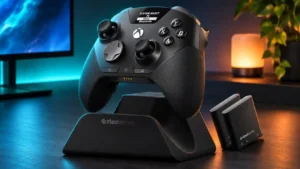
The dual-device dock and hot-swappable batteries make the Aeon Pro exceptionally convenient for Xbox and PC gaming. Crisp controls impress, but its steep price and divisive rear paddles make it...
Pros: battery replaceability, charging dock support
Cons: value for money, back button placement
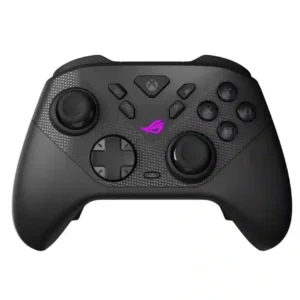
Best for precise TMR sticks, fast trigger stops, low-latency 2.4GHz play, and deep tuning. Skip it if you want a cheaper all-rounder, softer buttons for long sessions, or painless console-only...
Pros: overall satisfaction, button quality
Cons: d-pad accuracy, charging dock support
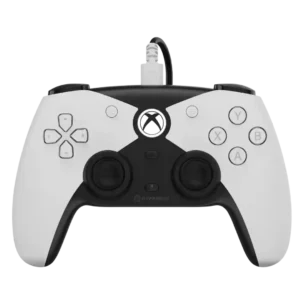
Best for a comfortable, affordable Xbox/PC pad with precise Hall sticks, a PlayStation-style layout, and useful rear buttons. Skip it if wireless play, deep software tuning, or consistently top-tier D-pad...
Pros: overall satisfaction, value for money
Cons: wired performance, vibration quality
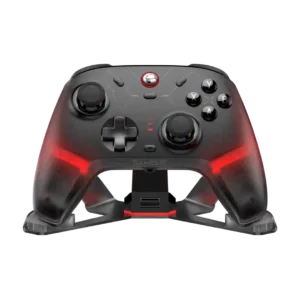
Choose the GameSir Cyclone 2 if you want a low-cost PC/Switch/mobile controller with precise sticks, deep customization, and a dock. Skip it if Xbox/PS5 support, premium buttons, or flawless dock/battery...
Pros: value for money, charging dock support
Cons: d-pad feel, compatibility with Xbox