Compare Razer Huntsman V2 TKL vs Corsair SKIFF 100

Razer Huntsman V2 TKL

Razer Huntsman V2 TKL

Overall score 4.0 / 5

Based on 15 scored reviews

vs
Corsair SKIFF 100

Corsair SKIFF 100

Overall score 4.0 / 5

Based on 4 scored reviews

How we score

Scorata scores summarize analyzed review evidence on a 1–5 scale; they are not laboratory measurements or a simple average of customer star ratings. Feature scores summarize the reviews covering that feature. The overall score averages feature scores within each review, then combines review averages. When both expert and customer evidence are available, those two groups receive equal weight. Products can have different review coverage, so small score gaps do not establish a winner.

Recommendations prioritize important features for the category, with a score of at least 3.5, a gap of at least 0.25 points and at least two supporting reviews per product. Features with widely varying scores or broad connectivity contexts are excluded from recommendations. These safeguards do not establish statistical significance.

Quick verdict

What each product is best for

The review evidence points to a tradeoff: macro customization and customization options versus media controls and volume control. Choose according to which strengths matter more to you; the overall score alone does not settle that choice.

Choose Razer Huntsman V2 TKL for macro customization and customization options.

Choose Corsair SKIFF 100 for media controls and volume control.

Why these recommendations?

Razer Huntsman V2 TKL

Where It Has the Edge

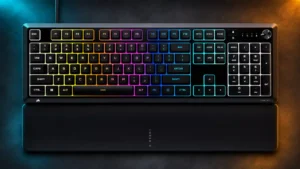
  • macro customization is 4.3 vs 3.3. Macro customization was well supported through Synapse and on-the-fly functions, with one review noting setup friction.
  • customization options is 4.8 vs 3.9. Customization options were broad, covering key remaps, secondary functions, shortcuts, RGB, macros, and profile controls.
  • durability is 4.6 vs 4.0. Durability was a major strength, driven by PBT keycaps, rugged construction, resistance to shine, and long switch/keycap life...

Corsair SKIFF 100

Where It Has the Edge

  • media controls is 4.3 vs 2.2. Quick media controls are practical, though Fn shortcuts and a stiff dial click frustrated one reviewer.
  • volume control is 4.3 vs 2.2. The notched volume dial is handy and tactile, although pressing it can require too much force.
Razer Huntsman V2 TKL 4.0 overall score
Corsair SKIFF 100 4.0 overall score

Compare features

Scores are out of 5. Missing scores mean missing review evidence, not a missing feature.

Scored on both products

Comfort and build

Ergonomics
Razer Huntsman V2 TKL
3.9

Ergonomics were mostly positive thanks to incline options, centering, and wrist support, with some caveats about feet grip and wrist-rest use.

Corsair SKIFF 100
4.0

Wrist support and low-profile keys improve comfort, although the rest height and shallow risers may not suit everyone.

Durability
Razer Huntsman V2 TKL
4.6

Durability was a major strength, driven by PBT keycaps, rugged construction, resistance to shine, and long switch/keycap life expectations.

Corsair SKIFF 100
4.0

The solid construction and splash protection suggest suitability for ordinary long-term desk use rather than heavy abuse.

Build quality
Razer Huntsman V2 TKL
4.5

Build quality was repeatedly praised as premium, sturdy, rock-solid, or excellent, despite some light plastic-body caveats.

Corsair SKIFF 100
4.1

The lightweight plastic construction feels surprisingly solid for its price, without the premium feel of metal.

Typing comfort
Razer Huntsman V2 TKL
4.0

Typing comfort depended on switch feel: several reviewers liked extended typing comfort, while one found the dampened bottom-out painful.

Corsair SKIFF 100
4.3

Recessed, low-profile keycaps feel comfortable under the fingers, and the membrane action is easy to live with.

Design aesthetics
Razer Huntsman V2 TKL
4.2

Design aesthetics were mostly praised as sleek, muted, professional, or clean, though one reviewer found the board visually plain.

Corsair SKIFF 100
4.0

The clean black chassis looks understated, though its styling can feel a little generic. RGB adds personality.

Materials quality
Razer Huntsman V2 TKL
3.5

Materials quality received limited but positive evidence for the aluminum top plate finish.

Corsair SKIFF 100
3.7

The plastic has a reasonably solid, pleasant finish, although metal would feel more substantial.

Size and form factor
Razer Huntsman V2 TKL
4.4

The TKL size was generally praised for compactness, portability, and gaming practicality without going as cramped as mini layouts.

Corsair SKIFF 100
4.5

The full-size arrangement is convenient for buyers who want a number pad and familiar key access.

Ownership and support

Reliability
Razer Huntsman V2 TKL
4.0

Reliability was supported by limited evidence: durable construction and stable profile/cable fit suggested dependable daily use, but cable issues in some reviews kept it from being universal.

Corsair SKIFF 100
4.5

The board delivers comfortable, dependable operation during ordinary use.

Value for money
Razer Huntsman V2 TKL
3.4

Value for money split reviewers: some saw a strong premium TKL, while others considered the price hard to justify against cheaper competitors.

Corsair SKIFF 100
4.0

Comfort, responsive keys and useful controls make it reasonably priced, but inexpensive mechanical rivals and the slightly pricier Plus complicate the value proposition.

Other features

Per-key lighting control
Razer Huntsman V2 TKL
5.0

Per-key lighting control was positively covered where reviewers noted individual-key customization and per-key RGB support.

Corsair SKIFF 100
2.0

Lighting is divided into zones rather than independently controllable keys, limiting detailed personalization.

Volume control
Razer Huntsman V2 TKL
2.2

Volume control was a clear compromise because the smaller board lacks the full-size model's dial or convenient dedicated controls.

Corsair SKIFF 100
4.3

The notched volume dial is handy and tactile, although pressing it can require too much force.

Frame rigidity
Razer Huntsman V2 TKL
5.0

Frame rigidity was strongly praised in the review that evaluated it directly, citing no creaking or flexing.

Corsair SKIFF 100
3.9

The chassis is reasonably rigid and sturdy despite its light weight and plastic construction.

Connectivity
Razer Huntsman V2 TKL
2.3

Connectivity drew criticism where reviewers disliked left-side USB-C placement or found third-party cable disconnects.

Corsair SKIFF 100
3.3

Wired USB keeps setup simple, but the absence of wireless connectivity is a compromise against similarly priced rivals.

Acoustics
Razer Huntsman V2 TKL
3.5

Acoustics were mixed: red-switch models sounded far better and quieter, while clicky versions, stabilizers, and case resonance drew complaints.

Corsair SKIFF 100
4.3

Muted keystrokes and a pleasing balance of damping and click make the keyboard satisfying without much noise.

Polling rate
Razer Huntsman V2 TKL
3.7

The 8,000Hz polling rate impressed as a technical spec, but reviewer consensus was mixed because its real-world benefit is hard to notice.

Corsair SKIFF 100
4.5

The 1000Hz polling rate helps keep inputs feeling responsive.

Cable quality
Razer Huntsman V2 TKL
3.6

Cable quality was mixed-to-positive: reviewers liked detachable braided cables, but some disliked stiffness, placement, or third-party cable limitations.

Corsair SKIFF 100
3.0

The standard rubber-coated cable is acceptable at this price, but a braided cable would feel more premium.

Portability
Razer Huntsman V2 TKL
4.4

Portability was a strength thanks to compact size, detachable cable, and a design reviewers felt encouraged moving the keyboard around.

Corsair SKIFF 100
5.0

It is unusually easy to move around for a full-size keyboard.

RGB lighting quality
Razer Huntsman V2 TKL
4.3

RGB lighting quality was generally good to excellent, though reviewers noted brightness inconsistency and limited lighting coverage in a few cases.

Corsair SKIFF 100
3.8

The lighting adds welcome color to the black chassis, although one reviewer found the LEDs pastel rather than vibrant.

Typing feel
Razer Huntsman V2 TKL
3.9

Typing feel ranged from dreamlike and crisp on red switches to mushy, muted, or hurt by stabilizer sound depending on reviewer preference.

Corsair SKIFF 100
4.3

Low-profile keys and softer membrane action make typing pleasant without the sharp tactile feedback of mechanical switches.

Keycap quality
Razer Huntsman V2 TKL
4.5

Keycap quality was a standout, with repeated praise for doubleshot PBT texture, ruggedness, durability, and shine-through construction.

Corsair SKIFF 100
4.3

The shaped keycaps feel pleasant and secure under the fingers despite not being double-shot PBT.

Key responsiveness
Razer Huntsman V2 TKL
4.7

Responsiveness was consistently praised, with reviewers calling the switches fast, instant, and easy to press quickly.

Corsair SKIFF 100
4.5

The keys respond promptly, helped by shallow travel and a 1000Hz polling rate.

Switch feel
Razer Huntsman V2 TKL
3.9

Reviewers praised the red linear optical switches for speed and smoothness, but several noted dampened or mushy bottom-outs and disliked the clicky option.

Corsair SKIFF 100
4.0

Membrane switches feel snappy, quiet and satisfying, but lack the tactile character and premium performance of mechanical alternatives.

Extra gaming features
Razer Huntsman V2 TKL
3.6

Extra gaming features were adequate rather than lavish, with useful gaming mode and Hypershift offsetting a stripped-down feature set.

Corsair SKIFF 100
3.5

Windows Lock is handy for gaming, but the keyboard lacks many advanced features found on premium boards.

Wrist rest quality
Razer Huntsman V2 TKL
4.0

The wrist rest was often comfortable and appreciated, but repeated complaints focused on the lack of magnetic attachment and possible wear.

Corsair SKIFF 100
4.0

The detachable rest is wide, stable and generally comfortable, but it attracts dust and may sit too low for some wrists.

Actuation consistency
Razer Huntsman V2 TKL
4.5

Actuation consistency received positive evidence where optical switches were described as less bounce-prone and ready for subsequent inputs.

Corsair SKIFF 100
4.5

Inputs feel consistent during gameplay.

Controls and connectivity

Media controls
Razer Huntsman V2 TKL
2.2

Media controls were a repeated limitation because the TKL lacks dedicated media keys and relies on function-layer controls.

Corsair SKIFF 100
4.3

Quick media controls are practical, though Fn shortcuts and a stiff dial click frustrated one reviewer.

RGB customization
Razer Huntsman V2 TKL
4.8

RGB customization was praised as extensive, with Synapse and Chroma offering abundant lighting effects and profile-level control.

Corsair SKIFF 100
3.6

Zone-based RGB can coordinate with a desk setup, but it lacks the precision of per-key customization.

Macro customization
Razer Huntsman V2 TKL
4.3

Macro customization was well supported through Synapse and on-the-fly functions, with one review noting setup friction.

Corsair SKIFF 100
3.3

Custom combinations and mouse inputs are useful, but there are no dedicated macro keys on the base model, so assignments can replace existing functions.

Customization options
Razer Huntsman V2 TKL
4.8

Customization options were broad, covering key remaps, secondary functions, shortcuts, RGB, macros, and profile controls.

Corsair SKIFF 100
3.9

Remapping and RGB settings offer worthwhile flexibility, but assigning new functions can overwrite existing ones and advanced tuning is limited.

Software quality
Razer Huntsman V2 TKL
4.3

Software quality was generally strong due to Synapse control and seamless peripheral integration, though Chroma Studio and macro setup drew small complaints.

Corsair SKIFF 100
4.3

iCUE offers intuitive, flexible configuration; the Web Hub provides a simpler browser-based option. Advanced tuning remains limited.

Performance

Backlight brightness
Razer Huntsman V2 TKL
3.0

Backlight brightness was acceptable but not a highlight; reviewers found it dimmer than some other backlit keyboards.

Corsair SKIFF 100
3.5

Brightness impressions vary: the lights can enliven a desk, but their colors are not vivid enough for everyone.

Noise level
Razer Huntsman V2 TKL
4.5

Noise level was usually a strength for red linear units, though clicky-switch reviews and stabilizer noise produced some negative scores.

Corsair SKIFF 100
4.9

Quiet membrane keystrokes are a consistent strength, especially around other people.

Gaming performance
Razer Huntsman V2 TKL
4.6

Gaming performance was broadly strong, especially for competitive play, with reviewers praising speed, control, and the TKL form factor.

Corsair SKIFF 100
4.5

Gaming feels responsive and consistent, although the membrane design is not aimed at premium switch performance.

Sound dampening
Razer Huntsman V2 TKL
4.5

Sound dampening was widely praised on red-switch models, but one clicky-switch review found stabilizer noise undermined Razer's dampening effort.

Corsair SKIFF 100
4.5

The switches are well damped without losing their satisfying click-like feedback.

Evidence available for one product

Other features

Ease of use
Razer Huntsman V2 TKLNo score yet
Corsair SKIFF 100
4.3

Setup is straightforward and configuration interfaces are intuitive, particularly for existing Corsair software users.

Compatibility
Razer Huntsman V2 TKL
3.5

Compatibility was mixed: standard keycaps were a plus, but long-key fit and cable/customization friction lowered some scores.

Corsair SKIFF 100No score yet
Desk grip
Razer Huntsman V2 TKLNo score yet
Corsair SKIFF 100
4.3

Rubber feet help keep the board in place, but its light weight means it may shift when pushed.

Desk space efficiency
Razer Huntsman V2 TKL
4.8

Desk space efficiency was a clear TKL advantage, giving reviewers more mouse room and a more centered typing position.

Corsair SKIFF 100No score yet
Function layer usability
Razer Huntsman V2 TKLNo score yet
Corsair SKIFF 100
2.0

Some media actions require Fn combinations instead of dedicated buttons, adding unnecessary effort.

Included accessories
Razer Huntsman V2 TKLNo score yet
Corsair SKIFF 100
4.8

A detachable palm rest is a generous and useful inclusion at this price.

Key rollover
Razer Huntsman V2 TKLNo score yet
Corsair SKIFF 100
4.5

12-key rollover handles simultaneous presses without causing problems in gameplay.

Key spacing
Razer Huntsman V2 TKL
5.0

Key spacing received direct praise for avoiding a crowded feel despite the compact TKL design.

Corsair SKIFF 100No score yet
Key stability
Razer Huntsman V2 TKL
5.0

Longer keys were described as stable in some reviews, though this did not erase broader stabilizer complaints.

Corsair SKIFF 100No score yet
Latency
Razer Huntsman V2 TKL
4.5

Latency measured as a strength in reviewer impressions, though several reviewers questioned whether users can actually feel the difference.

Corsair SKIFF 100No score yet
Layout options
Razer Huntsman V2 TKL
5.0

Layout options were praised where the TKL layout was judged one of the best balances for gaming and typing.

Corsair SKIFF 100No score yet
Onboard memory
Razer Huntsman V2 TKL
4.5

Onboard memory was positively mentioned for saving profiles to the board or hybrid storage.

Corsair SKIFF 100No score yet
Overall satisfaction
Razer Huntsman V2 TKLNo score yet
Corsair SKIFF 100
3.9

The keyboard is a comfortable, capable mid-priced option, though its basic membrane design faces stiff competition.

Packaging quality and presentation
Razer Huntsman V2 TKLNo score yet
Corsair SKIFF 100
4.8

Packaging is clear, thoughtful and protective rather than elaborate.

Profile management
Razer Huntsman V2 TKL
4.5

Profile management was consistently praised, especially for game-specific profiles and onboard/hybrid memory.

Corsair SKIFF 100No score yet
Spill resistance
Razer Huntsman V2 TKLNo score yet
Corsair SKIFF 100
4.3

IP53 splash resistance offers reassurance around drinks, but the keyboard is not waterproof.

Stabilizer quality
Razer Huntsman V2 TKL
1.9

Stabilizer quality was the most consistent hardware complaint, with rattling, poor sound, and Razer's unusual design repeatedly criticized.

Corsair SKIFF 100No score yet
Switch options
Razer Huntsman V2 TKL
3.3

The red and purple switch choices gave buyers options, though opinion strongly favored the quieter red linears while clicky or silent-linear feel split reviewers.

Corsair SKIFF 100No score yet
Unboxing experience
Razer Huntsman V2 TKLNo score yet
Corsair SKIFF 100
4.3

Paper wrapping and straightforward packaging make unboxing tidy and uncomplicated.

Weight and handling
Razer Huntsman V2 TKLNo score yet
Corsair SKIFF 100
4.0

Low weight makes handling easy, but it can also make the board easier to shift accidentally.

Performance

Cleaning ease
Razer Huntsman V2 TKLNo score yet
Corsair SKIFF 100
2.0

The soft-touch palm-rest coating collects dust and debris readily and needs frequent cleaning.

Legend visibility
Razer Huntsman V2 TKL
2.4

Legend visibility drew repeated criticism because secondary legends and some symbols were not illuminated or looked inconsistent.

Corsair SKIFF 100No score yet

Controls and connectivity

Performance customization
Razer Huntsman V2 TKLNo score yet
Corsair SKIFF 100
2.5

The keyboard has few performance tuning options beyond basic settings, a compromise at its price.

Software and driver support
Razer Huntsman V2 TKLNo score yet
Corsair SKIFF 100
4.3

Both browser-based configuration and iCUE are useful, with iCUE offering broader remapping options.

Other Top Gaming Keyboards to Consider

#1 Keychron Q5 HE
4.5

Good if you want a premium 96% Hall Effect keyboard for work and gaming with excellent build, sound, and customization. Skip it if you need cheaper esports-first speed, 8,000Hz polling,...

Pros: size and form factor, typing feel

Cons: switch options, portability

#2 Wooting 60HE+
4.4

Choose it if competitive gaming speed, Rapid Trigger, and deep per-key customization matter more than extras. Skip it if you need wireless, dedicated arrows/media keys, adjustable height, or a lower-cost...

Pros: overall satisfaction, customization options

Cons: value for money, switch options

#3 Keychron Q3 HE
4.4

Good if you want a premium, quiet TKL Hall Effect keyboard for typing and gaming. Skip it if price, portability, 8,000Hz polling, or broad switch choice matters most.

Pros: build quality, switch feel

Cons: switch options

#4 Keychron Q6 HE
4.4

Good if you want a premium full-size Hall Effect keyboard with smooth switches, quiet sound, and deep customization. Skip it if you need a portable, budget-friendly board or broad switch...

Pros: build quality, keycap quality

Cons: switch options, portability