Other features
Ease of use
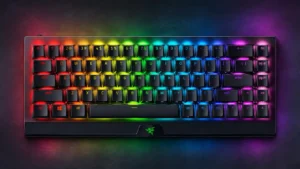
Razer BlackWidow V4 Mini HyperSpeed
4.0
Initial setup and ordinary layout can be straightforward, but advanced RGB configuration can be unnecessarily difficult.
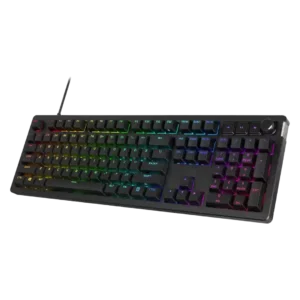
HyperX Alloy RiseNo score yet
Accessory compatibility
Razer BlackWidow V4 Mini HyperSpeed
2.7
Pairing a compatible Razer mouse to the same receiver can save a port, but some find the pairing unreliable or struggle to find matching replacement keycaps.
HyperX Alloy RiseNo score yet
Cable quality
Razer BlackWidow V4 Mini HyperSpeedNo score yet
HyperX Alloy Rise
2.0
Cable quality is criticized by Noisy Pixel, which found the USB cable and mounting area poorly integrated into the keyboard's design.
Delivery handling and condition
Razer BlackWidow V4 Mini HyperSpeed
2.3
Some units arrive in excellent condition, but other buyers report missing keys or apparent signs of previous use.
HyperX Alloy RiseNo score yet
Device compatibility
Razer BlackWidow V4 Mini HyperSpeed
1.0
PS5 compatibility is a clear complaint, including an unsuccessful attempt to update the keyboard before connecting.
HyperX Alloy RiseNo score yet
Function layer usability
Razer BlackWidow V4 Mini HyperSpeed
3.7
Some owners like the placement and illuminated function shortcuts, but others dislike having to hold Fn for everyday controls.
HyperX Alloy RiseNo score yet
Included accessories
Razer BlackWidow V4 Mini HyperSpeed
4.0
The supplied switch and keycap puller and stickers are welcomed as useful extras.
HyperX Alloy RiseNo score yet
Instruction readability
Razer BlackWidow V4 Mini HyperSpeed
1.0
One owner describes the tiny, low-contrast printed instructions as nearly impossible to read.
HyperX Alloy RiseNo score yet
Key stability
Razer BlackWidow V4 Mini HyperSpeedNo score yet
HyperX Alloy Rise
4.6
Key stability is praised where discussed, with reviewers noting stable switches and keys that stay in place even after customization.
Onboard memory
Razer BlackWidow V4 Mini HyperSpeedNo score yet
HyperX Alloy Rise
4.7
Onboard memory is praised where discussed because settings or configurations can be saved directly to the keyboard.
Overall satisfaction
Razer BlackWidow V4 Mini HyperSpeed
3.7
Many owners love the compact design, tactile keys and lighting, but others report early failures severe enough to return the keyboard. Overall satisfaction depends heavily on whether the unit works reliably.
HyperX Alloy RiseNo score yet
Polling rate
Razer BlackWidow V4 Mini HyperSpeedNo score yet
HyperX Alloy Rise
3.8
The 8,000Hz polling rate is recognized as high-end, but reviewers are split on practical benefit because some found the returns negligible.
Power efficiency
Razer BlackWidow V4 Mini HyperSpeed
2.5
RGB lighting is a major drain on the battery, substantially reducing runtime compared with dimmer or disabled lighting.
HyperX Alloy RiseNo score yet
Repairability
Razer BlackWidow V4 Mini HyperSpeed
2.5
Replaceable switches help extend the board’s life, but finding matching replacement keycaps can be difficult.
HyperX Alloy RiseNo score yet
Stabilizer quality
Razer BlackWidow V4 Mini HyperSpeedNo score yet
HyperX Alloy Rise
4.5
Stabilizer quality is praised in the detailed reviews, especially for reduced rattle, stability, and factory lubrication.
Suspend and resume
Razer BlackWidow V4 Mini HyperSpeed
1.0
One owner reports that the keyboard stops responding after inactivity and requires a PC restart to recover.
HyperX Alloy RiseNo score yet
Weight and handling
Razer BlackWidow V4 Mini HyperSpeed
4.2
Some appreciate the substantial weight for keeping the board in place, while others prefer its manageable size or find it too heavy.
HyperX Alloy RiseNo score yet
Wrist rest quality
Razer BlackWidow V4 Mini HyperSpeedNo score yet
HyperX Alloy Rise
2.0
Wrist rest quality is effectively a weakness because multiple reviewers specifically wished one was included or needed for comfort.
Battery and charging
Charging speed
Razer BlackWidow V4 Mini HyperSpeed
4.5
Charging in roughly five hours is presented as convenient by the favorable reviews.
HyperX Alloy RiseNo score yet
Performance
Cleaning ease
Razer BlackWidow V4 Mini HyperSpeed
1.0
One owner reports that several keycaps broke during the first cleaning attempt with a wet wipe and rubbing alcohol.
HyperX Alloy RiseNo score yet
Comfort and build
Control input comfort
Razer BlackWidow V4 Mini HyperSpeed
5.0
Flexible placement makes it easier to rest an arm comfortably on the desk.
HyperX Alloy RiseNo score yet
Ownership and support
Lighting reliability
Razer BlackWidow V4 Mini HyperSpeed
1.3
Lighting can turn off unexpectedly or fail entirely, sometimes on replacement units too. Hidden legends make such failures particularly disruptive.
HyperX Alloy RiseNo score yet
Manufacturer customer support
Razer BlackWidow V4 Mini HyperSpeed
1.0
Some owners report that support declined warranty coverage or offered a costly return process.
HyperX Alloy RiseNo score yet
Power connector reliability
Razer BlackWidow V4 Mini HyperSpeed
1.0
One owner reports the USB port stopped functioning after seven months.
HyperX Alloy RiseNo score yet
Warranty and support
Razer BlackWidow V4 Mini HyperSpeed
1.8
The advertised warranty is reassuring on paper, but several owners describe denied claims or unresolved defects.
HyperX Alloy RiseNo score yet
Controls and connectivity
Macro customization
Razer BlackWidow V4 Mini HyperSpeedNo score yet
HyperX Alloy Rise
4.3
Macro customization is useful and appreciated, with reviewers noting key remaps, macro setup, and enough flexibility for game profiles.
Multi-device wireless pairing
Razer BlackWidow V4 Mini HyperSpeed
4.2
Switching between devices or sharing one receiver with a mouse can be convenient. Shared-dongle reliability is inconsistent across owners.
HyperX Alloy RiseNo score yet
Software and driver support
Razer BlackWidow V4 Mini HyperSpeed
1.0
One owner reports recurring freezes and shutdowns after installing Synapse, even after a fresh Windows installation.
HyperX Alloy RiseNo score yet