Scorata scores summarize analyzed review evidence on a 1–5 scale; they are not laboratory measurements or a simple average of customer star ratings. Feature scores summarize the reviews covering that feature. The overall score averages feature scores within each review, then combines review averages. When both expert and customer evidence are available, those two groups receive equal weight. Products can have different review coverage, so small score gaps do not establish a winner.
Recommendations prioritize important features for the category, with a score of at least 3.5, a gap of at least 0.25 points and at least two supporting reviews per product. Features with widely varying scores or broad connectivity contexts are excluded from recommendations. These safeguards do not establish statistical significance.
Quick verdict
What each product is best for
The review evidence points to a tradeoff: ergonomics and noise level versus layout options and legend visibility. Choose according to which strengths matter more to you; the overall score alone does not settle that choice.
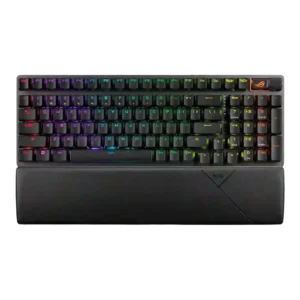
Choose ASUS ROG Strix Scope II 96 Wireless for ergonomics and noise level.
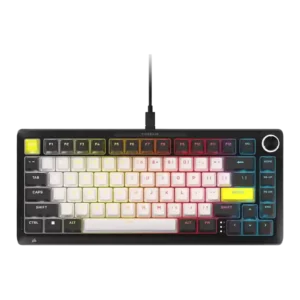
Choose Corsair Makr Pro 75 for layout options and legend visibility.
Why these recommendations?
ASUS ROG Strix Scope II 96 Wireless
Where It Has the Edge
ergonomics is 4.3 vs 3.1. Ergonomics are generally positive thanks to the wrist rest, adjustable angle, and typing comfort, with few direct complaints.
noise level is 4.3 vs 2.4. Noise level is mostly positive because the board is quieter than expected, though one reviewer found it neither...
portability is 3.5 vs 2.1. Portability is mixed: one reviewer liked taking it along easily and another said it fits a backpack, while...
Corsair Makr Pro 75
Where It Has the Edge
layout options is 4.9 vs 2.9. The 75% layout itself was praised as well balanced, spacious for its footprint, and close to ideal for...
legend visibility is 4.6 vs 2.7. Legend visibility scored well, with reviewers praising readability, shine-through clarity, and double-shot durability.
key spacing is 4.6 vs 2.9. The compact layout was still considered usable, with enough arrow-key spacing and little sense of cramping.
ASUS ROG Strix Scope II 96 Wireless4.2 overall score
Corsair Makr Pro 754.1 overall score
Compare features
Scores are out of 5. Missing scores mean missing review evidence, not a missing feature.
Scored on both products
Comfort and build
Ergonomics
ASUS ROG Strix Scope II 96 Wireless
4.3
Ergonomics are generally positive thanks to the wrist rest, adjustable angle, and typing comfort, with few direct complaints.
Corsair Makr Pro 75
3.1
Ergonomic evidence was mixed, with some appreciation for adjustable feet but recurring criticism of stiffness, height, or wrist-angle strain.
Design aesthetics
ASUS ROG Strix Scope II 96 Wireless
3.3
Design aesthetics are mixed: one reviewer called it gorgeous, while others disliked the gamer font or floating-key look.
Corsair Makr Pro 75
4.5
Most reviewers liked the clean, premium, bold look, though the white, black, and yellow color scheme was not universally loved.
Durability
ASUS ROG Strix Scope II 96 Wireless
4.2
Durability evidence is positive overall, especially around PBT caps and long-term build confidence, with one caveat about leatherette longevity.
Corsair Makr Pro 75
5.0
Durability evidence was positive, citing sturdy construction, long-lasting legends, and contactless switch design.
Typing comfort
ASUS ROG Strix Scope II 96 Wireless
4.6
Typing comfort is very strong overall, with reviewers reporting comfortable long sessions, pleasant typing, and reduced hand strain.
Corsair Makr Pro 75
4.0
Typing comfort was mixed: several reviewers found it comfortable for long sessions, while others found the stiff feel tiring or productivity-hampering.
Size and form factor
ASUS ROG Strix Scope II 96 Wireless
4.0
Size and form factor are mixed-positive: many like the compact numpad layout, while others feel it is stuck between full-size and truly compact boards.
Corsair Makr Pro 75
4.5
The 75% form factor was broadly praised as compact but practical, though the heavy chassis limited travel convenience.
Materials quality
ASUS ROG Strix Scope II 96 Wireless
4.3
Materials quality is generally good because of aluminum, PBT, foam, and premium-feeling parts, though some reviewers note plastic chassis elements.
Corsair Makr Pro 75
4.8
Material quality was widely praised, especially the aluminum construction and premium physical feel.
Build quality
ASUS ROG Strix Scope II 96 Wireless
4.6
Build quality is consistently strong, with reviewers describing the keyboard as solid, tank-like, well made, and premium-feeling.
Corsair Makr Pro 75
4.8
Reviewers overwhelmingly agreed the board feels premium, solid, and well built, with only value and DIY-positioning caveats tempering the praise.
Battery and charging
Battery life
ASUS ROG Strix Scope II 96 Wireless
4.8
Battery life is one of the most consistently praised attributes, with reviewers calling it beastly, impressive, class-leading, or unusually long-lasting.
Corsair Makr Pro 75
3.8
Battery-life evidence was split: one review criticized the optional wireless module's reduced endurance, while another praised weeks between charges.
Ownership and support
Reliability
ASUS ROG Strix Scope II 96 Wireless
4.8
Reliability evidence is positive but limited, with reviewers citing uninterrupted wireless sessions and a keyboard that works reliably out of the box.
Corsair Makr Pro 75
4.2
Reliability was mostly positive after use, with praise for accurate inputs and no missed presses, but one reviewer had poor out-of-box ghost-key behavior.
Rapid trigger support
ASUS ROG Strix Scope II 96 Wireless
2.0
Rapid-trigger support is a weakness for niche rhythm or rapid-trigger-focused players, with one reviewer saying another board would be better for that demand.
Corsair Makr Pro 75
4.8
Rapid Trigger was repeatedly praised as useful, well implemented, or genuinely valuable for competitive movement.
Analog input support
ASUS ROG Strix Scope II 96 Wireless
2.0
Analog input support is a limitation rather than a strength, with reviewer evidence pointing analog-gaming shoppers toward a different keyboard.
Corsair Makr Pro 75
4.0
One review treated analog input as niche but genuinely useful for users who need proportional key-depth control.
Value for money
ASUS ROG Strix Scope II 96 Wireless
4.2
Value for money is positive despite the premium price; reviewers often say it is worth it, competitive, or justified by the feature set.
Corsair Makr Pro 75
3.1
Value was the most frequent concern: reviewers respected the build and feature set, but many said cheaper Hall Effect competitors were easier to justify.
Ease of switch replacement
ASUS ROG Strix Scope II 96 Wireless
4.3
Ease of switch replacement is positive in the limited evidence, with reviewers saying switches can be swapped using the included tools or supported sockets.
Corsair Makr Pro 75
4.7
Switch replacement was generally judged easy, especially when reviewers described quick hot-swap access and simple replacement.
Performance
Backlight brightness
ASUS ROG Strix Scope II 96 Wireless
2.0
Backlight brightness is a weak spot in the evidence, with PCMag specifically calling the RGB lighting underwhelming and dim.
Corsair Makr Pro 75
4.6
Brightness was judged strong enough for daylight visibility with readable legends.
Legend visibility
ASUS ROG Strix Scope II 96 Wireless
2.7
Legend visibility is mixed to negative: reviewers liked some fonts, but several found the gamer styling or unlit secondary legends harder to read.
Corsair Makr Pro 75
4.6
Legend visibility scored well, with reviewers praising readability, shine-through clarity, and double-shot durability.
Wireless performance
ASUS ROG Strix Scope II 96 Wireless
4.8
Wireless performance is strongly positive overall, with reviewers reporting stable, fast, low-lag 2.4GHz use and only small Bluetooth caveats.
Corsair Makr Pro 75
2.9
Wireless evidence was mixed: some reviews praised or described strong wireless behavior, but most criticized wireless as optional, costly, or absent by default.
Noise level
ASUS ROG Strix Scope II 96 Wireless
4.3
Noise level is mostly positive because the board is quieter than expected, though one reviewer found it neither silent enough nor noisy enough for their taste.
Corsair Makr Pro 75
2.4
Noise-level evidence was mixed-to-negative: some appreciated the controlled sound, but others found it loud or less pleasant than competitors.
Sound dampening
ASUS ROG Strix Scope II 96 Wireless
4.6
Sound dampening is strongly praised, with reviewers repeatedly crediting foam, pads, and dampening materials for reducing ping, hollowness, and reverberation.
Corsair Makr Pro 75
4.0
Sound dampening was often praised for reducing hollow resonance and improving feel, but some reviewers felt the board was over-dampened or still compromised by stabilizers.
Gaming performance
ASUS ROG Strix Scope II 96 Wireless
4.5
Gaming performance is strongly praised across reviews, with repeated comments about responsive keys, strong wireless gaming behavior, and enjoyable play in competitive and casual contexts.
Corsair Makr Pro 75
4.5
Gaming performance was usually praised as excellent or highly responsive, though one reviewer found the overall experience solid but unspectacular.
Other features
Layout options
ASUS ROG Strix Scope II 96 Wireless
2.9
Layout options are polarizing: reviewers like the full-size key coverage in a 96% design, but several struggled with muscle memory or cramped placement.
Corsair Makr Pro 75
4.9
The 75% layout itself was praised as well balanced, spacious for its footprint, and close to ideal for several reviewers.
Key spacing
ASUS ROG Strix Scope II 96 Wireless
2.9
Key spacing is the most common layout complaint, with reviewers repeatedly noting cramped keys, adjustment time, or awkward muscle-memory changes.
Corsair Makr Pro 75
4.6
The compact layout was still considered usable, with enough arrow-key spacing and little sense of cramping.
Switch options
ASUS ROG Strix Scope II 96 Wireless
4.0
Evidence on switch options is limited, but the available reviewer sentiment says buyers choosing between the Snow and Storm styles should be happy either way.
Corsair Makr Pro 75
2.5
Switch-option evidence was limited and negative because standard MX tactile and clicky switches are not usable on the Hall Effect PCB.
Connectivity
ASUS ROG Strix Scope II 96 Wireless
4.5
Connectivity is a major strength, with repeated praise for tri-mode wired, 2.4GHz, Bluetooth, multi-device, and dual-PC flexibility.
Corsair Makr Pro 75
3.1
Connectivity was a recurring tradeoff: optional wireless expanded flexibility, but many reviewers disliked paying extra or lacking wireless by default.
Portability
ASUS ROG Strix Scope II 96 Wireless
3.5
Portability is mixed: one reviewer liked taking it along easily and another said it fits a backpack, while another found it not exactly portable.
Corsair Makr Pro 75
2.1
Portability was consistently weak because reviewers repeatedly emphasized the heavy near-1.3 kg body.
Acoustics
ASUS ROG Strix Scope II 96 Wireless
4.7
Acoustics are a major strength, with repeated praise for thocky, deep, muted, and premium-sounding keystrokes.
Corsair Makr Pro 75
3.6
Most reviewers found the sound better than typical gaming keyboards, controlled, or even excellent, but several noted it lacked depth, sounded average, or felt over-dampened.
Stabilizer quality
ASUS ROG Strix Scope II 96 Wireless
4.3
Stabilizer quality is mostly praised for smoothness, low rattle, and stable large keys, though one reviewer disliked the proprietary stabilizer design.
Corsair Makr Pro 75
3.4
Stabilizer evidence was sharply mixed, ranging from praised stable larger keys to strong complaints about rattle, thin lubing, and poor tuning.
Compatibility
ASUS ROG Strix Scope II 96 Wireless
3.5
Compatibility is mixed: reviewers liked device flexibility and ROG receiver pairing, but macOS software customization is limited.
Corsair Makr Pro 75
2.7
Compatibility evidence leaned mixed, with concerns about Mac-first use and USB-A cabling despite broader platform support.
Actuation consistency
ASUS ROG Strix Scope II 96 Wireless
4.5
Actuation consistency is viewed positively, with reviewers citing stable presses, minimal mis-presses, consistent keystrokes, and reliable simultaneous key processing.
Corsair Makr Pro 75
3.7
Actuation drew praise when calibrated or dialed in, but one reviewer reported out-of-box travel and calibration inconsistency.
RGB lighting quality
ASUS ROG Strix Scope II 96 Wireless
3.9
RGB lighting quality is mixed, ranging from attractive and tasteful to dim, gamery, or less impressive than competitors.
Corsair Makr Pro 75
4.7
RGB lighting quality was generally positive for tasteful, vivid, or flexible lighting, though a few reviewers found the implementation unremarkable or uneven.
Volume control
ASUS ROG Strix Scope II 96 Wireless
4.2
Volume control is positively reviewed, especially the roller implementation, which several reviewers enjoyed or found handy.
Corsair Makr Pro 75
4.9
The rotary volume control was consistently praised as useful, tactile, clever, and easy to use.
Desk space efficiency
ASUS ROG Strix Scope II 96 Wireless
4.0
Desk space efficiency is usually praised for giving more mouse room, but a minority say the 96% layout does not free up enough meaningful space.
Corsair Makr Pro 75
4.7
The 75% footprint was repeatedly praised for freeing mouse space while keeping important keys accessible.
Typing feel
ASUS ROG Strix Scope II 96 Wireless
4.4
Typing feel is one of the product's strongest reviewed attributes, with broad praise for smooth, satisfying typing and only a small amount of layout or switch-preference pushback.
Corsair Makr Pro 75
3.9
Typing feel was polarized, ranging from joyful, smooth, and precise to stiff, disappointing, or overly rigid.
Extra gaming features
ASUS ROG Strix Scope II 96 Wireless
4.5
Extra gaming features are well liked, including Game Bar hotkeys, recording controls, built-in shortcuts, and broad feature coverage.
Corsair Makr Pro 75
3.9
Hall Effect gaming extras such as Rapid Trigger, FlashTap, and SOCD were praised, but several reviewers complained about the missing easy Game Mode control.
Frame rigidity
ASUS ROG Strix Scope II 96 Wireless
4.6
Frame rigidity is strong across reviews, with evidence about sturdy frames, desk stability, minimal flex, and resistance to twisting.
Corsair Makr Pro 75
5.0
The aluminum frame was repeatedly described as rigid, stable, and resistant to creaks or flex.
Key responsiveness
ASUS ROG Strix Scope II 96 Wireless
4.4
Key responsiveness is consistently praised, with reviewers describing fast keystrokes, low effort actuation, reduced accidental presses, and responsive gaming inputs.
Corsair Makr Pro 75
4.8
Responsiveness was one of the clearest strengths, with many reviewers describing immediate, precise, or faster inputs.
Profile management
ASUS ROG Strix Scope II 96 Wireless
4.3
Profile management is positive where discussed, especially because profiles can be tweaked for games and used after software setup.
Corsair Makr Pro 75
4.5
Profile management earned positive evidence from the keyboard retaining saved onboard profiles when disconnected.
Keycap quality
ASUS ROG Strix Scope II 96 Wireless
4.2
Keycap quality is generally positive thanks to PBT or shine-resistant caps, though some regional ABS-keycap comments are more cautious.
Corsair Makr Pro 75
4.0
Keycap impressions were mixed: several reviewers praised texture, durability, and premium feel, while others found them slick, hollow, or ordinary.
Cable quality
ASUS ROG Strix Scope II 96 Wireless
3.8
Cable quality and USB-C handling are generally acceptable, though evidence includes a caution about the recessed USB-C port with third-party cables.
Corsair Makr Pro 75
3.6
Cable impressions were mixed: the included cable felt durable and flexible, but one reviewer disliked needing USB-A-to-USB-C accessories.
Switch feel
ASUS ROG Strix Scope II 96 Wireless
4.6
Reviewers repeatedly praised the NX Snow switch feel as smooth, refined, light, and satisfying, with only minor taste-based caveats from those who prefer clickier switches.
Corsair Makr Pro 75
4.5
Switch feel was generally praised for smooth, pre-lubed linear travel, although one reviewer found the switches only fine and loud.
Latency
ASUS ROG Strix Scope II 96 Wireless
4.8
Latency is a major strength in the evidence: reviewers report low response times, no felt lag, and near-zero wireless delay in real gaming use.
Corsair Makr Pro 75
4.9
Latency evidence was strongly positive, especially around immediate feel, low-latency operation, and wired-equivalent responsiveness.
Polling rate
ASUS ROG Strix Scope II 96 Wireless
4.5
Polling-rate evidence is limited to one review, but it links the 1000Hz behavior to more responsive-feeling inputs for competitive play.
Corsair Makr Pro 75
4.5
8,000Hz polling was usually treated as fast and performance-oriented, though one reviewer said it made no practical difference in use.
Key stability
ASUS ROG Strix Scope II 96 Wireless
4.4
Key stability is a strong point: reviewers describe reduced wobble, stable keystrokes, better typing stability, and almost no wobble on the switches.
Corsair Makr Pro 75
4.4
Key stability was generally positive, with smooth, stable switches, non-wobbly keys, and useful gaming firmness.
Onboard memory
ASUS ROG Strix Scope II 96 Wireless
4.5
Onboard memory is praised for letting users store profiles on the keyboard and reduce dependence on the software.
Corsair Makr Pro 75
4.5
One review praised retained settings through onboard profiles, giving the keyboard useful standalone configuration behavior.
Per-key lighting control
ASUS ROG Strix Scope II 96 Wireless
5.0
Per-key lighting control receives clear positive evidence from one review that described the customization as nearly endless.
Corsair Makr Pro 75
5.0
Per-key lighting control was viewed positively through detailed individual-key customization and programmable lighting.
Controls and connectivity
Software quality
ASUS ROG Strix Scope II 96 Wireless
2.5
Software quality is the clearest recurring weakness: Armoury Crate is described as bloated, slow, cumbersome, annoying, or hard to navigate despite useful controls.
Corsair Makr Pro 75
4.0
Software opinions were split: several reviewers praised Web Hub as polished, easy, or powerful, while others found iCUE/Web Hub frustrating, dense, sluggish, or limited.
Media controls
ASUS ROG Strix Scope II 96 Wireless
4.1
Media controls are useful and flexible for many reviewers, but one reviewer considered the compact wheel-and-button setup lacklustre.
Corsair Makr Pro 75
4.7
Media-control evidence was positive where reviewers praised the knob's broad functions and creative-control usefulness.
RGB customization
ASUS ROG Strix Scope II 96 Wireless
4.2
RGB customization is viewed positively, with reviewers noting per-key control, effects, color customization, and software-based sync options.
Corsair Makr Pro 75
4.7
RGB customization was praised for detailed control, per-key programmability, and broad aesthetic tuning.
Customization options
ASUS ROG Strix Scope II 96 Wireless
4.2
Customization options are strong overall, with many key, lighting, wheel, and software options, though power users may find some limits.
Corsair Makr Pro 75
4.4
Customization was one of the strongest themes, with praise for upgrade modules, actuation tuning, lighting control, and broad software control, though modularity confused some reviewers.
Hot-swappable switches
ASUS ROG Strix Scope II 96 Wireless
4.2
Hot-swappable switches are widely praised as a long-term ownership and tinkering advantage.
Corsair Makr Pro 75
4.4
Hot-swap evidence was positive where reviewers judged replacement easy, though one noted the capability is limited to compatible magnetic switches.
Evidence available for one product
Controls and connectivity
Macro customization
ASUS ROG Strix Scope II 96 Wireless
3.8
Macro customization is useful and sometimes easy, but one review notes the keyboard only has one programmability layer.
Corsair Makr Pro 75No score yet
Other features
Wrist rest quality
ASUS ROG Strix Scope II 96 Wireless
4.1
Wrist rest quality is mostly positive for comfort and magnetic attachment, though reviewers disagree on stiffness and one disliked using it while typing.
Good if you want a premium 96% Hall Effect keyboard for work and gaming with excellent build, sound, and customization. Skip it if you need cheaper esports-first speed, 8,000Hz polling,...
Choose it if competitive gaming speed, Rapid Trigger, and deep per-key customization matter more than extras. Skip it if you need wireless, dedicated arrows/media keys, adjustable height, or a lower-cost...
Good if you want a premium, quiet TKL Hall Effect keyboard for typing and gaming. Skip it if price, portability, 8,000Hz polling, or broad switch choice matters most.
Good if you want a premium full-size Hall Effect keyboard with smooth switches, quiet sound, and deep customization. Skip it if you need a portable, budget-friendly board or broad switch...