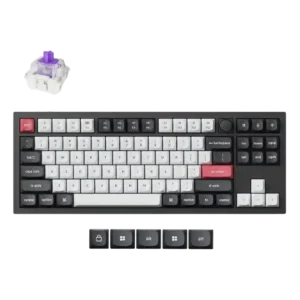
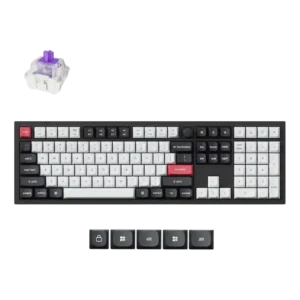
Scorata scores summarize analyzed review evidence on a 1–5 scale; they are not laboratory measurements or a simple average of customer star ratings. Feature scores summarize the reviews covering that feature. The overall score averages feature scores within each review, then combines review averages. When both expert and customer evidence are available, those two groups receive equal weight. Products can have different review coverage, so small score gaps do not establish a winner.
Recommendations prioritize important features for the category, with a score of at least 3.5, a gap of at least 0.25 points and at least two supporting reviews per product. Features with widely varying scores or broad connectivity contexts are excluded from recommendations. These safeguards do not establish statistical significance.
Quick verdict
What each product is best for
The review evidence points to a tradeoff: battery life and macro customization versus connectivity and gaming performance. Choose according to which strengths matter more to you; the overall score alone does not settle that choice.
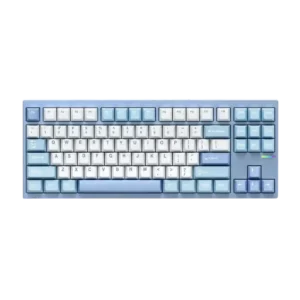
Choose McHose GX87 Keyboard for battery life and macro customization.
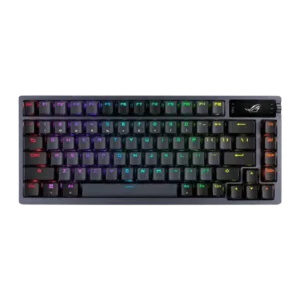
Choose ASUS ROG Azoth for connectivity and gaming performance.
Why these recommendations?
McHose GX87 Keyboard
Where It Has the Edge
battery life is 4.8 vs 4.6. Battery life was strongly praised, with reviewers emphasizing the large 8,000 mAh capacity and long time between charges.
macro customization is 4.5 vs 2.4. Macro customization was positively supported by reviewers who noted easy macro setup through VIA or QMK-style customization.
value for money is 4.9 vs 3.5. Value for money was one of the strongest areas, with reviewers repeatedly calling the keyboard exceptional for its...
ASUS ROG Azoth
Where It Has the Edge
connectivity is 4.7 vs 3.3. Connectivity was praised across wired, Bluetooth, and 2.4GHz use, with reviewers reporting easy setup, reliable pairing, and no...
gaming performance is 4.8 vs 4.2. Gaming performance received very strong praise, with reviewers calling it responsive, reliable, brilliant, and among the best gaming...
RGB customization is 4.6 vs 4.0. RGB customization was praised for per-key control, presets, custom effects, and broad adjustment options.
McHose GX87 Keyboard4.3 overall score
ASUS ROG Azoth4.2 overall score
Compare features
Scores are out of 5. Missing scores mean missing review evidence, not a missing feature.
Scored on both products
Comfort and build
Ergonomics
McHose GX87 Keyboard
4.0
Ergonomics received limited but positive evidence because the fixed typing angle was expected to be comfortable for most people.
ASUS ROG Azoth
4.0
Ergonomics were mixed: adjustable feet and stable placement helped comfort, but the high-profile, heavy design could become tiring without support.
Typing comfort
McHose GX87 Keyboard
4.5
Typing comfort was praised across reviews for its bouncy gasket feel, smooth typing, and balanced flex, though one reviewer found it slightly firm.
ASUS ROG Azoth
3.8
Typing comfort was mostly positive, especially for quiet office/home use and pleasant daily typing, but one reviewer struggled with typos.
Design aesthetics
McHose GX87 Keyboard
4.2
Design aesthetics were generally positive for clean, premium, and attractive looks, but some reviewers found the styling mundane or noticed mismatched colors.
ASUS ROG Azoth
4.7
Design aesthetics were generally praised for looking refined, handsome, premium, or striking while still keeping a gaming identity.
Durability
McHose GX87 Keyboard
4.7
Durability evidence centered on the solid aluminum build and PBT keycaps, which reviewers linked to lasting use.
ASUS ROG Azoth
5.0
Durability evidence was strong in long-term use, with reviewers saying the board aged well, felt built to last, and could withstand heavy daily use.
Materials quality
McHose GX87 Keyboard
4.5
Materials quality was praised for the aluminum case, smooth finish, premium feel, and solid components.
ASUS ROG Azoth
4.8
Materials quality was praised for premium-feeling metal, plastics, PBT keycaps, and high-quality components, even with a plastic bottom for wireless performance.
Size and form factor
McHose GX87 Keyboard
4.2
Size and form factor earned positive evidence from one reviewer who found TKL a comfortable step down from full-size keyboards.
ASUS ROG Azoth
4.4
The form factor was praised for being compact without sacrificing as much function as 60% designs.
Build quality
McHose GX87 Keyboard
4.7
Build quality was a major point of agreement, with every review giving positive evidence around the aluminum body, dense feel, assembly, or lack of flex.
ASUS ROG Azoth
4.9
Build quality was one of the strongest themes, with reviewers repeatedly describing the Azoth as solid, premium, tank-like, exceptionally built, and durable in long-term use.
Battery and charging
Battery life
McHose GX87 Keyboard
4.8
Battery life was strongly praised, with reviewers emphasizing the large 8,000 mAh capacity and long time between charges.
ASUS ROG Azoth
4.6
Battery life drew broad praise, from week-plus real-world use to long-term confidence, though reviewers noted the advertised maximum requires turning off RGB and OLED extras.
Ownership and support
Reliability
McHose GX87 Keyboard
3.0
Reliability evidence was mixed to negative in one review due to occasional held-input recognition and rare multiple key registrations.
ASUS ROG Azoth
3.0
Reliability was mostly good in short-term use but mixed long-term, with one reviewer reporting occasional repeating letters after years and others reporting firmware issues.
Value for money
McHose GX87 Keyboard
4.9
Value for money was one of the strongest areas, with reviewers repeatedly calling the keyboard exceptional for its price and feature set.
ASUS ROG Azoth
3.5
Value for money was mixed: many reviewers felt the premium build and features could justify the price, while others considered $250 hard to recommend.
Ease of switch replacement
McHose GX87 Keyboard
4.5
Switch replacement was mostly easy thanks to tool-free access and hot-swap sockets, though one reviewer found reinstalling switches harder because the PCB flexes.
ASUS ROG Azoth
4.7
Switch replacement was repeatedly described as easy or low-effort, helped by hot-swap sockets and included pullers and tools.
Other features
Onboard memory
McHose GX87 Keyboard
4.5
Onboard memory was positively supported by stored keyboard customizations that persist when moving between devices.
ASUS ROG Azoth
2.2
Onboard memory was criticized because some settings did not behave as expected across connection modes despite the keyboard supposedly having onboard storage.
Switch options
McHose GX87 Keyboard
3.0
Switch choice was the clearest limitation: one reviewer wanted tactile options at checkout, while another wanted to try tactiles despite liking the included switches.
ASUS ROG Azoth
4.6
Switch options were supported by reviewer praise for a wide range of compatible switch choices and multiple NX switch variants.
Portability
McHose GX87 Keyboard
2.0
Portability was a weakness because one reviewer said the heavy aluminum build makes it undesirable to carry to and from an office.
ASUS ROG Azoth
3.5
Portability was mixed: one reviewer liked the idea of traveling with it, while another found the heft made it less portable.
Profile management
McHose GX87 Keyboard
4.5
Profile management was supported by the ability to store customizations on the keyboard so settings persist across devices.
ASUS ROG Azoth
3.1
Profile management was split between easy profile swapping in one review and serious profile-reset problems tied to Armoury Crate in another.
Connectivity
McHose GX87 Keyboard
3.3
Connectivity was mixed: reviewers liked the wireless and tri-mode feature set, but noted mode-switch delay, visible front controls, and minor connectivity issues.
ASUS ROG Azoth
4.7
Connectivity was praised across wired, Bluetooth, and 2.4GHz use, with reviewers reporting easy setup, reliable pairing, and no trouble in normal testing.
Compatibility
McHose GX87 Keyboard
4.5
Compatibility evidence was positive where reviewers connected QMK and VIA support to deep, flexible keyboard customization.
ASUS ROG Azoth
3.3
Compatibility was mixed: basic Windows and Mac use worked, but customization and firmware support were notably more limited outside Windows.
Key stability
McHose GX87 Keyboard
3.9
Key stability evidence was mixed: one reviewer disliked the plate-mounted stabilizer tradeoff, while another found the installed stabilizers secure and free of ticking.
ASUS ROG Azoth
4.8
Key stability was praised mainly through the stable spacebar and measured keystrokes, with little wobble noted in broader switch feedback.
Actuation consistency
McHose GX87 Keyboard
4.0
One reviewer found the switch actuation consistent, with only a slight scratchiness detectable during very slow presses.
ASUS ROG Azoth
4.8
Actuation consistency was supported by direct praise for consistent, measured keystrokes, especially after switch swapping and with the board’s tuned internals.
RGB lighting quality
McHose GX87 Keyboard
3.5
RGB lighting quality was acceptable but not class-leading, with one reviewer saying the lighting options do not match bigger keyboard brands.
ASUS ROG Azoth
4.1
RGB lighting quality was generally pleasant and attractive, though one review noted an imperfect reddish hue in white lighting.
Latency
McHose GX87 Keyboard
4.2
Latency impressions were positive overall, helped by 1,000 Hz operation and an ultra-low-latency mode, though this is still framed as strong budget performance rather than elite Hall Effect speed.
ASUS ROG Azoth
4.8
Latency was considered excellent for wireless gaming, with multiple reviewers reporting there was no noticeable lag between me pressing a key or very low-latency behavior.
Desk space efficiency
McHose GX87 Keyboard
4.0
Desk space efficiency was positive in one review, which liked that TKL saves space while leaving room for an optional macro pad.
ASUS ROG Azoth
4.5
The 75% layout was praised for saving desk space and giving the mouse hand more room without becoming as restrictive as smaller compact layouts.
Stabilizer quality
McHose GX87 Keyboard
3.7
Stabilizer impressions were mixed: some reviewers found them tuned and issue-free, while others noted plate-mount tradeoffs or a need for more lube.
ASUS ROG Azoth
4.2
Stabilizers were generally praised for smoothness and spacebar quality, though one long-term/modding review criticized stems that detached easily.
Frame rigidity
McHose GX87 Keyboard
4.4
Frame rigidity was mostly praised for its solid, flex-free construction, though the quick-release design was seen by one reviewer as less sturdy than screws.
ASUS ROG Azoth
3.9
Frame rigidity was mostly strong, with almost no flex, though some reviewers felt the gasket mount was firmer and less flexible than expected.
Key responsiveness
McHose GX87 Keyboard
4.3
Key response was consistently praised, with reviewers describing the keys or switches as responsive and accurate enough for both typing and gaming.
ASUS ROG Azoth
4.7
Key responsiveness was praised in both typing and gaming, with reviewers noting snappy response, fast feel, and I had no missed keypresses.
Acoustics
McHose GX87 Keyboard
4.5
Acoustics were a standout strength, with reviewers repeatedly praising the thocky, poppy, solid, and very nice sound.
ASUS ROG Azoth
4.8
Reviewers consistently praised the Azoth for a refined, enthusiast-like sound, with multiple reviews calling its acoustics excellent, unique, or better than typical gaming keyboards.
Switch feel
McHose GX87 Keyboard
4.5
Reviewers generally liked the switch feel, calling the Vintage White or stock linear switches smooth, responsive, crisp, and satisfying, with only mild scratchiness or preference-based caveats.
ASUS ROG Azoth
4.4
Switch feel was usually praised as smooth, tactile, satisfying, or excellent, though some reviewers found specific stock switch variants too light or merely average.
Typing feel
McHose GX87 Keyboard
4.6
Typing feel was one of the strongest areas, with reviewers calling it joyful, great, smooth, and close to ideal.
ASUS ROG Azoth
4.7
Typing feel was one of the strongest attributes, with reviewers calling it next-level, fantastic, superb, energetic, or dreamlike, despite a few stock-feel reservations.
Extra gaming features
McHose GX87 Keyboard
4.5
Extra gaming features received positive evidence from one reviewer who highlighted the ultra-low-latency mode as a surprise at this price.
ASUS ROG Azoth
4.5
Extra gaming features were viewed positively overall, especially the OLED display, on-the-fly features, performance monitoring, and full gaming-keyboard feature set.
Keycap quality
McHose GX87 Keyboard
4.4
Keycap quality was praised for PBT material, thickness, durability, and a profile that helped typing accuracy.
ASUS ROG Azoth
4.4
Keycap quality was broadly positive thanks to PBT texture, durability, and resistance to shine, though one reviewer found them slightly slippery.
Polling rate
McHose GX87 Keyboard
4.2
Reviewers treated the 1,000 Hz polling behavior as a strength, linking it to responsive inputs and low-latency use.
ASUS ROG Azoth
4.2
Polling rate was considered sufficient for high-end wireless use, though later reviewers framed it as no longer cutting edge for elite competitive players.
Controls and connectivity
Macro customization
McHose GX87 Keyboard
4.5
Macro customization was positively supported by reviewers who noted easy macro setup through VIA or QMK-style customization.
ASUS ROG Azoth
2.4
Macro customization was one of the weaker functional areas because reviewers criticized the lack of function-layer assignment and limited macro placement.
Software quality
McHose GX87 Keyboard
4.3
Software quality was mostly praised for VIA, QMK, and the dedicated MCHOSE software, with caveats around VIA being basic and RGB customization sometimes clunky.
ASUS ROG Azoth
2.4
Software quality was the clearest weakness: Armoury Crate was repeatedly called slow, buggy, bloated, unintuitive, or harmful to otherwise strong hardware.
RGB customization
McHose GX87 Keyboard
4.0
RGB customization was broadly useful, especially through VIA, QMK, or the MCHOSE software, though one reviewer found the RGB controls clunky.
ASUS ROG Azoth
4.6
RGB customization was praised for per-key control, presets, custom effects, and broad adjustment options.
Customization options
McHose GX87 Keyboard
4.9
Customization options were a major strength, especially the magnetic or ball-catch quick-disassembly case, hot-swap design, and easy access for mods.
ASUS ROG Azoth
4.4
Customization was a major strength thanks to hot-swap support, included DIY tools, RGB/OLED options, and mod-friendly design, though software execution limited the experience.
Hot-swappable switches
McHose GX87 Keyboard
4.6
Hot-swappable switches were consistently treated as a benefit because users can replace switches without soldering and personalize the board.
ASUS ROG Azoth
4.7
Hot-swappable switches were treated as a key enthusiast-friendly strength, making switch experiments and modifications much easier.
Performance
Wireless performance
McHose GX87 Keyboard
4.0
Wireless performance received positive evidence from a reviewer who found the wireless functionality impressive and quick to reconnect.
ASUS ROG Azoth
4.9
Wireless performance was strongly praised, with reviewers reporting no lag, no dropouts, fast SpeedNova behavior, and long-term wireless reliability.
Gaming performance
McHose GX87 Keyboard
4.2
Gaming performance was viewed as more than adequate for casual or hybrid use, with reviewers reporting competent play across first-person and general gaming sessions.
ASUS ROG Azoth
4.8
Gaming performance received very strong praise, with reviewers calling it responsive, reliable, brilliant, and among the best gaming keyboards they had used.
Noise level
McHose GX87 Keyboard
4.5
Noise level received limited but positive evidence from a reviewer who described the sound as muted and thocky rather than harsh.
ASUS ROG Azoth
4.7
Noise level was praised as quiet or controlled, especially with red/silent-style switches and layered internal dampening.
Sound dampening
McHose GX87 Keyboard
4.6
Sound dampening was praised for reducing ping, refining the sound, and isolating vibration through the case design and internal layers.
ASUS ROG Azoth
4.7
Sound dampening was a major strength, with reviewers praising the layered foam, silicone, and gaskets for reducing ping, hollowness, and harshness.
Evidence available for one product
Performance
Backlight brightness
McHose GX87 KeyboardNo score yet
ASUS ROG Azoth
4.5
Backlighting was treated as useful and bright enough for dim conditions, with one reviewer praising illumination and another finding it helpful during load-shedding.
Legend visibility
McHose GX87 KeyboardNo score yet
ASUS ROG Azoth
2.3
Legend visibility was a repeated weak spot because legends were hard to see when the backlight was off or dimmed.
Other features
Cable quality
McHose GX87 Keyboard
2.0
Cable quality was a weak point in one review, where the included cable was described as cheap and not very good.
ASUS ROG AzothNo score yet
Key spacing
McHose GX87 KeyboardNo score yet
ASUS ROG Azoth
3.7
Key spacing opinions were split: some liked the 75% spacing and avoided 60% compromises, while others found the crammed F-row harder to hit accurately.
Layout options
McHose GX87 KeyboardNo score yet
ASUS ROG Azoth
4.5
Layout options were praised for balancing compact size with retained function-row, arrow, and navigation utility.
Passthrough features
McHose GX87 KeyboardNo score yet
ASUS ROG Azoth
2.0
Passthrough features were a weakness, with reviewers criticizing the lack of extra USB ports or audio jack.
Per-key lighting control
McHose GX87 KeyboardNo score yet
ASUS ROG Azoth
4.7
Per-key lighting control was positively supported by the ability to adjust the RGB backlight key by key.
Volume control
McHose GX87 KeyboardNo score yet
ASUS ROG Azoth
3.1
Volume control was mixed, with reviewers appreciating easy volume access but criticizing the rocker/knob as imprecise, finicky, or cumbersome.
Controls and connectivity
Media controls
McHose GX87 KeyboardNo score yet
ASUS ROG Azoth
2.6
Media controls were mixed: reviewers liked having control options but criticized the screen/knob system as awkward or overly sensitive.
Good if you want a premium 96% Hall Effect keyboard for work and gaming with excellent build, sound, and customization. Skip it if you need cheaper esports-first speed, 8,000Hz polling,...
Choose it if competitive gaming speed, Rapid Trigger, and deep per-key customization matter more than extras. Skip it if you need wireless, dedicated arrows/media keys, adjustable height, or a lower-cost...
Good if you want a premium, quiet TKL Hall Effect keyboard for typing and gaming. Skip it if price, portability, 8,000Hz polling, or broad switch choice matters most.
Good if you want a premium full-size Hall Effect keyboard with smooth switches, quiet sound, and deep customization. Skip it if you need a portable, budget-friendly board or broad switch...