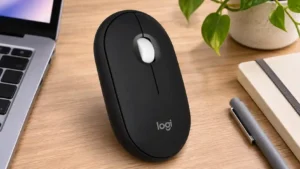
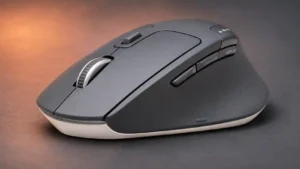
Other features
Ease of use
Logitech Pebble Mouse 2 M350sNo score yet
Logitech M720 Triathlon
4.5
Basic use and switching are relatively easy, although assigning devices and customizing controls takes some adjustment.
Accessory compatibility
Logitech Pebble Mouse 2 M350sNo score yet
Logitech M720 Triathlon
2.5
The older Unifying receiver is not interchangeable with Logi Bolt accessories.
Automatic scroll mode switching
Logitech Pebble Mouse 2 M350sNo score yet
Logitech M720 Triathlon
3.0
The wheel uses a manual mode switch rather than the automatic adaptive scrolling of more expensive models.
Balance and weight distribution
Logitech Pebble Mouse 2 M350sNo score yet
Logitech M720 Triathlon
5.0
The centered balance helps the mouse glide comfortably even with the AA battery installed.
ChromeOS compatibility
Logitech Pebble Mouse 2 M350sNo score yet
Logitech M720 Triathlon
5.0
The main buttons and scroll wheel worked well on a tested Chromebook.
Click consistency
Logitech Pebble Mouse 2 M350sNo score yet
Logitech M720 Triathlon
5.0
The main buttons have a solid, consistent click feel.
Click latency
Logitech Pebble Mouse 2 M350sNo score yet
Logitech M720 Triathlon
2.0
Click latency is too high for latency-sensitive competitive games.
Color options
Logitech Pebble Mouse 2 M350sNo score yet
Logitech M720 Triathlon
2.5
The lack of a white option disappoints shoppers seeking matching light-colored peripherals.
Cross-computer file and clipboard sharing
Logitech Pebble Mouse 2 M350sNo score yet
Logitech M720 Triathlon
4.6
Logitech Flow can save time by moving text or files between compatible computers, provided the software and network setup permit it.
Drop resistance
Logitech Pebble Mouse 2 M350sNo score yet
Logitech M720 Triathlon
5.0
One long-term owner reported that the mouse continued working well after two drops.
Environmental sustainability
Logitech Pebble Mouse 2 M350s
4.9
Recycled plastic and reduced packaging earn appreciation, especially for a modestly priced mouse.
Logitech M720 TriathlonNo score yet
Feet quality
Logitech Pebble Mouse 2 M350sNo score yet
Logitech M720 Triathlon
4.5
The PTFE feet are a welcome improvement over cheaper plastic feet.
Fingerprint and smudge resistance
Logitech Pebble Mouse 2 M350sNo score yet
Logitech M720 Triathlon
3.0
Grime and fingerprint marks can accumulate around frequently touched controls.
Free-spin scrolling
Logitech Pebble Mouse 2 M350sNo score yet
Logitech M720 Triathlon
4.8
Free-spin scrolling makes long documents and web pages easy to traverse quickly.
Gaming suitability
Logitech Pebble Mouse 2 M350sNo score yet
Logitech M720 Triathlon
2.6
The mouse can handle casual play, but its office-oriented weight, tracking and latency limit competitive gaming suitability.
Grip texture
Logitech Pebble Mouse 2 M350sNo score yet
Logitech M720 Triathlon
4.5
The rubberized sides feel secure and pleasant to hold, although they can deteriorate with age.
Instruction readability
Logitech Pebble Mouse 2 M350sNo score yet
Logitech M720 Triathlon
2.0
The brief setup guide does not explain the more complex button behavior sufficiently.
Left and right click quality
Logitech Pebble Mouse 2 M350sNo score yet
Logitech M720 Triathlon
4.6
Main clicks generally feel solid, smooth and easy to press.
Mac integration
Logitech Pebble Mouse 2 M350sNo score yet
Logitech M720 Triathlon
4.5
Battery notifications and configurable Mac controls help the mouse fit into a Mac workflow.
Motion consistency
Logitech Pebble Mouse 2 M350sNo score yet
Logitech M720 Triathlon
3.5
Slightly higher starting friction may make very slow movements less smooth, though it is a minor concern.
Power efficiency
Logitech Pebble Mouse 2 M350sNo score yet
Logitech M720 Triathlon
4.9
Long runtime from just one AA makes the mouse power-efficient.
Profile management
Logitech Pebble Mouse 2 M350sNo score yet
Logitech M720 Triathlon
5.0
Machine-specific button assignments let users adapt controls to different workflows.
Receiver quality
Logitech Pebble Mouse 2 M350sNo score yet
Logitech M720 Triathlon
3.9
The Unifying receiver remains useful and can share a port with compatible peripherals, but it is an older standard.
Responsiveness
Logitech Pebble Mouse 2 M350s
5.0
Its upgraded sensor feels prompt for ordinary office work.
Logitech M720 TriathlonNo score yet
Sleep mode
Logitech Pebble Mouse 2 M350sNo score yet
Logitech M720 Triathlon
4.5
Power-saving behavior helps extend battery life without frequent interruptions.
Suspend and resume
Logitech Pebble Mouse 2 M350sNo score yet
Logitech M720 Triathlon
2.0
One Mac setup required manual Bluetooth reconnection after waking from sleep.
Switch quality
Logitech Pebble Mouse 2 M350sNo score yet
Logitech M720 Triathlon
2.0
The inexpensive switch specification is a concern for heavy long-term use.
USB-C connectivity
Logitech Pebble Mouse 2 M350sNo score yet
Logitech M720 Triathlon
2.5
The USB-A receiver is inconvenient for USB-C-only computers without an adapter, and the mouse lacks USB-C charging.
Wireless latency
Logitech Pebble Mouse 2 M350sNo score yet
Logitech M720 Triathlon
3.7
Receiver latency is low in ordinary use, while Bluetooth lag can be noticeable in games or on some setups.
Ownership and support
Reliability
Logitech Pebble Mouse 2 M350sNo score yet
Logitech M720 Triathlon
4.6
Most reports describe reliable daily operation, with some long-term material and connection concerns.
Dongle-free setup
Logitech Pebble Mouse 2 M350sNo score yet
Logitech M720 Triathlon
4.6
Bluetooth allows use without occupying a USB port, particularly useful on laptops with limited ports.
Plug-and-play support
Logitech Pebble Mouse 2 M350sNo score yet
Logitech M720 Triathlon
4.9
Basic pointing works without customization software, making initial setup easy.
Replacement parts availability
Logitech Pebble Mouse 2 M350sNo score yet
Logitech M720 Triathlon
4.5
Replacement feet are reportedly easy to find when the originals wear out.
Tilt wheel support
Logitech Pebble Mouse 2 M350sNo score yet
Logitech M720 Triathlon
4.3
Left and right tilt adds flexibility, but full functionality can depend on software.
Warranty
Logitech Pebble Mouse 2 M350sNo score yet
Logitech M720 Triathlon
3.5
The one-year warranty is described as standard rather than exceptional.
Controls and connectivity
Accidental button activation
Logitech Pebble Mouse 2 M350sNo score yet
Logitech M720 Triathlon
4.5
One hands-on test found the device-switch button well positioned to avoid accidental clicks.
Button quality
Logitech Pebble Mouse 2 M350sNo score yet
Logitech M720 Triathlon
4.2
Most controls are satisfying and functional, with less praise for the mushy thumb button and middle click.
Gesture controls
Logitech Pebble Mouse 2 M350sNo score yet
Logitech M720 Triathlon
4.2
The hidden thumb button supports useful gestures, although it can be awkward to press or less useful on unsupported systems.
Programmable buttons
Logitech Pebble Mouse 2 M350sNo score yet
Logitech M720 Triathlon
4.6
There are plenty of programmable controls for shortcuts and repetitive tasks.
Scroll wheel customization
Logitech Pebble Mouse 2 M350sNo score yet
Logitech M720 Triathlon
4.5
Scroll behavior and tilt actions can be customized to make wide documents and other workflows easier to navigate.
Side button quality
Logitech Pebble Mouse 2 M350sNo score yet
Logitech M720 Triathlon
4.3
Forward and back buttons are handy for navigation; the hidden thumb control is less consistently easy to press.
Software and driver support
Logitech Pebble Mouse 2 M350sNo score yet
Logitech M720 Triathlon
2.9
The best customization features depend on supported Windows or Mac software, which can be an issue on managed or alternative systems.
Software quality
Logitech Pebble Mouse 2 M350sNo score yet
Logitech M720 Triathlon
4.6
Options software provides useful button, gesture and scroll customization, including app-specific assignments.
Software stability
Logitech Pebble Mouse 2 M350s
2.0
Conflicting per-app and Smart Action assignments can make the middle-button behavior unpredictable.
Logitech M720 TriathlonNo score yet
Battery and charging
Battery compartment fit
Logitech Pebble Mouse 2 M350sNo score yet
Logitech M720 Triathlon
3.0
One unit had a loose battery when the compartment was open, although its cover held it securely during use.
Battery indicator
Logitech Pebble Mouse 2 M350sNo score yet
Logitech M720 Triathlon
4.5
Software battery status helps users keep track of remaining power.
Comfort and build
Claw grip comfort
Logitech Pebble Mouse 2 M350sNo score yet
Logitech M720 Triathlon
4.0
Relaxed claw grips can work comfortably, but very large hands may struggle.
Durability over time
Logitech Pebble Mouse 2 M350sNo score yet
Logitech M720 Triathlon
4.2
Several owners report years of functioning controls, but sticky or disintegrating rubber and switch wear remain concerns.
Fingertip grip comfort
Logitech Pebble Mouse 2 M350sNo score yet
Logitech M720 Triathlon
5.0
A fingertip grip can accommodate a wide range of hand sizes.
Palm grip comfort
Logitech Pebble Mouse 2 M350sNo score yet
Logitech M720 Triathlon
4.6
The raised back supports palm grips especially well for small and medium hands.
Skate durability
Logitech Pebble Mouse 2 M350sNo score yet
Logitech M720 Triathlon
3.0
The PTFE feet can wear flat after prolonged use.
Switch durability
Logitech Pebble Mouse 2 M350sNo score yet
Logitech M720 Triathlon
2.0
One long-term assessment criticizes the inexpensive switches and their modest rated lifespan.
Performance
Device selection indicator visibility
Logitech Pebble Mouse 2 M350sNo score yet
Logitech M720 Triathlon
3.2
Numbered LEDs identify the active device, but some users find them hard to distinguish in bright light or inconvenient to check.
Productivity performance
Logitech Pebble Mouse 2 M350sNo score yet
Logitech M720 Triathlon
4.8
Programmable controls, rapid scrolling and multi-device operation can reduce repetitive actions during office work.
Scroll wheel noise
Logitech Pebble Mouse 2 M350sNo score yet
Logitech M720 Triathlon
2.9
The mechanical wheel is noticeably audible to some users, especially in quiet rooms.