Scorata scores summarize analyzed review evidence on a 1–5 scale; they are not laboratory measurements or a simple average of customer star ratings. Feature scores summarize the reviews covering that feature. The overall score averages feature scores within each review, then combines review averages. When both expert and customer evidence are available, those two groups receive equal weight. Products can have different review coverage, so small score gaps do not establish a winner.
Recommendations prioritize important features for the category, with a score of at least 3.5, a gap of at least 0.25 points and at least two supporting reviews per product. Features with widely varying scores or broad connectivity contexts are excluded from recommendations. These safeguards do not establish statistical significance.
Quick verdict
What each product is best for
The available evidence supports the recommendation below, but does not establish an overall winner. Check the remaining features against your priorities.
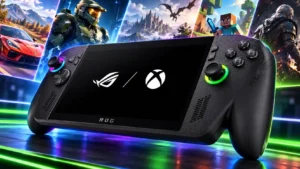
Choose Asus ROG Xbox Ally X20 for display quality and load times.
There is not enough comparable review evidence to recommend Asus ROG Xbox Ally X over the other product.
Why these recommendations?
Asus ROG Xbox Ally X20
Where It Has the Edge
display quality is 4.9 vs 3.4. The OLED screen is the standout attraction, with deep blacks, vivid color, bright HDR and smooth variable refresh....
load times is 4.5 vs 3.4. Fast internal storage helps the system feel responsive. Advanced Shader Delivery is also valued for avoiding the lengthy...
cooling efficiency is 4.8 vs 3.8. The revised cooling generally earns strong praise for reducing temperatures and avoiding throttling. Improvements are not consistently accompanied...
Asus ROG Xbox Ally X
Where It Has the Edge
No clear scored advantage over the other product.
Asus ROG Xbox Ally X204.0 overall score
Asus ROG Xbox Ally X3.7 overall score
Compare features
Scores are out of 5. Missing scores mean missing review evidence, not a missing feature.
Scored on both products
Other features
Ease of use
Asus ROG Xbox Ally X20
2.6
Quick settings and controller shortcuts help, but ordinary Windows tasks can still mean tiny touch targets and awkward trips to the desktop. Experiences range from near-console convenience to substantial frustration.
Asus ROG Xbox Ally X
3.4
The gaming shell removes a substantial amount of Windows friction, and familiarity makes daily navigation easier. It still requires more learning, maintenance and occasional touch or mouse intervention than a dedicated console.
Backward compatibility
Asus ROG Xbox Ally X20
4.0
The addition of Xbox backward-compatibility support for PC is welcomed. The praise does not establish compatibility with every older Xbox title.
Asus ROG Xbox Ally X
1.9
The Xbox name does not guarantee local access to your console purchases. Missing PC versions and incomplete Play Anywhere coverage are recurring disappointments, especially for older Xbox libraries.
Packaging presentation
Asus ROG Xbox Ally X20
4.0
The collector bundle’s Pelican case and presentation can feel unusually impressive. Missing chargers and cables in some European review packages fall short of the expectations created by premium pricing.
Asus ROG Xbox Ally X
2.2
The protective box and included stand receive some positive comments, but the basic cardboard stand often feels out of place in an expensive package. A missing carrying case is a repeated complaint, and one EU unit also lacked a charger.
Accessibility features
Asus ROG Xbox Ally X20
4.0
The anti-flicker setting is a welcome attempt to help users affected by OLED dimming. It offers potential mitigation rather than a guarantee of comfort.
Asus ROG Xbox Ally X
2.3
Small text, limited interface scaling and tiny controls can make some games or desktop apps uncomfortable to read and operate. The seven-inch screen makes these shortcomings more noticeable.
Fingerprint reader
Asus ROG Xbox Ally X20
5.0
Fingerprint unlocking is appreciated for convenience. One comparison also finds it more consistent than the reader on an MSI rival.
Asus ROG Xbox Ally X
3.4
Fingerprint login is a welcome shortcut when it works, and some tests find it quick and forgiving of finger angle. Missed readings and one later software-related failure show that reliability is uneven.
Availability
Asus ROG Xbox Ally X20
3.5
Major-retailer availability is reassuring for buyers concerned about overseas purchase and support. A separate regional account criticizes bundle-only purchase options, so access varies by the reported market.
Asus ROG Xbox Ally X
5.0
One long-term comparison finds the Ally much easier to buy in stores than several high-end rivals. Readily available stock is a practical advantage when competing models are scarce.
Repairability
Asus ROG Xbox Ally X20
2.0
The integrated controls cannot be swapped like a separate controller. Repairing them requires opening the handheld, making long-term stick durability especially valuable.
Asus ROG Xbox Ally X
3.5
Opening the case is feasible with ordinary screws and a pry tool, but opinions differ on how easy it feels. Numerous clips and the rear-button ribbon cable require care, even though access to the SSD is practical afterward.
Network stability
Asus ROG Xbox Ally X20
5.0
The Wi-Fi implementation earns praise for strong performance. One longer account reports no drops, connection trouble or noticeable lag.
Asus ROG Xbox Ally X
3.8
Very fast game downloads impress in one test. Streaming on hotel or tethered connections is less dependable, so network quality still matters more than the handheld's flexibility alone.
Controller quality
Asus ROG Xbox Ally X20
4.6
Sticks, buttons and bumpers usually earn praise for precision, tension and satisfying response. Not everyone prefers the revised feel, and one account reports squeaky triggers.
Asus ROG Xbox Ally X
3.5
Sticks and primary buttons often feel responsive and familiar, but the D-pad attracts repeated criticism. Loud face buttons, awkward menu placement and isolated trigger or stick issues temper otherwise strong handling.
Load times
Asus ROG Xbox Ally X20
4.5
Fast internal storage helps the system feel responsive. Advanced Shader Delivery is also valued for avoiding the lengthy shader preparation encountered on a compared Intel device.
Asus ROG Xbox Ally X
3.4
Some owners find games and apps noticeably quicker to open, while others wait through launchers, dependencies or lengthy game starts. Launch speed depends on the game and its storefront as well as the hardware.
Cooling efficiency
Asus ROG Xbox Ally X20
4.8
The revised cooling generally earns strong praise for reducing temperatures and avoiding throttling. Improvements are not consistently accompanied by higher frame rates, and some observers find the change comparatively modest.
Asus ROG Xbox Ally X
3.8
Cooling generally sustains performance effectively, with several favorable long-session reports. Comparisons with the newer X20 highlight additional thermal headroom available on that revision.
Digital storefront experience
Asus ROG Xbox Ally X20
4.2
Third-party stores increasingly fit into the Xbox launcher, making installed games easier to reach. Adding and managing them can still feel less seamless than using a dedicated console interface.
Asus ROG Xbox Ally X
3.3
Installed games from several stores can be gathered into one useful library. The convenience is undermined by hidden installers, desktop-oriented launchers, promotions and inconsistent controller focus.
Collectibility and presentation
Asus ROG Xbox Ally X20
4.8
The anniversary shell, subtle internal details and matching bundle make it feel like a genuine collector’s item. Its appeal extends beyond a routine color change for buyers drawn to special-edition hardware.
Asus ROG Xbox Ally X
4.0
The large presentation box is attractive enough to display on a shelf. Its appeal here is decorative presentation rather than a claim of rarity or investment value.
Heat management
Asus ROG Xbox Ally X20
4.7
Low temperatures and cool grips are recurring strengths, including during extended or demanding sessions. Several notice meaningful improvement over the previous model without heat becoming intrusive at the main touchpoints.
Asus ROG Xbox Ally X
4.1
Most tests keep the grips comfortable even when the processor is working hard. An owner also reports severe heating after accidental waking inside a closed case, making dependable power behavior an important practical limitation.
Game library quality
Asus ROG Xbox Ally X20
4.8
Broad Windows launcher access is a major strength, especially for an existing PC collection. Play Anywhere also earns praise for carrying supported purchases and saves between Xbox and PC.
Asus ROG Xbox Ally X
4.2
Broad PC-store access and compatible Xbox purchases provide plenty to play without committing to a single storefront. Missing Xbox Play Anywhere support still leaves frustrating gaps for some console owners.
Storage capacity
Asus ROG Xbox Ally X20
4.0
The 1TB SSD is considered a useful starting point for a mixed game library. It offers more room than one directly compared same-price competitor, though large modern installs can still fill it.
Asus ROG Xbox Ally X
3.5
The included terabyte feels generous for a handheld to one reviewer, but another finds that just a few large games consume much of it. How much you can keep installed depends heavily on the size of your library's games.
Controller features
Asus ROG Xbox Ally X20
4.0
Programmable controls, impulse triggers and the transforming D-pad add flexibility. The D-pad’s practical value is disputed: some love its versatility, while others find little difference between modes or report looseness and unintended movement.
Asus ROG Xbox Ally X
4.4
Impulse triggers add enjoyable feedback to compatible racing and shooting games, and enhanced vibration earns enthusiastic long-term praise. Game support and perceived strength vary, while one test unit suffered intermittent motor faults.
Power efficiency
Asus ROG Xbox Ally X20
3.8
Low-power modes can stretch lighter-game runtime impressively, and moderate settings often offer a sensible balance. Higher wattages bring diminishing gains, while newer Intel hardware is credited with better efficiency in a comparison.
Asus ROG Xbox Ally X
4.2
The most persuasive improvement is often good performance at moderate wattage rather than maximum Turbo speed. Some tests find little benefit from pushing power higher or using the gaming shell, so efficient settings remain game-dependent.
Device compatibility
Asus ROG Xbox Ally X20
4.1
Ports and external-device flexibility are generally appreciated, with several successful TV, monitor and peripheral setups. One account reports serious monitor and controller handoff issues, so the experience is not uniformly dependable.
Asus ROG Xbox Ally X
4.5
Dual USB-C ports make an external-glasses display especially convenient while charging. Full Windows connectivity also supports niche tasks such as loading music onto a compatible digital audio player.
Multiplayer experience
Asus ROG Xbox Ally X20
4.0
Online FIFA play is described as fun on the handheld. This is a positive experience with that game rather than a broad assessment of every online service.
Asus ROG Xbox Ally X
4.2
Portable cooperative and competitive play are both useful roles, with good results once suitable games are configured. Demanding online titles can need power-profile and graphics adjustments before they feel stable.
Storage expandability
Asus ROG Xbox Ally X20
4.4
microSD Express is welcomed for faster removable storage and the option to expand without opening the device. Older cards may run at slower fallback speeds, while internal SSD replacement still takes more work.
Asus ROG Xbox Ally X
4.2
MicroSD provides an easy way to add game storage, while a standard SSD slot supports larger internal upgrades. Replacing the SSD offers flexibility but requires opening the case carefully.
Accessory compatibility
Asus ROG Xbox Ally X20
4.3
AR-glasses integration and useful protective cases receive substantial praise. Existing Xbox Ally X cases often fail to fit, and reactions to the size and usefulness of bundle accessories vary.
Asus ROG Xbox Ally X
4.2
Dual USB-C connections make charging alongside display glasses, docks or other devices especially useful. Some common connections need adapters, and wireless headphone pairing can still send you into desktop settings.
Ownership and support
Reliability
Asus ROG Xbox Ally X20
2.7
Reports vary sharply: some describe dependable controls and software, while others repeatedly need reboots or workarounds. Sleep, resume, unresponsive inputs and games failing to launch are the main trouble spots.
Asus ROG Xbox Ally X
2.4
Long-term hardware experiences can be reassuring, but software dependability varies widely. Lost input focus, failed launches, boot problems and inconsistent sleep can interrupt otherwise excellent gameplay.
Subscription service value
Asus ROG Xbox Ally X20
2.7
The bundled Game Pass trial is a small bonus rather than a major offset to the price. Eligibility restrictions for existing subscribers and the included subscription tier reduce its appeal.
Asus ROG Xbox Ally X
4.4
Game Pass adds recurring discoveries and a broad selection without buying each game separately. The bundled subscription tier disappoints one reviewer who expected the top plan with such expensive hardware.
Ease of setup
Asus ROG Xbox Ally X20
2.0
Scattered Windows, firmware and app updates commonly make first setup tedious. A minority find the improved Xbox interface handles most initial tasks conveniently.
Asus ROG Xbox Ally X
2.9
Experiences range from quick controller-led onboarding to hours of updates, sign-ins and recovery attempts. Additional launchers and PC compatibility fixes can prolong the path to the first game.
Value for money
Asus ROG Xbox Ally X20
2.5
The high price is the most persistent reservation because core gaming performance stays close to the previous model. Some consider the screen and control refinements worth the premium, especially against pricier rivals.
Asus ROG Xbox Ally X
3.4
Comfort, demanding-game performance and flexible PC use can justify the investment for frequent players. The high purchase price, basic bundle and software rough edges remain substantial objections, with later owners finding better relative value or open-box deals.
Performance
Performance
Asus ROG Xbox Ally X20
4.0
The hardware remains capable across a broad range of games, especially with sensible settings. Its unchanged processor makes the performance story less compelling beside newer Intel handhelds or for owners of the previous Xbox Ally X.
Asus ROG Xbox Ally X
4.5
Strong handheld processing makes many demanding PC games enjoyable and keeps ordinary Windows work responsive. Gains over older Ally hardware are useful but vary substantially by game and power setting.
Graphical performance
Asus ROG Xbox Ally X20
2.6
Upscaling can preserve useful detail and improve playability, but it also draws complaints about softness, noise or doubled images. Several encounter black foliage or missing materials in a specific game, highlighting the importance of drivers.
Asus ROG Xbox Ally X
4.2
Many modern games retain impressive detail on the small display, especially with sensible settings and upscaling. The heaviest titles still need compromises, and aggressive resolution reduction or ray tracing can spoil the balance.
Display quality
Asus ROG Xbox Ally X20
4.9
The OLED screen is the standout attraction, with deep blacks, vivid color, bright HDR and smooth variable refresh. A few find the improvement less dramatic than expected or dislike aspects of HDR, reflections or color balance.
Asus ROG Xbox Ally X
3.4
The sharp 1080p panel and variable refresh help games look fluid, and several owners like its colors and reflection handling. The small screen, thick bezels and lack of OLED or HDR repeatedly disappoint at this price.
Noise level
Asus ROG Xbox Ally X20
4.3
Most accounts praise quiet fans, even in demanding modes. Loud button or D-pad clicks remain a separate complaint, and one account finds the fans loud under higher loads.
Asus ROG Xbox Ally X
3.5
Fans are often quiet enough to fade into the background, particularly at moderate power. Face-button clatter is a separate recurring complaint and can be much more intrusive in a shared quiet room.
Frame rate performance
Asus ROG Xbox Ally X20
3.5
Tuned settings can deliver smooth play, and lighter games often reach high frame rates. Demanding releases may settle around modest targets or exhibit dips and stutter, so a 120Hz screen does not guarantee 120fps gaming.
Asus ROG Xbox Ally X
4.2
Useful frame-rate gains make demanding handheld games more enjoyable, with lighter titles able to use the high-refresh display. A stable 30fps can be the realistic target for heavier games, and the generational uplift is far from uniform.
Audio quality
Asus ROG Xbox Ally X20
5.0
The front-facing speakers repeatedly impress with loud, full, clear sound and convincing spatial presentation. Several regard them as among the best on a handheld and find headphones optional for ordinary play.
Asus ROG Xbox Ally X
4.5
Front-facing speakers receive strong praise for loud, clear and surprisingly immersive sound. Bass is more limited than the spacious presentation, and good headphones can still improve the experience.
Battery and charging
Battery life
Asus ROG Xbox Ally X20
3.7
Battery endurance depends heavily on the game, brightness and power profile: demanding play often lasts only a few hours, while lighter titles can stretch much further. Reported improvements over the previous model range from negligible to substantial.
Asus ROG Xbox Ally X
4.1
Lighter games can last many hours, while demanding titles and Turbo mode shorten sessions sharply. Most owners find moderate power profiles a good everyday compromise, although some tests show little improvement over the previous model.
Charging speed
Asus ROG Xbox Ally X20
4.8
Fast charging is welcomed for reducing downtime, with compatible higher-power adapters offering quicker partial refills. Charging speed is distinct from the much more variable gaming runtime.
Asus ROG Xbox Ally X
4.2
Charging is generally considered brisk enough to restore useful playtime during a break. Reported half-charge and full-charge times vary, so the broadly positive impression matters more than any single timing.
Controls and connectivity
Media app support
Asus ROG Xbox Ally X20
4.0
The screen and speakers make video and general media use appealing. This praise concerns the viewing and listening experience rather than a specific app catalog.
Asus ROG Xbox Ally X
2.5
Windows can technically handle movie playback and other media tasks, but one excerpt finds non-gaming use awkward compared with a tablet or laptop. Media capability alone is a weak reason to choose this form factor.
Software and driver support
Asus ROG Xbox Ally X20
2.7
Support attracts opposing judgments, with praise for ASUS’s relative effort alongside complaints about slow releases. Delayed fixes for visible game-rendering faults are a particular frustration.
Asus ROG Xbox Ally X
2.8
Updates improve profiles, vibration, library tools and sometimes image quality over time. Separate Windows, store and ASUS maintenance remains cumbersome, and promised AI features do not consistently deliver useful handheld benefits.
User interface
Asus ROG Xbox Ally X20
3.5
Xbox Mode makes controller navigation and a combined library more useful, and several find it noticeably smoother. Others still encounter clutter, sluggish overlays or input failures that interrupt the experience.
Asus ROG Xbox Ally X
3.3
Xbox Mode puts games and common settings within easier controller reach than the Windows desktop. Opinions on its polish are sharply divided: library aggregation and switching help, while ads, focus problems and overlapping menus still frustrate.
Comfort and build
Design and aesthetics
Asus ROG Xbox Ally X20
4.8
The smoky translucent shell and gold details are widely admired as a distinctive anniversary design. A few find it too busy, dislike gold or object to bright lighting that cannot fully match the theme.
Asus ROG Xbox Ally X
3.8
The black finish, textured detailing and controller-like shape appeal to some owners. Others find the projecting handles awkward-looking even while appreciating their practical comfort.
Build quality
Asus ROG Xbox Ally X20
4.1
The handheld and collector accessories often feel solid and premium, with particular praise for protective cases and the Killswitch kickstand. Two accounts criticize an included stand whose rubber pad peeled off almost immediately.
Asus ROG Xbox Ally X
3.5
Several long-term owners report little wear and no hardware failures. Others find the plastics insufficiently premium or encounter creaking, trigger defects and concerns about conventional thumbstick durability.
Size and portability
Asus ROG Xbox Ally X20
3.5
Opinions on the 756g body depend on grip preference and arm support. Some find it compact and well balanced for its capabilities, while others regard its weight and bulk as significant obstacles to casual portability.
Asus ROG Xbox Ally X
3.1
Portable PC freedom is valuable around the house and away from it, but the thick grips and substantial weight require real bag space. Good balance helps during play more than it helps when packing.
Controller ergonomics
Asus ROG Xbox Ally X20
4.7
Controller-style grips, balanced weight and added texture make this exceptionally comfortable for many players. The rubberized surface divides a few opinions, including complaints about sweat or an unpleasant texture.
Asus ROG Xbox Ally X
4.9
Deep Xbox-style handles and well-distributed weight are the most consistent hardware strengths. Many owners find this their most comfortable handheld, particularly with larger hands.
Evidence available for one product
Performance
Audio settings
Asus ROG Xbox Ally X20No score yet
Asus ROG Xbox Ally X
4.3
Quick game/chat balancing and a broad calibration suite make sound settings useful and accessible. The best experience comes from having these controls within the gaming interface rather than deeper desktop menus.
Ownership and support
Cloud gaming support
Asus ROG Xbox Ally X20No score yet
Asus ROG Xbox Ally X
3.6
Cloud gaming can work impressively on a strong connection and provide a route to some console-only games. It remains an imperfect substitute when you want reliable local access to an existing Xbox purchase.
Other features
Dust resistance
Asus ROG Xbox Ally X20No score yet
Asus ROG Xbox Ally X
4.0
A year of daily use brings no reported worsening in dust buildup. That is a reassuring ownership observation rather than a formal dust-protection certification.
Exclusive games
Asus ROG Xbox Ally X20No score yet
Asus ROG Xbox Ally X
4.0
PC releases of formerly console-bound Sony games provide a useful way for Xbox-oriented players to try titles they missed. This benefit comes from PC access rather than a new library of Ally-exclusive games.
Microphone quality
Asus ROG Xbox Ally X20
2.0
The built-in microphone is considered below the standard of the device’s better features. Its presence is useful, but capture quality does not earn praise.
Asus ROG Xbox Ally XNo score yet
Online service quality
Asus ROG Xbox Ally X20No score yet
Asus ROG Xbox Ally X
4.8
Supported cross-device cloud saves let owners continue established progress without manual transfers. Successful syncing makes switching between the handheld and a console particularly convenient.
Remote play quality
Asus ROG Xbox Ally X20No score yet
Asus ROG Xbox Ally X
4.3
Remote Play can provide an excellent large-console experience on the handheld when the source system handles the graphics. Strong home connections work best; hotel Wi-Fi and tethering can make results less reliable.
Suspend and resume
Asus ROG Xbox Ally X20No score yet
Asus ROG Xbox Ally X
3.0
Suspend and resume is one of the most divisive parts of ownership. Some users report excellent charge retention and reliable returns, while others encounter random waking, heavy drain or forced resets.
Reviews Comparing These Products
These are a few of the reviews included in our analysis.
Choose it if you own N64 cartridges and want the most polished, low-lag way to play them on a 4K TV. Skip it if you want cheap emulation, broad flash-cart/controller...
Best for easy, controller-free family play that gets kids moving. Skip it if you want deep games, cutting-edge graphics, or dislike paying for Play Pass.
Pros: game library quality, value for money
Cons: subscription service value, graphical performance
Choose the SteamOS version for a comfortable, console-like handheld with a sharp 120Hz screen and strong performance. Skip it if you prioritize long battery life, quiet fans, or effortless access...
Choose Switch 2 for a sharper, faster, more social Switch with stronger Joy-Cons and broad backward compatibility. Skip it if short battery life, expensive storage, thin launch exclusives, or the...