
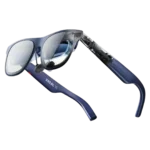
Xreal 1S Feature Scores
Explore all 55 feature scores for Xreal 1S, organized into pros and cons.
Scores by Feature
Summary
55 reviewed features-
Very positive 4.5-5.017 (31%)
-
Positive 3.5-4.424 (44%)
-
Neutral 2.5-3.411 (20%)
-
Negative 1.5-2.43 (5%)
Pros
Sort
-
The built-in 3DoF anchoring is one of the most consistently praised features, keeping the virtual screen convincingly fixed as the user turns their head. Reviewers often cite it as a major advantage over simpler display glasses.
-
Movies, TV, YouTube, and other video are the clearest strength of the 1S, with reviewers repeatedly describing a portable cinema-like experience. Flights, beds, couches, and hotel rooms are especially compelling use cases.
-
Build quality earns strong praise, with reviewers describing the frame, hinges, and materials as premium, sturdy, and well finished. The glasses generally feel more durable than their lightweight appearance suggests.
-
Handheld and console gaming benefits from the large OLED image, smooth motion, and very low perceived latency. The experience is strongest for seated play, while limited field of view, console adapters, and Real 3D frame-rate tradeoffs can matter for some games.
-
On-glasses controls for screen size, distance, position, dimming, and follow or anchor modes give the 1S unusually flexible display tuning. Most reviewers find the flexibility valuable, though the deeper settings can take time to learn.
-
The Micro-OLED display is one of the strongest parts of the product, with vivid color, high brightness, smooth motion, and a convincing large-screen look. A minority of users report blur, reflections, or optical inconsistencies that substantially reduce the experience.
-
The 1S improves resolution, brightness, field of view, and price versus the original One, making it attractive from older generations. Owners of a recent One or One Pro often see the gains as incremental rather than a necessary upgrade.
-
Color is a consistent strength, with reviewers praising vivid yet balanced reproduction for movies, games, and even some photo or video work. The OLED panels are repeatedly described as rich without looking obviously inaccurate.
-
Most owners and reviewers are enthusiastic about the portable big-screen experience, especially for travel, movies, and gaming. A smaller but meaningful group returned or downgraded it because of optical, fit, software, or reliability problems.
-
With a compatible USB-C DisplayPort device, setup is usually as simple as plugging in the cable and wearing the glasses. Unsupported consoles, desktop GPUs, and a few phone combinations can require adapters or troubleshooting.
-
Several users wear the glasses for many hours without major discomfort, helped by balanced weight and adjustable fit. The strongest long-session accounts describe them as comfortable enough for travel days, movies, or all-day use.
-
The glasses are widely praised as comfortable and well balanced for long movies, flights, and gaming sessions. Fit is not universal, though, and some users report eye strain, nose pressure, headaches, or fatigue after extended wear.
-
The Bose-tuned open-ear speakers are frequently praised for clear, surprisingly full sound that is good enough for casual movies and gaming. Dedicated earbuds or headphones still sound better and work better in noisy places.
-
Prescription inserts generally attach securely and restore a clear viewing experience for users who need correction. Reviewers report good results overall, with only minor fit or folding quirks in some setups.
-
The image is often described as sharp, vivid, and impressively clean in the center. Experiences vary at the edges, where some users report softness, glare, ghosting, or uneven focus that can make the whole picture feel less clear.
-
The display is broadly considered bright enough for indoor use, travel, and many bright environments, especially with electrochromic dimming. Most users do not need maximum brightness, although ambient light and reflections can still affect visibility.
-
Anchored and follow modes are generally stable, with many reviewers reporting little or no drift. A minority experienced drifting, motion blur, or occasional position shifts, so stability is not flawless across every unit and use case.
-
The large virtual screen creates a strong theater effect and is easy to resize for different content. Extreme 500-inch settings are less practical because the field of view forces users to look around instead of seeing the whole image at once.
-
Real 3D is a major attraction when it works, adding convincing depth to ordinary video and slower games without special software. Opinions split sharply over artifacts, jitter, reduced frame rates, and whether the effect is useful beyond novelty.
-
A private floating screen and adjustable dimming are useful for travel and public work, especially when the host display can be turned off. Privacy is less complete on devices that continue showing the same content on their own screen.
-
For display glasses, the 1S is considered light enough for travel and multi-hour sessions, especially compared with VR headsets. It is still heavier and bulkier than ordinary eyewear, and some users feel that extra weight on the nose.
-
The onboard interface offers substantial control without requiring an app and is generally easy once learned. Some reviewers find menu navigation or adjustment logic confusing, especially when accessing less common settings.
-
Head tracking and gaming response are usually described as smooth and effectively lag-free. Fast head movement or added processing such as Real 3D can introduce some blur or latency for more sensitive users.
-
Durability feedback is very positive: reviewers report drops, knocks, and regular travel use without meaningful damage. The frame and hinges generally inspire confidence for a portable device.
-
Many reviewers consider the $449 price strong for the display quality, tracking, and feature set, especially versus earlier models. Others see the glasses as an expensive niche accessory when cheaper display glasses or conventional screens meet their needs.
-
The dark blue, Wayfarer-like design is often viewed as attractive and more refined than earlier tech eyewear. From the side, however, the thicker optical hardware can still look bulky or conspicuously gadget-like.
-
The glasses pack a large display into a compact, portable frame that is far easier to carry than a headset or monitor. The birdbath optics and cable still add visible bulk and make the silhouette less like normal eyewear.
-
The physical buttons and rocker provide convenient access to display modes, brightness, dimming, and volume without reaching for an app. Most feedback is positive, although the control scheme takes some learning.
-
Reviewers consistently praise how evenly the frame spreads its weight across the nose and ears. That balance helps the glasses feel lighter in practice than their raw weight suggests.
-
Ultrawide modes and a large private screen can make travel work, browsing, and light editing much more comfortable. For sustained coding or text-heavy work, limited resolution, field of view, eye strain, and software limitations keep it from replacing a good monitor for many users.
-
The included case, USB-C cable, cleaning cloth, and nose pads make the basic package travel-ready and easy to fit. Case storage and cable organization receive mixed feedback, with some users preferring third-party cases.
-
Firmware support is viewed positively, with updates adding meaningful features and improving Real 3D performance after launch. Reviewers also stress keeping the glasses current for the best stability and feature behavior.
-
USB-C iPhones are repeatedly described as straightforward plug-and-play sources for the 1S. Reviewers particularly enjoy the pairing for streaming, social media, and travel entertainment.
-
Brightness and electrochromic dimming make the display usable in many bright and even outdoor situations. Direct light, reflections, and the optical design can still reduce clarity depending on angle and surroundings.
-
Multiple arm positions, nose pads, and prescription inserts give users useful ways to tune fit and viewing angle. Some faces, IPDs, noses, and head sizes still fall outside the sweet spot, so comfort and full-screen visibility can vary.
-
Text is readable and sometimes impressively crisp for menus, subtitles, browsing, and light work. Smaller text and edge areas are inconsistent, and several reviewers found prolonged reading or coding tiring enough to prefer a normal monitor.
-
Support experiences range from fast and helpful to deeply frustrating. Several customers praise responsive assistance, while at least one describes difficult troubleshooting requirements and poor resolution of a hardware problem.
-
Normal controls and interactions feel quick and immediate, making responsiveness a clear strength in everyday use.
-
The built-in microphones are described as competent for calls and conferencing, though they are not a standout reason to buy the glasses.
-
OLED contrast gives movies and games strong depth and dark blacks, but one recurring optical complaint is crushed shadow detail in very dark scenes. Overall contrast is good, though not uniformly excellent for every viewer.
-
The buttons generally respond quickly for mode changes and adjustments, but shortcut behavior is not perfectly reliable for every user. One reviewer reported repeated problems programming a control without disconnecting.
Cons
Sort
-
Basic display use benefits from not needing proprietary software, but users wanting richer desktop or multi-monitor features are much less satisfied. Missing or limited Windows and Android software support is a recurring complaint among productivity-focused owners.
-
The 1S works very well as a spatially tracked wearable display, but reviewers repeatedly caution that it is not full mixed reality or deeply interactive AR. Environmental understanding and richer spatial interaction require accessories or different hardware.
-
Prescription users can add inserts, but the lack of built-in diopter adjustment is a repeated drawback. People who cannot use the display clearly without correction may need to budget for inserts or wear contacts.
-
Optical clarity is highly variable by reviewer and fit. Some see a clean, edge-to-edge image, while others are distracted by birdbath reflections, ghosting, glare, or blur that cheaper competitors handle better.
-
The interchangeable nose pads help many users find a workable fit, but nose comfort is a recurring weak point for others. Complaints include pressure, pinching, and stock pads that do not suit every nose shape.
-
Many compatible devices connect and remain stable, but there are enough reports of disconnects and recognition problems to make this a mixed area. The experience is highly dependent on the source device and cable or adapter setup.
-
The battery-free glasses stay light by drawing power from the connected device, but that convenience shifts the power cost to the phone, laptop, or handheld. Long sessions may require a splitter, charger, or external battery hub.
-
Real 3D became glitchy enough for one user to suspect that the onboard processing could not keep up reliably beyond ordinary 2D viewing.
-
Built-in volume is adequate in quiet rooms but can be too low on trains, planes, or other noisy environments. External earbuds are the common workaround when stronger output is needed.
-
Reliability is inconsistent across the review set. Many users report instant recognition and trouble-free daily use, while others describe disconnects, glitches, drifting, software failures, or units that stopped working properly.
-
Compatible Android phones with USB-C DisplayPort output can work extremely well, including strong Samsung DeX use. Compatibility is not universal, and unsupported phones or regional app limitations can turn the experience into a frustrating one.
-
Heat is one of the more mixed areas: many users feel little or no uncomfortable warmth on the face, but others find the top of the frame noticeably hot during long sessions. Real 3D use is repeatedly associated with higher temperatures.
-
The open-ear speakers preserve awareness of the surroundings, but privacy varies with volume and environment. Some users report little audible leakage, while others say people sitting nearby can clearly hear the content.
-
The 52-degree field of view is usable for a normal virtual screen but is a recurring limitation for ultrawide layouts and very large screen settings. Users often need to turn their head to see edges, and some prefer wider-FOV alternatives.