If you want better cable flexibility
Choose HyperX Pulsefire Haste 2. It scores 4.5 vs 3.0 for cable flexibility, with a 4.0 overall score.

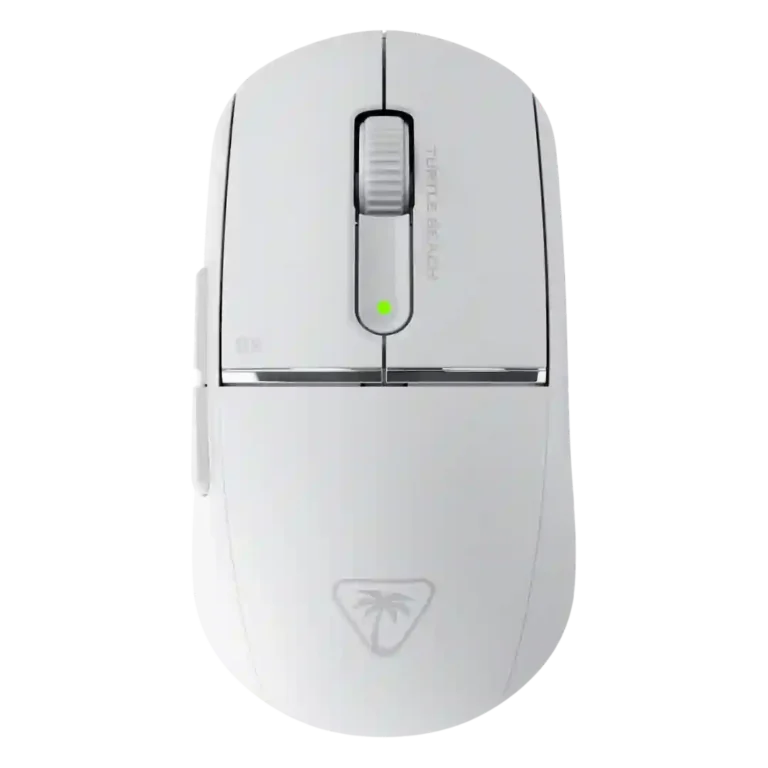
Choose the Burst II Pro for a very light, responsive wireless FPS mouse with strong battery life and deep tuning. Skip it if creaky sides, softer clicks, a polarizing rear flare, or premium pricing matter most.
Best for FPS-focused players who want a very light wireless mouse with strong sensor accuracy, low-latency 8K capability, long battery life, and deep software tuning. It fits medium-hand claw or relaxed palm users best when the rear flare feels natural.
Not for buyers who want a universally safe shape, very crisp main clicks, flashy RGB, the cheapest possible 8K mouse, or silent late-night clicks. It is also risky for users who strongly dislike creaky shells or cable tug when charging.
Across the reviews, the Turtle Beach Burst II Pro lands as a performance-focused wireless mouse built around low weight, strong sensor behavior, fast wireless response, and unusually good endurance for an 8K-capable model. Reviewers repeatedly praised its tracking, glide, battery life, and software depth, and several found it especially compelling for FPS play. The tradeoff is that its refinement is uneven: some reviewers loved the premium, solid shell, while others reported side creaking; click feel split opinions from crisp and snappy to padded or awkward; and the rear-flared shape clearly favors certain hands and grip styles. Its value is also context-dependent because it undercuts some flagships but still faces cheaper alternatives with similar broad appeal.
Compared with other Gaming Mice, this product is above average in weight, debounce customization, portability, near average in wireless latency, click noise, below average in RGB features, left and right click quality, build quality.
| Attribute | This product | Category average | Difference |
|---|---|---|---|
| RGB features | 2.0 | 3.7 | -1.7 |
| left and right click quality | 3.2 | 4.2 | -1.0 |
| weight | 4.8 | 4.1 | +0.7 |
| debounce customization | 4.5 | 3.6 | +0.9 |
| portability | 4.6 | 3.8 | +0.8 |
| software stability | 3.8 | 3.0 | +0.8 |
| premium feel | 4.8 | 4.0 | +0.8 |
| surface compatibility | 4.9 | 4.3 | +0.6 |
Choose HyperX Pulsefire Haste 2. It scores 4.5 vs 3.0 for cable flexibility, with a 4.0 overall score.
Choose Turtle Beach Burst II Air. It scores 4.7 vs 2.8 for firmware reliability, with a 4.3 overall score.
Choose Turtle Beach Kone II Air. It scores 5.0 vs 3.2 for left and right click quality, with a 4.3 overall score.
Choose Endgame Gear OP1we. It scores 4.6 vs 3.9 for build quality, with a 4.1 overall score.
Products reviewers directly compared with this model, grouped into quick takeaways.
Yes, most reviewers found it fast, accurate, and well suited to shooters. The main caveat is fit: one duplicate review disliked the shape enough to hurt Fortnite performance.
Battery life was one of the strongest points. Reviewers praised the 150-hour 1K mode and several still found the 8K mode usable for days.
Reviewers agreed the mouse can deliver very fast polling, but they split on usefulness. Some praised the responsiveness, while others called 8K subtle or a box-ticking feature for most players.
It depends on hand size and grip. Palm and claw users often liked the support, but the rear-flared shape felt awkward to some testers.
Click feel was one of the most divided areas. Some reviewers praised the crisp optical switches, while others found the main clicks padded or disliked the deeper sound.
Overall, reviewers liked Swarm II for remapping, macros, DPI, polling, and sensor controls. The main negatives were a flaky Easy Shift experience and a confusing update/setup flow in one duplicate transcript.
These are a few of the reviews included in our analysis.


Choose the ROG Harpe II Ace for ultralight FPS play, precise tracking, smooth glide, and web-based tuning. Skip it if you need palm-grip support, MMO buttons, onboard profiles, or long...
Pros: glide smoothness, weight
Cons: handedness options

Best for ultra-light, competition-focused speed, precise tracking, stable wireless, and long battery life. Skip it if you need quieter clicks, left-handed support, Bluetooth, more buttons, or better value for casual...
Pros: value for money, weight
Cons: click noise, RGB features

Choose it if you want a premium MMO/productivity mouse with 12 adjustable side buttons, strong battery life, and Stream Deck integration. Skip it if you need an ultralight FPS mouse,...
Pros: button customization, MMO gaming suitability
Cons: FPS gaming suitability

Best for precise wireless tracking, smooth glide, strong battery life, and unusually good 8K value. Skip it if you need polished software, quiet snappy clicks, true left-handed controls, or gentle...
Pros: software usability, sensor performance
Cons: RGB features, scroll wheel quality