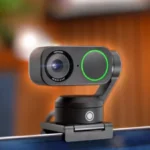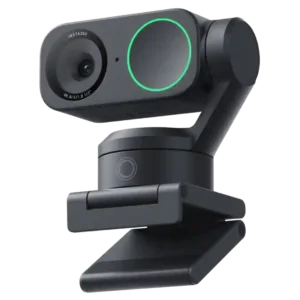
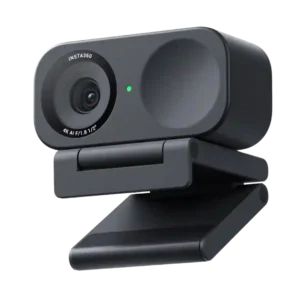
Compare Insta360 Link 2 vs Insta360 Link 2C

Insta360 Link 2

Insta360 Link 2

Overall score 4.4 / 5

Based on 134 scored reviews

vs
Insta360 Link 2C

Insta360 Link 2C

Overall score 4.0 / 5

Based on 143 scored reviews

How we score

Scorata scores summarize analyzed review evidence on a 1–5 scale; they are not laboratory measurements or a simple average of customer star ratings. Feature scores summarize the reviews covering that feature. The overall score averages feature scores within each review, then combines review averages. When both expert and customer evidence are available, those two groups receive equal weight. Products can have different review coverage, so small score gaps do not establish a winner.

Recommendations prioritize important features for the category, with a score of at least 3.5, a gap of at least 0.25 points and at least two supporting reviews per product. Features with widely varying scores or broad connectivity contexts are excluded from recommendations. These safeguards do not establish statistical significance.

Quick verdict

What each product is best for

The review evidence points to a tradeoff: ease of use and HDR performance versus privacy shutter and macOS compatibility. Choose according to which strengths matter more to you; the overall score alone does not settle that choice.

Choose Insta360 Link 2 for ease of use and HDR performance.

Choose Insta360 Link 2C for privacy shutter and macOS compatibility.

Why these recommendations?

Insta360 Link 2

Where It Has the Edge

  • ease of use is 4.6 vs 4.2. Despite its depth of features, day-to-day operation is usually intuitive; the main learning curve comes from dialing in...
  • HDR performance is 4.8 vs 3.5. HDR is a strong point, helping balance bright and dark areas while preserving a more natural-looking image in...
  • materials quality is 5.0 vs 3.8. Materials and fit are repeatedly described as premium and substantial, giving the small camera a more high-end feel...

Insta360 Link 2C

Where It Has the Edge

  • privacy shutter is 4.8 vs 2.3. The physical privacy shutter is a standout design feature: it is easy to operate and provides clear visual...
  • macOS compatibility is 4.9 vs 4.6. Mac compatibility is a standout strength. Multiple M-series Mac users report simple setup, stable operation, and much better...
  • size and footprint is 4.8 vs 4.5. The 2C’s compact size is a major advantage for laptops, travel, and uncluttered monitor setups.
Insta360 Link 2 4.4 overall score
Insta360 Link 2C 4.0 overall score

Compare features

Scores are out of 5. Missing scores mean missing review evidence, not a missing feature.

Scored on both products

Ownership and support

Reliability
Insta360 Link 2
3.8
Insta360 Link 2C
3.7
Details and evidence for reliability

Insta360 Link 2

Most owners report dependable daily operation, but a meaningful minority encountered crashes, gimbal failures, update loops, or other bugs that undermine confidence.

25 supporting reviews · Mixed evidence

Browse product reviews for Insta360 Link 2

Insta360 Link 2C

Basic operation is often dependable, but intermittent camera failures and virtual-output problems mean reliability can vary with software and connection setup.

7 supporting reviews · Mixed evidence

Browse product reviews for Insta360 Link 2C
Warranty
Insta360 Link 2
4.0
Insta360 Link 2C
1.0
Details and evidence for warranty

Insta360 Link 2

The standard one-year warranty provides basic coverage, with optional replacement protection available for users who want more reassurance.

1 supporting review · Limited evidence

Browse product reviews for Insta360 Link 2

Insta360 Link 2C

Warranty support drew a serious complaint from an owner who felt troubleshooting stopped without a useful hardware-service path.

1 supporting review · Limited evidence

Browse product reviews for Insta360 Link 2C
Connection reliability
Insta360 Link 2
5.0
Insta360 Link 2C
3.4
Details and evidence for connection reliability

Insta360 Link 2

Once connected, the camera is typically recognized quickly and stays dependable during normal use.

2 supporting reviews

Browse product reviews for Insta360 Link 2

Insta360 Link 2C

Most direct connections are stable, but dock and pass-through setups have produced intermittent or complete connection failures for some owners.

5 supporting reviews · Mixed evidence

Browse product reviews for Insta360 Link 2C
Customer support
Insta360 Link 2
4.3
Insta360 Link 2C
3.3
Details and evidence for customer support

Insta360 Link 2

Support is often praised for late-night help, replacements, and proactive outreach, though one owner reported getting no useful response.

6 supporting reviews · Mixed evidence

Browse product reviews for Insta360 Link 2

Insta360 Link 2C

Support experiences are split sharply: several owners praise fast, above-and-beyond help, while others describe unhelpful responses and denied troubleshooting.

7 supporting reviews · Mixed evidence

Browse product reviews for Insta360 Link 2C
Setup ease
Insta360 Link 2
4.8
Insta360 Link 2C
4.3
Details and evidence for setup ease

Insta360 Link 2

Physical setup is one of the Link 2’s most consistent strengths, with the magnetic mount and fast recognition making installation painless for most users.

21 supporting reviews

Browse product reviews for Insta360 Link 2

Insta360 Link 2C

Setup is usually quick and straightforward, though unclear instructions or unusual mounting and connection arrangements can create friction.

18 supporting reviews

Browse product reviews for Insta360 Link 2C
Value for money
Insta360 Link 2
4.4
Insta360 Link 2C
4.0
Details and evidence for value for money

Insta360 Link 2

The $200-class price is high for a basic webcam, but most buyers and experts consider the tracking, 4K image, and software features worth the premium.

45 supporting reviews

Browse product reviews for Insta360 Link 2

Insta360 Link 2C

Value is usually strong at sale prices and still competitive near list price, especially for 4K quality and software features. Some owners feel $150 is too much when advanced effects, mounts, or computer performance become limiting.

41 supporting reviews · Mixed evidence

Browse product reviews for Insta360 Link 2C
USB-C support
Insta360 Link 2
4.4
Insta360 Link 2C
4.0
Details and evidence for USB-C support

Insta360 Link 2

USB-C setup is simple and flexible, and the included cabling or adapters suit a range of modern computers and capture setups.

6 supporting reviews

Browse product reviews for Insta360 Link 2

Insta360 Link 2C

USB-C connectivity is straightforward and supports a clean detachable-cable setup.

1 supporting review · Limited evidence

Browse product reviews for Insta360 Link 2C
Plug-and-play setup
Insta360 Link 2
5.0
Insta360 Link 2C
4.7
Details and evidence for plug-and-play setup

Insta360 Link 2

Basic operation is genuinely plug-and-play on supported systems, with fast recognition and little setup required before a call.

6 supporting reviews

Browse product reviews for Insta360 Link 2

Insta360 Link 2C

Basic setup is exceptionally easy: many users simply plug it in and begin calling without needing a capture card or complicated configuration.

13 supporting reviews

Browse product reviews for Insta360 Link 2C

Other features

Ease of use
Insta360 Link 2
4.6
Insta360 Link 2C
4.2
Details and evidence for ease of use

Insta360 Link 2

Despite its depth of features, day-to-day operation is usually intuitive; the main learning curve comes from dialing in advanced settings and controls.

15 supporting reviews

Browse product reviews for Insta360 Link 2

Insta360 Link 2C

Day-to-day use is generally simple, with strong plug-and-play behavior and controls that remain approachable even for nontechnical users.

13 supporting reviews

Browse product reviews for Insta360 Link 2C
USB connectivity
Insta360 Link 2
5.0
Insta360 Link 2C
2.3
Details and evidence for USB connectivity

Insta360 Link 2

The supplied USB connection is straightforward and convenient, with the long cable making placement easier.

1 supporting review · Limited evidence

Browse product reviews for Insta360 Link 2

Insta360 Link 2C

Direct USB connections work, but some dock, monitor pass-through, and hub setups have caused failures that require connecting straight to the computer.

3 supporting reviews · Mixed evidence

Browse product reviews for Insta360 Link 2C
Privacy shutter
Insta360 Link 2
2.3
Insta360 Link 2C
4.8
Details and evidence for privacy shutter

Insta360 Link 2

There is no physical shutter, and some users would prefer a manual lens cover even though the camera turns downward when inactive.

2 supporting reviews

Browse product reviews for Insta360 Link 2

Insta360 Link 2C

The physical privacy shutter is a standout design feature: it is easy to operate and provides clear visual assurance that the lens is blocked.

6 supporting reviews

Browse product reviews for Insta360 Link 2C
Cable quality
Insta360 Link 2
2.5
Insta360 Link 2C
5.0
Details and evidence for cable quality

Insta360 Link 2

One owner found the supplied cable unusually thick and short, making desktop routing less convenient.

1 supporting review · Limited evidence

Browse product reviews for Insta360 Link 2

Insta360 Link 2C

The included USB-C cable is described as high quality and substantial.

1 supporting review · Limited evidence

Browse product reviews for Insta360 Link 2C
Echo reduction
Insta360 Link 2
3.5
Insta360 Link 2C
1.0
Details and evidence for echo reduction

Insta360 Link 2

Echo handling varies by setup: some tests find minimal reverberation, while external-speaker or room acoustics can still create noticeable echo.

5 supporting reviews · Mixed evidence

Browse product reviews for Insta360 Link 2

Insta360 Link 2C

Echo is a recurring weak point for the users who encountered it, with several reporting persistent feedback during conferencing.

3 supporting reviews

Browse product reviews for Insta360 Link 2C
Status indicator light
Insta360 Link 2
5.0
Insta360 Link 2C
2.5
Details and evidence for status indicator light

Insta360 Link 2

The green status ring provides an easy, reassuring visual confirmation that the camera is active.

1 supporting review · Limited evidence

Browse product reviews for Insta360 Link 2

Insta360 Link 2C

The indicator design is mixed: it can be clean and discreet, but one owner strongly disliked a green light remaining on while plugged in.

2 supporting reviews · Mixed evidence

Browse product reviews for Insta360 Link 2C
Microphone sensitivity
Insta360 Link 2
3.0
Insta360 Link 2C
5.0
Details and evidence for microphone sensitivity

Insta360 Link 2

The mic captures speech well but can also pick up keyboard and street noise when cancellation is not enough.

1 supporting review · Limited evidence

Browse product reviews for Insta360 Link 2

Insta360 Link 2C

The microphone can pick up speech from surprisingly far away, including across a room.

1 supporting review · Limited evidence

Browse product reviews for Insta360 Link 2C
Cable length
Insta360 Link 2
4.2
Insta360 Link 2C
2.7
Details and evidence for cable length

Insta360 Link 2

The roughly five-foot cable is praised for desk flexibility, but one desktop user still found the supplied lead too short for the setup.

5 supporting reviews · Mixed evidence

Browse product reviews for Insta360 Link 2

Insta360 Link 2C

Cable length is setup-dependent: it reaches comfortably in some desktop arrangements, while others need a longer replacement cable.

3 supporting reviews · Mixed evidence

Browse product reviews for Insta360 Link 2C
Mounting quality
Insta360 Link 2
4.7
Insta360 Link 2C
3.4
Details and evidence for mounting quality

Insta360 Link 2

Mounting is a standout strength: the magnetic base is quick, flexible, and secure on monitors, laptops, and compatible supports.

9 supporting reviews

Browse product reviews for Insta360 Link 2

Insta360 Link 2C

The magnetic mounting system is convenient and often praised, but a minority of owners report weak grip, awkward angles, or constant readjustment.

9 supporting reviews · Mixed evidence

Browse product reviews for Insta360 Link 2C
Driver requirements
Insta360 Link 2
3.8
Insta360 Link 2C
5.0
Details and evidence for driver requirements

Insta360 Link 2

Basic webcam use can work without special drivers, but many advanced features depend on installing the Link Controller software.

2 supporting reviews · Mixed evidence

Browse product reviews for Insta360 Link 2

Insta360 Link 2C

The camera can work without extra software for basic use, and one Windows user specifically credited its own driver with avoiding default-driver glitches.

3 supporting reviews

Browse product reviews for Insta360 Link 2C
Recording quality
Insta360 Link 2
4.3
Insta360 Link 2C
3.0
Details and evidence for recording quality

Insta360 Link 2

Recorded video is usually crisp and strong enough for content creation, but one owner encountered serious audio/video lag during music recording.

4 supporting reviews · Mixed evidence

Browse product reviews for Insta360 Link 2

Insta360 Link 2C

Recorded image quality is generally good, but certain 4K or software-effect configurations can introduce lag or weaker results.

3 supporting reviews · Mixed evidence

Browse product reviews for Insta360 Link 2C
Portrait mode
Insta360 Link 2
4.1
Insta360 Link 2C
3.0
Details and evidence for portrait mode

Insta360 Link 2

Vertical shooting is useful for social content, but the two-axis design can require physically rotating or remounting the camera.

8 supporting reviews

Browse product reviews for Insta360 Link 2

Insta360 Link 2C

Portrait use is possible, but the single-sided magnetic design makes vertical mounting less convenient than on some rivals.

2 supporting reviews · Mixed evidence

Browse product reviews for Insta360 Link 2C
Adjustable field of view
Insta360 Link 2
4.0
Insta360 Link 2C
5.0
Details and evidence for adjustable field of view

Insta360 Link 2

Cropping and zoom controls make it easier to tame an overly wide view without the severe softness some webcams introduce.

1 supporting review · Limited evidence

Browse product reviews for Insta360 Link 2

Insta360 Link 2C

The available framing and zoom controls make it easy to narrow the shot without the exaggerated facial distortion common to some wide webcams.

1 supporting review · Limited evidence

Browse product reviews for Insta360 Link 2C
Desk placement flexibility
Insta360 Link 2
4.7
Insta360 Link 2C
3.7
Details and evidence for desk placement flexibility

Insta360 Link 2

The magnetic mount and fold-flat design make it easy to position the camera on a monitor, desk, or nearby surface.

3 supporting reviews

Browse product reviews for Insta360 Link 2

Insta360 Link 2C

The camera works well on many monitors and desk arrangements, but overhead and steep-angle setups can be awkward because the mount does not lock.

3 supporting reviews · Mixed evidence

Browse product reviews for Insta360 Link 2C
Field of view
Insta360 Link 2
4.0
Insta360 Link 2C
3.0
Details and evidence for field of view

Insta360 Link 2

The view is comfortably wide for normal webcam use while still allowing useful cropping and reframing.

2 supporting reviews

Browse product reviews for Insta360 Link 2

Insta360 Link 2C

The lens width is polarizing: some like the natural, distortion-controlled framing, while others find it too wide and revealing for video calls.

3 supporting reviews · Mixed evidence

Browse product reviews for Insta360 Link 2C
Lens quality
Insta360 Link 2
5.0
Insta360 Link 2C
4.0
Details and evidence for lens quality

Insta360 Link 2

The bright f/1.8 optics help the camera maintain strong image quality and useful low-light performance.

1 supporting review · Limited evidence

Browse product reviews for Insta360 Link 2

Insta360 Link 2C

The lens produces crisp footage and works well with the relatively large sensor for a webcam.

1 supporting review · Limited evidence

Browse product reviews for Insta360 Link 2C
Pan adjustment
Insta360 Link 2
5.0
Insta360 Link 2C
4.0
Details and evidence for pan adjustment

Insta360 Link 2

Motorized panning is smooth and responsive, making it easy to follow movement or redirect the shot during presentations.

2 supporting reviews

Browse product reviews for Insta360 Link 2

Insta360 Link 2C

Digital panning through auto framing works smoothly enough to follow left-right movement inside the camera’s fixed field of view.

1 supporting review · Limited evidence

Browse product reviews for Insta360 Link 2C
Security features
Insta360 Link 2
2.0
Insta360 Link 2C
1.0
Details and evidence for security features

Insta360 Link 2

Security extras are limited: there is no Windows Hello IR hardware, so buyers needing facial sign-in should choose another webcam.

2 supporting reviews

Browse product reviews for Insta360 Link 2

Insta360 Link 2C

One business-oriented user raised concerns about software permissions, firewall changes, and data handling, making security a meaningful caveat for managed computers.

1 supporting review · Limited evidence

Browse product reviews for Insta360 Link 2C
Tilt adjustment
Insta360 Link 2
5.0
Insta360 Link 2C
4.0
Details and evidence for tilt adjustment

Insta360 Link 2

Motorized tilt is responsive and smooth for following movement or shifting between face, desk, and presentation views.

3 supporting reviews

Browse product reviews for Insta360 Link 2

Insta360 Link 2C

Tilt control is useful for positioning the view, particularly when adapting the webcam to nonstandard monitor placement.

1 supporting review · Limited evidence

Browse product reviews for Insta360 Link 2C
Framing quality
Insta360 Link 2
5.0
Insta360 Link 2C
4.0
Details and evidence for framing quality

Insta360 Link 2

Framing is exceptionally strong, keeping faces and bodies centered and composing whiteboards or presentations with very little effort.

10 supporting reviews

Browse product reviews for Insta360 Link 2

Insta360 Link 2C

Framing is smooth and practical, keeping faces well positioned without requiring constant manual adjustment.

2 supporting reviews

Browse product reviews for Insta360 Link 2C
Portability
Insta360 Link 2
4.9
Insta360 Link 2C
4.0
Details and evidence for portability

Insta360 Link 2

The Link 2 remains compact and easy to move despite its gimbal hardware, making it practical for travel or changing workspaces.

5 supporting reviews

Browse product reviews for Insta360 Link 2

Insta360 Link 2C

The small fixed-body design is easy to carry and suits a travel or go-bag setup better than a gimbal webcam.

1 supporting review · Limited evidence

Browse product reviews for Insta360 Link 2C
Rotation flexibility
Insta360 Link 2
4.1
Insta360 Link 2C
5.0
Details and evidence for rotation flexibility

Insta360 Link 2

The gimbal provides broad pan-and-tilt range, but losing the original model’s third axis makes vertical orientation more manual.

4 supporting reviews · Mixed evidence

Browse product reviews for Insta360 Link 2

Insta360 Link 2C

The camera can be flipped or rotated for alternate orientations, which is useful for social and live-video workflows.

1 supporting review · Limited evidence

Browse product reviews for Insta360 Link 2C
Latency
Insta360 Link 2
3.0
Insta360 Link 2C
2.1
Details and evidence for latency

Insta360 Link 2

Latency is usually manageable, but some setups show stutter, delayed gimbal return, or noticeable audio/video lag, especially with heavier software features.

5 supporting reviews · Mixed evidence

Browse product reviews for Insta360 Link 2

Insta360 Link 2C

Latency is one of the more important caveats. Several users report lag, stutter, or audio/video delay with bokeh, virtual-camera, or 4K workflows, while updated firmware can improve it.

7 supporting reviews

Browse product reviews for Insta360 Link 2C
Preset profiles
Insta360 Link 2
4.8
Insta360 Link 2C
4.0
Details and evidence for preset profiles

Insta360 Link 2

Saved positions and presets are especially useful for repeatable framing, letting users jump quickly between a face, desk, or presentation target.

6 supporting reviews

Browse product reviews for Insta360 Link 2

Insta360 Link 2C

Saved presets make it easier to jump between different lighting or framing setups without rebuilding settings each time.

1 supporting review · Limited evidence

Browse product reviews for Insta360 Link 2C
Motion clarity
Insta360 Link 2
3.7
Insta360 Link 2C
4.5
Details and evidence for motion clarity

Insta360 Link 2

Gimbal movement is often smooth and natural, but software or tracking failures can create jerky shifts, shaking, or abrupt corrections.

8 supporting reviews · Mixed evidence

Browse product reviews for Insta360 Link 2

Insta360 Link 2C

Motion is generally smooth and cleaner than older webcams, with fast movement showing fewer distracting artifacts.

4 supporting reviews

Browse product reviews for Insta360 Link 2C
Firmware updates
Insta360 Link 2
3.3
Insta360 Link 2C
4.0
Details and evidence for firmware updates

Insta360 Link 2

Firmware can improve tracking and is often easy to install, but several owners experienced update loops, glitches, or unresolved behavior after updating.

6 supporting reviews · Mixed evidence

Browse product reviews for Insta360 Link 2

Insta360 Link 2C

Firmware updates can materially improve performance; one long-term test specifically found the image and behavior better after updating.

1 supporting review · Limited evidence

Browse product reviews for Insta360 Link 2C
Mount stability
Insta360 Link 2
4.5
Insta360 Link 2C
3.8
Details and evidence for mount stability

Insta360 Link 2

The magnetic mount is usually impressively secure, although very thick monitors can make the camera easier to knock out of position.

5 supporting reviews · Mixed evidence

Browse product reviews for Insta360 Link 2

Insta360 Link 2C

Mount stability is one of the more divided areas. Many users find the magnet strong and steady, while others report slipping, detachment, or cable weight pulling the camera out of position.

20 supporting reviews · Mixed evidence

Browse product reviews for Insta360 Link 2C
Microphone quality
Insta360 Link 2
4.3
Insta360 Link 2C
3.7
Details and evidence for microphone quality

Insta360 Link 2

The built-in mic is better than many webcam or laptop microphones and often perfectly adequate for calls, but dedicated microphones still sound fuller and more professional.

30 supporting reviews

Browse product reviews for Insta360 Link 2

Insta360 Link 2C

The built-in microphone is divisive. Many users find it surprisingly clear and convenient for calls, while others report thin sound, echo, clipping, or quality well below a dedicated mic.

36 supporting reviews · Mixed evidence

Browse product reviews for Insta360 Link 2C
Frame rate
Insta360 Link 2
2.4
Insta360 Link 2C
3.0
Details and evidence for frame rate

Insta360 Link 2

The biggest frame-rate compromise is 4K being limited to 30fps, and a few users also ran into missing or inaccessible 60fps modes.

4 supporting reviews

Browse product reviews for Insta360 Link 2

Insta360 Link 2C

Frame-rate flexibility is a tradeoff: 1080p60 can look smoother, but 4K is limited to 30 fps and some software modes complicate access to 60 fps.

8 supporting reviews · Mixed evidence

Browse product reviews for Insta360 Link 2C
Auto exposure
Insta360 Link 2
4.5
Insta360 Link 2C
4.0
Details and evidence for auto exposure

Insta360 Link 2

Automatic exposure is generally effective at keeping faces visible and preserving color as room brightness changes.

3 supporting reviews

Browse product reviews for Insta360 Link 2

Insta360 Link 2C

Automatic lighting adjustment is effective in changing conditions and can make dim offices look more evenly lit without a ring light.

2 supporting reviews

Browse product reviews for Insta360 Link 2C
Monitor clip quality
Insta360 Link 2
5.0
Insta360 Link 2C
4.5
Details and evidence for monitor clip quality

Insta360 Link 2

The monitor clip holds firmly and resists movement once positioned.

1 supporting review · Limited evidence

Browse product reviews for Insta360 Link 2

Insta360 Link 2C

The monitor mount generally sits firmly and is easy to position on common displays.

2 supporting reviews

Browse product reviews for Insta360 Link 2C
Motion blur
Insta360 Link 2
5.0
Insta360 Link 2C
4.5
Details and evidence for motion blur

Insta360 Link 2

One direct report found moving footage free of noticeable blur or lag.

1 supporting review · Limited evidence

Browse product reviews for Insta360 Link 2

Insta360 Link 2C

Motion handling is a strength, with less blur and edge smearing than several older webcam setups.

2 supporting reviews

Browse product reviews for Insta360 Link 2C
Saturation adjustment
Insta360 Link 2
4.5
Insta360 Link 2C
4.0
Details and evidence for saturation adjustment

Insta360 Link 2

Saturation can be tuned alongside other image controls for users who want a more customized color profile.

1 supporting review · Limited evidence

Browse product reviews for Insta360 Link 2

Insta360 Link 2C

Saturation controls provide useful picture tuning and become particularly helpful when HDR is enabled.

1 supporting review · Limited evidence

Browse product reviews for Insta360 Link 2C
Windows compatibility
Insta360 Link 2
4.2
Insta360 Link 2C
4.7
Details and evidence for Windows compatibility

Insta360 Link 2

Windows support is usually smooth and instantly recognized, though Windows ARM64 compatibility caused serious problems for at least one owner.

5 supporting reviews · Mixed evidence

Browse product reviews for Insta360 Link 2

Insta360 Link 2C

Windows use is generally smooth, with strong results in mainstream conferencing apps and relief from default camera-driver glitches in one setup.

3 supporting reviews

Browse product reviews for Insta360 Link 2C
Dynamic range
Insta360 Link 2
4.8
Insta360 Link 2C
4.4
Details and evidence for dynamic range

Insta360 Link 2

Dynamic range is a notable strength, preserving more usable detail in mixed lighting and outperforming typical built-in webcams.

6 supporting reviews

Browse product reviews for Insta360 Link 2

Insta360 Link 2C

Bright windows and mixed lighting are handled well, with useful retention of both facial detail and background highlights.

5 supporting reviews

Browse product reviews for Insta360 Link 2C
Background blur
Insta360 Link 2
3.8
Insta360 Link 2C
3.5
Details and evidence for background blur

Insta360 Link 2

Bokeh can look convincingly camera-like when it works, but blur quality is inconsistent across systems and can clip hair, headphones, or foreground edges.

15 supporting reviews · Mixed evidence

Browse product reviews for Insta360 Link 2

Insta360 Link 2C

Natural lens blur looks good, but software bokeh is much more mixed because it can require stronger hardware, disable other modes, or introduce stutter and lag.

11 supporting reviews · Mixed evidence

Browse product reviews for Insta360 Link 2C
Digital zoom
Insta360 Link 2
4.4
Insta360 Link 2C
4.0
Details and evidence for digital zoom

Insta360 Link 2

Digital zoom is useful for presentations and reframing, and 4K capture helps preserve more detail when cropping in.

8 supporting reviews

Browse product reviews for Insta360 Link 2

Insta360 Link 2C

Digital zoom is useful and flexible, but gesture-based zoom can be inconsistent or limited depending on how tightly the shot is already framed.

5 supporting reviews

Browse product reviews for Insta360 Link 2C
Overall satisfaction
Insta360 Link 2
4.4
Insta360 Link 2C
4.1
Details and evidence for overall satisfaction

Insta360 Link 2

General owner sentiment is strongly positive, with many calling the camera outstanding or a meaningful upgrade; a small minority found it too basic or disappointing.

9 supporting reviews · Mixed evidence

Browse product reviews for Insta360 Link 2

Insta360 Link 2C

Overall satisfaction is high, driven by image quality, autofocus, easy setup, and strong value. Negative experiences cluster around software stability, microphone problems, mounting, and advanced-effect performance.

104 supporting reviews · Mixed evidence

Browse product reviews for Insta360 Link 2C
Video quality
Insta360 Link 2
4.7
Insta360 Link 2C
4.4
Details and evidence for video quality

Insta360 Link 2

Video quality is the product’s biggest consensus strength, with most users praising a sharp, professional image that clearly beats built-in webcams; a few tests criticize noise or softness.

66 supporting reviews

Browse product reviews for Insta360 Link 2

Insta360 Link 2C

Video quality is the Link 2C’s clearest strength: images are often described as crisp, detailed, professional-looking, and a major upgrade over built-in laptop webcams. A smaller group found the image soft, noisy, or underwhelming for the price.

85 supporting reviews

Browse product reviews for Insta360 Link 2C
Tripod compatibility
Insta360 Link 2
4.6
Insta360 Link 2C
4.3
Details and evidence for tripod compatibility

Insta360 Link 2

The standard tripod mount adds useful positioning flexibility and makes the camera easy to integrate into more elaborate creator setups.

4 supporting reviews

Browse product reviews for Insta360 Link 2

Insta360 Link 2C

Tripod support adds useful placement flexibility and works well for desk, overhead, and alternate-angle setups.

3 supporting reviews

Browse product reviews for Insta360 Link 2C
MacOS compatibility
Insta360 Link 2
4.6
Insta360 Link 2C
4.9
Details and evidence for macOS compatibility

Insta360 Link 2

macOS support is usually excellent across MacBook, Mac mini, and Mac Studio systems, with a few feature-permission or app-specific exceptions.

12 supporting reviews

Browse product reviews for Insta360 Link 2

Insta360 Link 2C

Mac compatibility is a standout strength. Multiple M-series Mac users report simple setup, stable operation, and much better video than their built-in cameras.

10 supporting reviews

Browse product reviews for Insta360 Link 2C
AI framing
Insta360 Link 2
4.8
Insta360 Link 2C
4.5
Details and evidence for AI framing

Insta360 Link 2

AI-assisted composition keeps subjects centered and can feel like having a camera operator handling the shot automatically.

2 supporting reviews

Browse product reviews for Insta360 Link 2

Insta360 Link 2C

AI-assisted framing is effective and useful for calls, streaming, and teaching, especially when movement would otherwise push the subject off-center.

4 supporting reviews

Browse product reviews for Insta360 Link 2C
Autofocus speed
Insta360 Link 2
4.3
Insta360 Link 2C
4.0
Details and evidence for autofocus speed

Insta360 Link 2

Focus is typically fast and responsive, though one strongly negative experience found movement pickup unusually slow and abrupt.

6 supporting reviews · Mixed evidence

Browse product reviews for Insta360 Link 2

Insta360 Link 2C

Focus transitions are usually quick and responsive, though a few users found them merely decent or occasionally slow to settle.

13 supporting reviews

Browse product reviews for Insta360 Link 2C
Camera angle adjustment
Insta360 Link 2
4.3
Insta360 Link 2C
4.0
Details and evidence for camera angle adjustment

Insta360 Link 2

The gimbal and app make angle changes easy for presentations and alternate views, though one owner disliked having to realign the camera after resets.

6 supporting reviews · Mixed evidence

Browse product reviews for Insta360 Link 2

Insta360 Link 2C

Angle adjustment is easy in normal monitor setups, but steep downward views can expose limitations in the bracket design.

3 supporting reviews · Mixed evidence

Browse product reviews for Insta360 Link 2C
Image sharpness
Insta360 Link 2
4.7
Insta360 Link 2C
4.4
Details and evidence for image sharpness

Insta360 Link 2

Sharpness is a major strength for most users, producing crisp facial detail and clear presentation footage; PCMag is a notable exception, finding the 4K image soft.

20 supporting reviews

Browse product reviews for Insta360 Link 2

Insta360 Link 2C

Sharpness is consistently strong, with fine facial detail and text coming through clearly without looking overly artificial in better setups.

19 supporting reviews

Browse product reviews for Insta360 Link 2C
Included accessories
Insta360 Link 2
3.8
Insta360 Link 2C
4.0
Details and evidence for included accessories

Insta360 Link 2

Useful cabling and mounting pieces help with setup, but the package is not especially generous and lacks extras such as a protective travel case.

2 supporting reviews · Mixed evidence

Browse product reviews for Insta360 Link 2

Insta360 Link 2C

The package generally includes what is needed to get started, though a white-camera buyer disliked receiving a black USB cable.

3 supporting reviews · Mixed evidence

Browse product reviews for Insta360 Link 2C
OBS compatibility
Insta360 Link 2
4.8
Insta360 Link 2C
5.0
Details and evidence for OBS compatibility

Insta360 Link 2

OBS support is broadly dependable and easy to activate, making the camera useful for streaming and recording workflows.

6 supporting reviews

Browse product reviews for Insta360 Link 2

Insta360 Link 2C

OBS can receive the configured camera settings cleanly and provides a useful path for streaming or reducing some virtual-camera lag.

1 supporting review · Limited evidence

Browse product reviews for Insta360 Link 2C
Microsoft Teams compatibility
Insta360 Link 2
4.4
Insta360 Link 2C
4.2
Details and evidence for Microsoft Teams compatibility

Insta360 Link 2

Teams works well for most setups, but a small number of users encountered software conflicts or needed troubleshooting before calls behaved normally.

8 supporting reviews · Mixed evidence

Browse product reviews for Insta360 Link 2

Insta360 Link 2C

Teams works well in the reported setups, with straightforward calling and strong image quality.

5 supporting reviews

Browse product reviews for Insta360 Link 2C
Auto framing
Insta360 Link 2
4.8
Insta360 Link 2C
4.6
Details and evidence for auto framing

Insta360 Link 2

Automatic framing is one of the strongest features, keeping people centered with little need for manual camera adjustment.

4 supporting reviews

Browse product reviews for Insta360 Link 2

Insta360 Link 2C

Auto framing is one of the most consistently praised smart features, keeping seated or moving users centered with little effort.

12 supporting reviews

Browse product reviews for Insta360 Link 2C
Google Meet compatibility
Insta360 Link 2
4.8
Insta360 Link 2C
5.0
Details and evidence for Google Meet compatibility

Insta360 Link 2

Google Meet generally works smoothly, with easy recognition and seamless use reported across both Mac and Windows setups.

6 supporting reviews

Browse product reviews for Insta360 Link 2

Insta360 Link 2C

Google Meet integration is smooth in the reported Mac and Windows workflows.

2 supporting reviews

Browse product reviews for Insta360 Link 2C
Streaming quality
Insta360 Link 2
4.5
Insta360 Link 2C
4.7
Details and evidence for streaming quality

Insta360 Link 2

Streaming generally looks polished and professional, with strong tracking and high image quality, though at least one OBS workflow produced lower quality than normal webcam use.

7 supporting reviews

Browse product reviews for Insta360 Link 2

Insta360 Link 2C

Streaming output is strong when the camera is configured correctly, with crisp image quality suitable for live content.

3 supporting reviews

Browse product reviews for Insta360 Link 2C
Zoom compatibility
Insta360 Link 2
4.4
Insta360 Link 2C
4.3
Details and evidence for Zoom compatibility

Insta360 Link 2

Zoom generally works reliably and preserves chosen camera settings, although isolated setup and software problems can require reboots or troubleshooting.

10 supporting reviews · Mixed evidence

Browse product reviews for Insta360 Link 2

Insta360 Link 2C

Zoom use is generally reliable and easy, although virtual-camera routing can require extra attention when using advanced effects.

10 supporting reviews

Browse product reviews for Insta360 Link 2C
Sensor quality
Insta360 Link 2
3.5
Insta360 Link 2C
3.6
Details and evidence for sensor quality

Insta360 Link 2

The half-inch sensor is large for a webcam and usually produces strong detail, though one test found it too noise-prone to fully justify 4K.

3 supporting reviews · Mixed evidence

Browse product reviews for Insta360 Link 2

Insta360 Link 2C

The large sensor usually helps with detail and lighting, but one owner reported heavy sensor noise that undermined 4K clarity.

5 supporting reviews

Browse product reviews for Insta360 Link 2C
Resolution
Insta360 Link 2
4.4
Insta360 Link 2C
4.5
Details and evidence for resolution

Insta360 Link 2

4K gives the camera a visibly sharper, more professional look in most setups, while 1080p can be cleaner or smoother when higher frame rates matter.

28 supporting reviews · Mixed evidence

Browse product reviews for Insta360 Link 2

Insta360 Link 2C

Resolution is a strong point, especially for users moving up from older HD webcams who want more visible detail.

2 supporting reviews

Browse product reviews for Insta360 Link 2C
Background separation
Insta360 Link 2
3.0
Insta360 Link 2C
3.0
Details and evidence for background separation

Insta360 Link 2

Background effects can create convincing separation, but edge detection is not foolproof and may wobble or cut into the foreground.

3 supporting reviews · Mixed evidence

Browse product reviews for Insta360 Link 2

Insta360 Link 2C

Software separation is usable but not flawless, with edge artifacts around hair or the subject appearing in some background effects.

2 supporting reviews · Mixed evidence

Browse product reviews for Insta360 Link 2C
Microphone pickup range
Insta360 Link 2
5.0
Insta360 Link 2C
5.0
Details and evidence for microphone pickup range

Insta360 Link 2

Voice pickup remains clear from normal desk distances, including a report of clean capture from roughly two feet away.

1 supporting review · Limited evidence

Browse product reviews for Insta360 Link 2

Insta360 Link 2C

Pickup range is strong enough to capture a speaker from across the room in at least one demanding setup.

1 supporting review · Limited evidence

Browse product reviews for Insta360 Link 2C
Profile saving
Insta360 Link 2
4.8
Insta360 Link 2C
4.8
Details and evidence for profile saving

Insta360 Link 2

Saved views make it easy to return to preferred angles and framing without rebuilding the setup each time.

2 supporting reviews

Browse product reviews for Insta360 Link 2

Insta360 Link 2C

Settings and presets generally persist well, including across calls and, in some cases, different computers.

4 supporting reviews

Browse product reviews for Insta360 Link 2C
Video conferencing quality
Insta360 Link 2
4.2
Insta360 Link 2C
4.2
Details and evidence for video conferencing quality

Insta360 Link 2

For meetings, the Link 2 delivers a noticeably more professional picture and useful hands-free framing, though app-specific software problems can occasionally disrupt that experience.

5 supporting reviews · Mixed evidence

Browse product reviews for Insta360 Link 2

Insta360 Link 2C

For Zoom, Teams, Meet, classes, and remote work, the camera usually delivers a clear, professional image. A few software and audio problems can still undermine longer or more demanding calls.

15 supporting reviews · Mixed evidence

Browse product reviews for Insta360 Link 2C

Controls and connectivity

Voice clarity
Insta360 Link 2
4.9
Insta360 Link 2C
2.3
Details and evidence for voice clarity

Insta360 Link 2

Speech is usually clean and easy to understand, helped by strong noise suppression even in busy rooms.

10 supporting reviews

Browse product reviews for Insta360 Link 2

Insta360 Link 2C

Speech can be clear enough for ordinary calls, but aggressive processing and some mic modes can make voices sound distorted or less crisp.

3 supporting reviews · Mixed evidence

Browse product reviews for Insta360 Link 2C
Streaming software compatibility
Insta360 Link 2
4.8
Insta360 Link 2C
3.0
Details and evidence for streaming software compatibility

Insta360 Link 2

Discord, OBS, and other streaming or communication tools generally recognize the camera cleanly and work without major issues.

3 supporting reviews

Browse product reviews for Insta360 Link 2

Insta360 Link 2C

Streaming-software behavior is mixed: settings can transfer cleanly, but virtual-camera failures can make advanced workflows unreliable.

2 supporting reviews · Mixed evidence

Browse product reviews for Insta360 Link 2C
Manual exposure controls
Insta360 Link 2
4.8
Insta360 Link 2C
4.0
Details and evidence for manual exposure controls

Insta360 Link 2

Manual exposure control is unusually deep for a webcam, with useful access to exposure, ISO, shutter speed, and related image tuning.

3 supporting reviews

Browse product reviews for Insta360 Link 2

Insta360 Link 2C

Manual exposure settings provide useful control when automatic lighting does not produce the desired look.

1 supporting review · Limited evidence

Browse product reviews for Insta360 Link 2C
Companion app quality
Insta360 Link 2
4.5
Insta360 Link 2C
3.7
Details and evidence for companion app quality

Insta360 Link 2

The Link Controller app is generally easy to understand and gives convenient access to the camera’s advanced functions.

2 supporting reviews

Browse product reviews for Insta360 Link 2

Insta360 Link 2C

The companion app offers deep control and is often easy to use, though reliability and occasional glitches keep it from being universally polished.

7 supporting reviews

Browse product reviews for Insta360 Link 2C
White balance controls
Insta360 Link 2
4.8
Insta360 Link 2C
4.0
Details and evidence for white balance controls

Insta360 Link 2

Manual white-balance and color-temperature controls are useful for matching room lighting and creating a more deliberate look.

4 supporting reviews

Browse product reviews for Insta360 Link 2

Insta360 Link 2C

White-balance controls are straightforward and give users a practical way to correct lighting color manually.

1 supporting review · Limited evidence

Browse product reviews for Insta360 Link 2C
Camera controls
Insta360 Link 2
3.7
Insta360 Link 2C
4.3
Details and evidence for camera controls

Insta360 Link 2

Controls are powerful and flexible through gestures, apps, shortcuts, and remote options, but gesture recognition can misfire or become awkward during live meetings.

21 supporting reviews · Mixed evidence

Browse product reviews for Insta360 Link 2

Insta360 Link 2C

Controls are flexible and useful for focus, framing, lighting, zoom, and effects, giving users much more tuning range than a basic webcam.

9 supporting reviews

Browse product reviews for Insta360 Link 2C
Manual focus controls
Insta360 Link 2
4.5
Insta360 Link 2C
4.0
Details and evidence for manual focus controls

Insta360 Link 2

Manual focus options provide extra control when automatic behavior or a specific presentation shot needs adjustment.

2 supporting reviews

Browse product reviews for Insta360 Link 2

Insta360 Link 2C

Manual focus control is useful for specialized shots where automatic focus is not the preferred behavior.

1 supporting review · Limited evidence

Browse product reviews for Insta360 Link 2C
Software quality
Insta360 Link 2
3.9
Insta360 Link 2C
3.6
Details and evidence for software quality

Insta360 Link 2

The software is powerful and often intuitive, but it is also the source of some of the harshest criticism due to crashes, update loops, compatibility gaps, and inconsistent advanced features.

27 supporting reviews · Mixed evidence

Browse product reviews for Insta360 Link 2

Insta360 Link 2C

The Link Controller is powerful and highly configurable, but software is also the product’s biggest recurring frustration. Virtual-camera failures, resource use, UI bugs, and effect-related lag appear alongside strong praise for its controls.

40 supporting reviews · Mixed evidence

Browse product reviews for Insta360 Link 2C
Privacy controls
Insta360 Link 2
4.4
Insta360 Link 2C
4.7
Details and evidence for privacy controls

Insta360 Link 2

The automatic downward-facing sleep position gives clear visual reassurance that the lens is not aimed at you, though software failures can occasionally interfere with it.

9 supporting reviews · Mixed evidence

Browse product reviews for Insta360 Link 2

Insta360 Link 2C

Physical privacy controls are easy to understand and give users more confidence than software-only camera disabling.

3 supporting reviews

Browse product reviews for Insta360 Link 2C

Performance

Lip-sync accuracy
Insta360 Link 2
1.8
Insta360 Link 2C
3.5
Details and evidence for lip-sync accuracy

Insta360 Link 2

Lip-sync is a real weak spot in the small number of reports that mention it, with audio and video sometimes drifting noticeably apart.

2 supporting reviews

Browse product reviews for Insta360 Link 2

Insta360 Link 2C

Audio/video synchronization is usually fine in straightforward conferencing, but bokeh or virtual-camera lag can cause noticeable drift in some setups.

2 supporting reviews · Mixed evidence

Browse product reviews for Insta360 Link 2C
Noise reduction
Insta360 Link 2
4.9
Insta360 Link 2C
3.2
Details and evidence for noise reduction

Insta360 Link 2

AI noise reduction is one of the microphone’s strongest features, consistently suppressing distracting background sound while preserving speech.

19 supporting reviews

Browse product reviews for Insta360 Link 2

Insta360 Link 2C

Noise processing can dramatically quiet fans and room noise, but aggressive filtering can also damage voice quality.

5 supporting reviews · Mixed evidence

Browse product reviews for Insta360 Link 2C
Contrast
Insta360 Link 2
4.5
Insta360 Link 2C
3.0
Details and evidence for contrast

Insta360 Link 2

The image avoids an overly flat look, giving subjects useful depth without requiring heavy correction.

1 supporting review · Limited evidence

Browse product reviews for Insta360 Link 2

Insta360 Link 2C

Contrast can look natural and improved over older webcams, but at least one comparison favored Continuity Camera’s automatic rendering.

2 supporting reviews · Mixed evidence

Browse product reviews for Insta360 Link 2C
HDR performance
Insta360 Link 2
4.8
Insta360 Link 2C
3.5
Details and evidence for HDR performance

Insta360 Link 2

HDR is a strong point, helping balance bright and dark areas while preserving a more natural-looking image in challenging lighting.

3 supporting reviews

Browse product reviews for Insta360 Link 2

Insta360 Link 2C

HDR can improve highlights and dim-room exposure, but its impact is sometimes subtle and a few users found it did little for difficult lighting.

4 supporting reviews

Browse product reviews for Insta360 Link 2C
Color accuracy
Insta360 Link 2
4.6
Insta360 Link 2C
3.5
Details and evidence for color accuracy

Insta360 Link 2

Color is usually natural, vibrant, and well balanced, with strong praise from users who care about visual fidelity.

13 supporting reviews

Browse product reviews for Insta360 Link 2

Insta360 Link 2C

Colors are frequently praised as natural and lively, yet there are notable complaints about reddish tint, washed-out color, or inferior skin rendering versus an iPhone.

12 supporting reviews · Mixed evidence

Browse product reviews for Insta360 Link 2C
Autofocus accuracy
Insta360 Link 2
5.0
Insta360 Link 2C
4.0
Details and evidence for autofocus accuracy

Insta360 Link 2

Autofocus repeatedly earns praise for locking onto the intended subject precisely and keeping faces or objects crisp.

4 supporting reviews

Browse product reviews for Insta360 Link 2

Insta360 Link 2C

Focus locking is generally dependable, with objects and faces snapping into clear focus without repeated hunting.

2 supporting reviews

Browse product reviews for Insta360 Link 2C
Skin tone accuracy
Insta360 Link 2
2.5
Insta360 Link 2C
3.5
Details and evidence for skin tone accuracy

Insta360 Link 2

Skin rendering is inconsistent across users: automatic exposure can preserve natural complexion, but one darker-skinned owner reported a pale, unnatural result.

2 supporting reviews · Mixed evidence

Browse product reviews for Insta360 Link 2

Insta360 Link 2C

Skin tones can look natural and flattering, though comparisons with Continuity Camera show that color rendering is not universally preferred.

4 supporting reviews

Browse product reviews for Insta360 Link 2C
1080p performance
Insta360 Link 2
3.7
Insta360 Link 2C
4.5
Details and evidence for 1080p performance

Insta360 Link 2

1080p is a practical sweet spot when 60fps or cleaner output matters, though one software issue left a user unable to access the advertised 1080p60 mode.

3 supporting reviews · Mixed evidence

Browse product reviews for Insta360 Link 2

Insta360 Link 2C

1080p remains a strong option when smoother 60 fps motion or software effects matter more than maximum resolution.

4 supporting reviews

Browse product reviews for Insta360 Link 2C
Background noise reduction
Insta360 Link 2
4.8
Insta360 Link 2C
4.0
Details and evidence for background noise reduction

Insta360 Link 2

Noise cancellation is highly effective at suppressing traffic, people, fans, and other room noise while keeping speech prominent.

9 supporting reviews

Browse product reviews for Insta360 Link 2

Insta360 Link 2C

Noise cancellation is effective at reducing fans, typing, and room ambience, making the built-in mic more useful in everyday calls.

3 supporting reviews

Browse product reviews for Insta360 Link 2C
Exposure accuracy
Insta360 Link 2
3.3
Insta360 Link 2C
4.0
Details and evidence for exposure accuracy

Insta360 Link 2

Exposure can look excellent when stable, but automatic adjustments can occasionally swing too far and produce blown highlights or crushed shadows.

2 supporting reviews · Mixed evidence

Browse product reviews for Insta360 Link 2

Insta360 Link 2C

Exposure is generally well controlled, especially once settings are dialed in, though factory brightness can run too high in some setups.

5 supporting reviews · Mixed evidence

Browse product reviews for Insta360 Link 2C
Autofocus performance
Insta360 Link 2
4.8
Insta360 Link 2C
4.2
Details and evidence for autofocus performance

Insta360 Link 2

Autofocus is a consistent strength, handling faces, movement, and product demonstrations with little manual intervention.

17 supporting reviews

Browse product reviews for Insta360 Link 2

Insta360 Link 2C

Autofocus is a major strength: it reliably shifts between faces and nearby objects and is especially useful for demos, teaching, and product shots.

17 supporting reviews

Browse product reviews for Insta360 Link 2C
Brightness adjustment
Insta360 Link 2
4.5
Insta360 Link 2C
5.0
Details and evidence for brightness adjustment

Insta360 Link 2

Brightness controls are useful for quickly tuning the picture when the room or subject needs extra correction.

1 supporting review · Limited evidence

Browse product reviews for Insta360 Link 2

Insta360 Link 2C

Raising brightness in the controller can make a visible improvement in dim conditions.

1 supporting review · Limited evidence

Browse product reviews for Insta360 Link 2C
Contrast adjustment
Insta360 Link 2
4.5
Insta360 Link 2C
4.0
Details and evidence for contrast adjustment

Insta360 Link 2

Manual contrast controls provide useful fine-tuning for users who want to shape the image to match their lighting.

1 supporting review · Limited evidence

Browse product reviews for Insta360 Link 2

Insta360 Link 2C

Contrast can be tuned easily to create a softer or more cinematic personal look.

1 supporting review · Limited evidence

Browse product reviews for Insta360 Link 2C
4K performance
Insta360 Link 2
4.5
Insta360 Link 2C
4.0
Details and evidence for 4K performance

Insta360 Link 2

4K output is usually praised for sharp, professional-looking detail, but several tests note grain, noise, or the 30fps ceiling under demanding conditions.

26 supporting reviews

Browse product reviews for Insta360 Link 2

Insta360 Link 2C

4K footage is usually sharp and impressive, but it tops out at 30 fps and a few owners found the real-world result less convincing than the specification suggests.

28 supporting reviews · Mixed evidence

Browse product reviews for Insta360 Link 2C
Low-light performance
Insta360 Link 2
4.4
Insta360 Link 2C
4.1
Details and evidence for low-light performance

Insta360 Link 2

Low-light performance is generally very good for a webcam, keeping faces clear and usable in dim rooms, though grain and tracking limitations can appear as light falls.

23 supporting reviews

Browse product reviews for Insta360 Link 2

Insta360 Link 2C

Low-light results are often better than built-in webcams and older Logitech models, with faces staying usable in dim rooms. Some setups still show noise and benefit noticeably from HDR or manual tuning.

22 supporting reviews · Mixed evidence

Browse product reviews for Insta360 Link 2C
White balance accuracy
Insta360 Link 2
3.3
Insta360 Link 2C
3.3
Details and evidence for white balance accuracy

Insta360 Link 2

White balance can look natural and accurate, but automatic color temperature has occasionally swung too far in difficult lighting.

2 supporting reviews · Mixed evidence

Browse product reviews for Insta360 Link 2

Insta360 Link 2C

Automatic white balance is often effective, but some users still saw unwanted tint or preferred manual correction.

3 supporting reviews · Mixed evidence

Browse product reviews for Insta360 Link 2C

Comfort and build

Materials quality
Insta360 Link 2
5.0
Insta360 Link 2C
3.8
Details and evidence for materials quality

Insta360 Link 2

Materials and fit are repeatedly described as premium and substantial, giving the small camera a more high-end feel than typical webcams.

4 supporting reviews

Browse product reviews for Insta360 Link 2

Insta360 Link 2C

Materials feel good for a compact webcam, though the body uses a fair amount of plastic and one owner described the product as delicate.

4 supporting reviews

Browse product reviews for Insta360 Link 2C
Design and appearance
Insta360 Link 2
5.0
Insta360 Link 2C
4.5
Details and evidence for design and appearance

Insta360 Link 2

The compact gimbal design stands out as unusually stylish and polished for a webcam, with a premium look that owners consistently like.

5 supporting reviews

Browse product reviews for Insta360 Link 2

Insta360 Link 2C

The design is widely liked for its compact, modern, premium look, with the physical shutter and magnetic mount adding practical appeal.

11 supporting reviews

Browse product reviews for Insta360 Link 2C
Size and footprint
Insta360 Link 2
4.5
Insta360 Link 2C
4.8
Details and evidence for size and footprint

Insta360 Link 2

The camera is compact enough for a desk or monitor without feeling toy-like, balancing a small footprint with the mechanics of a gimbal.

4 supporting reviews

Browse product reviews for Insta360 Link 2

Insta360 Link 2C

The 2C’s compact size is a major advantage for laptops, travel, and uncluttered monitor setups.

8 supporting reviews

Browse product reviews for Insta360 Link 2C
Durability
Insta360 Link 2
2.5
Insta360 Link 2C
2.7
Details and evidence for durability

Insta360 Link 2

Long-term durability is mixed: one owner reports repeated drops without damage, while another unit died after six months and another felt fragile.

3 supporting reviews · Mixed evidence

Browse product reviews for Insta360 Link 2

Insta360 Link 2C

Durability is uncertain: the camera can survive accidental drops, but heat concerns and a report of later reliability problems temper confidence.

3 supporting reviews · Mixed evidence

Browse product reviews for Insta360 Link 2C
Build quality
Insta360 Link 2
4.5
Insta360 Link 2C
4.4
Details and evidence for build quality

Insta360 Link 2

The camera usually feels premium, solid, and well assembled, although one dissatisfied owner found it lighter and less sturdy than expected.

10 supporting reviews · Mixed evidence

Browse product reviews for Insta360 Link 2

Insta360 Link 2C

Build quality is consistently strong, with a compact body, solid feel, and sturdy metal-and-plastic mounting hardware.

17 supporting reviews

Browse product reviews for Insta360 Link 2C

Tracking and training

Face tracking
Insta360 Link 2
4.1
Insta360 Link 2C
3.0
Details and evidence for face tracking

Insta360 Link 2

Face tracking can follow seated movement smoothly and keep the user centered, though a few owners saw it wander to other objects or lose the face.

4 supporting reviews · Mixed evidence

Browse product reviews for Insta360 Link 2

Insta360 Link 2C

Face tracking works within the fixed lens range, but the lack of a gimbal limits how far the 2C can follow movement.

1 supporting review · Limited evidence

Browse product reviews for Insta360 Link 2C
Subject tracking
Insta360 Link 2
4.4
Insta360 Link 2C
4.4
Details and evidence for subject tracking

Insta360 Link 2

Motorized tracking is the headline strength, usually following movement smoothly and keeping subjects in view; some users still report wandering targets, reacquisition problems, or gesture-triggered mistakes.

64 supporting reviews · Mixed evidence

Browse product reviews for Insta360 Link 2

Insta360 Link 2C

Digital subject tracking works well for normal movement and usually keeps people centered, though some users dislike frequent micro-adjustments.

10 supporting reviews

Browse product reviews for Insta360 Link 2C

Evidence available for one product

Other features

DeskView
Insta360 Link 2No score yet
Insta360 Link 2C
4.5
Details and evidence for DeskView

Insta360 Link 2

No review summary available for this feature. Missing evidence does not mean the feature is absent.

Browse product reviews for Insta360 Link 2

Insta360 Link 2C

DeskView is useful for teaching, demonstrations, and switching between face and workspace, though it can require manual positioning on the fixed 2C.

2 supporting reviews

Browse product reviews for Insta360 Link 2C
LINE compatibility
Insta360 Link 2No score yet
Insta360 Link 2C
1.0
Details and evidence for LINE compatibility

Insta360 Link 2

No review summary available for this feature. Missing evidence does not mean the feature is absent.

Browse product reviews for Insta360 Link 2

Insta360 Link 2C

LINE video on Windows 11 failed in one owner’s setup even though the microphone worked.

1 supporting review · Limited evidence

Browse product reviews for Insta360 Link 2C
Linux compatibility
Insta360 Link 2No score yet
Insta360 Link 2C
5.0
Details and evidence for Linux compatibility

Insta360 Link 2

No review summary available for this feature. Missing evidence does not mean the feature is absent.

Browse product reviews for Insta360 Link 2

Insta360 Link 2C

Linux performance was notably strong in the available test, with the camera working cleanly where some webcams struggle.

1 supporting review · Limited evidence

Browse product reviews for Insta360 Link 2C
Nintendo Switch 2 compatibility
Insta360 Link 2No score yet
Insta360 Link 2C
1.0
Details and evidence for Nintendo Switch 2 compatibility

Insta360 Link 2

No review summary available for this feature. Missing evidence does not mean the feature is absent.

Browse product reviews for Insta360 Link 2

Insta360 Link 2C

The Switch 2 detected the microphone but not the camera in one direct test, making it unsuitable for that use.

1 supporting review · Limited evidence

Browse product reviews for Insta360 Link 2C
System resource use
Insta360 Link 2No score yet
Insta360 Link 2C
2.0
Details and evidence for system resource use

Insta360 Link 2

No review summary available for this feature. Missing evidence does not mean the feature is absent.

Browse product reviews for Insta360 Link 2

Insta360 Link 2C

Software blur and bokeh effects can consume substantial memory and may be demanding on less powerful computers.

1 supporting review · Limited evidence

Browse product reviews for Insta360 Link 2C
Virtual backgrounds
Insta360 Link 2No score yet
Insta360 Link 2C
2.7
Details and evidence for virtual backgrounds

Insta360 Link 2

No review summary available for this feature. Missing evidence does not mean the feature is absent.

Browse product reviews for Insta360 Link 2

Insta360 Link 2C

Virtual backgrounds and bokeh-style effects are much less consistent than the core camera image, with edge artifacts, hardware requirements, lag, and outright failures reported.

6 supporting reviews · Mixed evidence

Browse product reviews for Insta360 Link 2C
Whiteboard mode
Insta360 Link 2No score yet
Insta360 Link 2C
4.3
Details and evidence for whiteboard mode

Insta360 Link 2

No review summary available for this feature. Missing evidence does not mean the feature is absent.

Browse product reviews for Insta360 Link 2

Insta360 Link 2C

Whiteboard mode is a useful teaching and presentation tool, keeping board content framed and readable when properly set up.

3 supporting reviews

Browse product reviews for Insta360 Link 2C

Controls and connectivity

Gesture controls
Insta360 Link 2No score yet
Insta360 Link 2C
3.1
Details and evidence for gesture controls

Insta360 Link 2

No review summary available for this feature. Missing evidence does not mean the feature is absent.

Browse product reviews for Insta360 Link 2

Insta360 Link 2C

Gesture controls are genuinely useful when they work, but they are one of the most inconsistent smart features, with missed inputs, accidental triggers, and awkward zoom behavior.

10 supporting reviews · Mixed evidence

Browse product reviews for Insta360 Link 2C

Ownership and support

Windows Hello support
Insta360 Link 2No score yet
Insta360 Link 2C
1.0
Details and evidence for Windows Hello support

Insta360 Link 2

No review summary available for this feature. Missing evidence does not mean the feature is absent.

Browse product reviews for Insta360 Link 2

Insta360 Link 2C

The webcam lacks the infrared capability needed for Windows Hello face login, which is a deal-breaker for users who specifically need that feature.

1 supporting review · Limited evidence

Browse product reviews for Insta360 Link 2C

Reviews Comparing These Products

These are a few of the reviews included in our analysis.

Video Reviews

Article Reviews

gamerevolution.com

In this Insta360 Link 2 & 2C review, GameRevolution takes a look at the new webcam for 2024. Is it worth buying?

Review score
4.4