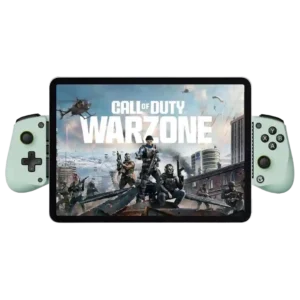
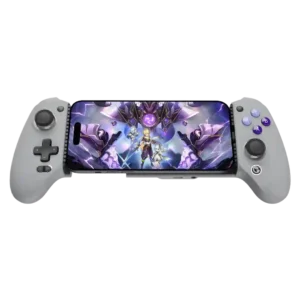
GameSir X5 Lite
Where It Has the Edge
No clear scored advantage over the other product.

Scorata scores summarize analyzed review evidence on a 1–5 scale; they are not laboratory measurements or a simple average of customer star ratings. Feature scores summarize the reviews covering that feature. The overall score averages feature scores within each review, then combines review averages. When both expert and customer evidence are available, those two groups receive equal weight. Products can have different review coverage, so small score gaps do not establish a winner.
Recommendations prioritize important features for the category, with a score of at least 3.5, a gap of at least 0.25 points and at least two supporting reviews per product. Features with widely varying scores or broad connectivity contexts are excluded from recommendations. These safeguards do not establish statistical significance.
Quick verdict
The available evidence supports the recommendation below, but does not establish an overall winner. Check the remaining features against your priorities.
There is not enough comparable review evidence to recommend GameSir X5 Lite over the other product.
Choose GameSir G8 Galileo for stick drift resistance and cloud gaming compatibility.
No clear scored advantage over the other product.
Scores are out of 5. Missing scores mean missing review evidence, not a missing feature.
Reviewers discuss battery life as part of the X5 Lite’s budget mobile-controller tradeoff. Comments are practical and tied to phone gaming, device fit, or the limits of the Lite design.
Because the controller draws power from the phone, there is no separate battery to remember or recharge. Most users consider the added phone drain modest, though one owner noticed meaningful power use.
Pass-through charging is useful but inconsistent. Some say it works perfectly, while others complain it is slow, low-wattage, or unreliable while playing.
Pass-through charging is a major convenience and often maintains useful charging speeds during play. Compatibility is inconsistent with some chargers and phones, and a few users report that charging is slow or does not work.
Customer support gets limited but positive mention, with one owner saying support helped after a port failure.
Customer-support experiences are sparse but include a strongly negative report about help with a failed firmware update. Service quality is therefore a potential risk for buyers needing troubleshooting.
Firmware support exists through the app, but sentiment is mixed because one owner reported an iPad-related firmware bug.
Firmware updates have added useful features such as faster charging, but the process is not always trouble-free. A few users report failed updates or controllers that malfunctioned afterward.
Reviewers discuss connection reliability as part of the X5 Lite’s budget mobile-controller tradeoff. Comments are practical and tied to phone gaming, device fit, or the limits of the Lite design.
The direct connection is usually stable and instantly recognized. A minority of users needed to unplug and reconnect the controller or encountered modes that did not register reliably.
Value is the clearest consensus. Reviewers repeatedly call the X5 Lite a steal, budget king, or unusually capable controller around $35.
Most reviewers see strong value because it undercuts major rivals while offering Hall controls, rear buttons, charging, and audio. A smaller group considers the price steep for a phone-only accessory.
Setup is usually quick and plug-and-play for supported games. Apple mode changes, mapping, and unsupported games can add friction.
Native controller-supported games are generally plug-and-play, and attaching a phone is simple. Touch mapping, special modes, and occasional recognition problems can add extra setup for unsupported games.
Screen overlays and app mapping can help unsupported games, but some reviewers dislike having digital buttons or UI quirks involved.
Moving the fingers off the touchscreen normally improves visibility, but game aspect ratios and black bars can still reduce the usable display area. The experience depends heavily on the phone and game.
Phone fit is usually secure thanks to the spring bridge and swappable pads. Thick cases, pop sockets, camera bumps, and some USB-C alignments can still interfere.
Phone fit varies more than any other physical trait. Bare phones and many slim cases sit securely, while thicker cases, large camera modules, off-center ports, and some foldables can require case removal or fail to fit.
Reviewers discuss durability as part of the X5 Lite’s budget mobile-controller tradeoff. Comments are practical and tied to phone gaming, device fit, or the limits of the Lite design.
Most long-term reports are positive, but durability is not flawless. Several owners describe broken or worn USB-C connectors, trigger parts, or labels after extended use or impact.
Most reviewers find the X5 Lite comfortable for mobile play, especially because it is light and shaped more like a real controller. Large hands are the main exception.
Full-size, Xbox-like grips make phone gaming far more comfortable than flatter telescopic controllers. Many reviewers could play for long sessions without the hand discomfort they normally associate with mobile controls.
Build quality is mixed but generally acceptable for the price. Many call it solid or sturdy, while some owners find the plastic light, hollow, or flimsy.
The chassis is consistently praised for tight construction, sturdy plastics, and minimal flex or creaking. Long-term users often say it still feels solid after months of regular use.
Reviewers discuss ergonomics as part of the X5 Lite’s budget mobile-controller tradeoff. Comments are practical and tied to phone gaming, device fit, or the limits of the Lite design.
The contoured handles and familiar controller shape fit the hands naturally. Its larger body is a deliberate ergonomic choice rather than a compact travel-first design.
The X5 Lite is better for small and medium hands than large hands. Bigger-handed players often mention cramped grips or small controls.
The larger grips generally suit medium and large hands better than compact mobile controllers. Fit is not universal, and a few very large-handed users wanted more room for their pinkies.
Reviewers discuss face button responsiveness as part of the X5 Lite’s budget mobile-controller tradeoff. Comments are practical and tied to phone gaming, device fit, or the limits of the Lite design.
Button presses normally register cleanly and consistently, including after months of use. Reports of sticking or missed inputs are rare but do appear in isolated units.
Reviewers discuss software customization as part of the X5 Lite’s budget mobile-controller tradeoff. Comments are practical and tied to phone gaming, device fit, or the limits of the Lite design.
Software controls allow adjustment of deadzones, sensitivity, layouts, and virtual touch mappings. The range is impressive, but achieving ideal settings can require trial and error.
Reviewers discuss button remapping options as part of the X5 Lite’s budget mobile-controller tradeoff. Comments are practical and tied to phone gaming, device fit, or the limits of the Lite design.
Remapping is broad and often easy, whether performed on the controller or through the app. Touch-only games may still require per-game setup and experimentation.
The app and GameHub features can help with mapping, firmware, and game discovery, but reviewers describe them as limited, Android-leaning, or hit-or-miss.
The companion app is powerful for calibration, firmware, touch mapping, and game launching. Its polish and reliability vary, with reports of crashes, clunky navigation, iOS limitations, and recognition problems.
The buttons are usually considered responsive and usable, though clearly membrane-based. Some like the quiet or satisfying presses, while others find them mushy or loud.
Face buttons are typically tactile, responsive, and close to console-controller quality. Critics mainly object to the use of membrane switches at this price rather than to everyday performance.
Reviewers discuss face button travel as part of the X5 Lite’s budget mobile-controller tradeoff. Comments are practical and tied to phone gaming, device fit, or the limits of the Lite design.
The face buttons have enough travel to feel deliberate without becoming slow. Reviewers who discuss the movement usually describe it as satisfying and familiar.
The swappable silicone pads are useful for phone fit, but the package feels bare to reviewers who wanted a cable or carrying case.
Alternate thumbsticks are a welcome inclusion and easy to swap, but only one of each style is supplied. The absence of a hard carrying case is another repeated disappointment.
The basic controller is easy once configured, but instructions, mode switching, and remapping can confuse some users.
Basic play is intuitive, while sensitive sticks, mode switching, and touch mapping can take time to learn. Most users become comfortable after calibration or a short adjustment period.
Drift resistance is a major selling point. Reviewers appreciate getting Hall-effect, drift-proof sticks at this low price.
The magnetic stick sensors inspire strong confidence against drift, and long-term users usually report no drifting. That durability advantage is a common reason buyers choose it over conventional alternatives.
Cloud and remote gaming are a strong fit. Steam Link, Game Pass, Moonlight, PlayStation streaming, and Netflix games are repeatedly mentioned as good use cases.
The controller works especially well with Xbox Cloud Gaming, Steam Link, GeForce Now, Luna, and remote-play services. Streaming quality still depends on the user’s network and the limitations of each service.
Portability is a major advantage. The controller is light, compact, and easy to toss in a bag for travel or commuting.
The full-size grips make it far bulkier than most telescopic controllers. It fits a backpack or travel bag, not a pocket, although some reviewers accept the extra size for the comfort gained.
Reviewers discuss compatibility with Xbox as part of the X5 Lite’s budget mobile-controller tradeoff. Comments are practical and tied to phone gaming, device fit, or the limits of the Lite design.
Its Xbox-style layout and direct connection make it particularly natural for Game Pass and Xbox Remote Play. Multiple reviewers call it one of the best ways to use Xbox cloud gaming on a phone.
Reviewers discuss analog stick tension as part of the X5 Lite’s budget mobile-controller tradeoff. Comments are practical and tied to phone gaming, device fit, or the limits of the Lite design.
The sticks feel quick and direct, but their sensitivity and shorter throw can take adjustment. Players who prefer slower, heavier analog movement may need to tune the deadzones.
Reviewers discuss trigger smoothness as part of the X5 Lite’s budget mobile-controller tradeoff. Comments are practical and tied to phone gaming, device fit, or the limits of the Lite design.
Trigger travel is generally smooth and comfortably shaped, but feel is not universally premium. Some reviewers describe the pull as too light, hollow, or less tactile than they prefer.
Reviewers discuss competitive gaming suitability as part of the X5 Lite’s budget mobile-controller tradeoff. Comments are practical and tied to phone gaming, device fit, or the limits of the Lite design.
Fast response, precise sticks, rear buttons, and hair-trigger mode make it capable of competitive play. The D-pad and app-dependent setup prevent it from being equally strong in every genre.
Compatibility is broad across USB-C Android phones, newer iPhones, iPads, foldables, and small tablets. A few users still ran into device or game-specific problems.
USB-C Android phones and newer iPhones are broadly supported, but platform features are not equal. Lightning iPhones, some foldables, and devices with unusual ports or camera housings may be excluded.
Low input lag is one of the strongest points. Reviewers repeatedly say the direct USB-C connection feels immediate or close to zero-latency.
Input response is consistently described as nearly instantaneous. The direct USB-C connection makes it especially attractive for action games and remote play.
Reviewers discuss premium feel as part of the X5 Lite’s budget mobile-controller tradeoff. Comments are practical and tied to phone gaming, device fit, or the limits of the Lite design.
Its full-size controls and rigid construction give it a distinctly premium, console-like feel. That impression is one of the clearest ways it separates itself from cheaper telescopic pads.
The triggers are digital rather than analog, which limits racing and pressure-sensitive control. Casual games are less affected.
The analog triggers provide a broad, controllable range for racing and other pressure-sensitive actions. Reviewers especially like the nuanced throttle control when streaming console games.
Reviewers discuss hand fatigue over long sessions as part of the X5 Lite’s budget mobile-controller tradeoff. Comments are practical and tied to phone gaming, device fit, or the limits of the Lite design.
Long-session comfort is a major strength, with several reviewers reporting little or no cramping. A small number of users with very large hands still found the shape uncomfortable after a short time.
Trigger feedback is one of the biggest compromises. Some users find them smooth enough, but many dislike the digital membrane feel and weak feedback.
Trigger response is fast and reliable, with hair-trigger mode adding an instant option for shooters. Most reviewers consider them more responsive than the compact triggers on many mobile pads.
Retro and emulator play is a popular use case, especially on Android and tablets. D-pad-heavy games are the caution point.
The controller is a strong companion for emulation, especially on wide-screen phones and more demanding systems. Older 4:3 games leave large side bars, and the D-pad is not ideal for every retro genre.
Reviewers discuss material quality as part of the X5 Lite’s budget mobile-controller tradeoff. Comments are practical and tied to phone gaming, device fit, or the limits of the Lite design.
The plastics feel thicker and more substantial than typical budget mobile-controller materials. Reviewers frequently compare the finish favorably with regular console gamepads.
The sticks are a clear strength for aiming and movement. Reviewers describe them as precise enough for shooters, racing, and 3D games despite their small size.
The Hall sticks are repeatedly praised for accurate aiming and controlled movement. Their high sensitivity can feel demanding at first, especially for casual players.
Reviewers discuss grip texture as part of the X5 Lite’s budget mobile-controller tradeoff. Comments are practical and tied to phone gaming, device fit, or the limits of the Lite design.
Texturing on the rear grips usually keeps the controller secure during play. A few users wanted a more aggressive surface, but slipping is rarely reported as a serious problem.
Several owners report reliable use over weeks, months, or long playtime. A few defective or glitchy reports keep it from feeling flawless.
Many users report dependable performance over months and across different games. A smaller group encountered calibration drift, intermittent recognition, or controls that behaved inconsistently.
USB-C makes the controller convenient and avoids Bluetooth pairing. The port location and case clearance can still be awkward for certain devices.
The pivoting USB-C connector is widely regarded as one of the smartest parts of the design because it simplifies insertion and removal. Some owners nevertheless report that the swivel connection can loosen or break over time.
Reviewers discuss travel friendliness as part of the X5 Lite’s budget mobile-controller tradeoff. Comments are practical and tied to phone gaming, device fit, or the limits of the Lite design.
Travel opinions depend on available bag space. Some users carry it everywhere and love it on trips, while frequent commuters prefer smaller controllers that pack down more easily.
Reviewers discuss d-pad feel as part of the X5 Lite’s budget mobile-controller tradeoff. Comments are practical and tied to phone gaming, device fit, or the limits of the Lite design.
Opinions on the D-pad are split: some find it precise and satisfying, while others call it mushy, wobbly, or overly clicky. Its suitability depends heavily on game genre and personal preference.
Reviewers discuss compatibility with PlayStation as part of the X5 Lite’s budget mobile-controller tradeoff. Comments are practical and tied to phone gaming, device fit, or the limits of the Lite design.
PlayStation Remote Play is an important use case and often works smoothly in PS mode. Some users encountered mode or app recognition failures and resorted to third-party software.
Reviewers discuss bumper quality as part of the X5 Lite’s budget mobile-controller tradeoff. Comments are practical and tied to phone gaming, device fit, or the limits of the Lite design.
The shoulder controls are usually solid and responsive. A few reviewers think the bumpers feel cheaper or less textured than the otherwise premium controls.
Overall satisfaction is high among budget-minded mobile gamers. Negative reviews usually come from D-pad problems, fit issues, charging disappointment, or compatibility friction.
Owners and experts overwhelmingly describe it as one of the strongest mobile controllers available. Even critical reviews usually frame the drawbacks as compromises around an otherwise excellent gaming experience.
Stick movement is praised as smooth and nicely controlled. A few users needed calibration or wanted larger caps, but the overall stick feel is strong.
Most reviewers find the sticks exceptionally smooth and fluid. Isolated units have shown rough rubbing or imperfect centering, usually resolved by changing a cap or calibrating.
Casual mobile gaming is the X5 Lite’s sweet spot. It gives phone games and streaming apps physical controls without the cost or complexity of premium models.
Casual games benefit from the comfort and immediate physical controls, although sensitive sticks can require acclimation. Several reviewers say the controller made them play more mobile games than expected.
The D-pad is the most disputed control. It works for menus and light use, but several reviewers complain about poor diagonals and accidental neighboring inputs.
The D-pad handles basic directional inputs accurately and works well for many platformers. Diagonal-heavy tests expose more inconsistency, especially for fighting games.
The Hall-effect sticks are one of the X5 Lite’s standout features. They feel smoother and more premium than shoppers might expect from a budget controller.
Hall effect sticks are one of the controller’s defining strengths, combining smooth movement with confidence against wear. Reviewers regularly cite them as a premium feature at this price.
A few reviewers miss a headphone jack or audio passthrough. Wireless earbuds or adapters are needed for wired-audio users.
The 3.5mm jack is appreciated for simple, latency-free wired audio on phones without a headphone port. One reviewer found its sound quality underwhelming, but outright failures are uncommon.
FPS play benefits from low lag and accurate sticks. Setup and trigger feel can still limit Call of Duty-style use for some players.
Shooters benefit from low latency, accurate Hall sticks, and optional hair triggers. A few reviewers find the small or sensitive sticks less controlled than a full-size console gamepad.
The full-size spacing can be easier on stiff or arthritic hands than cramped mobile controls. Its larger grip may therefore improve access for some players, though it is not a dedicated adaptive controller.
PC support is possible through USB on some setups and can resemble a generic Xbox pad. It is not the controller’s main purpose, and the empty center makes desktop use less comfortable.
The D-pad can manage casual fighting-game inputs, but diagonal motions are not its strength. Reviewers who tested demanding Street Fighter-style commands would not choose it primarily for fighters.
The spring-loaded cradle usually holds phones firmly, even during vigorous movement. One customer reported repeated slipping, so mounting security may vary by device and unit.
The rear paddles add pro-style flexibility without dominating the grip. Some users find them too easy to hit or wish they had a firmer, more substantial action.
Rear buttons and a satisfying D-pad can make platformers easier and less stressful on the thumbs. Performance is strongest in games that do not depend heavily on rapid diagonal inputs.
Long analog triggers and precise sticks work particularly well in racing games. Reviewers describe smooth throttle control and a much more console-like driving experience.
The home-button light can be distracting in dark rooms. Some users cover it or turn it off when possible.
Textured thumbstick edges give the thumbs a secure, non-slip surface. The interchangeable caps also let players choose a shape that better matches their grip preference.
Hair-trigger mode gives shooters a noticeably faster activation point and is easy to toggle. Rare reports of random activation or faulty trigger hardware keep it from being uniformly dependable.
Vibration support is limited and depends on games, modes, and phone compatibility. Reviewers who expect console-level rumble should treat it as a secondary feature rather than a core strength.
The controller feels substantial and usually balances a phone well between the grips. Heavier phones can make the combined setup tiring during marathon sessions.
Most reviewers praise the rear-button placement because the controls fall naturally under the middle fingers. A few users press them accidentally or find them lower than ideal.
The rear buttons are useful for jumping, attacks, emulator shortcuts, and other actions that keep the thumbs on the sticks. Their value depends on whether the player actually uses extra inputs.
Android receives the fullest software support, while iPhone owners lose advanced mapping and sometimes controller recognition inside the app. That platform gap is a recurring complaint.
Control noise is moderate and often quieter than Xbox-style alternatives. Some users still find the clicky D-pad or hollow trigger sound more noticeable than they would like.
Magnetic faceplates, swappable stick caps, adjustable modes, and mapping options create unusually deep customization. The main frustration is that alternate sticks are supplied as singles rather than matching pairs.
Two programmable rear inputs give the controller more flexibility than many mobile rivals. They can usually be assigned without needing to interrupt play with an app.
A dedicated capture button is convenient when intentionally used. Its close placement beneath the D-pad causes accidental screenshots for some players.
The gray-and-purple retro styling has plenty of fans, especially among those who like its Super Nintendo influence. Others find the color scheme plain and wish the removable faceplates had more visual options.
Start, Select, Menu, and mode functions provide useful shortcuts, but the layout can become crowded. The capture and macro controls beneath the D-pad are especially easy to trigger accidentally.
Turbo and macro-style functions are useful for repetitive inputs and can be activated quickly. One owner strongly disliked that the related buttons could not be disabled.
Buyers moving from smaller or older mobile controllers often see a major improvement in comfort, controls, and durability. The upgrade is less compelling for users who prioritize pocket portability.
The wired USB-C connection delivers immediate, dependable control without pairing. Reviewers value the simplicity and responsiveness compared with Bluetooth alternatives.

Best for precise TMR sticks, fast trigger stops, low-latency 2.4GHz play, and deep tuning. Skip it if you want a cheaper all-rounder, softer buttons for long sessions, or painless console-only...
Pros: overall satisfaction, button quality
Cons: d-pad accuracy, charging dock support

Best for a comfortable, affordable Xbox/PC pad with precise Hall sticks, a PlayStation-style layout, and useful rear buttons. Skip it if wireless play, deep software tuning, or consistently top-tier D-pad...
Pros: overall satisfaction, value for money
Cons: wired performance, vibration quality
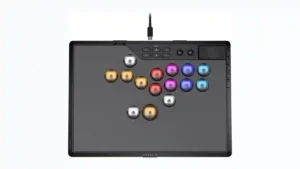
Choose it if you want a premium, tournament-ready leverless controller with excellent 2.4GHz wireless, deep actuation tuning, and sturdy construction. Skip it if loud, tall buttons, a heavy chassis, or...
Pros: overall satisfaction, button quality
Cons: control placement, button noise

Choose the GameSir Cyclone 2 if you want a low-cost PC/Switch/mobile controller with precise sticks, deep customization, and a dock. Skip it if Xbox/PS5 support, premium buttons, or flawless dock/battery...
Pros: value for money, charging dock support
Cons: d-pad feel, compatibility with Xbox