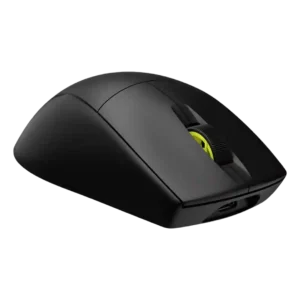
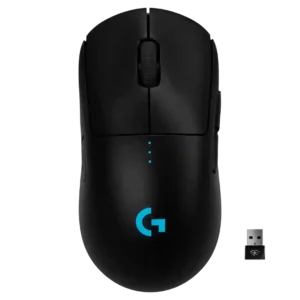
Corsair M75 AIR Wireless
Where It Has the Edge
- Bluetooth support is 3.5 vs 2.3. Bluetooth support is mixed: reviewers appreciate the option for productivity and multi-device use, but some dislike Bluetooth latency...

Scorata scores summarize analyzed review evidence on a 1–5 scale; they are not laboratory measurements or a simple average of customer star ratings. Feature scores summarize the reviews covering that feature. The overall score averages feature scores within each review, then combines review averages. When both expert and customer evidence are available, those two groups receive equal weight. Products can have different review coverage, so small score gaps do not establish a winner.
Recommendations prioritize important features for the category, with a score of at least 3.5, a gap of at least 0.25 points and at least two supporting reviews per product. Features with widely varying scores or broad connectivity contexts are excluded from recommendations. These safeguards do not establish statistical significance.
Quick verdict
The review evidence points to a tradeoff: Bluetooth support versus battery life and handedness options. Choose according to which strengths matter more to you; the overall score alone does not settle that choice.
Choose Corsair M75 AIR Wireless for Bluetooth support.
Choose Logitech G Pro Wireless for battery life and handedness options.
Scores are out of 5. Missing scores mean missing review evidence, not a missing feature.
Battery life is adequate to good but not class-leading, with praise for long enough use and criticism around 34-hour wireless estimates.
Battery life was broadly praised as excellent for a rechargeable wireless gaming mouse, though one long-term reviewer found it needed charging too often.
Charging convenience is generally positive, helped by USB-C, around-75-minute recharge comments, and usable wired operation.
Charging convenience was mostly positive, helped by fast charging, wired-use capability, and PowerPlay support, though micro-USB was viewed as dated.
Durability over time has limited positive support from the 100M-click optical switch expectation.
Durability over time was mixed: the shell and long-term use often held up, but double-click, middle-click, coating, and skate wear concerns appeared.
Switch durability gets positive but limited support from reviewers who value optical switches and long click-life expectations.
Switch durability was sharply mixed: several reviewers had no double-clicking, while others reported or emphasized double-click failures.
Skate durability is weak, with reviewers reporting scratches or poor stock skate quality.
Skate durability had limited mixed evidence, with long-term wear or movement noted but replacements considered easy.
Fingertip grip comfort has limited but very positive support from reviewers who found it ideal or comfortable.
Fingertip comfort was mixed, with some reviewers finding it tailor-made and others finding taper or size less ideal.
Palm grip comfort is positive overall, especially for users whose hands match the raised hump and curvature.
Palm grip comfort was strong for some hand sizes, though larger-hand palm users may not find the low profile ideal.
Ergonomic design is praised for its symmetry, tapering, and broadly usable form despite the minimalist design.
Ergonomic design was praised for a safe, adaptable shape that does not force one grip style.
Claw grip comfort is context-dependent, ranging from highly natural to too long or finicky for some hands.
Claw grip comfort was strong, with reviewers saying the mouse suited claw grips well and caused little discomfort during long play.
Build quality is divided, with several reviewers calling it solid and others criticizing rattles, plastic feel, or robustness.
Build quality drew strong praise for a light shell that still felt robust, solid, and free of flex, with a few durability caveats elsewhere.
Materials quality is mixed, ranging from convincing workmanship to complaints about cheap plastic and flex.
Materials quality was not strongly separated from build, but plastic material comments supported a mixed view of smooth lightweight materials versus limited premium finish.
Shape comfort is mostly positive across hand sizes and grip styles, though a few reviewers find it cramped or unremarkable.
Shape comfort was broadly praised as safe, comfortable, and adaptable, though a few reviewers wanted different hump, width, or taper details.
Long-session comfort is positive where discussed, with reviewers noting all-day comfort, no wrist aggravation, or work-and-play suitability.
Long-session comfort was repeatedly praised, with reviewers reporting no fatigue, cramping, or discomfort after extended sessions.
Handedness options are a weakness because reviewers repeatedly say the side-button layout makes it poor for left-handed use.
Handedness options were consistently praised because the mouse is truly ambidextrous with swappable side buttons.
Profile switching is the clearest repeated weakness, driven by the missing hardware DPI/profile switch and dependence on software.
Profile and DPI switching were useful when remapped, but bottom placement made quick switching less convenient for some users.
Left and right click quality is mixed, ranging from spacious and crisp to accidental actuation, pre-travel, or mushy implementation.
Left and right click quality was a standout strength, often described as crisp, satisfying, light, and precise.
Polling-rate impressions are mixed: several reviewers like or verify the 2,000Hz option, while others say it is hard to notice or failed their tests.
Polling/report-rate evidence was positive where reviewers connected 1ms reporting with smooth, responsive cursor behavior.
Weight tuning is criticized in limited evidence because the mouse does not offer adjustable weights.
Weight tuning evidence was mixed, with one review wishing for added weights and another noting a 10g weight option.
Connection stability is mixed: several reviewers report stable connections, while a few describe setup or wireless-operation trouble.
Connection stability was usually excellent, with several reviewers reporting no stutter or dropouts, though one long-term owner noted past dropouts.
RGB evidence depends on preference: some reviewers like the no-RGB minimalism and battery benefit, while one says the design needed lighting.
RGB features were usually considered basic or restrained, with some appreciating battery savings and others wishing for more or none at all.
Lift-off distance earns modestly positive evidence because reviewers value iCUE adjustment and calibration, though it is not a major focus.
Lift-off distance was praised as low and unobtrusive where tested, though software adjustment was absent.
Surface compatibility is positive overall through smooth movement and calibration, with one caveat about metal surfaces.
Surface compatibility was positive where discussed, with calibration or pad testing producing strong sensor behavior.
Switch feel trends positive, with reviewers liking the crisp, thocky, or satisfying optical-click feel, though not every click implementation is perfect.
Switch feel evidence was very positive in the PvP review, emphasizing unusually light mechanical switches.
MMO gaming suitability is weak in the available evidence because the sparse button layout is called a poor fit for button-heavy genres.
MMO suitability was mixed-to-negative: extra functions are possible, but several reviewers said the limited button count is not ideal for MMO users.
Cross-platform compatibility has limited but strong support from one review praising Windows and macOS usefulness.
Cross-platform compatibility was only lightly covered but positively described when the software and OS range were mentioned.
Onboard memory is useful but limited, with reviewers liking saved hardware settings while noting only one profile in one review.
Onboard memory was useful for carrying profiles and settings between computers or tournament setups.
Portability is modestly positive due to dongle storage and multi-device convenience.
Portability was helped by receiver storage and travel-friendly design, which reviewers found convenient.
Scroll wheel quality is generally acceptable to good, with praise for feel and resistance but some complaints about noise or looseness.
Scroll wheel quality was generally positive, praised for tactile, quiet, precise steps, although one reviewer wanted more defined steps.
Premium feel is split: one review says it feels premium, but several call the plastic shell cheap for the price.
Premium feel was mixed: some called it luxurious, while others felt the plain plastic design lacked polish for the price.
Ecosystem integration is modestly positive for users already invested in iCUE or Corsair wireless devices.
Ecosystem integration evidence was limited but positive where Logitech device lighting sync was demonstrated.
Motion consistency is praised in the few reviews that discuss it, especially for lag-free movement and stable skate placement.
Motion consistency was excellent in testing, with reviewers reporting no spinouts and smooth, consistent tracking.
Glide smoothness is a major strength in most reviews, although a few criticize the stock skates as slow or only okay.
Glide smoothness was mostly positive, though one reviewer found the stock feet less impressive than competitor PTFE skates.
Grip texture is mixed-positive: many praise the matte or grippy surface, while others find it slippery, coarse, or lacking grip tape.
Grip texture was mixed: the matte plastic was comfortable and sometimes grippy enough, but several reviewers wanted more texture or noticed slipping.
Weight is one of the strongest attributes, with broad praise for the 60g feel and only isolated criticism that it is not the very lightest.
Weight was a major strength; most reviewers praised the 80g class as exceptionally light, though ultralight trends made it less dominant later.
Click latency evidence is excellent, with reviewers repeatedly describing instant, unnoticeable, or near-wired response.
Click latency was consistently praised as imperceptible or effectively wired-like.
FPS gaming suitability is one of the strongest conclusions, with reviewers repeatedly calling it fast, precise, and well-suited for competitive shooters.
FPS suitability was one of the strongest themes, with reviewers praising the mouse for fast-paced shooters, tracking, flicks, and competitive play.
Cable flexibility is mixed; one review criticizes stiffness, while others find the cord usable or decent.
Cable feedback was mixed: some liked its flexibility or quality, while others complained it dragged, felt sticky, or was heavy and stiff.
The DPI range is viewed as generous and precise, though reviewers often pair that praise with frustration over hardware DPI switching.
DPI range and adjustment were praised as broad and easy to customize, even if bottom-button placement was divisive.
Weight balance has limited but positive support from one reviewer who says balance felt great in-game.
Weight distribution was generally praised as even, central, or perfectly balanced, supporting the mouse's light and controlled feel.
MOBA gaming suitability is weak in the available evidence because one review says MOBA players usually benefit from more buttons.
MOBA suitability received limited negative evidence because the mouse lacks extra buttons for that genre.
Wireless latency is consistently praised, with reviewers describing near-zero, no-lag, or wired-like responsiveness.
Wireless latency was consistently praised as wired-like, lag-free, or impossible to notice in play.
Click noise is mixed, ranging from quiet or acceptable to noisy buttons and louder scrolling.
Click noise was viewed favorably in the few reviews that addressed it, with comments about quiet or pleasant-sounding clicks.
Wireless performance is generally strong, with reviewers reporting expected, responsive, or interruption-free wireless use.
Wireless performance was one of the strongest areas, with reviewers repeatedly saying the connection felt flawless, responsive, and liberating.
Sensor performance is consistently praised for fast, precise, responsive movement, with only minor dissent tied to the broader mouse implementation rather than the sensor itself.
Sensor performance was one of the clearest strengths, repeatedly described as flawless, high tier, accurate, and responsive.
Programmable-button evidence is mostly negative because reviewers repeatedly find the button count too sparse for the price.
Programmable buttons were praised for useful remapping and G-Shift style layers, though minimalist button count limited some use cases.
Bluetooth support is mixed: reviewers appreciate the option for productivity and multi-device use, but some dislike Bluetooth latency or mode switching.
Bluetooth support was a limitation where discussed; reviewers noted the mouse relies on its receiver and wished Bluetooth were included.
Button responsiveness is split: some reviewers call the buttons quick and tactile, while others report false clicks or mushy post-travel.
Button responsiveness was rated highly, with reviewers repeatedly describing crisp, stable, light, and precise clicks.
Software usability is mixed: iCUE is praised as easier or straightforward by some and criticized as annoying or required by others.
Software usability was generally praised as easy, functional, and flexible for DPI, macros, lighting, and profiles.
Button customization is mixed: software remapping is useful, but reviewers criticize limits and reliance on iCUE.
Button customization was a consistent strength thanks to removable side buttons and software remapping options.
Side button quality is mixed-positive: placement is often praised, but reviewers also complain about low-key, recessed, flush, or slippery buttons.
Side button quality was highly praised for placement, click feel, modularity, and ambidextrous flexibility.
Value for money is highly disputed and leans negative because many reviewers think the price is high for the sparse feature set.
Value for money was mixed: many reviewers felt performance justified the price or sale value, but the premium launch price drew repeated criticism.
Macro support has limited evidence; one reviewer notes macros can be set up, but the small button layout limits practical use.
Macro support was positively mentioned through Logitech software and G-Shift style customization.
Accuracy evidence is strongly positive, with reviewers describing precise tracking, better in-game control, and pinpoint responses across competitive use.
Tracking accuracy was a major strength across reviews, with reviewers calling it extremely accurate, outstanding, and precise in real gameplay.
2.4GHz connectivity is usually praised for fast, stable, low-latency use, though one review had setup trouble.
Reviewers who discussed acceleration were positive, repeatedly describing no acceleration or prediction and framing this as part of the sensor's clean competitive tracking.
PowerPlay or wireless-charging compatibility was treated as a useful convenience, though micro-USB charging itself felt dated to one reviewer.
Firmware reliability has one negative supporting review focused on needing the included cable for setup and firmware-related pairing.
Software stability was mixed because G Hub was useful but described as buggy or needing fixes.

Choose the ROG Harpe II Ace for ultralight FPS play, precise tracking, smooth glide, and web-based tuning. Skip it if you need palm-grip support, MMO buttons, onboard profiles, or long...
Pros: glide smoothness, weight
Cons: handedness options

Excellent tracking, comfortable right-handed ergonomics and a versatile scroll wheel make the Basilisk V3 a strong gaming and productivity mouse. Its substantial weight, fixed cable and sometimes over-sensitive automatic scrolling...
Pros: scroll wheel quality, RGB features
Cons: weight, handedness options

The L7 Pro delivers remarkably light handling, precise aiming and a grippy shell at a budget price. Stock skates are less impressive, and conflicting click-latency measurements warrant caution for latency-sensitive...
Pros: value for money, weight
Cons: wired connectivity

Best for ultra-light, competition-focused speed, precise tracking, stable wireless, and long battery life. Skip it if you need quieter clicks, left-handed support, Bluetooth, more buttons, or better value for casual...
Pros: value for money, weight
Cons: click noise, RGB features