Scorata scores summarize analyzed review evidence on a 1–5 scale; they are not laboratory measurements or a simple average of customer star ratings. Feature scores summarize the reviews covering that feature. The overall score averages feature scores within each review, then combines review averages. When both expert and customer evidence are available, those two groups receive equal weight. Products can have different review coverage, so small score gaps do not establish a winner.
Recommendations prioritize important features for the category, with a score of at least 3.5, a gap of at least 0.25 points and at least two supporting reviews per product. Features with widely varying scores or broad connectivity contexts are excluded from recommendations. These safeguards do not establish statistical significance.
Quick verdict
What each product is best for
The review evidence points to a tradeoff: battery life and software stability versus weight and FPS gaming suitability. Choose according to which strengths matter more to you; the overall score alone does not settle that choice.
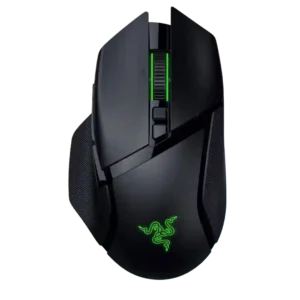
Choose Razer Basilisk V3 Pro 35K for battery life and software stability.
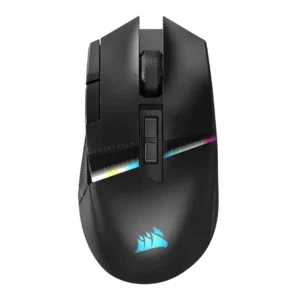
Choose Corsair Darkstar RGB for weight and FPS gaming suitability.
Why these recommendations?
Razer Basilisk V3 Pro 35K
Where It Has the Edge
battery life is 4.4 vs 2.2. Battery life was a consistent strength, but RGB and high polling rates could reduce endurance substantially.
software stability is 4.4 vs 1.8. Software stability was mostly improved or reliable, though Synapse still drew occasional criticism.
scroll wheel quality is 4.3 vs 2.5. The scroll wheel was a standout feature, though Smart-Reel behavior and occasional noise or responsiveness quirks created mixed...
Corsair Darkstar RGB
Where It Has the Edge
weight is 4.1 vs 2.7. The Darkstar is heavier than esports-first mice but generally praised for being lighter than rival MMO mice and...
FPS gaming suitability is 4.1 vs 3.0. FPS suitability is better than expected for an MMO mouse, with reviewers saying it handles shooters and flicks...
DPI range is 4.5 vs 3.5. The 26,000 DPI ceiling is treated as more than enough for most users, with praise for sensitivity and...
Razer Basilisk V3 Pro 35K4.2 overall score
Corsair Darkstar RGB3.9 overall score
Compare features
Scores are out of 5. Missing scores mean missing review evidence, not a missing feature.
Scored on both products
Battery and charging
Battery life
Razer Basilisk V3 Pro 35K
4.4
Battery life was a consistent strength, but RGB and high polling rates could reduce endurance substantially.
Corsair Darkstar RGB
2.2
Battery life is the most repeated complaint, especially with RGB enabled, where reviews call endurance disappointing or far from exceptional.
Charging convenience
Razer Basilisk V3 Pro 35K
4.2
Charging convenience ranged from excellent with the dock to frustrating when relying on quick wired top-ups.
Corsair Darkstar RGB
2.5
Charging convenience is mixed: USB-C access can be easy, but the stiff cable and missing dongle extender make wired charging less pleasant.
Controls and connectivity
Software stability
Razer Basilisk V3 Pro 35K
4.4
Software stability was mostly improved or reliable, though Synapse still drew occasional criticism.
Corsair Darkstar RGB
1.8
Software stability is a concern, with reviews citing detection trouble, iCUE working only intermittently, and a random DPI-drop bug.
Side button quality
Razer Basilisk V3 Pro 35K
4.4
Side buttons were generally praised for placement, tactility, and accessibility without many accidental presses.
Corsair Darkstar RGB
2.7
Side button quality is the most divisive control issue: reviewers like the concept, but many complain that some buttons are hard to reach, unintuitive, or hit-or-miss.
Bluetooth support
Razer Basilisk V3 Pro 35K
4.5
Bluetooth was valued for work, travel, and multi-device flexibility, though not always ideal for esports latency.
Corsair Darkstar RGB
3.3
Bluetooth support is useful for travel, secondary devices, and pairing flexibility, but reviewers warn it is too high-latency for gaming.
Software usability
Razer Basilisk V3 Pro 35K
4.1
Software usability was powerful but mixed: reviewers liked the depth of controls, while some found Synapse annoying or overwhelming.
Corsair Darkstar RGB
2.9
Software usability is sharply split: PCMag and one YouTube review find it navigable, while several others call iCUE confusing, unintuitive, or a slog.
Tilt gesture controls
Razer Basilisk V3 Pro 35K
4.7
Tilt controls were useful for horizontal scrolling, extra inputs, lean functions, and productivity workflows.
Corsair Darkstar RGB
4.0
Tilt gestures are a standout but divisive feature: several reviewers love or rely on them, while others report sensitivity, calibration, or reliability issues.
Button customization
Razer Basilisk V3 Pro 35K
4.6
Customization was a major strength, with extensive remapping, HyperShift, and button control through Synapse.
Corsair Darkstar RGB
4.4
Customization is one of the strongest themes, with reviewers praising deep button, DPI, RGB, gesture, and profile control despite software friction.
Programmable buttons
Razer Basilisk V3 Pro 35K
4.5
Programmable buttons were a major advantage, providing enough controls for productivity, MMOs, MOBAs, and general gaming.
Corsair Darkstar RGB
4.4
The large programmable-button set is a major selling point, especially for assigning skills, abilities, potions, and other inputs.
Button responsiveness
Razer Basilisk V3 Pro 35K
4.5
Button responsiveness was consistently positive, with clean actuation, clear pressure points, and minimal response delay.
Corsair Darkstar RGB
4.5
Button responsiveness is mostly strong: clicks are described as instant, smooth, snappy, and responsive across several reviews.
Other features
Cross-platform compatibility
Razer Basilisk V3 Pro 35K
2.2
Cross-platform support was a weakness for Linux users because Synapse is not officially available there.
Corsair Darkstar RGB
4.2
Cross-platform compatibility has limited but positive evidence, with one review calling the mouse versatile across Windows, Mac, and most OS setups.
Scroll wheel quality
Razer Basilisk V3 Pro 35K
4.3
The scroll wheel was a standout feature, though Smart-Reel behavior and occasional noise or responsiveness quirks created mixed notes.
Corsair Darkstar RGB
2.5
Scroll wheel feedback is mixed-to-negative because multiple reviewers found it stiff or hard to press despite tactile steps.
Cable flexibility
Razer Basilisk V3 Pro 35K
3.3
Cable feedback was mixed: one review found it stiff, another praised it as lightweight and smooth, and another found it slightly stiff.
Corsair Darkstar RGB
1.9
Cable flexibility is a repeated weakness: several reviewers criticize the included cable as stiff or not paracord-style.
Weight
Razer Basilisk V3 Pro 35K
2.7
Weight was the biggest tradeoff: some liked the controlled heft, but many found it heavy for fast competitive play.
Corsair Darkstar RGB
4.1
The Darkstar is heavier than esports-first mice but generally praised for being lighter than rival MMO mice and agile enough for quick movement.
FPS gaming suitability
Razer Basilisk V3 Pro 35K
3.0
FPS suitability was mixed: the sensor could keep up, but the weight reduced flick speed and competitive agility.
Corsair Darkstar RGB
4.1
FPS suitability is better than expected for an MMO mouse, with reviewers saying it handles shooters and flicks well, though not like ultralight FPS-first mice.
RGB features
Razer Basilisk V3 Pro 35K
4.3
RGB was usually praised for underglow and zone effects, though some noted hand coverage and battery drain.
Corsair Darkstar RGB
3.3
RGB opinions are mixed: some reviewers like the slick, versatile lighting, while others find key zones hidden, subtle, or battery-draining.
DPI range
Razer Basilisk V3 Pro 35K
3.5
The 35K DPI ceiling was viewed as technically impressive but often overkill or not worth paying extra for.
Corsair Darkstar RGB
4.5
The 26,000 DPI ceiling is treated as more than enough for most users, with praise for sensitivity and fine adjustment.
Motion consistency
Razer Basilisk V3 Pro 35K
5.0
Motion consistency was highly praised, with reviewers describing consistent tracking and precise input translation.
Corsair Darkstar RGB
4.2
Motion consistency evidence is limited but positive, with testing noting little to no noticeable jitter in the reviewed settings.
Surface compatibility
Razer Basilisk V3 Pro 35K
3.9
Surface compatibility was strong on pads and even glass in some tests, but harder or shiny surfaces created caveats.
Corsair Darkstar RGB
4.7
Surface compatibility is strong, with reviewers reporting excellent tracking across surfaces and improved feel after calibration.
Handedness options
Razer Basilisk V3 Pro 35K
2.3
Handedness was a clear limitation because reviewers repeatedly described it as right-handed only.
Corsair Darkstar RGB
1.5
Handedness is a clear limitation: the mouse is framed as unsuitable for left-handed gamers.
Left and right click quality
Razer Basilisk V3 Pro 35K
4.0
Main click quality was mostly good but mixed by one reviewer who found the clicks somewhat squishy or easy to mispress.
Corsair Darkstar RGB
4.6
Left and right click quality is a clear strength, with multiple reviews calling the main clicks wonderful, snappy, responsive, and tactile.
Lift-off distance
Razer Basilisk V3 Pro 35K
5.0
Lift-off distance control received strong marks where reviewers evaluated its adjustability and consistency across surfaces.
Corsair Darkstar RGB
4.5
Lift-off behavior is praised where tested, especially the improved control and instant cut-off during repositioning.
Polling rate
Razer Basilisk V3 Pro 35K
3.8
Polling rate feedback was mixed: high rates were valued, but accessories and battery penalties limited their practical appeal.
Corsair Darkstar RGB
4.2
The 2,000Hz polling capability is praised as high-spec and useful for competitive play, though one reviewer felt the latency difference would often be hard to notice.
Click latency
Razer Basilisk V3 Pro 35K
4.9
Latency-related feedback was strong, with reviewers praising fast response, low latency, and near-zero debounce delay.
Corsair Darkstar RGB
4.5
Direct click-response comments are positive, with reviewers describing the primary inputs as instant and right to the point.
Balance and weight distribution
Razer Basilisk V3 Pro 35K
4.2
Balance was generally viewed as controlled and stable, though one reviewer found the mouse somewhat front-heavy.
Corsair Darkstar RGB
4.6
Weight distribution is praised where discussed, with reviewers noting balanced feel and well-distributed mass.
Ecosystem integration
Razer Basilisk V3 Pro 35K
4.5
Razer ecosystem integration was liked for Chroma synchronization and multi-device setup polish.
Corsair Darkstar RGB
4.2
Ecosystem integration has limited but positive support, mainly around syncing multiple devices to one dongle.
Profile switching
Razer Basilisk V3 Pro 35K
4.8
Profile switching was useful where reviewers could store or cycle profiles without constantly returning to Synapse.
Corsair Darkstar RGB
4.5
Profile switching is useful once configured, with reviewers highlighting game-specific modes and on-the-fly profile changes.
Glide smoothness
Razer Basilisk V3 Pro 35K
4.7
Glide was usually praised as smooth or buttery, though surface choice affected the feel.
Corsair Darkstar RGB
4.4
Glide smoothness is mostly excellent thanks to large PTFE feet, though one reviewer found edge drag when leaning the mouse.
Connection stability
Razer Basilisk V3 Pro 35K
4.2
Connectivity was mostly stable, though one review had temporary dropouts until relocating the dongle.
Corsair Darkstar RGB
4.5
Connection stability is generally positive in play, with no issues reported in one review and low-latency wireless modes praised in another.
MOBA gaming suitability
Razer Basilisk V3 Pro 35K
4.8
MOBA suitability was positive where reviewers cited extra buttons, reliable commands, and precise tracking.
Corsair Darkstar RGB
4.5
MOBA suitability is also strong, with reviewers calling the Darkstar natural or versatile for MOBAs and related skill-heavy games.
Grip texture
Razer Basilisk V3 Pro 35K
4.6
Grip texture was consistently praised for control, fingerprint resistance, and rubberized side support.
Corsair Darkstar RGB
4.4
Grip texture is consistently liked, with rubberized or textured sides described as helpful, firm, grippy, and comfortable.
Premium feel
Razer Basilisk V3 Pro 35K
4.6
Premium feel was strong, with reviewers praising the look, hardware polish, and feature-packed construction.
Corsair Darkstar RGB
4.5
Premium feel is a consistent strength, supported by praise for its premium look, feel, materials, and build.
Switch feel
Razer Basilisk V3 Pro 35K
4.5
Switch feel was broadly positive, described as snappy, tactile, clean, or satisfying.
Corsair Darkstar RGB
4.6
Switch feel is widely liked, with reviewers describing the clicks as wonderful, crisp, quiet, snappy, smooth, and cushiony.
Onboard memory
Razer Basilisk V3 Pro 35K
4.4
Onboard memory was useful for profile storage and for reducing dependence on Synapse after setup.
Corsair Darkstar RGB
4.5
Onboard memory earns praise because configured profiles and lighting can run without keeping iCUE open.
Portability
Razer Basilisk V3 Pro 35K
4.0
Portability was acceptable for multi-PC or Bluetooth use, but weight made it less ideal as a travel-first mouse.
Corsair Darkstar RGB
4.1
Portability is supported by Bluetooth, multi-device flexibility, and versatile connection behavior, though it is not a major review theme.
Wireless latency
Razer Basilisk V3 Pro 35K
4.5
Wireless latency was praised as effectively indistinguishable from wired by one reviewer and low-latency through HyperSpeed by another.
Corsair Darkstar RGB
4.6
Wireless latency is praised on 2.4GHz, with reviewers reporting low-latency play and no practical latency issues.
2.4GHz connectivity
Razer Basilisk V3 Pro 35K
4.6
Reviewers liked the included HyperSpeed or 2.4GHz path for low-latency wireless use, with multi-device dongle convenience also mentioned.
Corsair Darkstar RGB
4.6
2.4GHz Slipstream is a strength, with reviewers praising its solid, low-latency connection and high polling capability.
MMO gaming suitability
Razer Basilisk V3 Pro 35K
4.2
MMO suitability was generally positive because of extra buttons and macros, but it was not seen as a full dedicated MMO mouse.
Corsair Darkstar RGB
4.2
MMO suitability is broadly positive because of the buttons, customization, and comfort, but the learning curve and side-button layout hold it back for some reviewers.
Comfort and build
Palm grip comfort
Razer Basilisk V3 Pro 35K
4.9
Palm grip comfort was one of the strongest fit cases, with several reviewers saying the shape felt fantastic or exceptionally comfortable.
Corsair Darkstar RGB
3.8
Palm grip comfort is split by hand size: larger-hand palm users settled in well, while a smaller-hand palm user found the shape unwieldy.
Claw grip comfort
Razer Basilisk V3 Pro 35K
3.2
Claw grip worked for some reviewers but was less comfortable for others because of the weight and shape.
Corsair Darkstar RGB
4.2
Claw grip comfort has limited but positive evidence, with one reviewer saying claw use felt pretty good.
Ergonomic design
Razer Basilisk V3 Pro 35K
4.8
Ergonomics were one of the strongest themes, especially for right-handed users and palm-focused comfort.
Corsair Darkstar RGB
4.3
Ergonomic design is generally praised for comfort, maneuverability, and right-handed control, though it is not universally the most ergonomic mouse.
Build quality
Razer Basilisk V3 Pro 35K
4.8
Build quality was repeatedly praised as solid, tank-like, or nearly flawless.
Corsair Darkstar RGB
4.7
Build quality is a major strength, with reviewers calling the mouse high-quality, rock-solid, extremely well built, and free of creaking.
Materials quality
Razer Basilisk V3 Pro 35K
4.8
Materials were viewed as premium, grippy, and visually polished, especially on the Phantom White version.
Corsair Darkstar RGB
4.7
Materials quality is praised through comments about premium-feeling surfaces, high-quality construction, and loved materials.
Long-session comfort
Razer Basilisk V3 Pro 35K
4.7
Long-session comfort was repeatedly praised thanks to the thumb rest, ergonomic shape, and reduced hand strain.
Corsair Darkstar RGB
4.8
Long-session comfort is strongly positive in the review that focused on endurance, calling it exceedingly comfortable over longer periods.
Fingertip grip comfort
Razer Basilisk V3 Pro 35K
3.1
Fingertip comfort was mixed to weak because the mouse is heavy and shaped more for palm or claw grips.
Corsair Darkstar RGB
3.1
Fingertip comfort is mixed: one reviewer could transition easily, while another found fingertip use uncomfortable and nearly unusable.
Shape comfort
Razer Basilisk V3 Pro 35K
4.2
Shape comfort was mostly positive for ergonomic use, though some reviewers found it too thin or grip-specific.
Corsair Darkstar RGB
4.2
Shape comfort is mostly positive, especially for medium-to-large hands, but one smaller-hand reviewer found it unwieldy.
Ownership and support
Macro support
Razer Basilisk V3 Pro 35K
4.9
Macro support was a strength through Synapse, HyperShift, and extra programmable controls.
Corsair Darkstar RGB
4.2
Macro support is viewed as useful for gaming and productivity, especially when mapped to creative tools, inventory management, or key presses.
Value for money
Razer Basilisk V3 Pro 35K
3.1
Value was the most common concern because the mouse is expensive and often only a modest upgrade over cheaper predecessors.
Corsair Darkstar RGB
3.3
Value is mixed: reviewers admire the features and innovation, but many question or criticize the high price.
Performance
Wireless performance
Razer Basilisk V3 Pro 35K
4.5
Wireless performance was generally strong, with rock-solid HyperSpeed and reliable 2.4GHz performance in most reviews.
Corsair Darkstar RGB
4.5
Wireless performance is broadly strong, with reviewers praising Slipstream responsiveness and wired-like behavior while noting some hardware omissions.
Sensor performance
Razer Basilisk V3 Pro 35K
4.7
Sensor performance was one of the highest-scoring areas, with reviewers praising accuracy, flawless tracking, and high-end specs.
Corsair Darkstar RGB
4.7
The Marksman sensor is one of the strongest points: reviews call it impressive, accurate, spot-on, and competitive with top-tier gaming mouse sensors.
Click noise
Razer Basilisk V3 Pro 35K
4.4
Click noise was mixed, with some reviewers calling it quiet and others noting sharper or louder clicks.
Corsair Darkstar RGB
4.3
Click noise is generally favorable, with reviewers describing the switches as quiet or not overly noisy while keeping tactile feel.
Tracking and training
Accuracy and tracking precision
Razer Basilisk V3 Pro 35K
4.6
Most reviewers praised precision and tracking, though one noted slight jitter at very high DPI settings.
Corsair Darkstar RGB
4.6
Reviewers consistently describe tracking as accurate, precise, smooth, and responsive across surfaces and games, with one heavier-body caveat handled under weight.
Evidence available for one product
Other features
Acceleration control
Razer Basilisk V3 Pro 35K
5.0
Evidence was positive where reviewers tested unwanted acceleration or jitter control, with one review reporting clean acceleration behavior.
Corsair Darkstar RGBNo score yet
Dock compatibility
Razer Basilisk V3 Pro 35K
4.0
Dock support was praised for convenience and higher polling, but reviewers often noted extra cost or availability issues.
Corsair Darkstar RGBNo score yet
Comfort and build
Durability over time
Razer Basilisk V3 Pro 35KNo score yet
Corsair Darkstar RGB
4.0
Durability over time has limited evidence, but one review expects the promised switches and rock-solid build to last for years.
Switch durability
Razer Basilisk V3 Pro 35KNo score yet
Corsair Darkstar RGB
4.2
Switch durability evidence is limited to optical-switch impressions, but one review says the actuation should last longer.
Choose the ROG Harpe II Ace for ultralight FPS play, precise tracking, smooth glide, and web-based tuning. Skip it if you need palm-grip support, MMO buttons, onboard profiles, or long...
Excellent tracking, comfortable right-handed ergonomics and a versatile scroll wheel make the Basilisk V3 a strong gaming and productivity mouse. Its substantial weight, fixed cable and sometimes over-sensitive automatic scrolling...
The L7 Pro delivers remarkably light handling, precise aiming and a grippy shell at a budget price. Stock skates are less impressive, and conflicting click-latency measurements warrant caution for latency-sensitive...
Best for ultra-light, competition-focused speed, precise tracking, stable wireless, and long battery life. Skip it if you need quieter clicks, left-handed support, Bluetooth, more buttons, or better value for casual...