Scorata scores summarize analyzed review evidence on a 1–5 scale; they are not laboratory measurements or a simple average of customer star ratings. Feature scores summarize the reviews covering that feature. The overall score averages feature scores within each review, then combines review averages. When both expert and customer evidence are available, those two groups receive equal weight. Products can have different review coverage, so small score gaps do not establish a winner.
Recommendations prioritize important features for the category, with a score of at least 3.5, a gap of at least 0.25 points and at least two supporting reviews per product. Features with widely varying scores or broad connectivity contexts are excluded from recommendations. These safeguards do not establish statistical significance.
Quick verdict
What each product is best for
The review evidence points to a tradeoff: media controls and stabilizer quality versus desk space efficiency and portability. Choose according to which strengths matter more to you; the overall score alone does not settle that choice.
Choose Corsair K100 RGB for media controls and stabilizer quality.
Choose HyperX Alloy Origins for desk space efficiency and portability.
Why these recommendations?
Corsair K100 RGB
Where It Has the Edge
media controls is 4.0 vs 2.8. Media controls are mostly praised for dedicated keys, a metal scroll wheel, and usable feedback, although some buttons...
stabilizer quality is 4.3 vs 3.2. Stabilizer quality is viewed as improved, with praise for better sound and less rattle, though one reviewer still...
RGB customization is 4.8 vs 3.7. RGB customization is considered extensive, with praise for per-key control, many lighting zones, and deep reworking options, though...
HyperX Alloy Origins
Where It Has the Edge
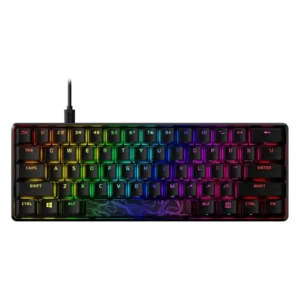
desk space efficiency is 4.9 vs 2.5. Desk space efficiency is strongly supported, especially for TKL, 60%, and 65% variants that leave more mouse room.
portability is 4.4 vs 2.1. Portability is a strength for the compact versions and detachable-cable design, especially for travel and LAN-style use.
size and form factor is 4.3 vs 2.3. Size and form factor are praised for compactness and no-nonsense gaming use, though the smallest models involve compromises.
Corsair K100 RGB4.1 overall score
HyperX Alloy Origins4.1 overall score
Compare features
Scores are out of 5. Missing scores mean missing review evidence, not a missing feature.
Scored on both products
Comfort and build
Ergonomics
Corsair K100 RGB
4.2
Ergonomics are generally good due to comfort and wrist support, though some reviewers want a better wrist angle or note the large full-size layout.
HyperX Alloy Origins
4.0
Ergonomics are mixed: adjustable feet and smaller layouts help comfort, but wrist fatigue and the need for a wrist rest appear in several reviews.
Size and form factor
Corsair K100 RGB
2.3
Size and form factor are a limitation for reviewers who describe the K100 as large, full-size, and demanding of desk space.
HyperX Alloy Origins
4.3
Size and form factor are praised for compactness and no-nonsense gaming use, though the smallest models involve compromises.
Typing comfort
Corsair K100 RGB
3.3
Typing comfort is mixed: some find the K100 comfortable after adjustment, while others call the sensitive switches unforgiving or not for all typists.
HyperX Alloy Origins
3.8
Typing comfort is mixed but generally favorable, with several reviewers enjoying daily typing while others note sensitivity or wrist comfort issues.
Build quality
Corsair K100 RGB
4.4
Build quality is usually described as premium, sturdy, solid, or excellent, but one Tom's Hardware sample left concerns because of magnet and key issues.
HyperX Alloy Origins
4.9
Build quality is the standout consensus strength, with reviewers repeatedly praising the aluminum body, weight, sturdiness, and premium feel.
Materials quality
Corsair K100 RGB
4.7
Materials quality is praised for aluminum, premium feel, strong construction, and top-quality components.
HyperX Alloy Origins
5.0
Materials quality is strongly positive, especially the aircraft-grade aluminum construction and high-quality case feel.
Durability
Corsair K100 RGB
4.7
Durability evidence focuses mainly on PBT keycaps and materials that reviewers say resist wear or hold up better over time.
HyperX Alloy Origins
4.5
Durability evidence is positive but limited, including expected longevity and a long-term report of continued use.
Design aesthetics
Corsair K100 RGB
4.6
Design aesthetics are widely praised as premium, sleek, gorgeous, luxurious, or visually impressive, with the RGB-heavy look occasionally framed as busy.
HyperX Alloy Origins
4.4
Design aesthetics are mostly praised as sleek, simple, attractive, or understated, though one reviewer found the design too slippery and plain.
Ownership and support
Reliability
Corsair K100 RGB
3.8
Reliability is mixed: optical switches are praised for avoiding chatter and missed inputs, but one reviewer experienced keyboard freezing and shutoff.
HyperX Alloy Origins
1.5
Reliability has limited negative evidence from one reviewer who reported severe lighting/profile glitches after restarts or unplugging.
Value for money
Corsair K100 RGB
3.3
Value for money is highly conditional: reviewers like the premium feature set but repeatedly warn that the high price only makes sense if the extras are used.
HyperX Alloy Origins
4.3
Value is generally strong, with many reviewers calling the price fair, competitive, or excellent; one reviewer felt the MSRP was too high.
Other features
Desk space efficiency
Corsair K100 RGB
2.5
Desk space efficiency is weak because multiple reviewers mention a massive footprint or the need to sacrifice room for the keyboard and wrist rest.
HyperX Alloy Origins
4.9
Desk space efficiency is strongly supported, especially for TKL, 60%, and 65% variants that leave more mouse room.
Portability
Corsair K100 RGB
2.1
Portability is poor because reviewers emphasize the K100's size, weight, full-size layout, and non-detachable cable as desk-bound traits.
HyperX Alloy Origins
4.4
Portability is a strength for the compact versions and detachable-cable design, especially for travel and LAN-style use.
Passthrough features
Corsair K100 RGB
4.0
Passthrough features are generally appreciated as a useful luxury or handy extra, though cable routing is not universally ideal.
HyperX Alloy Origins
2.0
Passthrough features are a clear weakness where discussed, because losing the prior USB passthrough/charging port disappointed reviewers.
Profile management
Corsair K100 RGB
4.0
Profile management is capable but can be overwhelming; reviewers praise large onboard profile capacity while noting the profile system can become complex.
HyperX Alloy Origins
2.3
Profile management is useful in theory, but evidence includes sync failures, unresponsive presets, and a three-profile limitation.
Volume control
Corsair K100 RGB
4.5
The volume wheel is a highlight, repeatedly praised for smoothness, premium feel, strong resistance, and better feel than some competitors.
HyperX Alloy Origins
3.0
Volume control is split: full-size reviewers wanted a dial or wheel, while one long-term Core user praised the volume shortcut placement.
Extra gaming features
Corsair K100 RGB
3.5
Extra gaming features are polarizing: reviewers praise the G keys and control wheel potential, but several call the wheel limited, janky, or not very useful in games.
HyperX Alloy Origins
5.0
Extra gaming features are strong, with NKRO, anti-ghosting, and game mode earning positive evidence for avoiding missed or accidental inputs.
Per-key lighting control
Corsair K100 RGB
4.5
Per-key lighting control is positively noted in reviews that appreciate the individual key lighting and access to the keyboard's 44 lighting zones.
HyperX Alloy Origins
3.0
Per-key lighting control is supported, but one reviewer found the layered workflow slow and awkward for detailed per-key setups.
Switch options
Corsair K100 RGB
2.0
Switch choice is viewed as limited because reviewers mention OPX and Cherry MX Speed variants, while one reviewer explicitly disliked the lack of a tactile option.
HyperX Alloy Origins
3.2
Switch choice is appreciated across the lineup, but smaller variants receive criticism when they ship with only linear switches or delayed tactile/clicky options.
Stabilizer quality
Corsair K100 RGB
4.3
Stabilizer quality is viewed as improved, with praise for better sound and less rattle, though one reviewer still found some wobble and rattling.
HyperX Alloy Origins
3.2
Stabilizer quality is mixed: some reviewers found little rattle, while others reported squeaking, looseness, or insufficient factory tuning.
Polling rate
Corsair K100 RGB
3.5
The 4,000Hz polling rate is seen as technically impressive and future-facing, yet many reviewers say the practical difference from 1,000Hz is subtle or hard to notice.
HyperX Alloy Origins
4.5
Polling rate evidence is positive but limited, with reviewers calling the 1000 Hz-class polling or scan behavior suitable for gaming.
Keycap quality
Corsair K100 RGB
4.4
The double-shot PBT keycaps are praised for feel, texture, clean looks, durability, and bright/crisp legends, though one review criticizes the included replacement caps as less durable.
HyperX Alloy Origins
3.5
Keycap quality is mixed: PBT-equipped compact versions are praised, while ABS caps on other versions draw shine, oil, rattle, and durability complaints.
Layout options
Corsair K100 RGB
4.7
Layout options improve because reviewers appreciate the standard bottom row and easier compatibility with aftermarket keycap sets.
HyperX Alloy Origins
3.9
Layout options are useful for gamers who want smaller boards, but the 60% layout creates productivity tradeoffs for some users.
Onboard memory
Corsair K100 RGB
4.5
Onboard memory is praised as unusually large or impressive, especially the ability to store many profiles and lighting layers on the keyboard.
HyperX Alloy Origins
3.8
Onboard memory is helpful for saving profiles across systems, but several reviewers considered the three-profile limit modest.
Cable quality
Corsair K100 RGB
3.0
Cable quality is mixed: reviewers call the cable sturdy, thick, and braided, but fixed and non-detachable design hurts convenience.
HyperX Alloy Origins
3.6
Cable quality is polarized, with praise for detachable braided USB-C cables but criticism of stiffness, kinks, and recessed-port compatibility.
Latency
Corsair K100 RGB
4.4
Latency impressions are mostly positive in real use, including reports of no lag or instant action, but some reviewers question whether the sub-millisecond gains are perceptible.
HyperX Alloy Origins
5.0
Latency evidence is strongly positive: reviewers measured tight or very low latency and reported no detectable lag in use.
Key stability
Corsair K100 RGB
5.0
Key stability receives strong praise from reviewers who note almost no tilt, no rattle, and no flex or wobble in the keys.
HyperX Alloy Origins
4.5
Key stability is generally positive, with reviewers noting no wobble or only minor wobble that was not distracting.
Compatibility
Corsair K100 RGB
4.4
Compatibility receives positive evidence from iCue recognizing another Corsair device, suggesting useful ecosystem integration.
HyperX Alloy Origins
4.0
Compatibility evidence is generally favorable for consoles and major platforms, though one review notes no macOS or Linux support for that model.
Connectivity
Corsair K100 RGB
3.8
Connectivity gets positive marks for USB passthrough as a handy extra, though the wired-only setup and thick cable remain contextual limitations.
HyperX Alloy Origins
3.5
Connectivity is mixed: detachable USB-C is appreciated, but reviewers noted software detection issues and no multi-device use.
Acoustics
Corsair K100 RGB
4.1
Acoustics are mixed: several reviewers like the smoother or more satisfying sound, while ProSettings complains about hollow, resonating, loud keys.
HyperX Alloy Origins
3.8
Acoustics are mixed, ranging from satisfying thock and pleasant sound to loud, clacky, or stabilizer-rattly impressions.
RGB lighting quality
Corsair K100 RGB
4.6
RGB lighting quality is one of the most consistently praised areas, with reviewers calling it vibrant, bright, clear, excellent, and visually premium.
HyperX Alloy Origins
4.8
RGB lighting quality is consistently praised for brightness, saturation, vividness, and attractive shine-through effects, with one color-mixing caveat.
Switch feel
Corsair K100 RGB
4.6
Reviewers consistently describe the OPX or Speed linear switches as fast, smooth, and satisfying, though a few note the sensitivity takes adjustment and the feel is not for everyone.
HyperX Alloy Origins
4.4
Reviewers generally describe the HyperX switches as smooth, familiar, satisfying, and good for gaming, though a few prefer Cherry-style or tactile alternatives for typing.
Key spacing
Corsair K100 RGB
3.7
Key spacing is mixed, with praise for standard bottom-row spacing but complaints that the left G keys can cause reaches or accidental presses.
HyperX Alloy Origins
3.8
Key spacing is context-dependent: the 60% model can feel tightly packed, while other layouts are described as standard or not cramped.
Key responsiveness
Corsair K100 RGB
4.7
The keyboard is repeatedly praised for very fast, sensitive, and responsive inputs, with several reviewers describing immediate or lightning-fast key response.
HyperX Alloy Origins
4.5
Responsiveness is a clear strength, with reviewers citing quick, precise inputs, reduced accidental presses, and skill activation that kept up with games.
Frame rigidity
Corsair K100 RGB
5.0
Frame rigidity receives excellent marks from reviewers who report no frame flex or only minimal flex.
HyperX Alloy Origins
5.0
Frame rigidity is excellent in the review evidence, with repeated comments about minimal flex, no give, and stable placement.
Typing feel
Corsair K100 RGB
4.4
Typing feel is generally strong once acclimated, with praise for fewer typos and satisfying keys, though PCMag initially found the keys uncomfortable.
HyperX Alloy Origins
4.4
Typing feel is mostly favorable, with reviewers calling it solid, satisfying, fluid, and easy to type on, though 60% sensitivity caused problems for some.
Actuation consistency
Corsair K100 RGB
5.0
Actuation consistency is supported by IGN's report that there were no response or press issues during fast gaming use.
HyperX Alloy Origins
5.0
One reviewer explicitly praised the speed and consistency of the keyboard and switch combination.
Performance
Sound dampening
Corsair K100 RGB
4.9
Sound dampening is praised most strongly by KitGuru, which finds the K100 noticeably more muted and less resonant than its predecessor.
HyperX Alloy Origins
3.0
Sound dampening evidence is limited and mildly negative, with one review noting the lack of foam lets sound travel more freely.
Legend visibility
Corsair K100 RGB
4.6
Legends are praised as sharp, clean, bright, and well illuminated, with reviewers appreciating the less gamer-heavy font and full legend visibility.
HyperX Alloy Origins
5.0
Legend visibility has positive evidence from the 60% model, where side-printed secondary functions were easy to recognize.
Noise level
Corsair K100 RGB
3.0
Noise level is divided: some reviewers call the board loud or drastically louder than quieter keyboards, while others find the sound pleasant or less distracting.
HyperX Alloy Origins
3.2
Noise level depends on switch and reviewer tolerance; some found it quieter or inoffensive, while others called it noisy or annoying.
Gaming performance
Corsair K100 RGB
4.5
Gaming performance is widely praised as fast, smooth, and confidence-inspiring, with some reviewers reporting better responsiveness or a noticeable improvement in games.
HyperX Alloy Origins
4.6
Gaming performance is one of the strongest areas, repeatedly praised as responsive, accurate, low-lag, and well suited to fast games.
Backlight brightness
Corsair K100 RGB
5.0
Backlight brightness is strongly praised where mentioned, especially by reviewers who call the lighting impressively bright.
HyperX Alloy Origins
5.0
Backlight brightness is a major strength, with reviewers repeatedly describing the lighting as extremely bright or easy to adjust.
Controls and connectivity
Media controls
Corsair K100 RGB
4.0
Media controls are mostly praised for dedicated keys, a metal scroll wheel, and usable feedback, although some buttons feel odd or less satisfying.
HyperX Alloy Origins
2.8
Media controls are adequate through function layers, but reviewers repeatedly wished for separate or dedicated media keys.
Macro customization
Corsair K100 RGB
4.6
Macro customization is a major strength, with reviewers praising G keys, Stream Deck integration, on-the-fly macro recording, and broad remapping possibilities.
HyperX Alloy Origins
3.5
Macro customization is available and useful, but reviewers also found it less intuitive or less capable than dedicated macro-focused alternatives.
RGB customization
Corsair K100 RGB
4.8
RGB customization is considered extensive, with praise for per-key control, many lighting zones, and deep reworking options, though software complexity can slow the process.
HyperX Alloy Origins
3.7
RGB customization is capable and often easy, but reviewers also criticized limited presets/effects and occasional setup friction.
Hot-swappable switches
Corsair K100 RGB
1.0
Hot-swappable switches score poorly because the one opinionated mention treats the lack of hot-swap support as a drawback.
HyperX Alloy Origins
2.0
Hot-swappable switch support is a weakness because reviewers specifically wanted hot-swap capability and noted its absence.
Customization options
Corsair K100 RGB
4.3
Customization options are extremely broad across lighting, keys, macros, and wheel functions, but reviewers often warn that configuring them takes effort.
HyperX Alloy Origins
5.0
Customization options are strong where reviewers discuss remapping and key assignment, especially on the Core model.
Software quality
Corsair K100 RGB
3.1
Software quality is the most divisive area, combining deep iCue functionality with repeated complaints about clunkiness, confusing workflows, and tedious setup.
HyperX Alloy Origins
2.8
Software quality is the most uneven area, with some reviewers finding it easy and others reporting confusing workflows, bugs, limits, or install problems.
Evidence available for one product
Ownership and support
Ease of switch replacement
Corsair K100 RGBNo score yet
HyperX Alloy Origins
1.0
Ease of switch replacement is poor where discussed, because changing switches requires desoldering both LED and switch components.
Other features
Wrist rest quality
Corsair K100 RGB
4.6
The wrist rest is broadly praised as comfortable, cushioned, magnetic, and much improved over earlier Corsair rests, with only minor firmness or branding complaints.
Good if you want a premium 96% Hall Effect keyboard for work and gaming with excellent build, sound, and customization. Skip it if you need cheaper esports-first speed, 8,000Hz polling,...
Choose it if competitive gaming speed, Rapid Trigger, and deep per-key customization matter more than extras. Skip it if you need wireless, dedicated arrows/media keys, adjustable height, or a lower-cost...
Good if you want a premium, quiet TKL Hall Effect keyboard for typing and gaming. Skip it if price, portability, 8,000Hz polling, or broad switch choice matters most.
Good if you want a premium full-size Hall Effect keyboard with smooth switches, quiet sound, and deep customization. Skip it if you need a portable, budget-friendly board or broad switch...