Scorata scores summarize analyzed review evidence on a 1–5 scale; they are not laboratory measurements or a simple average of customer star ratings. Feature scores summarize the reviews covering that feature. The overall score averages feature scores within each review, then combines review averages. When both expert and customer evidence are available, those two groups receive equal weight. Products can have different review coverage, so small score gaps do not establish a winner.
Recommendations prioritize important features for the category, with a score of at least 3.5, a gap of at least 0.25 points and at least two supporting reviews per product. Features with widely varying scores or broad connectivity contexts are excluded from recommendations. These safeguards do not establish statistical significance.
Quick verdict
What each product is best for
The review evidence points to a tradeoff: portability and latency versus media controls and frame rigidity. Choose according to which strengths matter more to you; the overall score alone does not settle that choice.
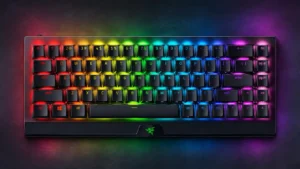
Choose Razer BlackWidow V4 Mini HyperSpeed for portability and latency.
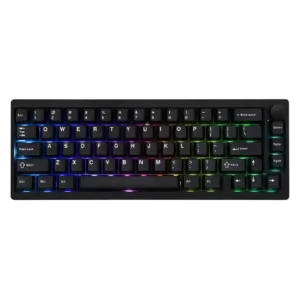
Choose Epomaker P65 for media controls and frame rigidity.
Why these recommendations?
Razer BlackWidow V4 Mini HyperSpeed
Where It Has the Edge
portability is 4.8 vs 2.9. The small footprint makes the board easy to carry, although its weight may be noticeable for some users.
latency is 4.7 vs 4.4. HyperSpeed is praised for quick response and barely perceptible delay. Bluetooth may introduce slight lag.
Epomaker P65
Where It Has the Edge
media controls is 4.8 vs 1.5. The metal rotary knob provides smooth volume adjustment, mute control and programmable functions with satisfying tactile feedback.
frame rigidity is 5.0 vs 4.5. The dense aluminum shell has almost no flex and stays firmly planted during typing or gaming.
Razer BlackWidow V4 Mini HyperSpeed3.8 overall score
Epomaker P654.2 overall score
Compare features
Scores are out of 5. Missing scores mean missing review evidence, not a missing feature.
Scored on both products
Comfort and build
Ergonomics
Razer BlackWidow V4 Mini HyperSpeed
5.0
The smaller footprint allows more flexible positioning and can reduce arm fatigue during gaming.
Epomaker P65
2.6
The fixed six-degree angle and tall front edge divide opinion. Typing can still be comfortable, but users who want adjustable feet may need a wrist rest or another board.
Durability
Razer BlackWidow V4 Mini HyperSpeed
1.4
A long-term owner reports no wear after a year, but many others describe cracked caps, failing switches or ports within weeks or months.
Epomaker P65
4.8
The aluminum case, thick PBT keycaps and rated switches suggest strong long-term durability, with reviewers expecting the chassis to last for years.
Build quality
Razer BlackWidow V4 Mini HyperSpeed
3.4
The chassis often feels sturdy and premium, but fragile keycaps and early defects lead other owners to question the overall construction.
Epomaker P65
4.9
The heavy CNC-aluminum chassis is the product’s clearest strength, repeatedly described as tank-like, premium and far more substantial than typical plastic boards.
Materials quality
Razer BlackWidow V4 Mini HyperSpeed
3.5
Some owners praise the premium feel, while others criticize the contrast between the heavy metal body and fragile plastic keys.
Epomaker P65
5.0
CNC aluminum, PBT caps, a polycarbonate plate and layered internal materials create a premium construction uncommon at this price.
Typing comfort
Razer BlackWidow V4 Mini HyperSpeed
3.5
Tactile feedback generally makes typing enjoyable, but cramped keys can be uncomfortable for those accustomed to larger boards.
Epomaker P65
4.6
The gasket-mounted plate softens bottom-out and supports long work sessions, though the fixed angle may still bother some users.
Size and form factor
Razer BlackWidow V4 Mini HyperSpeed
4.4
The 65% footprint keeps arrow keys while taking up much less space than larger boards. Some users find the keys and secondary functions too cramped for everyday use.
Epomaker P65
4.9
The compact 65% chassis balances desk efficiency with arrow keys and a knob, though users must accept missing dedicated keys.
Design aesthetics
Razer BlackWidow V4 Mini HyperSpeed
4.9
The blacked-out appearance and glowing keycap edges earn frequent praise, especially in the dark.
Epomaker P65
4.7
The understated black or retro khaki styling wins praise for looking clean, refined and office-friendly rather than aggressively gamer-focused.
Battery and charging
Battery life
Razer BlackWidow V4 Mini HyperSpeed
3.4
Runtime varies sharply with lighting and usage: some owners get several days or longer, while others need to charge daily or report fewer than ten hours.
Epomaker P65
3.9
Battery life ranges from several days with RGB enabled to much longer with lighting off. Most found it acceptable, though one reviewer wanted at least a full week.
Ownership and support
Reliability
Razer BlackWidow V4 Mini HyperSpeed
1.7
Experience is inconsistent: some owners report no issues, while others encounter failed keys, lighting problems, unstable pairing and repeated replacements.
Epomaker P65
2.4
Most reviewers experienced stable operation, but isolated reports of a failed 2.4GHz dongle, scratched caps and intermittent wiring create some quality-control concern.
Value for money
Razer BlackWidow V4 Mini HyperSpeed
2.8
The compact layout, hot-swap switches and wireless flexibility can justify the price, especially on sale. Defects, battery limitations and lower-priced alternatives make value contentious.
Epomaker P65
4.9
At roughly $120 and often less on sale, the P65 is widely considered exceptional value for a prebuilt aluminum keyboard.
Ease of switch replacement
Razer BlackWidow V4 Mini HyperSpeed
4.0
Some users find switch changes simple, but an expert could not pull the original switches out without fearing damage.
Epomaker P65
4.4
Hot-swap sockets make replacing or experimenting with switches far easier than soldered boards, though delicate pins can require careful alignment.
Other features
Key spacing
Razer BlackWidow V4 Mini HyperSpeed
1.0
Some buyers find the keys uncomfortably crowded, particularly when moving from larger keyboards.
Epomaker P65
5.0
The key spacing feels consistent and comfortable, helping reduce typing errors despite the compact layout.
Volume control
Razer BlackWidow V4 Mini HyperSpeed
1.0
Volume adjustment through the function layer is less convenient than a dedicated control.
Epomaker P65
5.0
The metal knob is a standout convenience, offering smooth adjustment, tactile steps and a press-to-mute function.
Profile management
Razer BlackWidow V4 Mini HyperSpeed
1.0
Some owners report profiles changing unexpectedly or reverting to default colors.
Epomaker P65
4.5
VIA layouts can be saved to onboard memory, allowing customized keymaps to persist without background software.
Actuation consistency
Razer BlackWidow V4 Mini HyperSpeed
2.2
Precision improves over the older model for some gamers, but double presses and keys failing to register remain serious complaints.
Epomaker P65
4.6
Typing feels steady and predictable, with smooth linear travel that avoids unwanted inputs and helps maintain accuracy.
Portability
Razer BlackWidow V4 Mini HyperSpeed
4.8
The small footprint makes the board easy to carry, although its weight may be noticeable for some users.
Epomaker P65
2.9
The compact footprint fits bags more easily than larger layouts, but the 1.3kg aluminum body makes it a poor choice for frequent travel.
Keycap quality
Razer BlackWidow V4 Mini HyperSpeed
2.6
Phantom Pudding caps look attractive and enhance RGB, but cracking, splitting and caps falling off are repeated concerns. One comparison also favors a competitor’s stock keycaps.
Epomaker P65
4.4
Thick double-shot PBT keycaps feel textured, durable and premium, although isolated units arrived scratched and one reviewer noticed inconsistent legend printing.
Key responsiveness
Razer BlackWidow V4 Mini HyperSpeed
3.2
Working switches respond quickly and precisely, especially during gaming. Several owners report missed inputs or repeated keystrokes.
Epomaker P65
4.8
The light linear switches feel snappy and promptly register commands, with no lag noticed in normal gaming.
Connectivity
Razer BlackWidow V4 Mini HyperSpeed
3.4
USB, Bluetooth and a 2.4 GHz dongle give owners flexible connection options, but some experience failures in one or more modes.
Epomaker P65
4.9
Bluetooth, 2.4GHz wireless and wired USB-C provide flexible everyday use, with convenient external mode switching and dongle storage.
Compatibility
Razer BlackWidow V4 Mini HyperSpeed
2.0
Backward compatibility with older Synapse devices is appreciated, but PS5 owners report that the keyboard does not work with their console.
Epomaker P65
3.5
Windows and macOS both work, but Mac users do not get dedicated keycaps or an easy hardware layout toggle.
Layout options
Razer BlackWidow V4 Mini HyperSpeed
4.3
Dedicated arrow keys and familiar main keys make the 65% layout practical, but number-pad and function-row shortcuts can frustrate full-size keyboard users.
Epomaker P65
3.0
The compact 65% layout saves room but removes the function row, numpad and some dedicated keys, requiring shortcuts or remapping.
Extra gaming features
Razer BlackWidow V4 Mini HyperSpeed
5.0
Snap Tap input priority can help with rapid changes of direction in competitive games.
Epomaker P65
4.0
N-key rollover supports simultaneous inputs, but the board omits enthusiast gaming extras such as adjustable actuation and Hall Effect controls.
Switch options
Razer BlackWidow V4 Mini HyperSpeed
4.0
The broad selection of compatible switches is useful for exploring different feels, though one buyer wanted a linear stock option.
Epomaker P65
3.1
Buyers can choose Zebra or Wisteria linears, but there are no stock tactile, clicky or silent choices; hot-swap support partly offsets that limitation.
Per-key lighting control
Razer BlackWidow V4 Mini HyperSpeed
5.0
Individual key lighting is an appealing way to personalize the compact board.
Epomaker P65
4.2
South-facing per-key LEDs can be configured through VIA, though the visible glow depends heavily on switch and keycap choice.
Overall satisfaction
Razer BlackWidow V4 Mini HyperSpeed
3.7
Many owners love the compact design, tactile keys and lighting, but others report early failures severe enough to return the keyboard. Overall satisfaction depends heavily on whether the unit works reliably.
Epomaker P65
4.4
Most reviewers strongly recommend the P65 for its premium feel, sound and value, though a small number report setup issues, damaged parts or component failures.
Typing feel
Razer BlackWidow V4 Mini HyperSpeed
4.3
The tactile feel and sound are commonly praised, including after long use, though sticky keys and cramped spacing can frustrate some typists.
Epomaker P65
5.0
Typing is consistently described as smooth, cushioned and satisfying, with several reviewers achieving strong speed and accuracy.
Acoustics
Razer BlackWidow V4 Mini HyperSpeed
4.4
Many enjoy the satisfying tactile clicks and subdued Orange-switch acoustics; others find the keyboard clickier than expected.
Epomaker P65
5.0
Reviewers consistently praise the rich, thocky or creamy sound, with the aluminum case, gasket mount and foam producing a refined profile without metallic ping.
Switch feel
Razer BlackWidow V4 Mini HyperSpeed
3.9
Orange tactile switches often earn praise for satisfying feedback and quiet feel. Sticky keys, double presses and inconsistent operation spoil that experience for some owners.
Epomaker P65
4.5
Both Zebra and Wisteria linears are smooth and responsive, with Zebra feeling lighter and Wisteria slightly heavier. Stock choice is limited to linear options.
Frame rigidity
Razer BlackWidow V4 Mini HyperSpeed
4.5
The frame feels solid with little noticeable flex, even during intense typing; keycap failures can occur despite that sturdy feel.
Epomaker P65
5.0
The dense aluminum shell has almost no flex and stays firmly planted during typing or gaming.
RGB lighting quality
Razer BlackWidow V4 Mini HyperSpeed
4.6
Many buyers love the vivid lighting and translucent keycap edges, although one owner found colors washed out even at maximum brightness.
Epomaker P65
4.1
The RGB is usually described as tasteful and even, but brightness and diffuser quality receive mixed comments.
Latency
Razer BlackWidow V4 Mini HyperSpeed
4.7
HyperSpeed is praised for quick response and barely perceptible delay. Bluetooth may introduce slight lag.
Epomaker P65
4.4
Wired and 2.4GHz response is consistently described as fast enough for gaming, with no perceptible input lag in practical tests.
Desk space efficiency
Razer BlackWidow V4 Mini HyperSpeed
5.0
The small footprint frees room for mouse swings and separate keypads, particularly on tight gaming desks.
Epomaker P65
4.9
The 65% layout frees substantial mouse room while retaining arrow keys and a control knob.
Controls and connectivity
Media controls
Razer BlackWidow V4 Mini HyperSpeed
1.5
Media shortcuts require extra key presses rather than dedicated controls, which can be inconvenient.
Epomaker P65
4.8
The metal rotary knob provides smooth volume adjustment, mute control and programmable functions with satisfying tactile feedback.
Software quality
Razer BlackWidow V4 Mini HyperSpeed
2.3
Synapse offers extensive control and some users find it improved, but others report confusing settings, unpredictable lighting and serious PC instability.
Epomaker P65
3.8
VIA itself is powerful and clean, but onboarding varies sharply: some reviewers loaded the JSON file in under a minute, while others struggled with recognition and vague instructions.
RGB customization
Razer BlackWidow V4 Mini HyperSpeed
3.4
Per-key effects and adjustable illumination are appealing, though layered colors and saved settings can be difficult or unreliable.
Epomaker P65
4.8
VIA offers adjustable colors, patterns and brightness, with enough control for either subtle static lighting or brighter effects.
Customization options
Razer BlackWidow V4 Mini HyperSpeed
4.9
Switch swapping, lighting effects and configurable settings provide plenty of room to personalize the keyboard.
Epomaker P65
4.5
QMK/VIA support enables extensive remapping, lighting changes, macros and knob reassignment, making the board highly adaptable once configured.
Hot-swappable switches
Razer BlackWidow V4 Mini HyperSpeed
5.0
Hot-swappable sockets are a major improvement, allowing owners to experiment with switches instead of replacing the entire keyboard.
Epomaker P65
4.9
The PCB accepts 3-pin and 5-pin mechanical switches, giving owners broad replacement and tuning flexibility without soldering.
Performance
Legend visibility
Razer BlackWidow V4 Mini HyperSpeed
2.0
The stealthy unlit look is distinctive, but hidden legends become frustrating when lighting goes out, and replacement caps may not match the original functions.
Epomaker P65
4.0
Legends are generally clear and readable, but one reviewer noticed inconsistent stroke thickness and Mac-specific symbols are absent.
Wireless performance
Razer BlackWidow V4 Mini HyperSpeed
3.2
HyperSpeed can feel as quick as wired input, and many users enjoy reliable wireless play. Others report disconnects, interference or failed Bluetooth pairing.
Epomaker P65
4.1
Bluetooth and 2.4GHz are generally reliable, but one customer reported a failed dongle, so confidence is high rather than flawless.
Backlight brightness
Razer BlackWidow V4 Mini HyperSpeed
4.4
Several owners praise the bright backlighting, but a dissenting owner finds the colors unimpressive at maximum brightness.
Epomaker P65
3.6
Lighting impressions vary: some reviewers found it bright and attractive, while others said the south-facing glow is muted behind the non-shine-through caps.
Noise level
Razer BlackWidow V4 Mini HyperSpeed
4.0
Orange switches are often described as quiet enough for shared settings, but not everyone agrees that the board is quiet.
Epomaker P65
3.3
The sound is appealing but not truly quiet. Several reviewers warn that its pronounced thock or clack may be distracting in shared workspaces.
Gaming performance
Razer BlackWidow V4 Mini HyperSpeed
4.6
Responsive inputs and a compact footprint make gaming enjoyable when the keyboard works correctly. Reliability issues can interrupt that experience.
Epomaker P65
4.5
The 1,000Hz mechanical design performs well for casual and even ranked gaming, but serious competitive players may prefer Hall Effect alternatives.
Sound dampening
Razer BlackWidow V4 Mini HyperSpeed
5.0
Internal dampening softens hard bottom-outs and makes daily typing less intrusive.
Epomaker P65
5.0
Five internal dampening layers and gasket mounting effectively suppress resonance, hollowness and metallic ping while preserving a full sound.
Evidence available for one product
Other features
Ease of use
Razer BlackWidow V4 Mini HyperSpeed
4.0
Initial setup and ordinary layout can be straightforward, but advanced RGB configuration can be unnecessarily difficult.
Epomaker P65No score yet
Accessory compatibility
Razer BlackWidow V4 Mini HyperSpeed
2.7
Pairing a compatible Razer mouse to the same receiver can save a port, but some find the pairing unreliable or struggle to find matching replacement keycaps.
Epomaker P65No score yet
Cable quality
Razer BlackWidow V4 Mini HyperSpeedNo score yet
Epomaker P65
3.7
The included braided USB-C cable is usually praised as unusually solid and attractive, though one customer reported faulty wiring.
Delivery handling and condition
Razer BlackWidow V4 Mini HyperSpeed
2.3
Some units arrive in excellent condition, but other buyers report missing keys or apparent signs of previous use.
Epomaker P65No score yet
Device compatibility
Razer BlackWidow V4 Mini HyperSpeed
1.0
PS5 compatibility is a clear complaint, including an unsuccessful attempt to update the keyboard before connecting.
Epomaker P65No score yet
Function layer usability
Razer BlackWidow V4 Mini HyperSpeed
3.7
Some owners like the placement and illuminated function shortcuts, but others dislike having to hold Fn for everyday controls.
Epomaker P65No score yet
Included accessories
Razer BlackWidow V4 Mini HyperSpeed
4.0
The supplied switch and keycap puller and stickers are welcomed as useful extras.
Epomaker P65No score yet
Instruction readability
Razer BlackWidow V4 Mini HyperSpeed
1.0
One owner describes the tiny, low-contrast printed instructions as nearly impossible to read.
Epomaker P65No score yet
Key stability
Razer BlackWidow V4 Mini HyperSpeedNo score yet
Epomaker P65
3.3
Most keys feel controlled, but a few users noticed wobble or slight misalignment on longer navigation and modifier keys.
Onboard memory
Razer BlackWidow V4 Mini HyperSpeedNo score yet
Epomaker P65
5.0
Customized layouts remain stored on the keyboard, so remaps continue working without VIA running.
Polling rate
Razer BlackWidow V4 Mini HyperSpeedNo score yet
Epomaker P65
4.4
The 1,000Hz wired and 2.4GHz polling rate is viewed as fully adequate for mainstream gaming, even if it trails 8K esports-focused boards.
Power efficiency
Razer BlackWidow V4 Mini HyperSpeed
2.5
RGB lighting is a major drain on the battery, substantially reducing runtime compared with dimmer or disabled lighting.
Epomaker P65No score yet
Repairability
Razer BlackWidow V4 Mini HyperSpeed
2.5
Replaceable switches help extend the board’s life, but finding matching replacement keycaps can be difficult.
Epomaker P65No score yet
Stabilizer quality
Razer BlackWidow V4 Mini HyperSpeedNo score yet
Epomaker P65
4.5
Factory-lubed stabilizers are mostly quiet and rattle-free, though a few reviewers found them merely average or heard minor spacebar ting.
Suspend and resume
Razer BlackWidow V4 Mini HyperSpeed
1.0
One owner reports that the keyboard stops responding after inactivity and requires a PC restart to recover.
Epomaker P65No score yet
Weight and handling
Razer BlackWidow V4 Mini HyperSpeed
4.2
Some appreciate the substantial weight for keeping the board in place, while others prefer its manageable size or find it too heavy.
Epomaker P65No score yet
Ownership and support
Analog input support
Razer BlackWidow V4 Mini HyperSpeedNo score yet
Epomaker P65
2.0
The P65 is a conventional mechanical board rather than a Hall Effect model, so it lacks adjustable analog-style actuation for competitive play.
Lighting reliability
Razer BlackWidow V4 Mini HyperSpeed
1.3
Lighting can turn off unexpectedly or fail entirely, sometimes on replacement units too. Hidden legends make such failures particularly disruptive.
Epomaker P65No score yet
Manufacturer customer support
Razer BlackWidow V4 Mini HyperSpeed
1.0
Some owners report that support declined warranty coverage or offered a costly return process.
Epomaker P65No score yet
Power connector reliability
Razer BlackWidow V4 Mini HyperSpeed
1.0
One owner reports the USB port stopped functioning after seven months.
Epomaker P65No score yet
Rapid trigger support
Razer BlackWidow V4 Mini HyperSpeedNo score yet
Epomaker P65
2.0
Rapid trigger is not included, making the P65 less suitable for players specifically seeking Hall Effect responsiveness.
Warranty and support
Razer BlackWidow V4 Mini HyperSpeed
1.8
The advertised warranty is reassuring on paper, but several owners describe denied claims or unresolved defects.
Epomaker P65No score yet
Battery and charging
Charging speed
Razer BlackWidow V4 Mini HyperSpeed
4.5
Charging in roughly five hours is presented as convenient by the favorable reviews.
Epomaker P65No score yet
Performance
Cleaning ease
Razer BlackWidow V4 Mini HyperSpeed
1.0
One owner reports that several keycaps broke during the first cleaning attempt with a wet wipe and rubbing alcohol.
Epomaker P65No score yet
Comfort and build
Control input comfort
Razer BlackWidow V4 Mini HyperSpeed
5.0
Flexible placement makes it easier to rest an arm comfortably on the desk.
Epomaker P65No score yet
Controls and connectivity
Macro customization
Razer BlackWidow V4 Mini HyperSpeedNo score yet
Epomaker P65
4.9
VIA supports recording and assigning macros, giving the compact layout useful programmable depth.
Multi-device wireless pairing
Razer BlackWidow V4 Mini HyperSpeed
4.2
Switching between devices or sharing one receiver with a mouse can be convenient. Shared-dongle reliability is inconsistent across owners.
Epomaker P65No score yet
Software and driver support
Razer BlackWidow V4 Mini HyperSpeed
1.0
One owner reports recurring freezes and shutdowns after installing Synapse, even after a fresh Windows installation.
Good if you want a premium 96% Hall Effect keyboard for work and gaming with excellent build, sound, and customization. Skip it if you need cheaper esports-first speed, 8,000Hz polling,...
Choose it if competitive gaming speed, Rapid Trigger, and deep per-key customization matter more than extras. Skip it if you need wireless, dedicated arrows/media keys, adjustable height, or a lower-cost...
Good if you want a premium, quiet TKL Hall Effect keyboard for typing and gaming. Skip it if price, portability, 8,000Hz polling, or broad switch choice matters most.
Good if you want a premium full-size Hall Effect keyboard with smooth switches, quiet sound, and deep customization. Skip it if you need a portable, budget-friendly board or broad switch...