Scorata scores summarize analyzed review evidence on a 1–5 scale; they are not laboratory measurements or a simple average of customer star ratings. Feature scores summarize the reviews covering that feature. The overall score averages feature scores within each review, then combines review averages. When both expert and customer evidence are available, those two groups receive equal weight. Products can have different review coverage, so small score gaps do not establish a winner.
Recommendations prioritize important features for the category, with a score of at least 3.5, a gap of at least 0.25 points and at least two supporting reviews per product. Features with widely varying scores or broad connectivity contexts are excluded from recommendations. These safeguards do not establish statistical significance.
Quick verdict
What each product is best for
The review evidence points to a tradeoff: ergonomics and noise level versus legend visibility and layout options. Choose according to which strengths matter more to you; the overall score alone does not settle that choice.
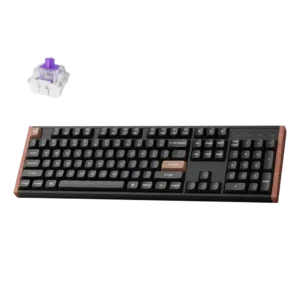
Choose Keychron K10 HE for ergonomics and noise level.
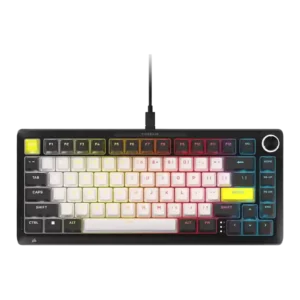
Choose Corsair Makr Pro 75 for legend visibility and layout options.
Why these recommendations?
Keychron K10 HE
Where It Has the Edge
ergonomics is 4.2 vs 3.1. Ergonomics were received positively through comfortable typing angle, adjustable height, and comfort-in-hand comments.
noise level is 4.4 vs 2.4. Noise level was received positively, with reviewers describing the keyboard as tighter, quieter, and smooth rather than loud.
value for money is 4.3 vs 3.1. Value for money was generally positive, with multiple reviewers calling the price fair, strong, or worth it, though...
Corsair Makr Pro 75
Where It Has the Edge
legend visibility is 4.6 vs 3.6. Legend visibility scored well, with reviewers praising readability, shine-through clarity, and double-shot durability.
layout options is 4.9 vs 4.4. The 75% layout itself was praised as well balanced, spacious for its footprint, and close to ideal for...
RGB lighting quality is 4.7 vs 4.2. RGB lighting quality was generally positive for tasteful, vivid, or flexible lighting, though a few reviewers found the...
Keychron K10 HE4.3 overall score
Corsair Makr Pro 754.1 overall score
Compare features
Scores are out of 5. Missing scores mean missing review evidence, not a missing feature.
Scored on both products
Comfort and build
Ergonomics
Keychron K10 HE
4.2
Ergonomics were received positively through comfortable typing angle, adjustable height, and comfort-in-hand comments.
Corsair Makr Pro 75
3.1
Ergonomic evidence was mixed, with some appreciation for adjustable feet but recurring criticism of stiffness, height, or wrist-angle strain.
Typing comfort
Keychron K10 HE
4.5
Typing comfort was praised for comfortable work use, a very good in-hand feel, and smooth typing comfort.
Corsair Makr Pro 75
4.0
Typing comfort was mixed: several reviewers found it comfortable for long sessions, while others found the stiff feel tiring or productivity-hampering.
Durability
Keychron K10 HE
4.5
Durability was positively judged where the aluminum frame and PBT keycaps were described as feeling durable.
Corsair Makr Pro 75
5.0
Durability evidence was positive, citing sturdy construction, long-lasting legends, and contactless switch design.
Size and form factor
Keychron K10 HE
4.2
Size and form factor were mostly positive for number-pad and full-layout usefulness, though one review also noted the large footprint.
Corsair Makr Pro 75
4.5
The 75% form factor was broadly praised as compact but practical, though the heavy chassis limited travel convenience.
Build quality
Keychron K10 HE
4.6
Build quality drew broad praise for weight, durable-feeling materials, substantial construction, and an excellent overall build.
Corsair Makr Pro 75
4.8
Reviewers overwhelmingly agreed the board feels premium, solid, and well built, with only value and DIY-positioning caveats tempering the praise.
Design aesthetics
Keychron K10 HE
4.7
Design aesthetics were widely praised for retro wood accents, refinement, rosewood styling, and a premium-looking full-size presentation.
Corsair Makr Pro 75
4.5
Most reviewers liked the clean, premium, bold look, though the white, black, and yellow color scheme was not universally loved.
Materials quality
Keychron K10 HE
4.7
Materials quality was praised for aluminum, PBT, real rosewood or wood accents, and metal framing.
Corsair Makr Pro 75
4.8
Material quality was widely praised, especially the aluminum construction and premium physical feel.
Battery and charging
Battery life
Keychron K10 HE
3.2
Battery life was mixed because one reviewer liked fast charging but said heavy RGB use required recharging every few days.
Corsair Makr Pro 75
3.8
Battery-life evidence was split: one review criticized the optional wireless module's reduced endurance, while another praised weeks between charges.
Other features
Desk space efficiency
Keychron K10 HE
2.0
Desk space efficiency was a weakness in the full-size design, with one reviewer saying the large layout is not ideal for small desks.
Corsair Makr Pro 75
4.7
The 75% footprint was repeatedly praised for freeing mouse space while keeping important keys accessible.
Volume control
Keychron K10 HE
2.5
Volume control was a drawback for one reviewer who expected to miss the hardware volume control from another keyboard.
Corsair Makr Pro 75
4.9
The rotary volume control was consistently praised as useful, tactile, clever, and easy to use.
Compatibility
Keychron K10 HE
4.5
Compatibility was praised in a broad multi-device context, with the reviewer saying the keyboard does it all at a reasonable price.
Corsair Makr Pro 75
2.7
Compatibility evidence leaned mixed, with concerns about Mac-first use and USB-A cabling despite broader platform support.
Connectivity
Keychron K10 HE
4.5
Connectivity was praised for easy switching between wireless modes and devices.
Corsair Makr Pro 75
3.1
Connectivity was a recurring tradeoff: optional wireless expanded flexibility, but many reviewers disliked paying extra or lacking wireless by default.
Stabilizer quality
Keychron K10 HE
4.6
Stabilizer quality was praised for quieter sound, improved large-key stability, and great stabilizer feel.
Corsair Makr Pro 75
3.4
Stabilizer evidence was sharply mixed, ranging from praised stable larger keys to strong complaints about rattle, thin lubing, and poor tuning.
Actuation consistency
Keychron K10 HE
4.8
Actuation consistency was praised through comments about outstanding consistency and magnetic switches that feel linear and stable.
Corsair Makr Pro 75
3.7
Actuation drew praise when calibrated or dialed in, but one reviewer reported out-of-box travel and calibration inconsistency.
Acoustics
Keychron K10 HE
4.6
Reviewers repeatedly liked the K10 HE’s sound, describing it as amazing, creamy, thocky, quieter, and nice.
Corsair Makr Pro 75
3.6
Most reviewers found the sound better than typical gaming keyboards, controlled, or even excellent, but several noted it lacked depth, sounded average, or felt over-dampened.
Extra gaming features
Keychron K10 HE
4.7
Extra gaming features were praised for movement precision, competitive advantage, and a fully loaded feature set.
Corsair Makr Pro 75
3.9
Hall Effect gaming extras such as Rapid Trigger, FlashTap, and SOCD were praised, but several reviewers complained about the missing easy Game Mode control.
Key spacing
Keychron K10 HE
4.0
Key spacing was positively noted because the full-size layout let the function row be spaced evenly.
Corsair Makr Pro 75
4.6
The compact layout was still considered usable, with enough arrow-key spacing and little sense of cramping.
Typing feel
Keychron K10 HE
4.5
Typing feel was broadly positive for smoothness, satisfying sound, and premium feel, with one caveat about reduced tactile satisfaction.
Corsair Makr Pro 75
3.9
Typing feel was polarized, ranging from joyful, smooth, and precise to stiff, disappointing, or overly rigid.
Layout options
Keychron K10 HE
4.4
Layout options were praised by users who needed a number pad and found the full-size layout useful for work tasks.
Corsair Makr Pro 75
4.9
The 75% layout itself was praised as well balanced, spacious for its footprint, and close to ideal for several reviewers.
Per-key lighting control
Keychron K10 HE
4.5
Per-key lighting control was praised where the reviewer specifically liked per-key RGB control.
Corsair Makr Pro 75
5.0
Per-key lighting control was viewed positively through detailed individual-key customization and programmable lighting.
RGB lighting quality
Keychron K10 HE
4.2
RGB lighting quality was mostly praised for attractive, subtle, or visible lighting, with one caveat that legends do not shine through.
Corsair Makr Pro 75
4.7
RGB lighting quality was generally positive for tasteful, vivid, or flexible lighting, though a few reviewers found the implementation unremarkable or uneven.
Switch options
Keychron K10 HE
2.0
Switch options were limited in one review because the compatible switches were described as proprietary and only available from Keychron.
Corsair Makr Pro 75
2.5
Switch-option evidence was limited and negative because standard MX tactile and clicky switches are not usable on the Hall Effect PCB.
Cable quality
Keychron K10 HE
4.0
Cable quality received a positive first impression for its angled USB connector.
Corsair Makr Pro 75
3.6
Cable impressions were mixed: the included cable felt durable and flexible, but one reviewer disliked needing USB-A-to-USB-C accessories.
Onboard memory
Keychron K10 HE
4.2
Onboard memory was praised because stored layouts made multi-platform use feel more intentional.
Corsair Makr Pro 75
4.5
One review praised retained settings through onboard profiles, giving the keyboard useful standalone configuration behavior.
Profile management
Keychron K10 HE
4.2
Profile management was praised through the ability to store two layouts onboard for multi-platform use.
Corsair Makr Pro 75
4.5
Profile management earned positive evidence from the keyboard retaining saved onboard profiles when disconnected.
Key responsiveness
Keychron K10 HE
5.0
Key responsiveness was one of the clearest strengths, with reviewers praising instant response, fast behavior, and very light registration.
Corsair Makr Pro 75
4.8
Responsiveness was one of the clearest strengths, with many reviewers describing immediate, precise, or faster inputs.
Switch feel
Keychron K10 HE
4.7
Switch feel was broadly praised as butter smooth, responsive, linear, and among the best reviewers had used, with one review noting a less tactile feel.
Corsair Makr Pro 75
4.5
Switch feel was generally praised for smooth, pre-lubed linear travel, although one reviewer found the switches only fine and loud.
Frame rigidity
Keychron K10 HE
4.8
Frame rigidity was praised in one review because the board did not twist much and felt very nice.
Corsair Makr Pro 75
5.0
The aluminum frame was repeatedly described as rigid, stable, and resistant to creaks or flex.
Portability
Keychron K10 HE
2.0
Portability was a drawback because the full-size board was described as heavier and less portable than the K8 HE.
Corsair Makr Pro 75
2.1
Portability was consistently weak because reviewers repeatedly emphasized the heavy near-1.3 kg body.
Keycap quality
Keychron K10 HE
4.1
Keycap quality was mostly positive for grippy, solid PBT caps and oil resistance, though one reviewer needed time to adjust to the rounded surface.
Corsair Makr Pro 75
4.0
Keycap impressions were mixed: several reviewers praised texture, durability, and premium feel, while others found them slick, hollow, or ordinary.
Key stability
Keychron K10 HE
4.5
Key stability was praised through clean, stable keypresses and a nicely weighted spacebar.
Corsair Makr Pro 75
4.4
Key stability was generally positive, with smooth, stable switches, non-wobbly keys, and useful gaming firmness.
Latency
Keychron K10 HE
4.9
Latency impressions were highly positive, with reviewers calling response time blazingly fast and the keyboard very responsive.
Corsair Makr Pro 75
4.9
Latency evidence was strongly positive, especially around immediate feel, low-latency operation, and wired-equivalent responsiveness.
Polling rate
Keychron K10 HE
4.5
Polling rate was tied to good responsiveness, with reviewers praising the 1000 Hz behavior for gaming and wireless-like-wired feel.
Corsair Makr Pro 75
4.5
8,000Hz polling was usually treated as fast and performance-oriented, though one reviewer said it made no practical difference in use.
Performance
Wireless performance
Keychron K10 HE
5.0
Wireless performance was praised as effectively wired-feeling, with reviewers saying wireless was indistinguishable from wired use.
Corsair Makr Pro 75
2.9
Wireless evidence was mixed: some reviews praised or described strong wireless behavior, but most criticized wireless as optional, costly, or absent by default.
Noise level
Keychron K10 HE
4.4
Noise level was received positively, with reviewers describing the keyboard as tighter, quieter, and smooth rather than loud.
Corsair Makr Pro 75
2.4
Noise-level evidence was mixed-to-negative: some appreciated the controlled sound, but others found it loud or less pleasant than competitors.
Legend visibility
Keychron K10 HE
3.6
Legend visibility was mixed: one reviewer found the text much more legible, while others wanted shine-through legends for dark use.
Corsair Makr Pro 75
4.6
Legend visibility scored well, with reviewers praising readability, shine-through clarity, and double-shot durability.
Sound dampening
Keychron K10 HE
4.8
Sound dampening was praised through thocky sound and acoustic foam comments that made typing more satisfying.
Corsair Makr Pro 75
4.0
Sound dampening was often praised for reducing hollow resonance and improving feel, but some reviewers felt the board was over-dampened or still compromised by stabilizers.
Gaming performance
Keychron K10 HE
4.8
Gaming performance was a major strength, with reviewers describing fluid accuracy, great results, competitive advantages, and excellent in-game feel.
Corsair Makr Pro 75
4.5
Gaming performance was usually praised as excellent or highly responsive, though one reviewer found the overall experience solid but unspectacular.
Backlight brightness
Keychron K10 HE
4.5
Backlight brightness was praised in one review because the RGB remained visible even under bright lighting.
Corsair Makr Pro 75
4.6
Brightness was judged strong enough for daylight visibility with readable legends.
Ownership and support
Value for money
Keychron K10 HE
4.3
Value for money was generally positive, with multiple reviewers calling the price fair, strong, or worth it, though one considered it somewhat excessive.
Corsair Makr Pro 75
3.1
Value was the most frequent concern: reviewers respected the build and feature set, but many said cheaper Hall Effect competitors were easier to justify.
Analog input support
Keychron K10 HE
4.5
Analog-style input support was viewed positively for racing, simulator control, gameplay realism, and broader input behavior than normal on/off switches.
Corsair Makr Pro 75
4.0
One review treated analog input as niche but genuinely useful for users who need proportional key-depth control.
Ease of switch replacement
Keychron K10 HE
4.8
Switch replacement was praised as seamless when using compatible magnetic switches.
Corsair Makr Pro 75
4.7
Switch replacement was generally judged easy, especially when reviewers described quick hot-swap access and simple replacement.
Rapid trigger support
Keychron K10 HE
4.8
Rapid trigger support was praised as useful for fast repeated inputs, gaming, and responsive competitive play.
Corsair Makr Pro 75
4.8
Rapid Trigger was repeatedly praised as useful, well implemented, or genuinely valuable for competitive movement.
Controls and connectivity
Media controls
Keychron K10 HE
4.0
Media controls received a positive feature mention through the function shortcuts used to control media.
Corsair Makr Pro 75
4.7
Media-control evidence was positive where reviewers praised the knob's broad functions and creative-control usefulness.
RGB customization
Keychron K10 HE
4.3
RGB customization was positively received for many options and a broad color selector, though rainbow-style effects were too much for one reviewer.
Corsair Makr Pro 75
4.7
RGB customization was praised for detailed control, per-key programmability, and broad aesthetic tuning.
Hot-swappable switches
Keychron K10 HE
4.8
Hot-swappable switch support was praised as seamless with compatible magnetic switches.
Corsair Makr Pro 75
4.4
Hot-swap evidence was positive where reviewers judged replacement easy, though one noted the capability is limited to compatible magnetic switches.
Customization options
Keychron K10 HE
4.7
Customization was one of the strongest themes, with reviewers praising personal actuation tuning, broad control, and key behavior flexibility.
Corsair Makr Pro 75
4.4
Customization was one of the strongest themes, with praise for upgrade modules, actuation tuning, lighting control, and broad software control, though modularity confused some reviewers.
Software quality
Keychron K10 HE
3.8
Software quality was split: reviewers liked clean, easy web configuration, but some wanted offline access and deeper macro tools.
Corsair Makr Pro 75
4.0
Software opinions were split: several reviewers praised Web Hub as polished, easy, or powerful, while others found iCUE/Web Hub frustrating, dense, sluggish, or limited.
Evidence available for one product
Ownership and support
Reliability
Keychron K10 HENo score yet
Corsair Makr Pro 75
4.2
Reliability was mostly positive after use, with praise for accurate inputs and no missed presses, but one reviewer had poor out-of-box ghost-key behavior.
Controls and connectivity
Macro customization
Keychron K10 HE
3.5
Macro customization was mixed, with one reviewer wanting better macro tools and another praising multi-input key behavior.
Corsair Makr Pro 75No score yet
Other features
Wrist rest quality
Keychron K10 HE
4.0
Wrist rest quality was positively received because the separate rest felt soft and pretty good.
Good if you want a premium 96% Hall Effect keyboard for work and gaming with excellent build, sound, and customization. Skip it if you need cheaper esports-first speed, 8,000Hz polling,...
Choose it if competitive gaming speed, Rapid Trigger, and deep per-key customization matter more than extras. Skip it if you need wireless, dedicated arrows/media keys, adjustable height, or a lower-cost...
Good if you want a premium, quiet TKL Hall Effect keyboard for typing and gaming. Skip it if price, portability, 8,000Hz polling, or broad switch choice matters most.
Good if you want a premium full-size Hall Effect keyboard with smooth switches, quiet sound, and deep customization. Skip it if you need a portable, budget-friendly board or broad switch...