Scorata scores summarize analyzed review evidence on a 1–5 scale; they are not laboratory measurements or a simple average of customer star ratings. Feature scores summarize the reviews covering that feature. The overall score averages feature scores within each review, then combines review averages. When both expert and customer evidence are available, those two groups receive equal weight. Products can have different review coverage, so small score gaps do not establish a winner.
Recommendations prioritize important features for the category, with a score of at least 3.5, a gap of at least 0.25 points and at least two supporting reviews per product. Features with widely varying scores or broad connectivity contexts are excluded from recommendations. These safeguards do not establish statistical significance.
Quick verdict
What each product is best for
The review evidence points to a tradeoff: noise level and compatibility versus reliability and rapid trigger support. Choose according to which strengths matter more to you; the overall score alone does not settle that choice.
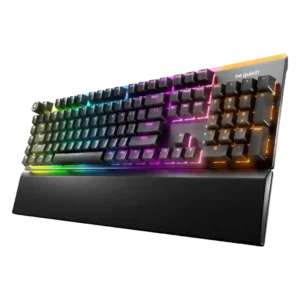
Choose be quiet! Light Mount for noise level and compatibility.
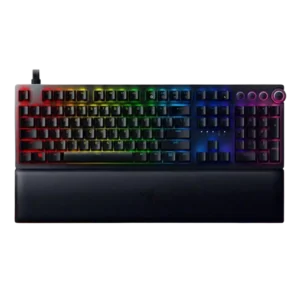
Choose Razer Huntsman V2 Analog for reliability and rapid trigger support.
Why these recommendations?
be quiet! Light Mount
Where It Has the Edge
noise level is 4.4 vs 2.8. Noise level is the product’s strongest theme, with reviewers finding it impressively quiet even when noting specific louder...
compatibility is 4.6 vs 3.1. Compatibility is a strength thanks to web-based IO Center access for Mac, Linux, Chromium browsers, and locked-down machines.
cable quality is 4.1 vs 2.7. Cable quality gets positive comments where discussed, mainly because the included USB cable is braided, thick, detachable, and...
Razer Huntsman V2 Analog
Where It Has the Edge
reliability is 3.9 vs 3.4. Reliability evidence was mixed: reviewers trusted the overall build and purpose, but one reported occasional unregistered keypresses.
rapid trigger support is 3.8 vs 1.3. Rapid trigger was seen as potentially useful but niche, adding functionality mainly for users who can benefit from...
extra gaming features is 4.2 vs 2.6. Extra gaming features were broadly strong when reviewers valued dual actuation, game mode, and advanced inputs, but they...
be quiet! Light Mount4.2 overall score
Razer Huntsman V2 Analog3.9 overall score
Compare features
Scores are out of 5. Missing scores mean missing review evidence, not a missing feature.
Scored on both products
Comfort and build
Ergonomics
be quiet! Light Mount
4.3
Ergonomics are mostly positive due to adjustable feet and a comfortable magnetic wrist rest, with one reviewer wanting a thicker rest.
Razer Huntsman V2 Analog
4.4
Ergonomics were generally helped by the plush wrist rest and support during long sessions, but one reviewer warned the tall keyboard makes the rest nearly necessary.
Typing comfort
be quiet! Light Mount
4.4
Typing comfort is strong thanks to quiet switches, cushioned feel, supportive rest, and low-fatigue long-session use.
Razer Huntsman V2 Analog
3.2
Typing comfort was mixed: some reviewers found long typing pleasant, while others complained about fatigue or tough regular typing.
Materials quality
be quiet! Light Mount
4.0
Materials are often called premium or high-quality, but some reviewers criticize the plastic underside at this price.
Razer Huntsman V2 Analog
4.7
Materials quality was praised for textured PBT keycaps and a tough aluminum frame, with reviewers connecting those materials to premium feel.
Build quality
be quiet! Light Mount
4.2
Build quality is generally viewed as solid and refined, with some criticism of the plastic base or less premium heft.
Razer Huntsman V2 Analog
4.6
Build quality was consistently strong, with reviewers describing the keyboard as sturdy, premium, well-built, and solid on the desk.
Size and form factor
be quiet! Light Mount
3.0
Size and form factor are mixed to negative: the full-size layout suits users who need every key but feels large and inflexible to others.
Razer Huntsman V2 Analog
3.4
Size and form factor were mixed, with reviewers valuing the full-size format but also describing the board as chunky, heavy, or space-consuming.
Design aesthetics
be quiet! Light Mount
4.0
Design opinions are mostly positive for its clean RGB-forward look, but some reviewers find the overall gaming-keyboard shape plain or dated.
Razer Huntsman V2 Analog
4.4
Design aesthetics were usually praised as sleek, classic, stylish, or visually striking, though a few reviewers found the look plain or typical for Razer.
Durability
be quiet! Light Mount
4.3
Durability evidence centers on PBT keycaps and legends that should resist wear, giving reviewers confidence in long-term keycap life.
Razer Huntsman V2 Analog
4.5
Durability evidence centered on sturdy construction and long-lasting materials, with reviewers expecting the keyboard and keycaps to hold up well.
Ownership and support
Reliability
be quiet! Light Mount
3.4
Reliability evidence is mixed, combining praise for wired dependability with isolated software/profile reliability issues.
Razer Huntsman V2 Analog
3.9
Reliability evidence was mixed: reviewers trusted the overall build and purpose, but one reported occasional unregistered keypresses.
Rapid trigger support
be quiet! Light Mount
1.3
Rapid trigger support is a clear weakness because multiple reviewers explicitly say it is absent.
Razer Huntsman V2 Analog
3.8
Rapid trigger was seen as potentially useful but niche, adding functionality mainly for users who can benefit from repeated fast presses.
Analog input support
be quiet! Light Mount
1.4
Reviewers who discuss analog input say the Light Mount lacks magnetic or optical analog response, making it weaker for cutting-edge gaming features.
Razer Huntsman V2 Analog
3.8
Analog input was the most divisive feature: reviewers praised it as game-changing or highly controllable in supported games, but several found support limited, hard to master, or not useful for most players.
Value for money
be quiet! Light Mount
3.7
Value for money is split: reviewers recognize the quality and quietness, but several see the price as high against wireless or gaming-feature competitors.
Razer Huntsman V2 Analog
3.2
Value for money was highly split: reviewers liked it on sale or for committed enthusiasts, but many called the launch price difficult to justify.
Other features
Latency
be quiet! Light Mount
4.3
Latency evidence is limited but positive, with reviewers reporting no noticeable delay or performance limitation.
Razer Huntsman V2 Analog
2.1
Latency evidence was limited and negative, with one reviewer calling the delay higher than expected at this price.
Extra gaming features
be quiet! Light Mount
2.6
Gaming extras are limited: reviewers like basic game mode and macro keys, but miss rapid trigger, adjustable actuation, SOCD, or deeper esports tools.
Razer Huntsman V2 Analog
4.2
Extra gaming features were broadly strong when reviewers valued dual actuation, game mode, and advanced inputs, but they remained niche or underused for some.
Polling rate
be quiet! Light Mount
3.5
Polling rate is considered adequate or standard at 1,000 Hz, supporting mainstream gaming but not a headline feature.
Razer Huntsman V2 Analog
2.0
Polling-rate evidence was limited to one reviewer who disliked that this model lacks the higher 8,000 Hz polling seen on some related Huntsman boards.
Compatibility
be quiet! Light Mount
4.6
Compatibility is a strength thanks to web-based IO Center access for Mac, Linux, Chromium browsers, and locked-down machines.
Razer Huntsman V2 Analog
3.1
Compatibility was a common caveat because analog or gamepad-style inputs depend on game support and sometimes conflict with normal keyboard or controller behavior.
Portability
be quiet! Light Mount
3.4
Portability is mixed: lighter weight and web configuration help movement, but the full-size footprint works against travel use.
Razer Huntsman V2 Analog
2.0
Portability scored poorly because the full-size, heavy wired board was considered unsuitable for travel.
Cable quality
be quiet! Light Mount
4.1
Cable quality gets positive comments where discussed, mainly because the included USB cable is braided, thick, detachable, and practical.
Razer Huntsman V2 Analog
2.7
Cable quality was a consistent complaint due to non-detachable dual cables, awkward routing, tangles, and bulk despite some praise for braiding.
Switch options
be quiet! Light Mount
4.1
Switch options are viewed positively because linear and tactile choices cover preferences, though options remain narrower than enthusiast boards.
Razer Huntsman V2 Analog
2.9
Switch variety drew criticism because the analog implementation effectively means linear switches, with reviewers wishing for tactile feedback or finding that limitation disappointing.
Acoustics
be quiet! Light Mount
4.6
Reviewers consistently describe the keyboard as quiet, muted, or acoustically refined, with only a few noting it is not completely silent.
Razer Huntsman V2 Analog
3.6
Acoustics were mixed: some enjoyed the sound profile, thocky bottom-out, or satisfying clicks, while others objected to ping or sheer volume.
Onboard memory
be quiet! Light Mount
4.3
Onboard memory is useful for saved lighting/profile behavior and reducing reliance on always-running software.
Razer Huntsman V2 Analog
3.2
Onboard memory was appreciated in principle, but reviewers noted limitations such as lighting not being stored or profiles not assigning automatically.
Layout options
be quiet! Light Mount
3.3
Layout options are mixed: ISO/ANSI availability helps, but the lack of TKL or smaller layouts limits choice.
Razer Huntsman V2 Analog
4.2
Layout evidence was limited but positive where the standard keycap/bottom-row arrangement made customization easier.
Frame rigidity
be quiet! Light Mount
3.9
Frame rigidity is generally solid, especially where reviewers note stiffness or aluminum support, though one review says it lacks premium heft.
Razer Huntsman V2 Analog
4.7
Frame rigidity was praised for heft, sturdiness, and resistance to sliding during use.
Stabilizer quality
be quiet! Light Mount
4.6
Stabilizer quality is a standout strength, with repeated praise for lubed, quiet, stable, rattle-free larger keys.
Razer Huntsman V2 Analog
4.0
Stabilizer quality had limited but positive evidence, with one reviewer judging the stock stabilizers as good overall.
Switch feel
be quiet! Light Mount
4.4
Switch feel is praised as smooth, cushioned, satisfying, and quiet, without the mushiness some users might fear.
Razer Huntsman V2 Analog
3.8
Reviewers split on the analog linear switches: several liked their smoothness, speed, resistance, or sound, while others found them stiff, heavy, or less refined than preferred alternatives.
Connectivity
be quiet! Light Mount
3.1
Connectivity is mixed because reviewers appreciate the reliable wired connection but repeatedly note the absence of wireless.
Razer Huntsman V2 Analog
3.6
Connectivity was mixed: USB-C and passthrough support were appreciated, but port requirements, cable behavior, and inconsistent setup frustrated some reviewers.
Profile management
be quiet! Light Mount
3.8
Profile management is mostly positive where IO Center profiles are discussed, but one reviewer reports confusion between hardware and software profiles.
Razer Huntsman V2 Analog
3.3
Profile management was useful but imperfect, with onboard/profile support praised while RGB memory limits and lack of grouping drew complaints.
Wrist rest quality
be quiet! Light Mount
4.3
The wrist rest is generally praised as comfortable, supportive, magnetic, and well positioned, with one reviewer finding it too thin.
Razer Huntsman V2 Analog
4.7
Wrist rest quality was one of the strongest areas, repeatedly praised as plush, comfortable, improved, and premium-feeling.
Volume control
be quiet! Light Mount
4.0
Volume control is praised for being accessible, satisfying, and easy to use through the knob/dial.
Razer Huntsman V2 Analog
3.6
Volume control was praised by some for feel and convenience, while others disliked wobble, defaults, or the experience relative to the price.
Per-key lighting control
be quiet! Light Mount
4.3
Per-key lighting control is praised for vivid individual-key control, custom zones, and layered effects.
Razer Huntsman V2 Analog
4.8
Per-key lighting control was praised when available, especially by reviewers who called per-key customization sublime or easy to configure.
Typing feel
be quiet! Light Mount
4.4
Typing feel is consistently praised as satisfying, smooth, quiet, and premium, though some reviewers note it is a different feel from clickier boards.
Razer Huntsman V2 Analog
4.1
Typing feel ranged from excellent and pleasant to loud or stiff, with most praise focused on smooth key feel and most criticism tied to noise and switch weight.
Key responsiveness
be quiet! Light Mount
4.3
Key responsiveness is viewed as fast and precise enough for normal gaming and typing, even without advanced analog features.
Razer Huntsman V2 Analog
4.1
Responsiveness was often praised in games and rapid actions, though a few reviewers reported missed or insufficiently registered presses when actuation settings or typing style did not line up.
RGB lighting quality
be quiet! Light Mount
4.4
RGB lighting quality is a major strength, praised as vibrant, crisp, bright, even, and visually striking.
Razer Huntsman V2 Analog
4.5
RGB lighting quality was widely praised for accuracy, glow, brightness, and visual impact, though one reviewer felt Razer’s own PBT keycap design held it back.
Keycap quality
be quiet! Light Mount
4.2
Keycap quality is praised for PBT double-shot construction, texture, shine-through clarity, and lack of visible imperfections.
Razer Huntsman V2 Analog
4.3
Keycap quality was usually praised for PBT texture, durability, grip, and feel, but some reviewers thought the legends and brightness were only average.
Desk space efficiency
be quiet! Light Mount
2.5
Desk space efficiency is a weakness because the Light Mount is a full-size board with extra keys and can feel large on a desk.
Razer Huntsman V2 Analog
2.6
Desk space efficiency was weak because reviewers noted the full-size keyboard and wrist rest take considerable desk space.
Actuation consistency
be quiet! Light Mount
4.0
The available evidence says actuation is consistent enough for fast-paced games, but this attribute is not discussed broadly.
Razer Huntsman V2 Analog
4.0
Adjustable actuation generally worked well and could be tuned effectively, but one reviewer reported occasional missed keypresses and others tied consistency to setup.
Performance
Sound dampening
be quiet! Light Mount
4.6
Sound dampening is strongly praised, especially the multilayer foam/silicone approach that reduces echo, reverb, and harsh keystroke noise.
Razer Huntsman V2 Analog
2.4
Sound dampening drew one clear negative assessment: a reviewer said the keyboard did not dampen sound much.
Noise level
be quiet! Light Mount
4.4
Noise level is the product’s strongest theme, with reviewers finding it impressively quiet even when noting specific louder buttons or comparisons.
Razer Huntsman V2 Analog
2.8
Noise level was one of the clearest tradeoffs, with many reviewers calling the keyboard loud, though one found it quiet and another called the switches not the quietest but acceptable.
Legend visibility
be quiet! Light Mount
3.7
Legend visibility is mixed because shine-through clarity is praised, while some icons, lock indicators, or large side-key legends draw criticism.
Razer Huntsman V2 Analog
2.5
Legend visibility was a recurring weak point, with multiple reviewers noting hard-to-read symbols or longer legends that were not cleanly illuminated.
Gaming performance
be quiet! Light Mount
4.1
Gaming performance is good for mainstream play, but several reviewers distinguish it from esports-focused or analog-switch boards.
Razer Huntsman V2 Analog
4.5
Gaming performance was broadly strong, especially when actuation tuning or analog features fit the game, although not every reviewer found the flagship features essential.
Backlight brightness
be quiet! Light Mount
4.2
Backlighting is usually praised as bright and vivid, though some reviewers find the top bar jarring or the underside lighting too dim.
Razer Huntsman V2 Analog
3.7
Backlight brightness was mixed: some found the lighting bright, colorful, or sharp, while others found legends dimmer than expected.
Controls and connectivity
Software quality
be quiet! Light Mount
4.3
Software quality is generally praised as simple, polished, responsive, and web-accessible, with one notable complaint about underdevelopment.
Razer Huntsman V2 Analog
3.5
Software quality was mixed: Synapse enabled powerful customization and was sometimes easy, but reviewers also called setup complicated, frustrating, messy, or unintuitive.
RGB customization
be quiet! Light Mount
4.3
RGB customization is broadly praised for layers, colors, Dynamic Lighting support, and broad software control, with some preset-selection complaints.
Razer Huntsman V2 Analog
4.7
RGB customization received strong praise through Synapse and Chroma, especially for color control, profiles, and Razer’s broader lighting ecosystem.
Macro customization
be quiet! Light Mount
4.2
Macro customization is a clear strength, with reviewers praising remapping, recording macros, programmable M keys, and FN-layer possibilities.
Razer Huntsman V2 Analog
4.1
Macro customization and dual-step actions were valued for one-key multi-action setups, though some reviewers found setup or mastery less intuitive.
Customization options
be quiet! Light Mount
4.4
Customization is praised across lighting, remapping, macros, layers, profiles, and web/software controls.
Razer Huntsman V2 Analog
4.5
Customization options were a major strength, with reviewers repeatedly citing deep per-key actuation, lighting, remapping, and input flexibility.
Media controls
be quiet! Light Mount
4.0
Media controls are mostly praised for easy access and satisfying operation, though one review finds the knob somewhat wobbly.
Razer Huntsman V2 Analog
4.0
Media controls were generally liked for convenience and feel, but some reviewers criticized dark symbols or awkward-looking controls.
Evidence available for one product
Ownership and support
Ease of switch replacement
be quiet! Light Mount
4.7
Switch replacement is praised as easy and flexible thanks to included tools and 5-pin hot-swappable compatibility.
Razer Huntsman V2 AnalogNo score yet
Controls and connectivity
Hot-swappable switches
be quiet! Light Mount
4.6
Hot-swappable switch support is praised when reviewers connect it to easy customization and 5-pin switch flexibility.
Razer Huntsman V2 AnalogNo score yet
Other features
Key spacing
be quiet! Light MountNo score yet
Razer Huntsman V2 Analog
4.4
Key spacing had limited positive evidence, with one reviewer saying the well-spaced layout helped long gaming sessions.
Key stability
be quiet! Light Mount
4.5
Key stability is a strength, with reviewers praising stable large keys, minimal rattle, and strong stabilizer behavior.
Razer Huntsman V2 AnalogNo score yet
Passthrough features
be quiet! Light MountNo score yet
Razer Huntsman V2 Analog
4.3
Passthrough features were mostly praised, especially the USB 3.0 port, though one reviewer felt the extra port burden reduced its practical freedom.
Good if you want a premium 96% Hall Effect keyboard for work and gaming with excellent build, sound, and customization. Skip it if you need cheaper esports-first speed, 8,000Hz polling,...
Choose it if competitive gaming speed, Rapid Trigger, and deep per-key customization matter more than extras. Skip it if you need wireless, dedicated arrows/media keys, adjustable height, or a lower-cost...
Good if you want a premium, quiet TKL Hall Effect keyboard for typing and gaming. Skip it if price, portability, 8,000Hz polling, or broad switch choice matters most.
Good if you want a premium full-size Hall Effect keyboard with smooth switches, quiet sound, and deep customization. Skip it if you need a portable, budget-friendly board or broad switch...