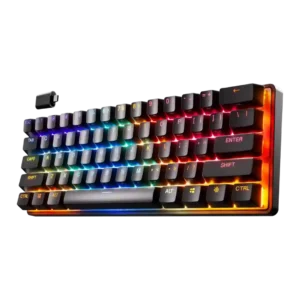
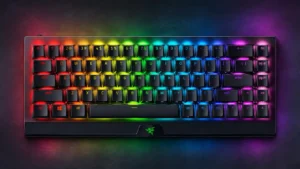
SteelSeries Apex Pro Mini
Where It Has the Edge
- profile management is 4.0 vs 1.0. Profile management was useful but not seamless, with praise for onboard/game/device profiles and a caveat that Bluetooth profile...

Scorata scores summarize analyzed review evidence on a 1–5 scale; they are not laboratory measurements or a simple average of customer star ratings. Feature scores summarize the reviews covering that feature. The overall score averages feature scores within each review, then combines review averages. When both expert and customer evidence are available, those two groups receive equal weight. Products can have different review coverage, so small score gaps do not establish a winner.
Recommendations prioritize important features for the category, with a score of at least 3.5, a gap of at least 0.25 points and at least two supporting reviews per product. Features with widely varying scores or broad connectivity contexts are excluded from recommendations. These safeguards do not establish statistical significance.
Quick verdict
The review evidence points to a tradeoff: profile management versus design aesthetics and desk space efficiency. Choose according to which strengths matter more to you; the overall score alone does not settle that choice.
Choose SteelSeries Apex Pro Mini for profile management.
Choose Razer BlackWidow V4 Mini HyperSpeed for design aesthetics and desk space efficiency.
Scores are out of 5. Missing scores mean missing review evidence, not a missing feature.
Ergonomics were mixed: the compact shape fit one reviewer very comfortably, but several reviews disliked stability when feet were deployed or noted sliding.
The smaller footprint allows more flexible positioning and can reduce arm fatigue during gaming.
Durability evidence was positive, with reviewers citing the 100-million keypress claim favorably and praising tough PBT caps with less worry about wear.
A long-term owner reports no wear after a year, but many others describe cracked caps, failing switches or ports within weeks or months.
Design aesthetics were mixed: some liked the simple, compact, sleek look, while others found the case generic, plastic-feeling, or not premium enough for the price.
The blacked-out appearance and glowing keycap edges earn frequent praise, especially in the dark.
The 60-percent size was praised for compactness, travel, and gaming, but several reviewers found it too small or disruptive for productivity and typing.
The 65% footprint keeps arrow keys while taking up much less space than larger boards. Some users find the keys and secondary functions too cramped for everyday use.
Build quality ranged from strong praise for sturdiness and rigidity to criticism of plastic feel, slight flex, squeaking, and value mismatch at the price.
The chassis often feels sturdy and premium, but fragile keycaps and early defects lead other owners to question the overall construction.
Typing comfort was polarized: some reviewers found long sessions or on-the-go writing comfortable, while others reported typos or discomfort from the tiny layout.
Tactile feedback generally makes typing enjoyable, but cramped keys can be uncomfortable for those accustomed to larger boards.
Materials quality was mixed because reviewers appreciated solid construction but repeatedly pointed out the plastic case, with one calling it disappointing for the price.
Some owners praise the premium feel, while others criticize the contrast between the heavy metal body and fragile plastic keys.
Battery life was a mild concern rather than a strength: reviewers accepted the rated life but criticized regular charging, aggressive sleep behavior, and wake delay.
Runtime varies sharply with lighting and usage: some owners get several days or longer, while others need to charge daily or report fewer than ten hours.
Reliability was mixed: one reviewer reported no failures in daily use, while others mentioned an early Bluetooth issue or wake-from-sleep delay.
Experience is inconsistent: some owners report no issues, while others encounter failed keys, lighting problems, unstable pairing and repeated replacements.
Ease of switch replacement scored poorly because the non-hot-swappable design forces caution and limits switch-level changes.
Some users find switch changes simple, but an expert could not pull the original switches out without fearing damage.
Value for money was the most repeated criticism, with many reviewers saying the keyboard is expensive or hard to justify unless the user will exploit its specialized features.
The compact layout, hot-swap switches and wireless flexibility can justify the price, especially on sale. Defects, battery limitations and lower-priced alternatives make value contentious.
Hot-swappable switch evidence was negative because one review criticized that the switches are not hot-swappable, limiting sound-profile changes and modifications.
Hot-swappable sockets are a major improvement, allowing owners to experiment with switches instead of replacing the entire keyboard.
Media controls were mixed: one reviewer found secondary media toggles clunky in the 60-percent layout, while another successfully mapped play/pause behavior.
Media shortcuts require extra key presses rather than dedicated controls, which can be inconvenient.
Software quality was powerful but imperfect: reviewers praised expansive tuning and intuitive customization, while also noting learning curves, confusing firmware updates, bugs, and complexity.
Synapse offers extensive control and some users find it improved, but others report confusing settings, unpredictable lighting and serious PC instability.
Customization options were a core strength, repeatedly praised for remapping, actuation tuning, dual actions, profiles, and deep per-key control.
Switch swapping, lighting effects and configurable settings provide plenty of room to personalize the keyboard.
RGB customization was generally liked for per-key and preset control, but one review found SteelSeries GG's illumination section broken during testing.
Per-key effects and adjustable illumination are appealing, though layered colors and saved settings can be difficult or unreliable.
Volume control had limited but positive evidence from one review that called the printed shortcut/volume-control setup really nice.
Volume adjustment through the function layer is less convenient than a dedicated control.
Profile management was useful but not seamless, with praise for onboard/game/device profiles and a caveat that Bluetooth profile swapping takes time to learn.
Some owners report profiles changing unexpectedly or reverting to default colors.
Compatibility evidence was positive, with reviewers citing useful profiles or successful operation across phones, tablets, PlayStation, and mobile devices.
Backward compatibility with older Synapse devices is appreciated, but PS5 owners report that the keyboard does not work with their console.
Adjustable actuation was widely praised for meaningful tuning from hair-trigger to firmer presses, though a few reviewers noted accidental double-typing or that very low settings need care.
Precision improves over the older model for some gamers, but double presses and keys failing to register remain serious complaints.
Keycap quality was consistently praised, especially the double-shot PBT caps, solid feel, texture, durability, and upgrade over older glossy ABS caps.
Phantom Pudding caps look attractive and enhance RGB, but cracking, splitting and caps falling off are repeated concerns. One comparison also favors a competitor’s stock keycaps.
Extra gaming features split reviewers: dual actions and game-specific tuning were praised by enthusiasts but criticized by others as hard to master or not clearly beneficial.
Snap Tap input priority can help with rapid changes of direction in competitive games.
Per-key lighting control drew one strong praise for being fantastic and one criticism because the software section handling illumination was broken.
Individual key lighting is an appealing way to personalize the compact board.
Responsiveness was one of the strongest areas: reviewers repeatedly described fast actuation, fewer missed strokes, quicker reactions, and very fast in-game feel, with only sensitivity-related caveats at low actuation.
Working switches respond quickly and precisely, especially during gaming. Several owners report missed inputs or repeated keystrokes.
Key spacing was a negative adjustment point in the two scored reviews, where the keyboard felt unusually small or the keys felt too close.
Some buyers find the keys uncomfortably crowded, particularly when moving from larger keyboards.
Connectivity was praised in wireless reviews for Bluetooth, 2.4GHz, wired options, and quick dongle performance, with multi-device use seen as useful.
USB, Bluetooth and a 2.4 GHz dongle give owners flexible connection options, but some experience failures in one or more modes.
Layout options were the clearest usability tradeoff: some reviewers loved the intuitive secondary bindings, but others struggled with missing arrow, function, and navigation keys.
Dedicated arrow keys and familiar main keys make the 65% layout practical, but number-pad and function-row shortcuts can frustrate full-size keyboard users.
Desk space efficiency was consistently positive, with reviewers praising the compact layout for reclaiming desk space and enabling larger mouse movements.
The small footprint frees room for mouse swings and separate keypads, particularly on tight gaming desks.
Most reviewers liked the smooth linear OmniPoint feel, with repeated praise for speed and smoothness; one typing-focused review found the linear feel a little spongy and another noted only a basic smooth feel.
Orange tactile switches often earn praise for satisfying feedback and quiet feel. Sticky keys, double presses and inconsistent operation spoil that experience for some owners.
Portability was generally positive for the small body and travel use, though one reviewer wanted better travel packaging and dongle storage.
The small footprint makes the board easy to carry, although its weight may be noticeable for some users.
Acoustics were subjective but often liked, with praise for thock, clocky sound, and satisfying clickety-clack; IGN was the clearest negative outlier on switch/stabilizer rattle.
Many enjoy the satisfying tactile clicks and subdued Orange-switch acoustics; others find the keyboard clickier than expected.
Latency impressions were very positive in gaming-focused reviews, where the board was described as lightning fast, hair-trigger, and immediately in sync with movement.
HyperSpeed is praised for quick response and barely perceptible delay. Bluetooth may introduce slight lag.
RGB lighting quality was broadly positive, with reviewers praising brightness, smooth color cycling, bold colors, vibrant lighting, and clean shine-through.
Many buyers love the vivid lighting and translucent keycap edges, although one owner found colors washed out even at maximum brightness.
Typing feel was generally good to excellent once adjusted, with several reviewers praising the typing experience, though one review only liked it and did not love it due to linear switches and layout.
The tactile feel and sound are commonly praised, including after long use, though sticky keys and cramped spacing can frustrate some typists.
Frame rigidity was usually praised: reviewers noted little or no flex during normal use, an inflexible body, and a stable aluminum-backed construction.
The frame feels solid with little noticeable flex, even during intense typing; keycap failures can occur despite that sturdy feel.
Sound dampening was mixed: one reviewer heard rattle, while others reported minimal case ping or little high-pitched ringing.
Internal dampening softens hard bottom-outs and makes daily typing less intrusive.
Wireless performance was consistently strong, with reviewers reporting solid connections, no hiccups, no noticeable lag, and rock-solid performance.
HyperSpeed can feel as quick as wired input, and many users enjoy reliable wireless play. Others report disconnects, interference or failed Bluetooth pairing.
Legend visibility was mixed: shine-through legends and front legends helped some reviewers, while others found secondary functions hard to read or hidden by lighting, shadows, or the layout.
The stealthy unlit look is distinctive, but hidden legends become frustrating when lighting goes out, and replacement caps may not match the original functions.
Noise level was a caveat for typing, with reviews describing loud clacking or a louder-side sound even when the reviewer liked the acoustic profile.
Orange switches are often described as quiet enough for shared settings, but not everyone agrees that the board is quiet.
Backlight brightness was mostly praised for visibility and brightness, though one gaming-focused review noted the RGB was not the brightest.
Several owners praise the bright backlighting, but a dissenting owner finds the colors unimpressive at maximum brightness.
Gaming performance received the strongest consensus: reviewers repeatedly called it seamless, phenomenal, snappy, responsive, or even their best dedicated gaming keyboard experience.
Responsive inputs and a compact footprint make gaming enjoyable when the keyboard works correctly. Reliability issues can interrupt that experience.
Initial setup and ordinary layout can be straightforward, but advanced RGB configuration can be unnecessarily difficult.
Pairing a compatible Razer mouse to the same receiver can save a port, but some find the pairing unreliable or struggle to find matching replacement keycaps.
Cable quality was positive overall, with reviewers describing the detachable USB-C cable as nice, braided, heavy duty, premium, or durable, though not exceptional.
Some units arrive in excellent condition, but other buyers report missing keys or apparent signs of previous use.
PS5 compatibility is a clear complaint, including an unsuccessful attempt to update the keyboard before connecting.
Some owners like the placement and illuminated function shortcuts, but others dislike having to hold Fn for everyday controls.
The supplied switch and keycap puller and stickers are welcomed as useful extras.
One owner describes the tiny, low-contrast printed instructions as nearly impossible to read.
One review praised key stability, saying the keycaps felt nice with little to no wiggle on the switches.
Onboard memory was mixed: one review praised up to five onboard profiles, while another criticized the inability to save lighting profiles to onboard memory.
Many owners love the compact design, tactile keys and lighting, but others report early failures severe enough to return the keyboard. Overall satisfaction depends heavily on whether the unit works reliably.
RGB lighting is a major drain on the battery, substantially reducing runtime compared with dimmer or disabled lighting.
Replaceable switches help extend the board’s life, but finding matching replacement keycaps can be difficult.
Stabilizer quality was mixed-to-positive: several reviewers liked the sound and feel, while others heard rattle or wanted more lube.
One owner reports that the keyboard stops responding after inactivity and requires a PC restart to recover.
The broad selection of compatible switches is useful for exploring different feels, though one buyer wanted a linear stock option.
Some appreciate the substantial weight for keeping the board in place, while others prefer its manageable size or find it too heavy.
The wrist-rest evidence was negative because one reviewer specifically criticized the lack of an included wrist rest or extra accessories.
Analog-like and dual-actuation features split reviewers: some liked walk/run-style control and dual bindings, while others found the behavior unintuitive, questionable in games, or difficult to train.
Lighting can turn off unexpectedly or fail entirely, sometimes on replacement units too. Hidden legends make such failures particularly disruptive.
Some owners report that support declined warranty coverage or offered a costly return process.
One owner reports the USB port stopped functioning after seven months.
The advertised warranty is reassuring on paper, but several owners describe denied claims or unresolved defects.
Charging in roughly five hours is presented as convenient by the favorable reviews.
One owner reports that several keycaps broke during the first cleaning attempt with a wet wipe and rubbing alcohol.
Flexible placement makes it easier to rest an arm comfortably on the desk.
Macro customization was strong, with reviewers noting macro assignment, extensive key binding control, and the ability to program macros deeply through SteelSeries GG.
Switching between devices or sharing one receiver with a mouse can be convenient. Shared-dongle reliability is inconsistent across owners.
One owner reports recurring freezes and shutdowns after installing Synapse, even after a fresh Windows installation.
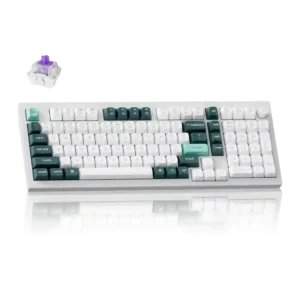
Good if you want a premium 96% Hall Effect keyboard for work and gaming with excellent build, sound, and customization. Skip it if you need cheaper esports-first speed, 8,000Hz polling,...
Pros: size and form factor, typing feel
Cons: switch options, portability
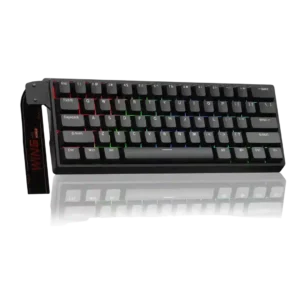
Choose it if competitive gaming speed, Rapid Trigger, and deep per-key customization matter more than extras. Skip it if you need wireless, dedicated arrows/media keys, adjustable height, or a lower-cost...
Pros: overall satisfaction, customization options
Cons: value for money, switch options
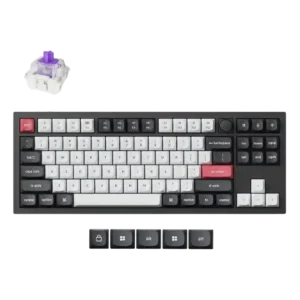
Good if you want a premium, quiet TKL Hall Effect keyboard for typing and gaming. Skip it if price, portability, 8,000Hz polling, or broad switch choice matters most.
Pros: build quality, switch feel
Cons: switch options
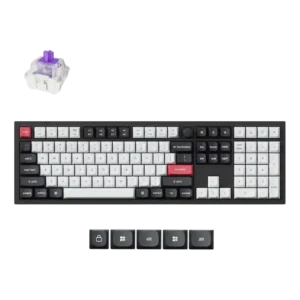
Good if you want a premium full-size Hall Effect keyboard with smooth switches, quiet sound, and deep customization. Skip it if you need a portable, budget-friendly board or broad switch...
Pros: build quality, keycap quality
Cons: switch options, portability