Scorata scores summarize analyzed review evidence on a 1–5 scale; they are not laboratory measurements or a simple average of customer star ratings. Feature scores summarize the reviews covering that feature. The overall score averages feature scores within each review, then combines review averages. When both expert and customer evidence are available, those two groups receive equal weight. Products can have different review coverage, so small score gaps do not establish a winner.
Recommendations prioritize important features for the category, with a score of at least 3.5, a gap of at least 0.25 points and at least two supporting reviews per product. Features with widely varying scores or broad connectivity contexts are excluded from recommendations. These safeguards do not establish statistical significance.
Quick verdict
What each product is best for
The review evidence points to a tradeoff: size and form factor and portability versus wrist rest quality and volume control. Choose according to which strengths matter more to you; the overall score alone does not settle that choice.
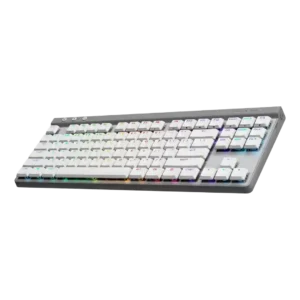
Choose Logitech G515 Lightspeed for size and form factor and portability.
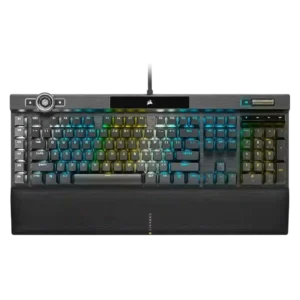
Choose Corsair K100 RGB for wrist rest quality and volume control.
Why these recommendations?
Logitech G515 Lightspeed
Where It Has the Edge
size and form factor is 4.5 vs 2.3. The slim low-profile TKL form factor was consistently liked for balancing compactness, desk fit, and a familiar key...
portability is 4.2 vs 2.1. Portability was helped by the slim TKL size, dongle storage, and light-enough weight, though the lack of a...
desk space efficiency is 4.3 vs 2.5. The TKL layout was treated as a useful space saver for mouse movement and cleaner desks, especially for...
Corsair K100 RGB
Where It Has the Edge
wrist rest quality is 4.6 vs 2.2. The wrist rest is broadly praised as comfortable, cushioned, magnetic, and much improved over earlier Corsair rests, with...
volume control is 4.5 vs 2.4. The volume wheel is a highlight, repeatedly praised for smoothness, premium feel, strong resistance, and better feel than...
media controls is 4.0 vs 2.5. Media controls are mostly praised for dedicated keys, a metal scroll wheel, and usable feedback, although some buttons...
Logitech G515 Lightspeed4.1 overall score
Corsair K100 RGB4.1 overall score
Compare features
Scores are out of 5. Missing scores mean missing review evidence, not a missing feature.
Scored on both products
Comfort and build
Ergonomics
Logitech G515 Lightspeed
4.4
Most ergonomic comments were positive, citing the low profile, usable tilt options, and comfortable angles for typing without a wrist rest.
Corsair K100 RGB
4.2
Ergonomics are generally good due to comfort and wrist support, though some reviewers want a better wrist angle or note the large full-size layout.
Size and form factor
Logitech G515 Lightspeed
4.5
The slim low-profile TKL form factor was consistently liked for balancing compactness, desk fit, and a familiar key layout.
Corsair K100 RGB
2.3
Size and form factor are a limitation for reviewers who describe the K100 as large, full-size, and demanding of desk space.
Typing comfort
Logitech G515 Lightspeed
4.6
Typing comfort was a major strength, with reviewers adapting quickly and reporting comfortable, accurate, or error-free work sessions.
Corsair K100 RGB
3.3
Typing comfort is mixed: some find the K100 comfortable after adjustment, while others call the sensitive switches unforgiving or not for all typists.
Materials quality
Logitech G515 Lightspeed
4.1
Materials quality was generally seen as good for the price, especially the plastic and PBT keycaps, though not as premium as metal-bodied models.
Corsair K100 RGB
4.7
Materials quality is praised for aluminum, premium feel, strong construction, and top-quality components.
Build quality
Logitech G515 Lightspeed
4.3
Build quality was usually praised as sturdy and substantial despite the plastic chassis, with a smaller set of reviews noticing cost-cutting or QC drawbacks.
Corsair K100 RGB
4.4
Build quality is usually described as premium, sturdy, solid, or excellent, but one Tom's Hardware sample left concerns because of magnet and key issues.
Design aesthetics
Logitech G515 Lightspeed
4.5
The design was widely praised as slim, clean, mature, and desk-friendly, with only a few reviewers calling the plastic look more generic.
Corsair K100 RGB
4.6
Design aesthetics are widely praised as premium, sleek, gorgeous, luxurious, or visually impressive, with the RGB-heavy look occasionally framed as busy.
Durability
Logitech G515 Lightspeed
4.7
Durability evidence was positive, focused on confidence in the construction and long-wearing PBT keycaps or replaceable-battery longevity.
Corsair K100 RGB
4.7
Durability evidence focuses mainly on PBT keycaps and materials that reviewers say resist wear or hold up better over time.
Ownership and support
Reliability
Logitech G515 Lightspeed
4.1
Reliability was mostly positive for actual use, especially wireless stability and gaming dependability, but one review raised a double-pressing concern.
Corsair K100 RGB
3.8
Reliability is mixed: optical switches are praised for avoiding chatter and missed inputs, but one reviewer experienced keyboard freezing and shutoff.
Value for money
Logitech G515 Lightspeed
4.3
Value was generally positive because reviewers saw it as cheaper than premium Logitech alternatives while preserving most everyday strengths.
Corsair K100 RGB
3.3
Value for money is highly conditional: reviewers like the premium feature set but repeatedly warn that the high price only makes sense if the extras are used.
Other features
Wrist rest quality
Logitech G515 Lightspeed
2.2
Wrist-rest evidence was negative because several reviewers noted the G515 does not include one, even if the low profile softened the impact.
Corsair K100 RGB
4.6
The wrist rest is broadly praised as comfortable, cushioned, magnetic, and much improved over earlier Corsair rests, with only minor firmness or branding complaints.
Volume control
Logitech G515 Lightspeed
2.4
Volume control was a frequent complaint because many reviewers wanted a dial or wheel instead of function-layer shortcuts.
Corsair K100 RGB
4.5
The volume wheel is a highlight, repeatedly praised for smoothness, premium feel, strong resistance, and better feel than some competitors.
Portability
Logitech G515 Lightspeed
4.2
Portability was helped by the slim TKL size, dongle storage, and light-enough weight, though the lack of a carry case limited one reviewer's enthusiasm.
Corsair K100 RGB
2.1
Portability is poor because reviewers emphasize the K100's size, weight, full-size layout, and non-detachable cable as desk-bound traits.
Passthrough features
Logitech G515 Lightspeed
2.2
USB passthrough was only discussed as an absence, and that absence was framed as a potential weakness.
Corsair K100 RGB
4.0
Passthrough features are generally appreciated as a useful luxury or handy extra, though cable routing is not universally ideal.
Desk space efficiency
Logitech G515 Lightspeed
4.3
The TKL layout was treated as a useful space saver for mouse movement and cleaner desks, especially for users who do not need a numpad.
Corsair K100 RGB
2.5
Desk space efficiency is weak because multiple reviewers mention a massive footprint or the need to sacrifice room for the keyboard and wrist rest.
Key stability
Logitech G515 Lightspeed
3.5
Key stability was mixed: some reviews found wobble minimal or improved, while others complained about loose keycaps or rattle.
Corsair K100 RGB
5.0
Key stability receives strong praise from reviewers who note almost no tilt, no rattle, and no flex or wobble in the keys.
Cable quality
Logitech G515 Lightspeed
4.2
The included USB-C cable was described as generous, flexible, and reasonably protected, with no major complaints about charging or wired use.
Corsair K100 RGB
3.0
Cable quality is mixed: reviewers call the cable sturdy, thick, and braided, but fixed and non-detachable design hurts convenience.
Switch options
Logitech G515 Lightspeed
3.1
Switch options were limited in one review's view because the G515 lacks a clicky option and offers only tactile or linear.
Corsair K100 RGB
2.0
Switch choice is viewed as limited because reviewers mention OPX and Cherry MX Speed variants, while one reviewer explicitly disliked the lack of a tactile option.
Compatibility
Logitech G515 Lightspeed
3.5
Compatibility evidence centered on useful macOS support and a limitation around single-device Bluetooth, making it good but not universally flexible.
Corsair K100 RGB
4.4
Compatibility receives positive evidence from iCue recognizing another Corsair device, suggesting useful ecosystem integration.
Key spacing
Logitech G515 Lightspeed
4.4
Key spacing was generally comfortable and familiar, with reviewers saying the standard layout avoided a steep learning curve.
Corsair K100 RGB
3.7
Key spacing is mixed, with praise for standard bottom-row spacing but complaints that the left G keys can cause reaches or accidental presses.
Frame rigidity
Logitech G515 Lightspeed
4.5
Frame rigidity was praised, with several reviewers reporting little to no flex despite the all-plastic construction.
Corsair K100 RGB
5.0
Frame rigidity receives excellent marks from reviewers who report no frame flex or only minimal flex.
Actuation consistency
Logitech G515 Lightspeed
4.6
The strongest actuation comments described the tactile switches as consistent across keys and comfortable under repeated use.
Corsair K100 RGB
5.0
Actuation consistency is supported by IGN's report that there were no response or press issues during fast gaming use.
Layout options
Logitech G515 Lightspeed
4.3
The TKL layout was considered easy to adapt to and standard enough for broad use, though numpad users may miss the extra keys.
Corsair K100 RGB
4.7
Layout options improve because reviewers appreciate the standard bottom row and easier compatibility with aftermarket keycap sets.
RGB lighting quality
Logitech G515 Lightspeed
4.2
RGB lighting quality was generally praised for clean, bright, or tasteful output, though some reviews noted uneven or dimmer areas.
Corsair K100 RGB
4.6
RGB lighting quality is one of the most consistently praised areas, with reviewers calling it vibrant, bright, clear, excellent, and visually premium.
Latency
Logitech G515 Lightspeed
4.8
Latency impressions were excellent over Lightspeed, with reviewers repeatedly saying the wireless connection felt indistinguishable from wired or showed no noticeable delay.
Corsair K100 RGB
4.4
Latency impressions are mostly positive in real use, including reports of no lag or instant action, but some reviewers question whether the sub-millisecond gains are perceptible.
Polling rate
Logitech G515 Lightspeed
3.8
Polling-rate evidence was mixed: one review praised the steady 1,000 Hz implementation, while others treated missing adjustable polling as a competitive-feature gap.
Corsair K100 RGB
3.5
The 4,000Hz polling rate is seen as technically impressive and future-facing, yet many reviewers say the practical difference from 1,000Hz is subtle or hard to notice.
Profile management
Logitech G515 Lightspeed
4.3
Profile management was viewed positively, with reviewers liking per-game or per-app profiles, shared presets, and onboard profile storage.
Corsair K100 RGB
4.0
Profile management is capable but can be overwhelming; reviewers praise large onboard profile capacity while noting the profile system can become complex.
Typing feel
Logitech G515 Lightspeed
4.7
Typing feel was one of the most consistently praised attributes, often described as satisfying, superb, smooth, or excellent for productivity.
Corsair K100 RGB
4.4
Typing feel is generally strong once acclimated, with praise for fewer typos and satisfying keys, though PCMag initially found the keys uncomfortable.
Connectivity
Logitech G515 Lightspeed
4.0
Reviewers liked the mix of Lightspeed, Bluetooth, and wired modes, but Bluetooth limitations and single-profile comments kept this from being uniformly perfect.
Corsair K100 RGB
3.8
Connectivity gets positive marks for USB passthrough as a handy extra, though the wired-only setup and thick cable remain contextual limitations.
Stabilizer quality
Logitech G515 Lightspeed
4.1
Stabilizer impressions were mixed-positive: several reviewers found little wobble or rattle, while one noted rattling typical of prebuilts.
Corsair K100 RGB
4.3
Stabilizer quality is viewed as improved, with praise for better sound and less rattle, though one reviewer still found some wobble and rattling.
Acoustics
Logitech G515 Lightspeed
4.2
Reviewers generally found the sound profile controlled and pleasant for a mainstream low-profile gaming board, though one noted some plastic-on-plastic character.
Corsair K100 RGB
4.1
Acoustics are mixed: several reviewers like the smoother or more satisfying sound, while ProSettings complains about hollow, resonating, loud keys.
Key responsiveness
Logitech G515 Lightspeed
4.6
Responsiveness was a major strength, supported by short actuation, fast-feeling inputs, and good results in games.
Corsair K100 RGB
4.7
The keyboard is repeatedly praised for very fast, sensitive, and responsive inputs, with several reviewers describing immediate or lightning-fast key response.
Switch feel
Logitech G515 Lightspeed
4.5
Switch feel was strongly praised across reviews for smooth, tactile, snappy, and comfortable low-profile action, though a few preferences varied.
Corsair K100 RGB
4.6
Reviewers consistently describe the OPX or Speed linear switches as fast, smooth, and satisfying, though a few note the sensitivity takes adjustment and the feel is not for everyone.
Extra gaming features
Logitech G515 Lightspeed
3.5
Game Mode and key-disabling options were useful, but reviewers repeatedly noted the G515 is light on extra hardware features.
Corsair K100 RGB
3.5
Extra gaming features are polarizing: reviewers praise the G keys and control wheel potential, but several call the wheel limited, janky, or not very useful in games.
Keycap quality
Logitech G515 Lightspeed
4.4
Keycap quality was mostly praised for PBT material, texture, grip, and shine-through legends, with isolated complaints about smoothness, wobble, or QC.
Corsair K100 RGB
4.4
The double-shot PBT keycaps are praised for feel, texture, clean looks, durability, and bright/crisp legends, though one review criticizes the included replacement caps as less durable.
Onboard memory
Logitech G515 Lightspeed
4.5
Onboard memory was positively received because it lets users carry profiles or settings without relying on G Hub on every PC.
Corsair K100 RGB
4.5
Onboard memory is praised as unusually large or impressive, especially the ability to store many profiles and lighting layers on the keyboard.
Per-key lighting control
Logitech G515 Lightspeed
4.5
Per-key RGB control was cited as a meaningful gamer-friendly advantage over some alternatives.
Corsair K100 RGB
4.5
Per-key lighting control is positively noted in reviews that appreciate the individual key lighting and access to the keyboard's 44 lighting zones.
Performance
Backlight brightness
Logitech G515 Lightspeed
3.2
Brightness impressions were mixed: some found it sufficient or excellent, while others thought parts of the legends or overall lighting were dimmer than competitors.
Corsair K100 RGB
5.0
Backlight brightness is strongly praised where mentioned, especially by reviewers who call the lighting impressively bright.
Legend visibility
Logitech G515 Lightspeed
3.2
Legend visibility was uneven: shine-through legends were often readable, but some reviews found uneven lighting, darker legend areas, or non-backlit regional characters.
Corsair K100 RGB
4.6
Legends are praised as sharp, clean, bright, and well illuminated, with reviewers appreciating the less gamer-heavy font and full legend visibility.
Noise level
Logitech G515 Lightspeed
4.4
Noise levels were widely praised as quiet or muted for a mechanical gaming keyboard, helped by low-profile switches and dampening.
Corsair K100 RGB
3.0
Noise level is divided: some reviewers call the board loud or drastically louder than quieter keyboards, while others find the sound pleasant or less distracting.
Sound dampening
Logitech G515 Lightspeed
4.5
Sound dampening was one of the clearest strengths, with many reviews crediting foam and lubrication for a quieter, more refined sound.
Corsair K100 RGB
4.9
Sound dampening is praised most strongly by KitGuru, which finds the K100 noticeably more muted and less resonant than its predecessor.
Gaming performance
Logitech G515 Lightspeed
4.6
Gaming performance was consistently strong, with reviewers describing responsive, reliable, and enjoyable play across shooters and general gaming.
Corsair K100 RGB
4.5
Gaming performance is widely praised as fast, smooth, and confidence-inspiring, with some reviewers reporting better responsiveness or a noticeable improvement in games.
Controls and connectivity
Media controls
Logitech G515 Lightspeed
2.5
Media controls were one of the most repeated weaknesses because reviewers missed dedicated buttons and disliked relying on function-key shortcuts.
Corsair K100 RGB
4.0
Media controls are mostly praised for dedicated keys, a metal scroll wheel, and usable feedback, although some buttons feel odd or less satisfying.
Hot-swappable switches
Logitech G515 Lightspeed
2.2
Hot-swap support was a clear weakness: reviewers repeatedly noted the switches are not hot-swappable or customizable at the hardware level.
Corsair K100 RGB
1.0
Hot-swappable switches score poorly because the one opinionated mention treats the lack of hot-swap support as a drawback.
Software quality
Logitech G515 Lightspeed
4.1
Software was mostly praised for depth and polish, especially G Hub and KEYCONTROL, though some reviewers found it dense, difficult, or resource-heavy.
Corsair K100 RGB
3.1
Software quality is the most divisive area, combining deep iCue functionality with repeated complaints about clunkiness, confusing workflows, and tedious setup.
Customization options
Logitech G515 Lightspeed
4.6
Customization was one of the strongest themes, with reviewers praising broad remapping, profiles, lighting control, and KEYCONTROL depth.
Corsair K100 RGB
4.3
Customization options are extremely broad across lighting, keys, macros, and wheel functions, but reviewers often warn that configuring them takes effort.
RGB customization
Logitech G515 Lightspeed
4.6
RGB customization was a strong point, with reviewers highlighting per-key color, effects, animations, presets, and deep G Hub control.
Corsair K100 RGB
4.8
RGB customization is considered extensive, with praise for per-key control, many lighting zones, and deep reworking options, though software complexity can slow the process.
Macro customization
Logitech G515 Lightspeed
4.6
Macro customization was a standout strength, with repeated praise for KEYCONTROL, layers, per-key assignments, and up to 15 functions per key.
Corsair K100 RGB
4.6
Macro customization is a major strength, with reviewers praising G keys, Stream Deck integration, on-the-fly macro recording, and broad remapping possibilities.
Evidence available for one product
Battery and charging
Battery life
Logitech G515 Lightspeed
4.2
Battery life drew mostly positive reactions in real-world use, especially with lighting managed, but several reviewers said it trails some competing wireless boards.
Corsair K100 RGBNo score yet
Ownership and support
Ease of switch replacement
Logitech G515 Lightspeed
1.5
Switch replacement scored poorly because the switches are soldered, limiting hardware customizability.
Corsair K100 RGBNo score yet
Rapid trigger support
Logitech G515 Lightspeed
1.5
Rapid trigger support scored poorly because a reviewer specifically cited its absence versus similarly priced gaming boards.
Corsair K100 RGBNo score yet
Performance
Wireless performance
Logitech G515 Lightspeed
4.8
Wireless performance was one of the strongest consensus points, with Lightspeed repeatedly described as stable, rock solid, and essentially lag-free.
Good if you want a premium 96% Hall Effect keyboard for work and gaming with excellent build, sound, and customization. Skip it if you need cheaper esports-first speed, 8,000Hz polling,...
Choose it if competitive gaming speed, Rapid Trigger, and deep per-key customization matter more than extras. Skip it if you need wireless, dedicated arrows/media keys, adjustable height, or a lower-cost...
Good if you want a premium, quiet TKL Hall Effect keyboard for typing and gaming. Skip it if price, portability, 8,000Hz polling, or broad switch choice matters most.
Good if you want a premium full-size Hall Effect keyboard with smooth switches, quiet sound, and deep customization. Skip it if you need a portable, budget-friendly board or broad switch...