Scorata scores summarize analyzed review evidence on a 1–5 scale; they are not laboratory measurements or a simple average of customer star ratings. Feature scores summarize the reviews covering that feature. The overall score averages feature scores within each review, then combines review averages. When both expert and customer evidence are available, those two groups receive equal weight. Products can have different review coverage, so small score gaps do not establish a winner.
Recommendations prioritize important features for the category, with a score of at least 3.5, a gap of at least 0.25 points and at least two supporting reviews per product. Features with widely varying scores or broad connectivity contexts are excluded from recommendations. These safeguards do not establish statistical significance.
Quick verdict
What each product is best for
The review evidence points to a tradeoff: ergonomics and per-key lighting control versus connectivity and legend visibility. Choose according to which strengths matter more to you; the overall score alone does not settle that choice.
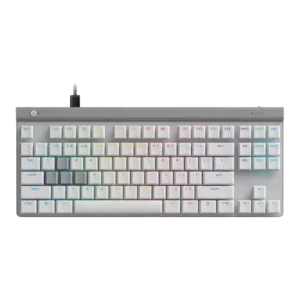
Choose Logitech G515 Rapid for ergonomics and per-key lighting control.
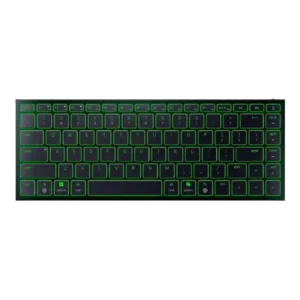
Choose Razer Joro for connectivity and legend visibility.
Why these recommendations?
Logitech G515 Rapid
Where It Has the Edge
ergonomics is 4.7 vs 2.9. Ergonomics were praised for the low height, adjustable feet, relaxed hand position, and reduced strain over longer sessions.
per-key lighting control is 4.5 vs 2.4. Per-key lighting control was positively described through G Hub, especially where RGB can be customized individually alongside actuation.
gaming performance is 4.6 vs 3.2. Gaming performance was the clearest consensus strength, with reviewers describing fast, responsive, competitive-focused performance and tangible in-game advantages.
Razer Joro
Where It Has the Edge
connectivity is 4.0 vs 2.7. Connectivity was praised for easy pairing and device switching, but Bluetooth-only wireless and dongle omissions created caveats.
legend visibility is 3.8 vs 2.9. Legend visibility was mostly positive thanks to readable fonts and illuminated legends, but one reviewer missed backlighting on...
profile management is 4.1 vs 3.2. Profile management was helpful through onboard profiles, although one reviewer still found broader customization flexibility limited.
Logitech G515 Rapid4.0 overall score
Razer Joro3.7 overall score
Compare features
Scores are out of 5. Missing scores mean missing review evidence, not a missing feature.
Scored on both products
Comfort and build
Ergonomics
Logitech G515 Rapid
4.7
Ergonomics were praised for the low height, adjustable feet, relaxed hand position, and reduced strain over longer sessions.
Razer Joro
2.9
Ergonomics were mixed to negative overall: some liked the flat angle, but many criticized the lack of adjustable feet and fatigue over time.
Materials quality
Logitech G515 Rapid
4.6
Materials quality was viewed positively thanks to premium-feeling finishes, double-shot PBT caps, and rigid steel reinforcement.
Razer Joro
4.3
Materials quality was mostly strong thanks to the aluminum top plate, though one reviewer found the plastic base comparatively cheap.
Design aesthetics
Logitech G515 Rapid
4.5
The design earned broad praise for its slim, clean, professional look, two-tone styling, and attractive desk presence.
Razer Joro
4.6
Design reactions were strongly positive, with reviewers calling the Joro stunning, clean, minimalist, gorgeous, and premium-looking.
Durability
Logitech G515 Rapid
4.7
Durability impressions were positive where reviewers discussed lasting materials, especially sturdy PBT keycaps and a premium-feeling chassis.
Razer Joro
4.5
One long-term tester found the Joro held up without visible wear after several weeks, supporting a positive durability score.
Build quality
Logitech G515 Rapid
4.5
Build quality was one of the strongest areas, with repeated praise for sturdy construction, premium feel, steel reinforcement, and minimal flex; one reviewer still found the plastic package less premium than rivals.
Razer Joro
4.6
Build quality was one of the strongest themes, with reviewers repeatedly praising the rigid, sturdy construction despite the ultra-thin chassis.
Size and form factor
Logitech G515 Rapid
4.6
Size and form factor were consistently praised for the very slim 22mm low-profile build and compact TKL footprint.
Razer Joro
4.7
The slim, light form factor impressed reviewers, with hands-on comments emphasizing how thin and capable the keyboard felt.
Typing comfort
Logitech G515 Rapid
3.4
Typing comfort was highly preference-dependent, ranging from smooth and comfortable for long sessions to too soft or uncomfortable for extended productivity.
Razer Joro
3.5
Typing comfort ranged from comfortable long writing sessions to fatigue and frustration, mostly depending on angle and layout tolerance.
Ownership and support
Reliability
Logitech G515 Rapid
4.3
Reliability evidence was limited but favorable, with reviewers noting no issues during use and no problems on a newer rig.
Razer Joro
4.1
Reliability was generally positive for device switching and daily use, with only isolated connection caveats.
Rapid trigger support
Logitech G515 Rapid
4.6
Rapid Trigger was strongly praised across reviews as a meaningful competitive feature for faster resets, movement, and repeat inputs.
Razer Joro
4.0
PCWorld explicitly tied Snap Tap to rapid-trigger-style support, giving the Joro credit for that gaming feature.
Value for money
Logitech G515 Rapid
3.5
Value was mixed: some reviewers justified the price through performance and customization, while others saw wired-only or plastic construction as too expensive.
Razer Joro
2.9
Value for money was one of the weakest areas, with many reviewers calling the Joro expensive unless portability is the buyer's top priority.
Analog input support
Logitech G515 Rapid
2.5
Analog-style depth control exists, but reviewers said the low-profile implementation is weak for joystick-like or gradual analog uses such as driving or flight games.
Razer Joro
2.6
GamesRadar framed the Joro as missing the fancier analog-system actuation features found elsewhere in Razer's lineup.
Performance
Sound dampening
Logitech G515 Rapid
4.5
Sound dampening was praised for reducing echo and creating a quieter, more controlled acoustic profile.
Razer Joro
2.0
TechRadar specifically criticized the lack of dampening, saying the keys could feel harsh under heavier typing.
Wireless performance
Logitech G515 Rapid
1.5
Wireless performance scored poorly because reviewers treated the complete lack of wireless connectivity as a major lost convenience.
Razer Joro
2.9
Wireless performance was mixed: Bluetooth was often stable for productivity, but sleep delays, input lag, and competitive-gaming limitations were repeated concerns.
Gaming performance
Logitech G515 Rapid
4.6
Gaming performance was the clearest consensus strength, with reviewers describing fast, responsive, competitive-focused performance and tangible in-game advantages.
Razer Joro
3.2
Gaming performance was context-dependent: reviewers found it acceptable or speedy for casual use, but weak for serious or PC-focused competitive gaming.
Legend visibility
Logitech G515 Rapid
2.9
Legend visibility was a recurring lighting weakness, with uneven illumination on longer legends and local-language legend backlighting called out.
Razer Joro
3.8
Legend visibility was mostly positive thanks to readable fonts and illuminated legends, but one reviewer missed backlighting on secondary functions.
Backlight brightness
Logitech G515 Rapid
4.3
Backlight diffusion was judged clean in one hands-on review, though lighting criticism appeared more often around uneven legends than raw brightness.
Razer Joro
4.2
GamesRadar found the RGB strong enough that half brightness still looked fantastic, though this was discussed alongside battery impact.
Noise level
Logitech G515 Rapid
4.5
Noise level was a strength, with reviewers describing the keyboard as quiet, shared-space friendly, and quieter than many mechanical alternatives.
Razer Joro
4.5
Noise level was a strength, with reviewers describing the Joro as quiet, restrained, and suitable for offices, shared spaces, or travel.
Other features
Per-key lighting control
Logitech G515 Rapid
4.5
Per-key lighting control was positively described through G Hub, especially where RGB can be customized individually alongside actuation.
Razer Joro
2.4
Per-key lighting control was a recurring limitation because reviewers noted single-zone RGB and no individual key effects.
Key stability
Logitech G515 Rapid
2.8
Key stability had a notable caveat, with one reviewer calling out minor but definite keycap wobble during rapid presses.
Razer Joro
4.6
PCMag specifically found no wobble or mush in the keys, supporting a strong key-stability score.
Latency
Logitech G515 Rapid
4.2
Latency was considered strong for wired competitive use, though one review noted the absence of newer 8K polling limits the ceiling.
Razer Joro
2.8
Latency was a key concern outside wired mode, with multiple reviewers calling out Bluetooth input delay or the lack of low-latency wireless support.
Connectivity
Logitech G515 Rapid
2.7
Connectivity was a tradeoff: reviewers accepted wired consistency for competitive play, but repeatedly criticized the lack of wireless versatility and desk tidiness.
Razer Joro
4.0
Connectivity was praised for easy pairing and device switching, but Bluetooth-only wireless and dongle omissions created caveats.
Key responsiveness
Logitech G515 Rapid
4.7
Key responsiveness was consistently praised, especially for rapid movements, immediate input response, and magnetic switch speed.
Razer Joro
3.5
Responsiveness varied by use case, with some reviewers reporting quick input while others found the keys slow or less responsive than mechanical alternatives.
Keycap quality
Logitech G515 Rapid
4.6
Keycap quality was praised for textured double-shot PBT, strong feel, and resistance to shine.
Razer Joro
3.3
Keycap feedback was mixed: reviewers liked smooth, comfortable caps and etched legends, but several complained about smudges, fingerprints, or clammy feel.
Profile management
Logitech G515 Rapid
3.2
Profile management was mixed: reviewers liked profile features, but several criticized cumbersome onboard saving or unreliable automatic switching.
Razer Joro
4.1
Profile management was helpful through onboard profiles, although one reviewer still found broader customization flexibility limited.
Typing feel
Logitech G515 Rapid
3.2
Typing feel was the most mixed core experience: some loved the smooth, quiet action, while others found it soft, hollow, mushy, or underwhelming.
Razer Joro
4.1
Typing feel was generally pleasant for a slim scissor-switch keyboard, though not all reviewers found it satisfying versus mechanical alternatives.
Volume control
Logitech G515 Rapid
2.3
Volume control was repeatedly criticized because reviewers missed a dedicated dial or roller and disliked relying on secondary key functions.
Razer Joro
3.2
Volume control opinions split: Macworld liked one-hand Fn access, while a comparison reviewer disliked the volume placement.
Polling rate
Logitech G515 Rapid
3.2
Polling rate drew a caveat: the 1,000 Hz implementation was usable, but the missing 8K option limited its premium competitive spec sheet.
Razer Joro
4.0
A wired 1,000Hz mode was praised as a useful fallback when battery or wireless gaming performance mattered.
Layout options
Logitech G515 Rapid
4.0
The TKL layout was mostly viewed as clean and space-saving, but users who need a numpad or more top controls may miss them.
Razer Joro
3.4
Layout opinions split sharply: some reviewers found the 75% layout efficient, while others disliked the small Shift, spacebar, or right-side key choices.
Actuation consistency
Logitech G515 Rapid
4.0
Adjustable actuation was praised when used per key, though the short low-profile travel made multi-stage precision harder in one review.
Razer Joro
4.6
PCMag found the typing feel consistent across the whole board, supporting a strong actuation-consistency score.
RGB lighting quality
Logitech G515 Rapid
3.9
RGB lighting quality was mixed: several reviewers liked the crisp, vibrant lighting, while others found uneven illumination on larger keys.
Razer Joro
4.3
RGB lighting quality was widely praised as vibrant, beautiful, bright, colorful, and unusually polished for this kind of travel keyboard.
Extra gaming features
Logitech G515 Rapid
3.7
Extra gaming functions were useful for rapid input and multi-action setups, but one reviewer found multi-actuation less versatile or not personally useful.
Razer Joro
4.1
Gaming extras such as Snap Tap, NKRO, and gaming-mode features were appreciated, although they did not fully overcome the keyboard's travel-first limits.
Desk space efficiency
Logitech G515 Rapid
4.2
The TKL layout was praised for saving desk space and leaving more mouse room while preserving most major controls.
Razer Joro
4.5
Reviewers liked how the compact 75% layout preserved useful controls while saving space and staying productivity-friendly.
Acoustics
Logitech G515 Rapid
4.5
Reviewers generally liked the board's muted, clean sound, praising its rattle-free tone, satisfying thud, and audible-but-quiet character.
Razer Joro
4.3
Reviewers who discussed sound found the Joro's scissor switches pleasant, leaning deeper and subtly satisfying rather than loud or clicky.
Frame rigidity
Logitech G515 Rapid
4.6
Frame rigidity scored very well, with reviewers repeatedly noting steel reinforcement, heft, no flex, and strong desk stability.
Razer Joro
4.7
Frame rigidity was consistently praised, with multiple reviewers noting almost no flex or bending from the thin deck.
Switch feel
Logitech G515 Rapid
4.0
Switch feel divided reviewers: many liked the smooth, satisfying magnetic switches, while others found the low-profile feel mushy, hollow, or too soft for typing.
Razer Joro
4.1
Switch feel was divisive but often positive for scissor switches, with praise for crisp tactility offset by complaints of sluggishness from critics.
Portability
Logitech G515 Rapid
4.5
Portability evidence was limited but positive, with one reviewer emphasizing the light, lithe 800-gram design.
Razer Joro
4.6
Portability was the strongest consensus point: reviewers repeatedly praised the thin, light, bag-friendly body for travel and mobile work.
Key spacing
Logitech G515 Rapid
3.6
Key spacing split reviewers: one found the keys not cramped, while another reported missteps during fast gaming and typing.
Razer Joro
3.6
Key spacing drew mixed reactions: some reviewers liked the spacing and full-size keys, while others found the compact layout cramped or hard to navigate.
Onboard memory
Logitech G515 Rapid
4.5
Onboard memory was praised in the one review that evaluated it, because saved setups can follow the keyboard to another PC.
Razer Joro
4.5
Macworld praised the ability to save function changes directly on the keyboard, supporting onboard memory usefulness.
Controls and connectivity
Media controls
Logitech G515 Rapid
2.3
Media controls were one of the most repeated complaints, with reviewers missing dedicated media keys, extra physical controls, or a volume roller.
Razer Joro
3.3
Media controls worked through function layers and were reachable for some, but other reviewers found their placement awkward or annoying.
Macro customization
Logitech G515 Rapid
4.4
Macro and remapping support was praised as powerful, flexible, and useful through G Hub.
Razer Joro
3.8
Macro customization was useful where Synapse and onboard tools allowed it, but reviewers criticized the lack of on-the-fly macro recording and limited remap space.
Customization options
Logitech G515 Rapid
4.5
Customization was a major strength, especially per-key actuation, key remapping, RGB, macros, and deep G Hub tuning.
Razer Joro
4.0
Customization was often useful through Synapse, remapping, lighting, and profiles, though some reviewers found limits around remappable keys and software dependence.
RGB customization
Logitech G515 Rapid
4.2
RGB customization was generally praised through G Hub, though one reviewer disliked needing software for even small lighting tweaks.
Razer Joro
3.9
RGB customization was considered useful through Synapse and onboard controls, though it remained constrained by single-zone behavior.
Software quality
Logitech G515 Rapid
3.9
Software quality was mixed: G Hub is powerful and often easy to use, but some reviewers found it clunky, unfriendly, or unreliable with profiles.
Razer Joro
3.9
Software quality was mixed: reviewers liked Synapse's growing Mac support and clearer layout, but some encountered availability or dependency frustrations.
Evidence available for one product
Battery and charging
Battery life
Logitech G515 RapidNo score yet
Razer Joro
3.5
Battery impressions were split: several reviewers praised all-day or weeklong use with modest lighting, while others criticized short runtime with RGB enabled.
Other features
Cable quality
Logitech G515 RapidNo score yet
Razer Joro
3.9
The included braided USB-C cable was generally appreciated as premium, though one reviewer noted practical limits from its short USB-C-to-C design.
Compatibility
Logitech G515 RapidNo score yet
Razer Joro
4.5
Compatibility was a major strength, especially for users switching between Windows, macOS, mobile devices, and multiple paired systems.
Stabilizer quality
Logitech G515 Rapid
4.6
Stabilizer quality was positively noted in one detailed review, which found no rattle, echo, or sense of poor key mounting.
Razer JoroNo score yet
Switch options
Logitech G515 RapidNo score yet
Razer Joro
2.5
Switch options were a limitation because the Joro is not mechanical, which reviewers said may deter buyers who want that feel.
Good if you want a premium 96% Hall Effect keyboard for work and gaming with excellent build, sound, and customization. Skip it if you need cheaper esports-first speed, 8,000Hz polling,...
Choose it if competitive gaming speed, Rapid Trigger, and deep per-key customization matter more than extras. Skip it if you need wireless, dedicated arrows/media keys, adjustable height, or a lower-cost...
Good if you want a premium, quiet TKL Hall Effect keyboard for typing and gaming. Skip it if price, portability, 8,000Hz polling, or broad switch choice matters most.
Good if you want a premium full-size Hall Effect keyboard with smooth switches, quiet sound, and deep customization. Skip it if you need a portable, budget-friendly board or broad switch...