Scorata scores summarize analyzed review evidence on a 1–5 scale; they are not laboratory measurements or a simple average of customer star ratings. Feature scores summarize the reviews covering that feature. The overall score averages feature scores within each review, then combines review averages. When both expert and customer evidence are available, those two groups receive equal weight. Products can have different review coverage, so small score gaps do not establish a winner.
Recommendations prioritize important features for the category, with a score of at least 3.5, a gap of at least 0.25 points and at least two supporting reviews per product. Features with widely varying scores or broad connectivity contexts are excluded from recommendations. These safeguards do not establish statistical significance.
Quick verdict
What each product is best for
The review evidence points to a tradeoff: ergonomics and connectivity versus portability and value for money. Choose according to which strengths matter more to you; the overall score alone does not settle that choice.
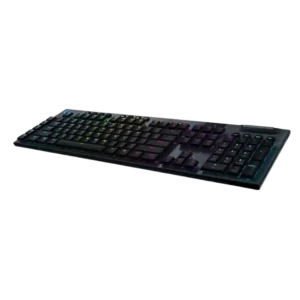
Choose Logitech G915 Lightspeed for ergonomics and connectivity.
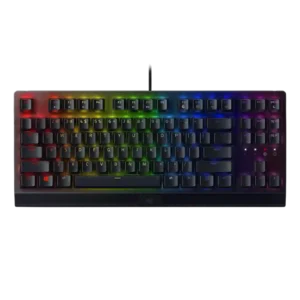
Choose Razer BlackWidow V3 for portability and value for money.
Why these recommendations?
Logitech G915 Lightspeed
Where It Has the Edge
ergonomics is 4.2 vs 3.9. Ergonomics are mostly positive because of the low profile and adjustable feet, though one reviewer felt the keyboard...
connectivity is 4.9 vs 2.5. Reviewers consistently liked the mix of Lightspeed, Bluetooth, wired use, and fast device switching, with only minor caveats...
noise level is 3.6 vs 2.3. Noise opinions depend on switch choice: clicky switches are quieter than some mechanical boards but still too loud...
Razer BlackWidow V3
Where It Has the Edge
portability is 4.6 vs 3.7. Portability evidence was positive, citing the lightweight full-size build and compact TKL packability.
value for money is 4.1 vs 3.4. Value for money was generally positive for a sturdy, capable midrange board, but one TKL review argued the...
gaming performance is 4.7 vs 4.4. Gaming performance was broadly praised for responsive in-game behavior, reliable combos, and suitability for both MMO and shooter-style...
Logitech G915 Lightspeed4.3 overall score
Razer BlackWidow V34.0 overall score
Compare features
Scores are out of 5. Missing scores mean missing review evidence, not a missing feature.
Scored on both products
Comfort and build
Ergonomics
Logitech G915 Lightspeed
4.2
Ergonomics are mostly positive because of the low profile and adjustable feet, though one reviewer felt the keyboard needed tilt to feel right.
Razer BlackWidow V3
3.9
Ergonomics were mixed: the wrist rest, feet, and angled setup helped comfort, but the full-size footprint made positioning difficult for some.
Design aesthetics
Logitech G915 Lightspeed
4.9
The design receives broad praise for looking sleek, mature, slim, attractive, and premium rather than overly gamer-styled.
Razer BlackWidow V3
4.1
Design aesthetics were highly subjective, with praise for the pink, black, and minimalist looks offset by Quartz cosmetic complaints.
Typing comfort
Logitech G915 Lightspeed
4.6
Typing comfort is a strong point thanks to the low profile, stable feel, and reduced wrist angle.
Razer BlackWidow V3
4.2
Typing comfort was mostly positive, with reviewers praising easy, enjoyable typing, but some slowed down or needed the wrist rest for longer sessions.
Build quality
Logitech G915 Lightspeed
4.9
Reviewers strongly praised the premium, solid construction, frequently describing the keyboard as sturdy, durable, tank-like, or a real step up.
Razer BlackWidow V3
4.6
Build quality was a major strength across reviews, with repeated praise for the sturdy feel, aluminum top, rugged construction, and quality overall.
Materials quality
Logitech G915 Lightspeed
4.3
Materials are mostly praised for aluminum, brushed-metal, and premium feel, but one reviewer disliked the sharp frame edges.
Razer BlackWidow V3
4.5
Materials quality was generally positive thanks to the aluminum top, sturdy feel, and durable parts, with only some caveats around ABS keycaps elsewhere.
Durability
Logitech G915 Lightspeed
4.8
Durability evidence is mostly strong, including rough household use, long-term daily use, and no major failures over time.
Razer BlackWidow V3
4.9
Durability was strongly praised, especially around the hard-wearing construction, robust product design, and tough keycaps.
Size and form factor
Logitech G915 Lightspeed
4.6
The thin form factor is heavily praised, but the full-size model is criticized by some for being very large.
Razer BlackWidow V3
4.5
Size and form factor evidence came from TKL coverage, where the smaller layout was praised as compact.
Ownership and support
Reliability
Logitech G915 Lightspeed
4.4
Reliability is strong in long-term evidence and TKL use, although one first-use wake issue created a negative first impression.
Razer BlackWidow V3
3.8
Reliability was mixed: some reviewers reported no performance issues or called it reliable, while one long-term TKL review reported missing profiles.
Value for money
Logitech G915 Lightspeed
3.4
Value is the main tradeoff: reviewers often admire the keyboard but repeatedly caution that the price is steep.
Razer BlackWidow V3
4.1
Value for money was generally positive for a sturdy, capable midrange board, but one TKL review argued the price faced stronger alternatives.
Other features
Connectivity
Logitech G915 Lightspeed
4.9
Reviewers consistently liked the mix of Lightspeed, Bluetooth, wired use, and fast device switching, with only minor caveats about Bluetooth latency.
Razer BlackWidow V3
2.5
Connectivity was a limitation because reviewers repeatedly noted that the standard V3 is wired-only and lacks wireless or Bluetooth.
Acoustics
Logitech G915 Lightspeed
5.0
One reviewer specifically praised the clicky sound, treating the key acoustics as a standout part of the typing experience.
Razer BlackWidow V3
2.8
Acoustics were highly preference-dependent: one reviewer enjoyed the clicky sound, while others criticized pinging and a cacophonous din.
Cable quality
Logitech G915 Lightspeed
2.4
Cable and charging feedback is mixed: the braided cable is praised, but multiple reviewers criticize the micro-USB charging port as cheap or outdated.
Razer BlackWidow V3
4.3
Cable quality was mostly positive for the braided, durable, manageable cable, though one reviewer warned cable routing could kink it.
Desk space efficiency
Logitech G915 Lightspeed
4.3
Tenkeyless coverage highlights major mouse-space gains, while the full-size model is seen as less desk-friendly because of its length.
Razer BlackWidow V3
2.7
Desk space efficiency was mixed to negative for the full-size model, with reviewers struggling for mouse room or noting the wrist rest consumed desk space.
Compatibility
Logitech G915 Lightspeed
4.5
One reviewer positively framed the device-switching use case as helpful for smart TVs and other devices.
Razer BlackWidow V3
3.3
Compatibility was mixed: basic USB PC use was easy, but deeper customization was limited for Linux and macOS users.
Keycap quality
Logitech G915 Lightspeed
2.7
Keycap quality is the most consistent hardware concern, with complaints about marks, wear, wobble, thinness, small caps, and proprietary replacement issues.
Razer BlackWidow V3
3.9
Keycap quality split reviewers: textured doubleshot ABS was often liked for grip and durability, but ABS material, uneven aesthetics, and cheap-feeling keys drew criticism.
Key stability
Logitech G915 Lightspeed
2.9
Key stability is mixed-to-weak, with praise for stable typing in some reviews but complaints about rattle, wobble, and cheap-feeling keycaps in others.
Razer BlackWidow V3
4.0
Key stability was mixed: some evidence praised the switch/keycap stabilizing design, while another review noted wobble on larger keys.
Actuation consistency
Logitech G915 Lightspeed
3.8
Evidence is split: one reviewer liked the clear, consistent clicky actuation, while another struggled to sense the exact registration point.
Razer BlackWidow V3
4.9
Actuation consistency was praised through no-missed-input comments, especially during gaming and heavy key-bashing scenarios.
Extra gaming features
Logitech G915 Lightspeed
4.3
Game mode and G-key functions are considered useful, especially for locking keys or mapping game/streaming actions.
Razer BlackWidow V3
3.3
Extra gaming features were mixed: one review praised the loaded feature set, while another criticized the lack of gaming keys and other extras.
Key spacing
Logitech G915 Lightspeed
3.3
Key spacing is mixed: close keys helped one reviewer settle in, but another found them easier to hit accidentally.
Razer BlackWidow V3
4.2
Key spacing had limited positive support, with one review crediting the standard shape and spacing for comfortable typing.
Switch options
Logitech G915 Lightspeed
4.6
Reviewers appreciate having linear, tactile, and clicky options, with several noting the variants help match user preference.
Razer BlackWidow V3
3.7
Switch choice was seen as useful because Green and Yellow options suit different preferences, but several reviewers wished the lineup offered broader switch variety.
Portability
Logitech G915 Lightspeed
3.7
Portability is mixed: the TKL model and dongle storage help, while the full-size board is too long to carry easily.
Razer BlackWidow V3
4.6
Portability evidence was positive, citing the lightweight full-size build and compact TKL packability.
Onboard memory
Logitech G915 Lightspeed
4.1
Onboard memory is useful for profiles, but implementation can feel counterintuitive or limited in software.
Razer BlackWidow V3
4.7
Onboard memory had limited but positive evidence, with up to five profiles described as convenient.
Polling rate
Logitech G915 Lightspeed
5.0
Polling-rate evidence is positive, with 1ms/1,000Hz behavior tied directly to imperceptible lag and fast wireless performance.
Razer BlackWidow V3
4.5
Polling rate received limited but positive support, with the reviewer tying the fast thousand-hertz rate to responsive keypress behavior.
Frame rigidity
Logitech G915 Lightspeed
4.6
The frame is generally praised for rigidity and low flex, though one long-term reviewer noticed a slight bend that did not affect use.
Razer BlackWidow V3
4.3
Frame rigidity was mostly praised for low flex and stability, though one review found it less rigid than some Filco and Ducky boards.
Profile management
Logitech G915 Lightspeed
4.0
Profile switching is useful, but one reviewer found the onboard profile workflow counterintuitive.
Razer BlackWidow V3
3.6
Profile management was mixed: onboard/profile customization was convenient in positive reviews, but one long-term reviewer reported profiles going missing.
Key responsiveness
Logitech G915 Lightspeed
4.8
Reviewers repeatedly describe the low-profile switches as zippy, responsive, fast, and comparable to wired responsiveness.
Razer BlackWidow V3
4.5
Key responsiveness was one of the clearest strengths, with reviewers reporting quick actuation, reliable in-game inputs, and no keypress problems in normal play.
Layout options
Logitech G915 Lightspeed
3.8
Layout feedback is mixed: tenkeyless versions improve compactness, while some reviewers disliked the large full-size footprint.
Razer BlackWidow V3
3.5
Layout options received limited support, mainly from the suggestion that some users would be better served by the TKL version.
Passthrough features
Logitech G915 Lightspeed
2.3
USB passthrough is a recurring absence, with reviewers noting or expecting it at this high price.
Razer BlackWidow V3
2.0
Passthrough features were criticized because reviewers noted the absence of USB or audio passthrough.
RGB lighting quality
Logitech G915 Lightspeed
4.3
Lighting quality is generally praised as vivid and bright, though several reviews mention bleed, small legends, or less sharp illumination.
Razer BlackWidow V3
4.1
RGB lighting quality was divisive: many liked the vibrant Chroma glow, but Quartz lighting bleed, uneven shine-through, and toned-down brightness disappointed others.
Wrist rest quality
Logitech G915 Lightspeed
3.1
Wrist-rest feedback is mixed: many reviewers dislike that none is included, while others say the low profile reduces the need for one.
Razer BlackWidow V3
3.2
Wrist rest quality was mixed to weak: some found it useful or comfortable, while others called it hard plastic, uncomfortable, or an afterthought.
Typing feel
Logitech G915 Lightspeed
4.3
Typing feel is broadly positive and often called smooth, snappy, or enjoyable, though some reviewers needed adjustment or disliked the low-profile feel.
Razer BlackWidow V3
4.2
Typing feel was mostly positive, ranging from enthusiastic praise to decent performance, with some criticism when forceful typing caused sound or underpressing issues.
Switch feel
Logitech G915 Lightspeed
4.4
Switch feel is mostly praised for low-profile speed, tactile/clicky feel, and typing enjoyment, with isolated complaints about uncanny or insufficient clickiness.
Razer BlackWidow V3
4.4
Reviewers generally liked the switch feel, describing the Green switches as tactile, clicky, responsive, and fun, though some treated the sound as a tradeoff.
Latency
Logitech G915 Lightspeed
5.0
Latency is a major strength, with reviewers repeatedly saying lag was imperceptible, nonexistent, or indistinguishable from wired use.
Razer BlackWidow V3
5.0
Latency evidence was strongly positive, with one review calling it remarkably low and another praising the fast Yellow switch for rapid-fire key presses.
Volume control
Logitech G915 Lightspeed
4.7
The volume wheel is a standout feature, widely praised for its feel and smoothness, with only minor complaints about delay or lack of tactility.
Razer BlackWidow V3
4.7
Volume control was one of the best-liked extras, with several reviewers calling the roller useful, handy, convenient, or life-giving.
Performance
Noise level
Logitech G915 Lightspeed
3.6
Noise opinions depend on switch choice: clicky switches are quieter than some mechanical boards but still too loud for shared spaces in one review.
Razer BlackWidow V3
2.3
Noise level was the most consistent drawback, with multiple reviewers warning that Green switches are loud, pingy, or annoying in shared and quiet spaces.
Backlight brightness
Logitech G915 Lightspeed
4.8
Reviewers generally found the backlighting bright, with praise for vivid illumination even when running wirelessly.
Razer BlackWidow V3
4.0
Backlight brightness drew mixed but mostly favorable comments, with vibrant Chroma praise balanced against one reviewer finding the lights more toned down.
Legend visibility
Logitech G915 Lightspeed
2.8
Legend visibility is a weakness where mentioned, with complaints about small legends or secondary characters not shining through.
Razer BlackWidow V3
3.3
Legend visibility was uneven; reviewers disliked missing or unlit identifiers, while one TKL reviewer praised improved foreign-key visibility.
Gaming performance
Logitech G915 Lightspeed
4.4
Gaming evidence is positive overall, with reviewers calling it responsive and easy to use in games, though some saw little measurable stat improvement.
Razer BlackWidow V3
4.7
Gaming performance was broadly praised for responsive in-game behavior, reliable combos, and suitability for both MMO and shooter-style play.
Controls and connectivity
Software quality
Logitech G915 Lightspeed
4.1
Software feedback is split: many find G Hub easy, refined, and powerful, while others call it complex, dreadful, or counterintuitive.
Razer BlackWidow V3
3.3
Software quality was sharply split: many liked Synapse customization, while others disliked multiple apps, clunkiness, or bugs.
RGB customization
Logitech G915 Lightspeed
4.9
RGB customization is a major strength, with praise for extensive effects, per-key control, downloadable designs, and broad color options.
Razer BlackWidow V3
4.6
RGB customization was consistently praised through Razer Chroma and Synapse controls, with reviewers noting flexible profiles, custom effects, and game-integrated lighting.
Macro customization
Logitech G915 Lightspeed
4.4
Macro support is widely praised through G keys, profile layers, software assignments, and on-the-fly recording, with some limits on TKL/F-key mapping.
Razer BlackWidow V3
4.6
Macro customization was well supported through Synapse, on-the-fly recording, Hypershift, and broad key assignment flexibility.
Media controls
Logitech G915 Lightspeed
4.2
Media controls are generally valued, though some reviewers criticize the rubber buttons as mushy, cheap, or inconsistent at the edges.
Razer BlackWidow V3
4.3
Media controls were mostly liked, with reviewers praising the roller/button convenience even when some preferred dedicated media keys.
Customization options
Logitech G915 Lightspeed
4.5
Customization is viewed positively, with reviewers highlighting many assignment, lighting, and software options.
Razer BlackWidow V3
4.6
Customization options were a recurring strength, covering key remapping, RGB, macros, Hypershift, and flexible Synapse controls despite software caveats.
Evidence available for one product
Battery and charging
Battery life
Logitech G915 Lightspeed
4.7
Battery life is one of the strongest points, repeatedly described as solid, commendable, impressive, exceptional, or long-lasting even with RGB enabled.
Razer BlackWidow V3No score yet
Other features
Per-key lighting control
Logitech G915 Lightspeed
5.0
Per-key lighting control is praised when discussed, including fully programmable RGB and per-key color choices.
Razer BlackWidow V3No score yet
Stabilizer quality
Logitech G915 LightspeedNo score yet
Razer BlackWidow V3
2.5
Stabilizer quality had limited negative evidence, centered on a hollow spacebar thud during typing.
Performance
Sound dampening
Logitech G915 LightspeedNo score yet
Razer BlackWidow V3
1.9
Sound dampening appeared weak in the negative evidence, with pinging and hollow/cacophonous typing sounds standing out.
Wireless performance
Logitech G915 Lightspeed
4.8
Wireless performance is one of the clearest strengths, with many reviewers describing Lightspeed as wired-like, reliable, fast, and lag-free.
Good if you want a premium 96% Hall Effect keyboard for work and gaming with excellent build, sound, and customization. Skip it if you need cheaper esports-first speed, 8,000Hz polling,...
Choose it if competitive gaming speed, Rapid Trigger, and deep per-key customization matter more than extras. Skip it if you need wireless, dedicated arrows/media keys, adjustable height, or a lower-cost...
Good if you want a premium, quiet TKL Hall Effect keyboard for typing and gaming. Skip it if price, portability, 8,000Hz polling, or broad switch choice matters most.
Good if you want a premium full-size Hall Effect keyboard with smooth switches, quiet sound, and deep customization. Skip it if you need a portable, budget-friendly board or broad switch...