Scorata scores summarize analyzed review evidence on a 1–5 scale; they are not laboratory measurements or a simple average of customer star ratings. Feature scores summarize the reviews covering that feature. The overall score averages feature scores within each review, then combines review averages. When both expert and customer evidence are available, those two groups receive equal weight. Products can have different review coverage, so small score gaps do not establish a winner.
Recommendations prioritize important features for the category, with a score of at least 3.5, a gap of at least 0.25 points and at least two supporting reviews per product. Features with widely varying scores or broad connectivity contexts are excluded from recommendations. These safeguards do not establish statistical significance.
Quick verdict
What each product is best for
The review evidence points to a tradeoff: software quality and value for money versus ergonomics and battery life. Choose according to which strengths matter more to you; the overall score alone does not settle that choice.
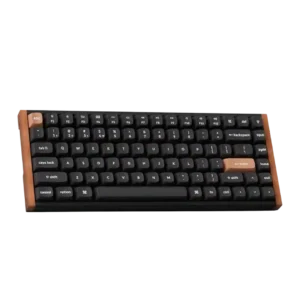
Choose Keychron K2 HE for software quality and value for money.
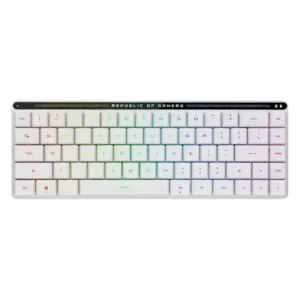
Choose ASUS ROG Falchion RX for ergonomics and battery life.
Why these recommendations?
Keychron K2 HE
Where It Has the Edge
software quality is 4.4 vs 2.7. Software quality was mostly praised for a web-based Launcher that avoids bulky apps, though some reviewers found it...
value for money is 4.6 vs 3.9. Value for money was broadly positive because reviewers saw premium Hall effect features and design at a reasonable...
legend visibility is 3.5 vs 2.8. Legend visibility depended on version: opaque Special Edition caps drew criticism, while font clarity and shine-through options were...
ASUS ROG Falchion RX
Where It Has the Edge
ergonomics is 4.4 vs 3.3. Ergonomics are mostly positive thanks to comfort, height options, and low fatigue, though one reviewer found the stock...
battery life is 4.7 vs 4.4. Battery life is a consistent strength, with reviewers reporting long multi-day use and calling endurance fantastic or impressive.
reliability is 4.9 vs 3.3. Reliability is excellent in the available evidence, with reviewers reporting stable wireless use and no dropouts or missed...
Keychron K2 HE4.4 overall score
ASUS ROG Falchion RX4.4 overall score
Compare features
Scores are out of 5. Missing scores mean missing review evidence, not a missing feature.
Scored on both products
Comfort and build
Ergonomics
Keychron K2 HE
3.3
Ergonomics were mixed: adjustable angles helped some reviewers, but keyboard height caused wrist strain for others.
ASUS ROG Falchion RX
4.4
Ergonomics are mostly positive thanks to comfort, height options, and low fatigue, though one reviewer found the stock height very low.
Durability
Keychron K2 HE
4.8
Durability was inferred positively from sturdy construction, Hall effect longevity, and even an accidental drop test, with no major durability complaint.
ASUS ROG Falchion RX
3.2
Durability evidence is limited and mixed, focused on concern that ABS keycaps may wear over time.
Size and form factor
Keychron K2 HE
4.7
The size and form factor were generally viewed as a good 75% balance, but the compact layout and weight were not ideal for every user.
ASUS ROG Falchion RX
4.1
Size and form factor are useful but polarizing: reviewers like the compact 65%-in-60% footprint while noting cramped keys and adjustment time.
Typing comfort
Keychron K2 HE
4.3
Typing comfort was usually positive thanks to smooth switches and low fatigue, but height caused discomfort for some reviewers.
ASUS ROG Falchion RX
4.9
Typing comfort is very positive in the limited evidence, with reviewers describing long typing as joyful and non-cramping.
Materials quality
Keychron K2 HE
4.7
Materials quality came through in praise for aluminum, wood, concrete, PBT, and overall premium-feeling construction.
ASUS ROG Falchion RX
4.5
Materials quality is positive, especially the metal top plate and premium feel, despite plastic being used elsewhere.
Build quality
Keychron K2 HE
4.9
Build quality was a consistent strength, with reviewers calling it solid, premium, rigid, and well made across editions.
ASUS ROG Falchion RX
4.7
Build quality is broadly praised as solid, premium, and well put together despite the compact low-profile body.
Design aesthetics
Keychron K2 HE
4.8
Design aesthetics earned broad praise for wood accents, a premium office-friendly look, and a less-gamer visual identity.
ASUS ROG Falchion RX
4.9
Design is one of the strongest areas, with reviewers repeatedly calling the keyboard elegant, futuristic, clean, or premium-looking.
Battery and charging
Battery life
Keychron K2 HE
4.4
Battery life was generally positive, ranging from several days to multiple weeks depending on RGB and wireless settings, with a few average assessments.
ASUS ROG Falchion RX
4.7
Battery life is a consistent strength, with reviewers reporting long multi-day use and calling endurance fantastic or impressive.
Ownership and support
Reliability
Keychron K2 HE
3.3
Reliability was mixed: some reviewers reported no issues or a reliable experience, while others noted wake or 2.4GHz input issues.
ASUS ROG Falchion RX
4.9
Reliability is excellent in the available evidence, with reviewers reporting stable wireless use and no dropouts or missed keypresses.
Ease of switch replacement
Keychron K2 HE
3.8
Switch replacement was possible, but the practical experience was constrained by limited compatible magnetic switch choices.
ASUS ROG Falchion RX
2.5
Switch replacement flexibility is weak because reviewers suggest tinkerers may need another keyboard if they want to swap switches.
Value for money
Keychron K2 HE
4.6
Value for money was broadly positive because reviewers saw premium Hall effect features and design at a reasonable price, even if not cheap.
ASUS ROG Falchion RX
3.9
Value is mixed: many reviewers think the premium experience justifies the price, while others call the keyboard expensive or not especially affordable.
Other features
Per-key lighting control
Keychron K2 HE
2.0
Per-key lighting control was specifically criticized in one review for not supporting individual key color selection.
ASUS ROG Falchion RX
4.7
Per-key lighting control is supported positively by fully configurable RGB that can assign colors and patterns per key.
Wrist rest quality
Keychron K2 HE
5.0
Wrist rest quality was praised when reviewers tried Keychron's optional palm rest, though the need for one also reflected keyboard height.
ASUS ROG Falchion RX
2.5
Wrist-rest evidence is negative because the keyboard lacks one and a reviewer wished the cover had been replaced by a slim wrist rest.
Volume control
Keychron K2 HE
2.7
Volume control was criticized mainly through the missing knob and reliance on remapping or function-row controls.
ASUS ROG Falchion RX
4.4
Volume control is generally useful and convenient through the touch panel, though one reviewer rated it only a decent interface.
Cable quality
Keychron K2 HE
3.3
Cable impressions were mixed: the braided cable was praised, but several reviewers disliked the short length or side-port constraints.
ASUS ROG Falchion RX
2.0
The bundled USB cable is the clear weak point, with one reviewer calling it overly stiff.
Portability
Keychron K2 HE
3.0
Portability was a weak-to-mixed area because weight and size made the board less travel-friendly despite compact dimensions.
ASUS ROG Falchion RX
4.3
Portability is strongly supported by the compact size and cover, though some reviewers dislike how the cover or dongle storage works for travel.
Latency
Keychron K2 HE
4.0
Latency evidence was mixed: several reviewers saw no noticeable lag, while one measured/characterized performance as not top-tier gaming latency.
ASUS ROG Falchion RX
4.9
Latency evidence is strongly positive, with reviewers reporting near-zero latency, no perceivable input delay, and strong low-latency wireless performance.
Onboard memory
Keychron K2 HE
5.0
Onboard memory was praised because mappings or settings stayed on the keyboard and transferred across devices.
ASUS ROG Falchion RX
4.2
Onboard memory receives positive but limited evidence, with one review noting storage for five profiles.
RGB lighting quality
Keychron K2 HE
3.9
RGB lighting quality ranged from bright and attractive to partially blocked by opaque caps, making it version-dependent.
ASUS ROG Falchion RX
4.6
RGB lighting quality is consistently praised for brightness, vividness, shine-through legends, and attractive integration with the white design.
Key spacing
Keychron K2 HE
3.4
Key spacing was mixed, with smaller or tightly packed keys bothering some reviewers before they adjusted.
ASUS ROG Falchion RX
3.0
Key spacing is one of the main compromises, with reviewers citing cramped keys, accidental presses, and a short right Shift learning curve.
Polling rate
Keychron K2 HE
4.3
Polling rate was considered adequate to good for most users at 1,000Hz, but not class-leading for top competitive gaming.
ASUS ROG Falchion RX
4.7
Polling-rate evidence is limited but positive, with one reviewer calling the high-rate 2.4GHz mode suitable for gaming.
Stabilizer quality
Keychron K2 HE
4.2
Stabilizer quality was mostly good, with several reviewers noting limited rattle or firm larger keys, but some still heard inconsistency.
ASUS ROG Falchion RX
4.5
Stabilizer quality is praised, especially for limited spacebar rattle and lack of ticking.
Acoustics
Keychron K2 HE
4.7
Reviewers frequently liked the K2 HE's deeper, thocky, or satisfying sound, though one called it unadventurous rather than exciting.
ASUS ROG Falchion RX
4.3
Most reviewers praised the sound profile as quiet, pleasant, or refined, though one clicky-switch review found the sound annoying for long work sessions.
Layout options
Keychron K2 HE
3.2
Layout options were mixed: the 75% layout kept useful keys, but missing numpad, print screen, or full-size spacing bothered some users.
ASUS ROG Falchion RX
3.6
Layout feedback is mixed: reviewers like the compact function access, but missing dedicated function-row keys can be inconvenient.
Key responsiveness
Keychron K2 HE
4.7
Key responsiveness was a major strength, with reviewers repeatedly calling the board fast, highly responsive, or effortless to trigger.
ASUS ROG Falchion RX
4.4
Key responsiveness is generally strong and fast, though a few reviewers mention sensitivity can cause accidental inputs during adjustment.
Connectivity
Keychron K2 HE
4.5
Connectivity was generally strong across Bluetooth, 2.4GHz, and wired use, though side-port design and occasional wake behavior created caveats.
ASUS ROG Falchion RX
4.8
Connectivity is repeatedly praised for wired, Bluetooth, and 2.4GHz options, with several reviewers calling switching or setup easy.
Extra gaming features
Keychron K2 HE
4.8
Advanced gaming features were praised as serious tools for competitive players, especially actuation tuning and rapid-trigger behaviors.
ASUS ROG Falchion RX
4.6
Gaming extras are viewed positively, including high rollover, Omni receiver sharing, and profile or macro features that gamers still use.
Actuation consistency
Keychron K2 HE
4.7
The Hall effect switches were repeatedly described as smooth and consistent, with only mild stiffness noted in one review.
ASUS ROG Falchion RX
4.8
Evidence is limited but positive: the switches are described as wobble-free with near-zero debounce behavior.
Compatibility
Keychron K2 HE
4.8
Compatibility was praised for Mac/Windows switching, Linux mentions, and cross-device use, with no major platform problem in scored evidence.
ASUS ROG Falchion RX
4.7
Compatibility is a strength because reviewers appreciated Mac support, Mac/PC switching, and usefulness across operating systems.
Switch feel
Keychron K2 HE
4.9
Switch feel was the standout attribute: reviewers repeatedly described the magnetic switches as smooth, stable, satisfying, and highly responsive.
ASUS ROG Falchion RX
4.8
Switch feel is one of the keyboard’s strongest attributes, with reviewers describing the low-profile switches as smooth, refined, snappy, or surprisingly good.
Typing feel
Keychron K2 HE
4.8
Typing feel was overwhelmingly praised, often described as cloud-like, fluid, smooth, or among the best experiences reviewers had used.
ASUS ROG Falchion RX
4.7
Typing feel is broadly excellent, especially on red-switch units, though one reviewer found it less satisfying than traditional mechanical switches.
Profile management
Keychron K2 HE
4.6
Profile management was positive, with reviewers valuing locally stored profiles and separate typing/gaming setups.
ASUS ROG Falchion RX
4.6
Profile management is positive, with reviewers noting five or six profiles and customization that can carry between devices.
Key stability
Keychron K2 HE
4.9
Key stability was repeatedly praised, with reviewers noting little or no wobble from double-rail switches and stabilized larger keys.
ASUS ROG Falchion RX
4.8
Key stability is highly praised; reviewers repeatedly mention minimal wobble, secure keycaps, and uniform feel.
Desk space efficiency
Keychron K2 HE
4.6
The 75% layout was praised for saving desk space while retaining essentials, though some users missed larger layouts.
ASUS ROG Falchion RX
4.6
The compact design is praised for saving desk space and leaving more room for mouse movement or small-desk setups.
Frame rigidity
Keychron K2 HE
4.8
Frame rigidity was praised in the reviews that discussed it, including no deck flex, rigid construction, and ultra-stable typing.
ASUS ROG Falchion RX
4.9
Frame rigidity is a major strength; multiple reviewers report no deck flex, creaking, or a rock-solid base.
Keycap quality
Keychron K2 HE
4.3
Keycap quality was mostly praised for PBT, OSA shape, and comfort, though a few reviews noted plain styling or material-saving concerns.
ASUS ROG Falchion RX
4.3
Keycaps are mostly praised for feel, coating, shine-through lighting, and stability, but ABS material and replacement concerns temper scores.
Performance
Backlight brightness
Keychron K2 HE
2.7
Backlight brightness split reviewers: some found it dim or redundant on opaque caps, while others praised brighter implementations.
ASUS ROG Falchion RX
4.8
Backlighting is judged bright enough for low-light use, with one reviewer especially praising its daytime brightness.
Wireless performance
Keychron K2 HE
3.9
Wireless performance was mixed: many reviewers had flawless Bluetooth/2.4GHz use, while others saw wake delay or 2.4GHz bugginess.
ASUS ROG Falchion RX
4.7
Wireless performance is strong overall, with reviewers praising stable 2.4GHz behavior, while Bluetooth delay is mentioned as a minor limitation.
Legend visibility
Keychron K2 HE
3.5
Legend visibility depended on version: opaque Special Edition caps drew criticism, while font clarity and shine-through options were praised elsewhere.
ASUS ROG Falchion RX
2.8
Legend visibility is mixed to weak because side or secondary legends do not receive as much light and can be hard to see in the dark.
Noise level
Keychron K2 HE
4.2
Noise level was generally acceptable to good, with reviewers describing it as quiet enough or not overly clicky, though not silent.
ASUS ROG Falchion RX
4.9
Noise level is a major strength for red-switch units, repeatedly described as very quiet or near-silent.
Sound dampening
Keychron K2 HE
4.8
Sound dampening was praised for muted, premium, thocky sound from internal foam, silicone, and dampening layers.
ASUS ROG Falchion RX
4.6
Sound dampening is strongly praised for reducing ping, rattle, echo, and case noise through silicone foam layers.
Gaming performance
Keychron K2 HE
4.7
Gaming performance was broadly positive, especially for responsiveness, rapid trigger, strafing, and clean repeated inputs, though pure esports comparisons were more guarded.
ASUS ROG Falchion RX
4.7
Gaming performance is praised by most reviewers for responsiveness and real-world play, with one reviewer seeing it more as a work keyboard.
Controls and connectivity
Software quality
Keychron K2 HE
4.4
Software quality was mostly praised for a web-based Launcher that avoids bulky apps, though some reviewers found it less polished than competitors or dependent on USB/web access.
ASUS ROG Falchion RX
2.7
Software quality is the weakest repeated theme; Armoury Crate is called bloated, frustrating, difficult, or mixed despite offering useful controls.
Media controls
Keychron K2 HE
2.9
Media controls were a recurring weakness because reviewers wanted a knob or dedicated controls, despite remapping and function-row workarounds.
ASUS ROG Falchion RX
4.4
Media controls are widely praised as useful and space-efficient, though a few reviewers found the touch panel less useful or only moderately responsive.
Customization options
Keychron K2 HE
4.8
Customization was one of the strongest themes, with reviewers praising per-key actuation, remapping, lighting, macros, and Hall effect controls.
ASUS ROG Falchion RX
4.3
Customization is generally strong thanks to remapping, profiles, touch-panel options, and RGB controls, though software quality varies.
Macro customization
Keychron K2 HE
4.7
Macro customization was praised where discussed, especially because macros could be created in Launcher and retained across devices.
ASUS ROG Falchion RX
4.5
Macro customization is a strength, with reviewers praising on-the-fly macro recording and programmable macro support.
Hot-swappable switches
Keychron K2 HE
2.6
Hot-swap support was consistently treated as limited because the board only accepts compatible Hall effect double-rail switches.
ASUS ROG Falchion RX
2.5
Hot-swappability is a limitation: several reviewers note the board is not hot-swappable, with only one reviewer downplaying the issue.
RGB customization
Keychron K2 HE
4.6
RGB customization was praised for plentiful modes and settings, even when lighting visibility itself was not always ideal.
ASUS ROG Falchion RX
4.7
RGB customization is praised where tested, with a reviewer highlighting many lighting-effect options in Armoury Crate.
Evidence available for one product
Ownership and support
Analog input support
Keychron K2 HE
4.2
Analog-style depth input was viewed as a useful advanced feature, especially for gamepad-like controls, though one reviewer saw it as more novel than essential.
ASUS ROG Falchion RXNo score yet
Rapid trigger support
Keychron K2 HE
4.9
Rapid trigger support was one of the clearest strengths, repeatedly praised for instant reset, gaming movement, and fast repeat inputs.
ASUS ROG Falchion RXNo score yet
Other features
Switch options
Keychron K2 HE
2.5
Switch options were the most consistent limitation because compatibility is restricted to a small set of linear Gateron double-rail magnetic switches.
Good if you want a premium 96% Hall Effect keyboard for work and gaming with excellent build, sound, and customization. Skip it if you need cheaper esports-first speed, 8,000Hz polling,...
Choose it if competitive gaming speed, Rapid Trigger, and deep per-key customization matter more than extras. Skip it if you need wireless, dedicated arrows/media keys, adjustable height, or a lower-cost...
Good if you want a premium, quiet TKL Hall Effect keyboard for typing and gaming. Skip it if price, portability, 8,000Hz polling, or broad switch choice matters most.
Good if you want a premium full-size Hall Effect keyboard with smooth switches, quiet sound, and deep customization. Skip it if you need a portable, budget-friendly board or broad switch...