Scorata scores summarize analyzed review evidence on a 1–5 scale; they are not laboratory measurements or a simple average of customer star ratings. Feature scores summarize the reviews covering that feature. The overall score averages feature scores within each review, then combines review averages. When both expert and customer evidence are available, those two groups receive equal weight. Products can have different review coverage, so small score gaps do not establish a winner.
Recommendations prioritize important features for the category, with a score of at least 3.5, a gap of at least 0.25 points and at least two supporting reviews per product. Features with widely varying scores or broad connectivity contexts are excluded from recommendations. These safeguards do not establish statistical significance.
Quick verdict
What each product is best for
The review evidence points to a tradeoff: acoustics and customization options versus switch options and onboard memory. Choose according to which strengths matter more to you; the overall score alone does not settle that choice.
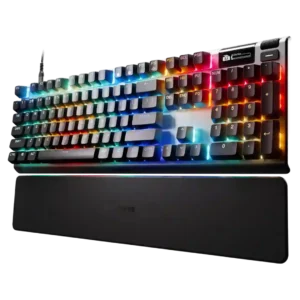
Choose SteelSeries Apex Pro Gen 3 for acoustics and customization options.
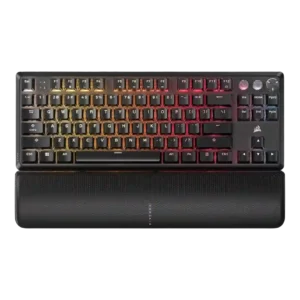
Choose Corsair K70 PRO for switch options and onboard memory.
Why these recommendations?
SteelSeries Apex Pro Gen 3
Where It Has the Edge
acoustics is 4.0 vs 2.7. Acoustics were mixed-positive: many liked the thocky or improved sound, while others heard hollow, clacky, or less refined...
customization options is 4.5 vs 3.5. Customization was a major strength, with reviewers praising granular actuation, bindings, RGB, and profiles despite occasional complexity.
size and form factor is 4.7 vs 3.7. Form factor sentiment depended on model: TKL and Mini layouts saved space, while compactness could require adjustment.
Corsair K70 PRO
Where It Has the Edge
switch options is 4.4 vs 2.5. Switch selection was a consistent strength, with reviewers praising the range of Cherry MX options, though one review...
onboard memory is 4.9 vs 3.2. Onboard memory was repeatedly praised for storing profiles, lighting layers, macros, and settings directly on the keyboard.
backlight brightness is 4.1 vs 2.5. Backlight brightness evidence was limited but positive, with reviewers finding it visible without becoming distracting.
SteelSeries Apex Pro Gen 34.2 overall score
Corsair K70 PRO4.0 overall score
Compare features
Scores are out of 5. Missing scores mean missing review evidence, not a missing feature.
Scored on both products
Comfort and build
Ergonomics
SteelSeries Apex Pro Gen 3
3.8
Ergonomics were strong for typing reach and long sessions, but some media-control placement and wrist positioning drew complaints.
Corsair K70 PRO
3.4
Ergonomics were mixed, with comfortable angle options and wrist slopes offset by palm-rest interference in one review.
Size and form factor
SteelSeries Apex Pro Gen 3
4.7
Form factor sentiment depended on model: TKL and Mini layouts saved space, while compactness could require adjustment.
Corsair K70 PRO
3.7
Size and form factor evidence was mixed: some liked the standard full-size layout, while others preferred smaller boards.
Materials quality
SteelSeries Apex Pro Gen 3
4.2
Materials were mostly praised for aluminum, matte finishes, and sturdy construction, but the Mini plastic-only case felt less premium.
Corsair K70 PRO
4.8
Materials quality was praised where reviewed, especially for brushed aluminum, solid plastic, and a premium-feeling chassis.
Build quality
SteelSeries Apex Pro Gen 3
4.7
Build quality was widely praised as sturdy, robust, premium, and tank-like despite some plastic construction caveats.
Corsair K70 PRO
4.4
Build quality was mostly praised for solidity and premium feel, though some reviews flagged simplicity, ping-related build concerns, or cost-cut corners.
Typing comfort
SteelSeries Apex Pro Gen 3
4.4
Typing comfort was often excellent for long writing sessions, but TechRadar disliked the taller keycap typing experience.
Corsair K70 PRO
4.5
Typing comfort was mostly positive when reviewers discussed comfortable keycaps, wrist support, and long typing sessions.
Durability
SteelSeries Apex Pro Gen 3
4.8
One review specifically praised durability, saying the board could withstand intense gaming and bumps.
Corsair K70 PRO
4.9
Durability evidence centered on PBT keycaps and legends, which reviewers expected to resist wear, shine, and fading.
Design aesthetics
SteelSeries Apex Pro Gen 3
4.3
Design aesthetics were mostly positive for clean, minimal, premium looks, though one reviewer found the design nondescript.
Corsair K70 PRO
4.4
Design aesthetics were generally praised for clean, simple, sleek styling, though a few reviewers found brushed aluminum or generic gaming looks less exciting.
Battery and charging
Battery life
SteelSeries Apex Pro Gen 3
3.4
Battery life was acceptable but not standout: reviewers reported several days or about two heavy days, while IGN called it not the greatest.
Corsair K70 PRO
2.0
Battery life had limited evidence from the Mini Wireless review, where RGB-on runtime was criticized as poor.
Ownership and support
Reliability
SteelSeries Apex Pro Gen 3
4.7
Reliability was supported by accurate input registration and no missed rapid presses in some reviews, but wireless reliability was not perfect.
Corsair K70 PRO
4.8
Reliability was strong in full-size reviews, with praise for no dropped keystrokes or lag, though one TKL review noted early system-specific issues.
Ease of switch replacement
SteelSeries Apex Pro Gen 3
2.9
Switch replacement sentiment was split: keycap swapping was easy, but non-swappable or hard-to-repair switch designs frustrated reviewers.
Corsair K70 PRO
1.5
Ease of switch replacement was criticized where switches were not hot-swappable, requiring soldering or whole-keyboard replacement for failures.
Rapid trigger support
SteelSeries Apex Pro Gen 3
4.6
Rapid Trigger/Rapid Tap features were repeatedly praised for faster resets, movement, and competitive control.
Corsair K70 PRO
4.8
Rapid trigger support was treated as a real competitive feature, especially for Hall-effect TKL models, though reviewers also noted the risk of accidental inputs.
Value for money
SteelSeries Apex Pro Gen 3
3.8
Value was the most divided category: many reviewers justified the cost, while others found the premium price hard to defend.
Corsair K70 PRO
3.8
Value for money was heavily mixed: many reviewers justified the premium price, while others called it high, only reasonable, or poor against alternatives.
Other features
Switch options
SteelSeries Apex Pro Gen 3
2.5
Switch choice drew mixed reactions: reviewers praised the Hall-effect base but criticized limited hardware versatility and mixed switch types on some keys.
Corsair K70 PRO
4.4
Switch selection was a consistent strength, with reviewers praising the range of Cherry MX options, though one review noted that some versions offered fewer variants.
Onboard memory
SteelSeries Apex Pro Gen 3
3.2
Onboard memory was useful for profiles and cross-PC settings, but lighting behavior and profile requirements limited the experience.
Corsair K70 PRO
4.9
Onboard memory was repeatedly praised for storing profiles, lighting layers, macros, and settings directly on the keyboard.
Acoustics
SteelSeries Apex Pro Gen 3
4.0
Acoustics were mixed-positive: many liked the thocky or improved sound, while others heard hollow, clacky, or less refined notes.
Corsair K70 PRO
2.7
Acoustics were one of the most mixed areas, with praise for low ping in one review but repeated complaints about hollow sound, harsh clacking, or ping.
Volume control
SteelSeries Apex Pro Gen 3
3.7
Volume control was generally useful, but the small or recessed wheel hurt ergonomics on some models.
Corsair K70 PRO
4.8
Volume control was a standout positive, with reviewers repeatedly praising smooth, grippy, accurate, tactile, or notchy rollers and knobs.
Polling rate
SteelSeries Apex Pro Gen 3
3.7
Reviewers considered the 1000 Hz polling rate usable and solid, while noting it trails newer 8000 Hz rivals.
Corsair K70 PRO
2.9
The 8,000Hz polling rate divided reviewers: some noticed benefits in gaming, while many called it unnoticeable, unnecessary, or only marginally useful.
Per-key lighting control
SteelSeries Apex Pro Gen 3
4.3
Per-key lighting control was useful and flexible, but some custom profiles required GG running in the background.
Corsair K70 PRO
5.0
Per-key lighting control had limited but positive evidence, with one review emphasizing individual key color programming as part of the keyboard’s main appeal.
Profile management
SteelSeries Apex Pro Gen 3
4.3
Profile management was useful through QuickSet, presets, and OLED controls, but five always-loaded profiles and clunky menus created friction.
Corsair K70 PRO
4.9
Profile management was a strength, with repeated praise for onboard profiles, game/typing setups, and saved settings without running software.
Extra gaming features
SteelSeries Apex Pro Gen 3
4.6
Extra gaming features such as Protection Mode, Rapid Tap, dual actuation, and OLED controls were often praised as genuinely useful.
Corsair K70 PRO
4.1
Extra gaming features were useful to many reviewers, especially Tournament/Game Mode, though some called Tournament Mode niche or unnecessary.
Passthrough features
SteelSeries Apex Pro Gen 3
2.0
Passthrough was a clear weakness where reviewers missed USB passthrough or noted its absence alongside wired limitations.
Corsair K70 PRO
2.5
Passthrough features were a weakness, with reviewers missing built-in USB passthrough from earlier or competing keyboards.
Key spacing
SteelSeries Apex Pro Gen 3
4.5
One reviewer found the key reach comfortable, with nothing too far to stretch.
Corsair K70 PRO
4.0
Key spacing had limited evidence, with one review saying the keys were well spaced despite some wobble.
Key stability
SteelSeries Apex Pro Gen 3
4.0
One review found individual key wobble small enough on the dual-rail Hall-effect switches, supporting generally stable key travel.
Corsair K70 PRO
3.5
Key stability had limited evidence; the one scored review found some wobble but said it was not distracting in normal use.
Wrist rest quality
SteelSeries Apex Pro Gen 3
4.3
The wrist rest was usually praised for comfort, angle, magnetic attachment, and materials, though a few reviewers found it hard or awkward.
Corsair K70 PRO
3.9
Wrist rest quality varied widely, from very comfortable and secure to gross-feeling, loose, or intrusive depending on reviewer and model.
Desk space efficiency
SteelSeries Apex Pro Gen 3
3.7
Desk-space efficiency was polarizing: full-size models consumed space, while Mini and TKL versions freed up room.
Corsair K70 PRO
3.2
Desk space efficiency was context-dependent; stable rubber feet helped, but some reviewers noted sliding feet or full-size bulk.
Switch feel
SteelSeries Apex Pro Gen 3
4.5
Reviewers mostly liked the OmniPoint switches for smooth, linear, fast feel, though one found them too light and preferred another board.
Corsair K70 PRO
4.0
Reviewers generally liked the Cherry MX and Hall-effect switch feel, praising smoothness and responsiveness, though some called Speed switches too sensitive, mixed switches distracting, or certain switches rough.
Connectivity
SteelSeries Apex Pro Gen 3
4.0
Connectivity ranged from smooth setup and simple wired use to serious wireless/dongle complaints in one PCMag review.
Corsair K70 PRO
3.6
Connectivity was praised for easy wired plug-and-play and USB-C, but several reviewers disliked the lack of wireless choice.
Typing feel
SteelSeries Apex Pro Gen 3
4.3
Typing feel was usually praised as smooth, satisfying, and enjoyable, though Mini and one video review found it less impressive.
Corsair K70 PRO
3.9
Typing feel ranged from excellent and breezy to merely adequate or underwhelming, with sound and switch choice strongly shaping the experience.
Stabilizer quality
SteelSeries Apex Pro Gen 3
3.3
Stabilizers were mixed: some reviewers praised reduced wobble or no rattling, while others reported rattly or inconsistent larger keys.
Corsair K70 PRO
3.0
Stabilizer quality was mixed: some reviews found little rattle or a strong spacebar, while others complained about ping, rattle, or inconsistent lube.
Layout options
SteelSeries Apex Pro Gen 3
4.5
Layout options were appreciated in the review that noted full-size, tenkeyless, and wireless variants.
Corsair K70 PRO
4.2
Layout options evidence was positive but limited, covering useful full-size gaming benefits and alternative layout support through software.
Actuation consistency
SteelSeries Apex Pro Gen 3
3.8
Actuation was often praised as consistent and precise, but a few tests found software settings did not perfectly match physical results.
Corsair K70 PRO
4.0
Actuation consistency was praised in mechanical-switch testing, but mixed Hall-effect and mechanical switch coverage created a more uneven feel in one TKL review.
RGB lighting quality
SteelSeries Apex Pro Gen 3
4.2
RGB lighting quality was often praised for even, attractive, non-intrusive lighting, but color accuracy and brightness were not universally strong.
Corsair K70 PRO
4.4
RGB lighting quality was praised for vivid lighting, accurate whites, strong reflections, and daytime visibility, with one Mini Wireless review finding LEDs dim.
Portability
SteelSeries Apex Pro Gen 3
3.9
Portability varied by model: Mini and TKL versions were easy to move, while the full-size wired model was desk-bound.
Corsair K70 PRO
4.1
Portability evidence was positive when detachable cables, onboard profiles, or lighter TKL construction made travel or moving easier.
Latency
SteelSeries Apex Pro Gen 3
4.1
Latency evidence was mostly positive in wired use, but Bluetooth and some measured results kept it from being flawless.
Corsair K70 PRO
4.2
Latency impressions were positive in several gaming reviews, but some reviewers said the measurable gains were too small for humans to feel.
Key responsiveness
SteelSeries Apex Pro Gen 3
4.9
Responsiveness was one of the strongest themes, with multiple reviewers saying inputs felt immediate and kept up with fast keystrokes.
Corsair K70 PRO
4.9
Key responsiveness scored strongly across gaming-focused reviews, with repeated praise for fast, precise inputs and reliable command registration.
Keycap quality
SteelSeries Apex Pro Gen 3
4.4
Keycaps were generally praised for PBT texture, grip, visibility, or shape, with some caveats around non-premium caps on the Mini.
Corsair K70 PRO
4.4
Keycap quality was usually praised for PBT material, durability, texture, and legends, though one TKL review criticized ABS caps as cheap.
Frame rigidity
SteelSeries Apex Pro Gen 3
4.2
The Mini review found the board difficult to flex or bend, supporting strong frame rigidity for that version.
Corsair K70 PRO
4.2
Frame rigidity was usually strong, with many reviewers noting little or no flex, though one review found more flex than expected.
Cable quality
SteelSeries Apex Pro Gen 3
4.5
Cable quality was praised when reviewers mentioned the braided, detachable USB-C cable as welcome or less intrusive.
Corsair K70 PRO
4.5
Cable quality was a clear positive, with reviewers liking detachable USB-C, premium braided feel, useful length, and easier transport.
Performance
Backlight brightness
SteelSeries Apex Pro Gen 3
2.5
Brightness was a recurring caveat, with reviewers saying the lighting was dimmer than desired or less bright than nearby accessories.
Corsair K70 PRO
4.1
Backlight brightness evidence was limited but positive, with reviewers finding it visible without becoming distracting.
Sound dampening
SteelSeries Apex Pro Gen 3
4.1
Sound dampening was generally seen as improved and effective, though one video reviewer still found the sound less refined than expected.
Corsair K70 PRO
2.5
Sound dampening drew criticism when silicone layers or internal design failed to control ping, though one TKL review said silicone helped.
Noise level
SteelSeries Apex Pro Gen 3
4.2
Noise level was usually considered reasonable, with reviewers saying it was quieter than before or not distracting.
Corsair K70 PRO
3.1
Noise level depended heavily on switch choice and board acoustics, with quiet Red-switch praise balanced by noisy, clicky, and ping-heavy complaints.
Wireless performance
SteelSeries Apex Pro Gen 3
3.5
Wireless performance was mixed, with one reviewer reporting dongle issues while others found wireless latency or claimed battery behavior acceptable.
Corsair K70 PRO
2.9
Wireless performance was mostly a limitation for wired models, though the Mini Wireless evidence reported no wireless signal issues.
Legend visibility
SteelSeries Apex Pro Gen 3
3.8
Legend visibility was mixed: the white TKL was praised for readable legends, while Mini front legends were criticized for not shining through.
Corsair K70 PRO
4.1
Legend visibility was mostly positive thanks to crisp fonts and durable legends, but a few reviews disliked indicator visibility or reduced RGB shine-through.
Gaming performance
SteelSeries Apex Pro Gen 3
4.6
Gaming performance was strongly praised across written and video reviews, especially for shooters, fast-paced games, and esports features.
Corsair K70 PRO
4.7
Gaming performance was one of the strongest areas, with many reviewers calling the keyboard fast, accurate, responsive, and excellent in real gameplay.
Controls and connectivity
Media controls
SteelSeries Apex Pro Gen 3
3.2
Media controls were mixed: OLED and volume controls were useful, but small wheels, cumbersome processes, and missing buttons drew complaints.
Corsair K70 PRO
4.4
Media controls were mostly praised for convenience, dedicated buttons, and immediate usefulness, though one TKL review found the buttons unresponsive.
Customization options
SteelSeries Apex Pro Gen 3
4.5
Customization was a major strength, with reviewers praising granular actuation, bindings, RGB, and profiles despite occasional complexity.
Corsair K70 PRO
3.5
Customization options were strong overall, especially on Hall-effect TKL models and iCUE, but some reviews saw limits from mixed switch coverage or brand software.
Hot-swappable switches
SteelSeries Apex Pro Gen 3
2.9
Hot-swap evidence was mixed by model and reviewer, ranging from no hot-swap support to Hall-effect switch swapping on TKL/Mini units.
Corsair K70 PRO
2.1
Hot-swappable switch support was a major split: some models finally offered it, while many Pro/RGB Pro reviews criticized the lack of hot-swap repairability.
RGB customization
SteelSeries Apex Pro Gen 3
4.4
RGB customization was a clear strength, with per-key control and many effects praised, though some reviewers found setup less straightforward.
Corsair K70 PRO
4.6
RGB customization was a major strength, with reviewers praising iCUE control, layers, profiles, individual color control, and broad lighting flexibility.
Software quality
SteelSeries Apex Pro Gen 3
3.9
Software quality was mixed: GG offered deep, useful tools, but several reviewers called it cluttered, bloated, or inconsistent.
Corsair K70 PRO
4.1
Software quality was generally positive, with iCUE praised for depth and control, though some reviewers found it confusing, heavy, or occasionally frustrating.
Macro customization
SteelSeries Apex Pro Gen 3
4.6
Macro customization was viewed positively, with reviewers noting easy setup and access through software or onboard controls.
Corsair K70 PRO
4.5
Macro customization was praised for easy recording, remapping, and programmable keys, though one reviewer wished for dedicated macro keys.
Evidence available for one product
Ownership and support
Analog input support
SteelSeries Apex Pro Gen 3
2.2
Analog-style control was a weak point in the TechRadar review, which wanted more gamepad-like analog mapping options.
Corsair K70 PRONo score yet
Other features
Compatibility
SteelSeries Apex Pro Gen 3No score yet
Corsair K70 PRO
4.3
Compatibility was mostly positive for PC, Mac, Linux, Xbox, and multi-device use, though PS5 support was criticized elsewhere in the source.
Good if you want a premium 96% Hall Effect keyboard for work and gaming with excellent build, sound, and customization. Skip it if you need cheaper esports-first speed, 8,000Hz polling,...
Choose it if competitive gaming speed, Rapid Trigger, and deep per-key customization matter more than extras. Skip it if you need wireless, dedicated arrows/media keys, adjustable height, or a lower-cost...
Good if you want a premium, quiet TKL Hall Effect keyboard for typing and gaming. Skip it if price, portability, 8,000Hz polling, or broad switch choice matters most.
Good if you want a premium full-size Hall Effect keyboard with smooth switches, quiet sound, and deep customization. Skip it if you need a portable, budget-friendly board or broad switch...