Other features
Accessory compatibility
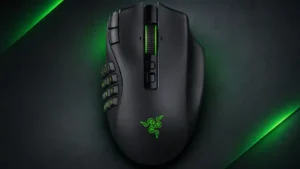
Razer Naga V3 Pro
2.0
The recessed USB connector may be picky about cable compatibility.
Razer Basilisk V3 X HyperSpeedNo score yet
AI Prompt Master
Razer Naga V3 Pro
2.7
The AI Prompt Master shortcut divides opinion: some appreciate workflow efficiencies, while others disable it or find it unnecessary and limited.
Razer Basilisk V3 X HyperSpeedNo score yet
Automatic scroll mode switching
Razer Naga V3 Pro
3.7
Smart-Reel is convenient for some, but oversensitive free spin, audible transitions and occasional mode-switch delays make others prefer manual modes.
Razer Basilisk V3 X HyperSpeedNo score yet
Cable flexibility
Razer Naga V3 Pro
2.0
The bundled braided cable is stiff and drags more than a flexible gaming cable.
Razer Basilisk V3 X HyperSpeedNo score yet
Cable quality
Razer Naga V3 Pro
3.3
The included cable receives mixed feedback: one likes it, while another finds it stiff and draggy.
Razer Basilisk V3 X HyperSpeedNo score yet
Click-and-drag usability
Razer Naga V3 ProNo score yet
Razer Basilisk V3 X HyperSpeed
4.5
The supportive shape and tracking help control dragging windows and similar desktop actions.
Cloud settings backup
Razer Naga V3 ProNo score yet
Razer Basilisk V3 X HyperSpeed
4.5
Synapse can restore settings across computers where the software is installed.
Color options
Razer Naga V3 Pro
2.0
Black is the only color available, and an additional finish would have been welcome.
Razer Basilisk V3 X HyperSpeedNo score yet
Console compatibility
Razer Naga V3 ProNo score yet
Razer Basilisk V3 X HyperSpeed
2.5
Console connectivity is possible via Bluetooth but compatibility is not guaranteed.
Cross-platform compatibility
Razer Naga V3 ProNo score yet
Razer Basilisk V3 X HyperSpeed
5.0
Bluetooth pairing worked well with a MacBook and Steam Deck, although customization options vary by system.
Device compatibility
Razer Naga V3 ProNo score yet
Razer Basilisk V3 X HyperSpeed
5.0
Bluetooth paired successfully with a MacBook and Steam Deck, adding useful device flexibility.
Ecosystem integration
Razer Naga V3 ProNo score yet
Razer Basilisk V3 X HyperSpeed
4.5
Compatible Razer receivers, synchronized lighting and cross-device shortcuts are useful for an existing Razer setup.
Environmental sustainability
Razer Naga V3 ProNo score yet
Razer Basilisk V3 X HyperSpeed
4.0
The recycled cardboard packaging is a welcome touch.
Fingerprint and smudge resistance
Razer Naga V3 ProNo score yet
Razer Basilisk V3 X HyperSpeed
4.5
The slightly rough plastic texture reduces the greasy feel associated with smoother shells.
Gaming suitability
Razer Naga V3 ProNo score yet
Razer Basilisk V3 X HyperSpeed
4.6
The mouse is a capable all-round gaming option with accurate tracking and numerous commands, but is not ideal for weight-sensitive esports players.
Handedness options
Razer Naga V3 ProNo score yet
Razer Basilisk V3 X HyperSpeed
2.0
The sculpted design is intended for right-handed use and does not accommodate left-handed grips well.
Horizontal scrolling
Razer Naga V3 Pro
5.0
Horizontal wheel tilt makes spreadsheets, wide webpages and editing timelines easier to navigate.
Razer Basilisk V3 X HyperSpeedNo score yet
Included accessories
Razer Naga V3 Pro
2.6
The box provides the essentials but omits the receiver needed for maximum polling. A storage case for unused panels would also be useful.
Razer Basilisk V3 X HyperSpeedNo score yet
Interchangeable side panels
Razer Naga V3 Pro
4.9
Three magnetic side panels make it easy to switch between two, six and twelve thumb buttons. The secure attachment and quick recognition make this flexibility genuinely practical.
Razer Basilisk V3 X HyperSpeedNo score yet
Learning curve
Razer Naga V3 Pro
3.1
The dense twelve-button grid takes practice and muscle memory, although the sculpted six-button layout is easier to learn.
Razer Basilisk V3 X HyperSpeedNo score yet
Lift-off distance
Razer Naga V3 Pro
5.0
Adjustable lift-off behavior helps keep the crosshair stable during wide sweeps.
Razer Basilisk V3 X HyperSpeedNo score yet
MacOS compatibility
Razer Naga V3 ProNo score yet
Razer Basilisk V3 X HyperSpeed
3.8
The mouse works as a basic Bluetooth or receiver-connected device on macOS, but Synapse customization is limited to Windows.
Middle click quality
Razer Naga V3 ProNo score yet
Razer Basilisk V3 X HyperSpeed
4.8
Middle clicks feel dependable and avoid the inconsistency one tester experienced on an older Basilisk.
Mouse sensitivity matching
Razer Naga V3 Pro
5.0
The sensitivity-matching tool works well for transferring familiar sensitivity settings from another mouse.
Razer Basilisk V3 X HyperSpeedNo score yet
Overall satisfaction
Razer Naga V3 ProNo score yet
Razer Basilisk V3 X HyperSpeed
4.6
The mouse earns favorable overall impressions for comfort, performance and useful controls, despite weight and power tradeoffs.
Receiver quality
Razer Naga V3 ProNo score yet
Razer Basilisk V3 X HyperSpeed
4.5
Compatible HyperSpeed receivers can be shared with other supported Razer peripherals, which is helpful if a dongle is lost.
Repairability
Razer Naga V3 Pro
4.0
Independently replaceable wheel microswitches are a useful repairability advantage despite the proprietary wheel mechanism.
Razer Basilisk V3 X HyperSpeedNo score yet
Repairability
Razer Naga V3 Pro
4.0
The wheel uses separately replaceable microswitches, which is helpful for repairs.
Razer Basilisk V3 X HyperSpeedNo score yet
Scroll acceleration
Razer Naga V3 Pro
2.5
Free-spin acceleration can feel excessively fast, making scrolling harder to control.
Razer Basilisk V3 X HyperSpeedNo score yet
Scroll precision
Razer Naga V3 ProNo score yet
Razer Basilisk V3 X HyperSpeed
5.0
The wheel offers smooth and precise scrolling control.
Scroll wheel grip texture
Razer Naga V3 ProNo score yet
Razer Basilisk V3 X HyperSpeed
4.5
The rubber wheel texture helps users flick through pages easily.
Scroll wheel resistance
Razer Naga V3 Pro
4.3
The wheel offers useful resistance choices, although free movement can be too easy for some.
Razer Basilisk V3 X HyperSpeedNo score yet
Sensitivity clutch usefulness
Razer Naga V3 ProNo score yet
Razer Basilisk V3 X HyperSpeed
3.5
The added sniper control is useful for secondary commands, although some users find it difficult to reach quickly.
USB-C connectivity
Razer Naga V3 Pro
3.5
USB-C is a welcome upgrade, although the recessed port and adapter can restrict third-party cable fit.
Razer Basilisk V3 X HyperSpeedNo score yet
Weight tuning
Razer Naga V3 ProNo score yet
Razer Basilisk V3 X HyperSpeed
4.0
A lighter battery or AAA adapter can trim some weight for users who find the stock setup heavy.
Wrist and forearm strain relief
Razer Naga V3 ProNo score yet
Razer Basilisk V3 X HyperSpeed
4.8
The thumb rest and supportive contour help reduce hand strain during extended work or gaming.
Controls and connectivity
Accidental button activation
Razer Naga V3 Pro
4.0
Accidental presses are a concern on the dense grid and extra ring-finger button, but the latter can be physically locked.
Razer Basilisk V3 X HyperSpeedNo score yet
Haptic controls
Razer Naga V3 Pro
5.0
Tactile wheel feedback gives more control over rapid scrolling and item selection.
Razer Basilisk V3 X HyperSpeedNo score yet
Lockable ring-finger button
Razer Naga V3 Pro
4.7
The extra ring-finger button is useful for modifiers and shortcuts, but some hands press it unintentionally. A physical lock turns it into a solid finger rest.
Razer Basilisk V3 X HyperSpeedNo score yet
Multi-device wireless pairing
Razer Naga V3 ProNo score yet
Razer Basilisk V3 X HyperSpeed
4.5
Compatible HyperSpeed devices can share a receiver, reducing the need for separate dongles.
Scroll wheel customization
Razer Naga V3 Pro
4.6
Distinct wheel modes offer useful flexibility and fine control, although manual mode switching can have a brief delay.
Razer Basilisk V3 X HyperSpeedNo score yet
Side button tactile indexing
Razer Naga V3 Pro
3.5
Sculpted buttons make the grid easier to navigate by touch, especially the six-button layout. Some players still miss a tactile home marker on the twelve-button grid.
Razer Basilisk V3 X HyperSpeedNo score yet
Simultaneous button input
Razer Naga V3 ProNo score yet
Razer Basilisk V3 X HyperSpeed
4.5
Holding Hypershift while pressing another control provides a useful second command layer.
Software resource usage
Razer Naga V3 Pro
1.5
One user felt the desktop software noticeably slowed down their computer.
Razer Basilisk V3 X HyperSpeedNo score yet
Software stability
Razer Naga V3 Pro
2.5
Software stability varies: some experience immediate, reliable changes while others lose bindings, encounter profile failures or see sleep-related bugs.
Razer Basilisk V3 X HyperSpeedNo score yet
Battery and charging
Battery health controls
Razer Naga V3 Pro
4.8
The optional charging setup includes a charge limit to help manage battery health.
Razer Basilisk V3 X HyperSpeedNo score yet
Magnetic battery cover security
Razer Naga V3 ProNo score yet
Razer Basilisk V3 X HyperSpeed
3.5
The magnetic cover is easy to remove and can fit securely without rattling, but one owner felt it lift during play.
Rechargeable battery
Razer Naga V3 ProNo score yet
Razer Basilisk V3 X HyperSpeed
2.3
The absence of built-in recharging is inconvenient for some users, even though rechargeable AA cells are an option.
Replaceable battery support
Razer Naga V3 ProNo score yet
Razer Basilisk V3 X HyperSpeed
4.0
The replaceable AA cell offers quick swaps and lets users choose rechargeable cells, but requires keeping replacements handy.
Wireless charging support
Razer Naga V3 Pro
4.7
Optional wireless charging accessories can keep the mouse powered continuously and pair easily.
Razer Basilisk V3 X HyperSpeedNo score yet
Comfort and build
Button legend durability
Razer Naga V3 Pro
4.7
Double-shot molded legends are a welcome upgrade over printed labels and should resist fading with repeated use.
Razer Basilisk V3 X HyperSpeedNo score yet
Chassis height comfort
Razer Naga V3 ProNo score yet
Razer Basilisk V3 X HyperSpeed
3.0
The taller shell can take some adjustment for owners coming from lower-profile mice.
Fingertip grip comfort
Razer Naga V3 Pro
2.4
Fingertip grip is often awkward because of the weight, width and reach required for extra buttons.
Razer Basilisk V3 X HyperSpeedNo score yet
Skate durability
Razer Naga V3 Pro
3.0
Visible marks on the feet after little use raise concerns about wear.
Razer Basilisk V3 X HyperSpeedNo score yet
Ownership and support
Firmware reliability
Razer Naga V3 Pro
1.5
One reported sleep-related cursor movement bug can wake the computer or interrupt display maintenance.
Razer Basilisk V3 X HyperSpeedNo score yet
Product support lifespan
Razer Naga V3 Pro
2.5
Long-term usefulness depends partly on ongoing companion software support, a concern for a mouse with so many programmable controls.
Razer Basilisk V3 X HyperSpeedNo score yet
Replacement parts availability
Razer Naga V3 Pro
2.5
More separately available side panel options would make the modular design more useful over time.
Razer Basilisk V3 X HyperSpeedNo score yet