Battery and charging
Battery life
Razer Naga V3 Pro
4.8
Battery life is a major strength, with some users going weeks between charges. Actual runtime depends on lighting, polling and connection mode.
SteelSeries PrimeNo score yet
Battery health controls
Razer Naga V3 Pro
4.8
The optional charging setup includes a charge limit to help manage battery health.
SteelSeries PrimeNo score yet
Charging convenience
Razer Naga V3 Pro
4.9
Optional dock or charging mat can eliminate routine cable charging, though the excellent battery life makes them unnecessary for many users.
SteelSeries PrimeNo score yet
Wireless charging support
Razer Naga V3 Pro
4.7
Optional wireless charging accessories can keep the mouse powered continuously and pair easily.
SteelSeries PrimeNo score yet
Other features
2.4GHz connectivity
Razer Naga V3 Pro
4.9
The 2.4GHz connection feels fast and dependable for games, with straightforward pairing.
SteelSeries PrimeNo score yet
AI Prompt Master
Razer Naga V3 Pro
2.7
The AI Prompt Master shortcut divides opinion: some appreciate workflow efficiencies, while others disable it or find it unnecessary and limited.
SteelSeries PrimeNo score yet
Automatic scroll mode switching
Razer Naga V3 Pro
3.7
Smart-Reel is convenient for some, but oversensitive free spin, audible transitions and occasional mode-switch delays make others prefer manual modes.
SteelSeries PrimeNo score yet
Color options
Razer Naga V3 Pro
2.0
Black is the only color available, and an additional finish would have been welcome.
SteelSeries PrimeNo score yet
Console compatibility
Razer Naga V3 ProNo score yet
SteelSeries Prime
3.0
The mouse works well with compatible Xbox games, but its settings software is unavailable directly on the console.
Cross-platform compatibility
Razer Naga V3 ProNo score yet
SteelSeries Prime
4.0
The availability of customization software on both Windows and macOS is an advantage over some rivals.
Device switching
Razer Naga V3 Pro
5.0
Moving between work laptops and gaming PCs is straightforward.
SteelSeries PrimeNo score yet
Ecosystem integration
Razer Naga V3 ProNo score yet
SteelSeries Prime
3.0
SteelSeries devices can share one software suite, but lighting patterns do not automatically synchronize.
Fingerprint and smudge resistance
Razer Naga V3 ProNo score yet
SteelSeries Prime
4.0
The matte finish conceals fingerprints for some users, but others notice greasy residue accumulating easily.
Firmware updateability
Razer Naga V3 ProNo score yet
SteelSeries Prime
5.0
Firmware updates through the companion software are handled smoothly.
Handedness options
Razer Naga V3 ProNo score yet
SteelSeries Prime
2.0
The right-handed design limits its suitability for left-handed players.
Horizontal scrolling
Razer Naga V3 Pro
5.0
Horizontal wheel tilt makes spreadsheets, wide webpages and editing timelines easier to navigate.
SteelSeries PrimeNo score yet
Interchangeable side panels
Razer Naga V3 Pro
4.9
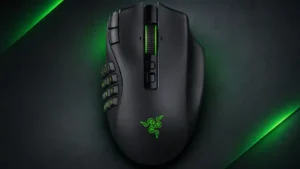
Three magnetic side panels make it easy to switch between two, six and twelve thumb buttons. The secure attachment and quick recognition make this flexibility genuinely practical.
SteelSeries PrimeNo score yet
Launch quality control
Razer Naga V3 ProNo score yet
SteelSeries Prime
3.0
The updated cable and feet are an improvement over the original batch, which drew much stronger criticism.
Learning curve
Razer Naga V3 Pro
3.1
The dense twelve-button grid takes practice and muscle memory, although the sculpted six-button layout is easier to learn.
SteelSeries PrimeNo score yet
MacOS compatibility
Razer Naga V3 ProNo score yet
SteelSeries Prime
4.0
The companion software supports customization on macOS as well as Windows.
Motion latency
Razer Naga V3 Pro
5.0
Motion response is fast and smooth with little perceptible lag.
SteelSeries PrimeNo score yet
Mouse cable detachability
Razer Naga V3 ProNo score yet
SteelSeries Prime
4.2
The detachable cord makes storage and replacement easier, though some question the benefit on a wired-only mouse.
Mouse cable length
Razer Naga V3 ProNo score yet
SteelSeries Prime
5.0
The included cable is long enough to route around a desk and leave useful slack.
Mouse sensitivity matching
Razer Naga V3 Pro
5.0
The sensitivity-matching tool works well for transferring familiar sensitivity settings from another mouse.
SteelSeries PrimeNo score yet
Power efficiency
Razer Naga V3 Pro
5.0
Efficient sensor operation contributes to long battery life, even with substantial daily use.
SteelSeries PrimeNo score yet
Repairability
Razer Naga V3 Pro
4.0
The wheel uses separately replaceable microswitches, which is helpful for repairs.
SteelSeries PrimeNo score yet
Scroll acceleration
Razer Naga V3 Pro
2.5
Free-spin acceleration can feel excessively fast, making scrolling harder to control.
SteelSeries PrimeNo score yet
Scroll wheel resistance
Razer Naga V3 Pro
4.3
The wheel offers useful resistance choices, although free movement can be too easy for some.
SteelSeries PrimeNo score yet
Scroll wheel usefulness in games
Razer Naga V3 Pro
4.9
The precision tactile mode is especially useful for weapon swaps and skill cycling.
SteelSeries PrimeNo score yet
Sleep mode
Razer Naga V3 Pro
1.5
An idle or sleep transition can cause unwanted cursor movement or delayed inputs, according to one detailed account.
SteelSeries PrimeNo score yet
USB receiver storage
Razer Naga V3 Pro
4.8
A hidden receiver compartment under the side panel helps keep the dongle secure when traveling.
SteelSeries PrimeNo score yet
Windows compatibility
Razer Naga V3 ProNo score yet
SteelSeries Prime
4.0
Windows users can customize mouse settings using the companion software.
Wireless latency
Razer Naga V3 Pro
4.5
Wireless response is excellent overall, although Bluetooth can introduce a delay after idling.
SteelSeries PrimeNo score yet
Controls and connectivity
Angle snapping
Razer Naga V3 ProNo score yet
SteelSeries Prime
4.0
Tracking is free from problematic angle snapping in normal use.
Bluetooth support
Razer Naga V3 Pro
4.6
Bluetooth is convenient for work and multiple computers, with excellent endurance and unusually good response for the connection type.
SteelSeries PrimeNo score yet
Haptic controls
Razer Naga V3 Pro
5.0
Tactile wheel feedback gives more control over rapid scrolling and item selection.
SteelSeries PrimeNo score yet
In-app promotional interruptions
Razer Naga V3 ProNo score yet
SteelSeries Prime
2.0
Promotional pages and giveaways make the GG software feel more cluttered than necessary.
Lockable ring-finger button
Razer Naga V3 Pro
4.7
The extra ring-finger button is useful for modifiers and shortcuts, but some hands press it unintentionally. A physical lock turns it into a solid finger rest.
SteelSeries PrimeNo score yet
Polling rate customization
Razer Naga V3 Pro
5.0
Automatic polling-rate switching is convenient for balancing game response with desktop battery savings.
SteelSeries PrimeNo score yet
Scroll wheel customization
Razer Naga V3 Pro
4.6
Distinct wheel modes offer useful flexibility and fine control, although manual mode switching can have a brief delay.
SteelSeries PrimeNo score yet
Side button tactile indexing
Razer Naga V3 Pro
3.5
Sculpted buttons make the grid easier to navigate by touch, especially the six-button layout. Some players still miss a tactile home marker on the twelve-button grid.
SteelSeries PrimeNo score yet
Software and driver support
Razer Naga V3 Pro
2.1
Desktop Synapse support is extensive, but the web configurator is unavailable in several accounts, limiting software flexibility.
SteelSeries PrimeNo score yet
Software privacy
Razer Naga V3 ProNo score yet
SteelSeries Prime
2.0
The required software account is unwelcome for users who prefer not to share email or password information.
Software resource usage
Razer Naga V3 Pro
1.5
One user felt the desktop software noticeably slowed down their computer.
SteelSeries PrimeNo score yet
Software stability
Razer Naga V3 Pro
2.5
Software stability varies: some experience immediate, reliable changes while others lose bindings, encounter profile failures or see sleep-related bugs.
SteelSeries PrimeNo score yet
Comfort and build
Button legend durability
Razer Naga V3 Pro
4.7
Double-shot molded legends are a welcome upgrade over printed labels and should resist fading with repeated use.
SteelSeries PrimeNo score yet
Skate durability
Razer Naga V3 Pro
3.0
Visible marks on the feet after little use raise concerns about wear.
SteelSeries PrimeNo score yet
Performance
Cleaning ease
Razer Naga V3 ProNo score yet
SteelSeries Prime
2.0
The ridged wheel and adjacent gaps collect dirt and are not easy to wipe clean.
Weight specification accuracy
Razer Naga V3 ProNo score yet
SteelSeries Prime
3.5
The bare mouse matches its advertised 69-gram weight, but the figure excludes the attached cable, which can be misleading to some shoppers.
Wireless performance
Razer Naga V3 Pro
5.0
Wireless operation is generally fast and dependable, including with the optional charging mat.
SteelSeries PrimeNo score yet
Ownership and support
Double-click reliability
Razer Naga V3 ProNo score yet
SteelSeries Prime
5.0
The optical-magnetic design reduces susceptibility to unintended double-clicking caused by electrical contact wear.
Firmware reliability
Razer Naga V3 Pro
1.5
One reported sleep-related cursor movement bug can wake the computer or interrupt display maintenance.
SteelSeries PrimeNo score yet
Multi-device support
Razer Naga V3 Pro
5.0
Bluetooth and wireless connectivity make using the mouse with multiple computers convenient.
SteelSeries PrimeNo score yet
Power connector reliability
Razer Naga V3 ProNo score yet
SteelSeries Prime
4.0
The recessed connector locks the cable in place to help prevent port damage.
Product support lifespan
Razer Naga V3 Pro
2.5
Long-term usefulness depends partly on ongoing companion software support, a concern for a mouse with so many programmable controls.
SteelSeries PrimeNo score yet
Tilt wheel support
Razer Naga V3 Pro
4.8
The tilt wheel is useful for horizontal navigation and can also be remapped to in-game commands.
SteelSeries PrimeNo score yet
Upgrade value
Razer Naga V3 Pro
3.7
The lighter body, improved internals and additional controls are worthwhile refinements, but the familiar design makes upgrading from the V2 Pro optional.
SteelSeries PrimeNo score yet